# anti-alias seems not working in QVTKOpenGLNativeWidget
**URL:** https://discourse.vtk.org/t/anti-alias-seems-not-working-in-qvtkopenglnativewidget/12979
**Category:** Support
**Created:** [December 29, 2023, 1:03am UTC](https://discourse.vtk.org/t/anti-alias-seems-not-working-in-qvtkopenglnativewidget/12979 "2023-12-29T01:03:21Z")
**Posts on this page:** 5
**Page:** 1
### Author:  [@baker-Xie](https://discourse.vtk.org/u/baker-Xie)
#### Post date: [December 29, 2023, 1:03am UTC](https://discourse.vtk.org/t/anti-alias-seems-not-working-in-qvtkopenglnativewidget/12979/1 "2023-12-29T01:03:21Z")
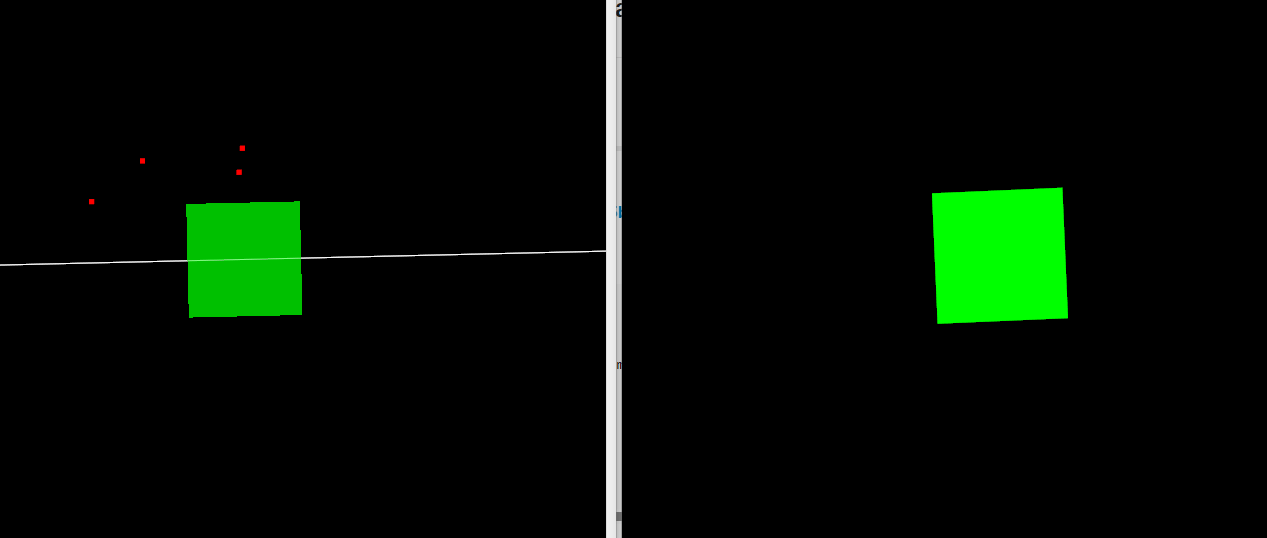
The left window is a QVTKOpenGLNativeWidget renderwindow, the right is vtkRenderWindow.
The gree cube is a vtkCubeSource → vtkGlyph3DMapper. You can see the cube in right window is smoother than left.
I have write the following code, but it didn’t work.
```auto
vtkOpenGLRenderWindow::SetGlobalMaximumNumberOfMultiSamples(16);
QSurfaceFormat::setDefaultFormat(QVTKOpenGLNativeWidget::defaultFormat());
// vtkwidget is a instance of QVTKOpenGLNativeWidget
ui->vtkwidget->GetRenderWindow()->SetMultiSamples(16);
```
---
### Author:  [@Paulo\_Carvalho](https://discourse.vtk.org/u/Paulo_Carvalho)
#### Post date: [January 3, 2024, 8:12pm UTC](https://discourse.vtk.org/t/anti-alias-seems-not-working-in-qvtkopenglnativewidget/12979/2 "2024-01-03T20:12:47Z")
Hello,
Do make sure you call these:
> [@baker-Xie](#):
>
> ```auto
> vtkOpenGLRenderWindow::SetGlobalMaximumNumberOfMultiSamples(16);
> QSurfaceFormat::setDefaultFormat(QVTKOpenGLNativeWidget::defaultFormat());
>
> ```
BEFORE instantiating a `QVTKOpenGLNativeWidget`.
take care,
PC
---
### Author:  [@baker-Xie](https://discourse.vtk.org/u/baker-Xie)
#### Post date: [January 4, 2024, 7:24am UTC](https://discourse.vtk.org/t/anti-alias-seems-not-working-in-qvtkopenglnativewidget/12979/3 "2024-01-04T07:24:06Z")
Hi Paulo, I have done this as you did, but the problem still exist. (I think the problem is caused by other reason, may not anti-alias)
Please see the image blow
cube 1 is vtkCubeSource-\>vtkPolyDataMapper-\>vtkActor. Cube1’s opacity = 1
cube 2~6 are vtkCubeSource-\>vtkGlyph3DMapper-\>vtkActor ( In vtkGlyph3DMapper, I have set difference scale and orientation for each cube), cube 2~6 's opcaity = 0.5
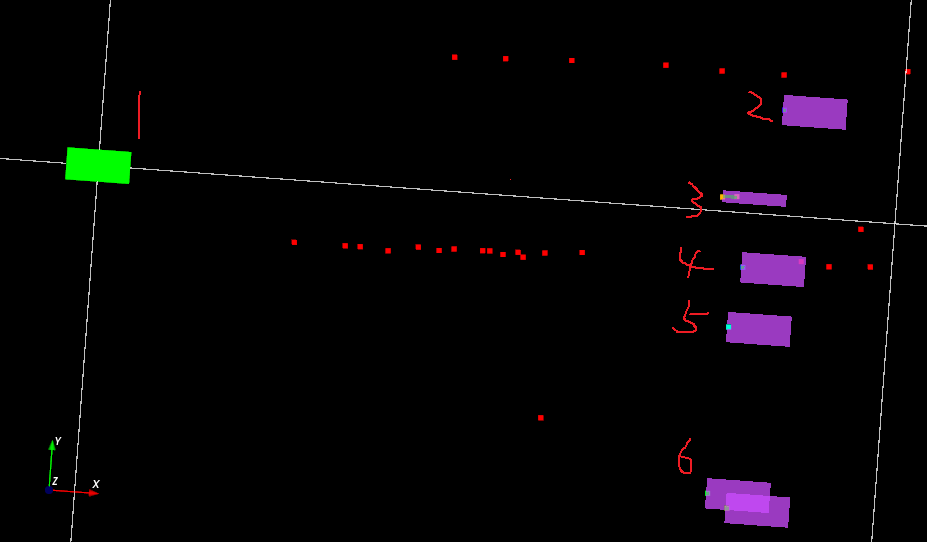
Why cube 2~6 look like so bad? Do you have any idea?
---
### Author:  [@Paulo\_Carvalho](https://discourse.vtk.org/u/Paulo_Carvalho)
#### Post date: [January 5, 2024, 10:40am UTC](https://discourse.vtk.org/t/anti-alias-seems-not-working-in-qvtkopenglnativewidget/12979/4 "2024-01-05T10:40:14Z")
Hello,
Can you try FXAA? FXAA is post-rendering, thus it can mitigate certain aliasing caused by some shaders MSAA is unable to handle. Maybe such shaders are involved in the case of the cubes 2-6. Either this or change the pink rectangles pipeline to that of the green one. BTW, why do you need `vtkGlyph3DMapper` instead of a common polydata mapper?
take care,
PC
---
### Author:  [@baker-Xie](https://discourse.vtk.org/u/baker-Xie)
#### Post date: [January 5, 2024, 11:43am UTC](https://discourse.vtk.org/t/anti-alias-seems-not-working-in-qvtkopenglnativewidget/12979/5 "2024-01-05T11:43:16Z")
Hi, I have tried FXAA, the result is not so good I think. The reason why I use vtkGlyph3DMapper is because I need to render thousands of cubes / arrow / sphere / or other source at 30fps. And those object s are changing all the time (color / size / pos / orientation).
BTW, I found why I can see edges in cube 2~6. Because they are transparent. I think I found a strange behaviour that vtk have. You can look at this link [object seems wrong rendered when transparency are used - Support - VTK](https://discourse.vtk.org/t/object-seems-wrong-rendered-when-transparency-are-used/13014)