# Axes Thumbnail to interact with image.
**URL:** https://discourse.vtk.org/t/axes-thumbnail-to-interact-with-image/5971
**Category:** Support
**Created:** [June 10, 2021, 12:20pm UTC](https://discourse.vtk.org/t/axes-thumbnail-to-interact-with-image/5971 "2021-06-10T12:20:27Z")
**Posts on this page:** 4
**Page:** 1
### Author:  [@Luis\_Carlos\_Carneiro](https://discourse.vtk.org/u/Luis_Carlos_Carneiro)
#### Post date: [June 10, 2021, 12:20pm UTC](https://discourse.vtk.org/t/axes-thumbnail-to-interact-with-image/5971/1 "2021-06-10T12:20:27Z")
Dear All,
I want to have a plane with a coupled thumbnail axes image. With interaction wit the thumbnail I can rotate the plane in the direction of each axis.
There is something in VTK that eases to do that?
Thanks,
Luís Gonçalves
---
### Author:  [@Paulo\_Carvalho](https://discourse.vtk.org/u/Paulo_Carvalho)
#### Post date: [June 10, 2021, 9:35pm UTC](https://discourse.vtk.org/t/axes-thumbnail-to-interact-with-image/5971/2 "2021-06-10T21:35:00Z")
Hello,
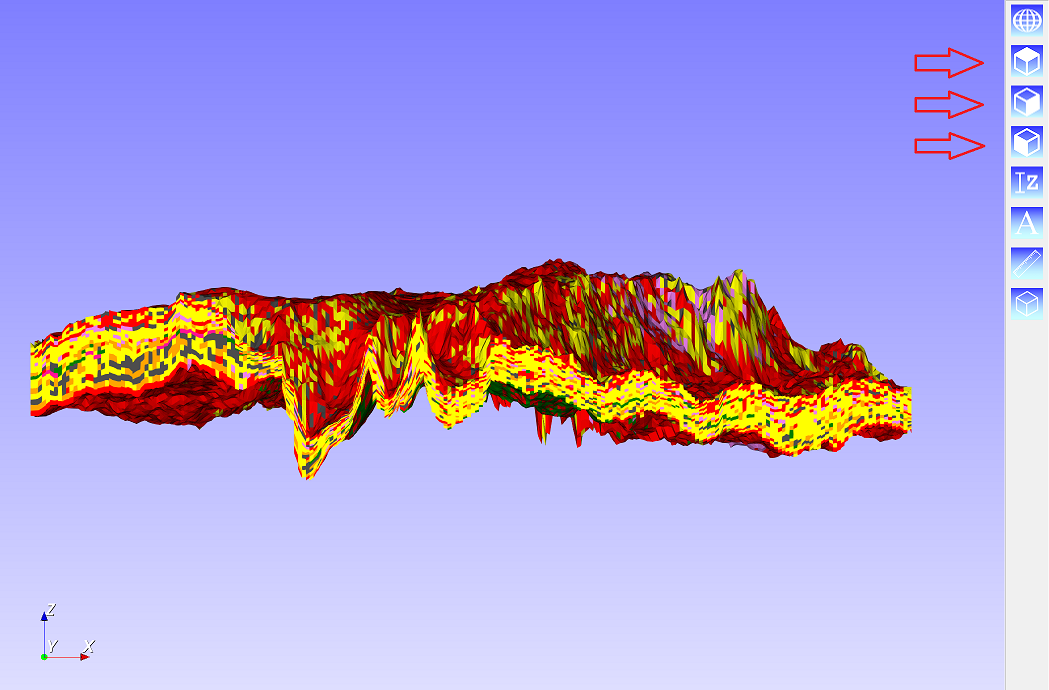
Do you mean something like the buttons below (indicated by the red arrows)?
regards,
Paulo
---
### Author:  [@Luis\_Carlos\_Carneiro](https://discourse.vtk.org/u/Luis_Carlos_Carneiro)
#### Post date: [June 10, 2021, 9:39pm UTC](https://discourse.vtk.org/t/axes-thumbnail-to-interact-with-image/5971/3 "2021-06-10T21:39:28Z")
No. Like the axes in left-lower corner. If rotate those axes with the mouse the figure rotates accordingly.
---
### Author:  [@Paulo\_Carvalho](https://discourse.vtk.org/u/Paulo_Carvalho)
#### Post date: [June 10, 2021, 9:44pm UTC](https://discourse.vtk.org/t/axes-thumbnail-to-interact-with-image/5971/4 "2021-06-10T21:44:59Z")
Then you can do:
```cpp
_vtkwidget = new QVTKOpenGLWidget();
(...)
//----------------------adding the orientation axes-------------------------
vtkSmartPointer axes = vtkSmartPointer::New();
_vtkAxesWidget = vtkSmartPointer::New();
_vtkAxesWidget->SetOutlineColor(0.9300, 0.5700, 0.1300);
_vtkAxesWidget->SetOrientationMarker(axes);
_vtkAxesWidget->SetInteractor(_vtkwidget->GetRenderWindow()->GetInteractor());
_vtkAxesWidget->SetViewport(0.0, 0.0, 0.2, 0.2);
_vtkAxesWidget->SetEnabled(1);
_vtkAxesWidget->InteractiveOn();
//--------------------------------------------------------------------------
```
I used `QVTKOpenGLWidget` as my VTK window, but what is important is to access the render window (vtkRenderWindow).
I hope this helps.