# Background color always black
**URL:** https://discourse.vtk.org/t/background-color-always-black/7516
**Category:** Support
**Created:** [December 28, 2021, 2:15pm UTC](https://discourse.vtk.org/t/background-color-always-black/7516 "2021-12-28T14:15:44Z")
**Posts on this page:** 15
**Page:** 1
### Author:  [@Julienchz](https://discourse.vtk.org/u/Julienchz)
#### Post date: [December 28, 2021, 2:15pm UTC](https://discourse.vtk.org/t/background-color-always-black/7516/1 "2021-12-28T14:15:44Z")
Hi, I am using a QQuickVtkRenderWindow inside a bigger software with a smaller QQuickVtkRenderItem. I changed the background color of the QQuickVtkRenderItem no problem… but the QQuickVtkRenderWindow is still black… and is the whole software window. To just change the backgound-color of my application window inside QML code doesn’t work.
Does anyone have any idea how to fix that?
Thanks for your help
---
### Author:  [@Paulo\_Carvalho](https://discourse.vtk.org/u/Paulo_Carvalho)
#### Post date: [December 28, 2021, 6:39pm UTC](https://discourse.vtk.org/t/background-color-always-black/7516/2 "2021-12-28T18:39:58Z")
Hi, Julien,
I change the background of my scene via renderer (`vtkRenderer`):
```cpp
// add a nice sky-like background
_rendererMainScene->GradientBackgroundOn();
_rendererMainScene->SetBackground(0.9, 0.9, 1);
_rendererMainScene->SetBackground2(0.5, 0.5, 1);
_rendererMainScene->SetLayer( 0 ); //only the renderer of layer 0 have background.
```
regards,
Paulo
---
### Author:  [@Julienchz](https://discourse.vtk.org/u/Julienchz)
#### Post date: [December 29, 2021, 7:44am UTC](https://discourse.vtk.org/t/background-color-always-black/7516/3 "2021-12-29T07:44:54Z")
But the renderer take the size of my QQuickVTKRenderItem and not of my QQuickVtkRenderWindow
---
### Author:  [@mwestphal](https://discourse.vtk.org/u/mwestphal)
#### Post date: [December 29, 2021, 8:49am UTC](https://discourse.vtk.org/t/background-color-always-black/7516/4 "2021-12-29T08:49:20Z")
@sankhesh
---
### Author:  [@Paulo\_Carvalho](https://discourse.vtk.org/u/Paulo_Carvalho)
#### Post date: [December 29, 2021, 12:14pm UTC](https://discourse.vtk.org/t/background-color-always-black/7516/5 "2021-12-29T12:14:25Z")
Well, that’s a different question.
---
### Author:  [@claude](https://discourse.vtk.org/u/claude)
#### Post date: [October 15, 2022, 6:45am UTC](https://discourse.vtk.org/t/background-color-always-black/7516/6 "2022-10-15T06:45:21Z")
I get the same problem.Have you found a good solution for this?
---
### Author:  [@Jiang](https://discourse.vtk.org/u/Jiang)
#### Post date: [May 29, 2023, 12:06am UTC](https://discourse.vtk.org/t/background-color-always-black/7516/7 "2023-05-29T00:06:47Z")
Hi I have the same problem here. Does any one know the solution ?
---
### Author:  [@mwestphal](https://discourse.vtk.org/u/mwestphal)
#### Post date: [May 30, 2023, 7:21am UTC](https://discourse.vtk.org/t/background-color-always-black/7516/8 "2023-05-30T07:21:53Z")
@lgivord
---
### Author:  [@lgivord](https://discourse.vtk.org/u/lgivord)
#### Post date: [May 30, 2023, 8:33am UTC](https://discourse.vtk.org/t/background-color-always-black/7516/9 "2023-05-30T08:33:38Z")
what version of vtk did you use?
FYI, recently the qml support in VTK has been improved [https://gitlab.kitware.com/vtk/vtk/-/merge\_requests/9763](https://gitlab.kitware.com/vtk/vtk/-/merge_requests/9763)
until the next release of VTK, I recommand you to use vtk master.
---
### Author:  [@lgivord](https://discourse.vtk.org/u/lgivord)
#### Post date: [May 30, 2023, 8:36am UTC](https://discourse.vtk.org/t/background-color-always-black/7516/10 "2023-05-30T08:36:38Z")
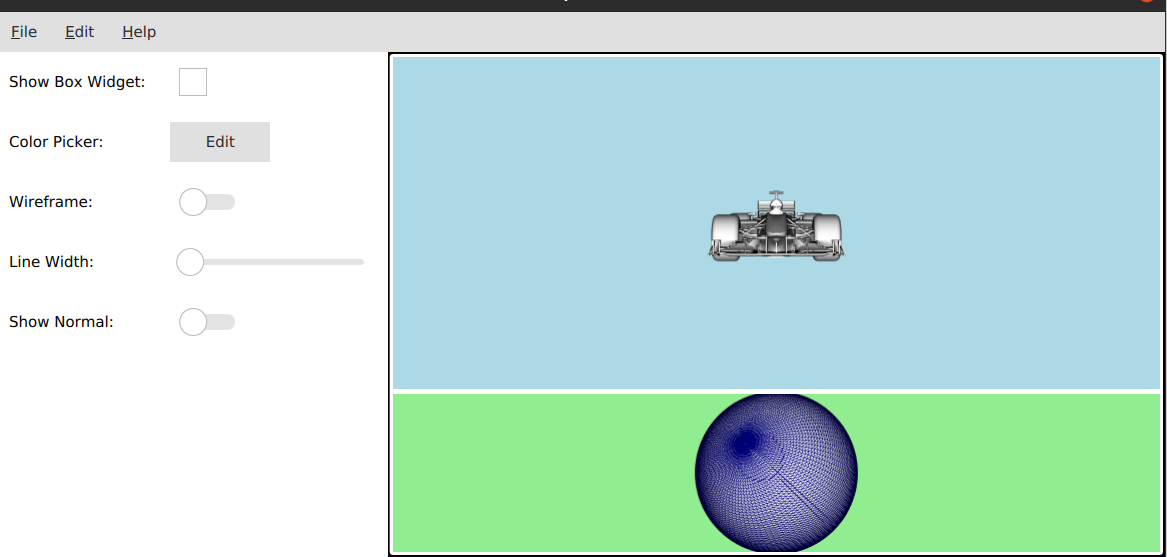
after a quick test with vtk master, I can set a background color (blue and green in the screen), so it shiould fix your issue
---
### Author:  [@Jiang](https://discourse.vtk.org/u/Jiang)
#### Post date: [May 30, 2023, 5:00pm UTC](https://discourse.vtk.org/t/background-color-always-black/7516/11 "2023-05-30T17:00:49Z")
Hi @lgivord thanks for the reply. I am using VTK 9.2.6 version i think this is pretty recent version.
To me , it seems you change the background of renderer or renderitem.
the problem @Julienchz mentioned here is the background color and size change of the renderwindow.
for example, if the application size is 1000x1000. and the renderwindow is always following the application size and cannot be smaller than that. Also, its background is always black and cannot be changed.
Just wondering if this is an known bug for current VTK version.
Thanks
---
### Author:  [@toddy](https://discourse.vtk.org/u/toddy)
#### Post date: [May 31, 2023, 4:16am UTC](https://discourse.vtk.org/t/background-color-always-black/7516/12 "2023-05-31T04:16:45Z")
```auto
for each QQuickVtkRenderWindow->renderWindow->GetRenderers()
{
vtkRenderer->SetBackground(R,G,B);
}
```
or possibly
` vtkRenderer->SetBackgroundAlpha(0);`
Are you saying your vktRenderer does not fill the whole vtkRenderWindow? Perhaps you need another dummy vtkRenderer for the empty space.
---
### Author:  [@lgivord](https://discourse.vtk.org/u/lgivord)
#### Post date: [May 31, 2023, 7:31am UTC](https://discourse.vtk.org/t/background-color-always-black/7516/13 "2023-05-31T07:31:34Z")
You’re right, also recent work on qml in vtk isn’t in `VTK 9.2.6`, but will be available in the next release.
Note that `QQuickVtkRenderWindow` will be deprecated in `VTK 9.3.0` and we should always using instead `QQuickVTKItem`, so this issue should not be in vtk master.
There is few example in vtk here : [https://gitlab.kitware.com/vtk/vtk/-/tree/master/Examples/GUI/QML/QtQuickBoxWidget](https://gitlab.kitware.com/vtk/vtk/-/tree/master/Examples/GUI/QML/QtQuickBoxWidget) to show how using it now.
In short, you will need to create your own class which herited to [QQuickVtkItem](https://gitlab.kitware.com/vtk/vtk/-/blob/master/GUISupport/QtQuick/QQuickVTKItem.h) :
- the **main.cxx**
```c++
class MyVtkItem : public QQuickVTKItem
{
public:
struct Data : vtkObject
{
static Data *New();
vtkTypeMacro(Data, vtkObject);
vtkNew actor;
vtkNew mapper;
};
// -----------------------------------------------------------------------
vtkUserData initializeVTK(vtkRenderWindow *renderWindow) override
{
vtkNew sphereSource;
sphereSource->SetCenter(0.0, 0.0, 0.0);
sphereSource->SetRadius(5.0);
vtk->mapper->SetInputConnection(sphereSource->GetOutputPort());
vtkNew boxActor;
vtk->actor->SetMapper(vtk->mapper);
vtk->actor->GetProperty()->SetRepresentationToSurface();
vtk->actor->GetProperty()->SetColor(0, 0, 0.5);
vtkNew renderer;
renderer->AddActor(vtk->actor);
renderer->RemoveAllLights();
vtkNew colors;
renderer->SetBackground(colors->GetColor3d("LightGreen").GetData());
renderWindow->AddRenderer(renderer);
renderWindow->SetMultiSamples(16);
return vtk;
}
private:
vtkNew vtk;
};
vtkStandardNewMacro(MyVtkItem::Data);
// -----------------------------------------------------------------------
int main(int argc, char *argv[])
{
QQuickVTKItem::setGraphicsApi();
QGuiApplication app(argc, argv);
QQmlApplicationEngine engine;
qmlRegisterType("com.vtk.example", 1, 0, "MyVtkItem");
engine.load(QUrl(QStringLiteral("qrc:/main.qml")));
if (engine.rootObjects().isEmpty())
{
return -1;
}
return app.exec();
}
```
And in the **main.qml** file something like that:
```json
import QtQuick 2.9
import QtQuick.Controls 2.12
import QtQuick.Window 2.2
import com.vtk.example 1.0
import QtQuick.Dialogs 1.0
ApplicationWindow {
id: win
visible: true
width: 500
height: 500
minimumWidth:500
minimumHeight:500
title: qsTr("vtk-qml-demo")
MyVtkItem {
id: vtk
x: 0
y: 0
width: parent.width
height: parent.height
}
}
```
you will obtain something like that:
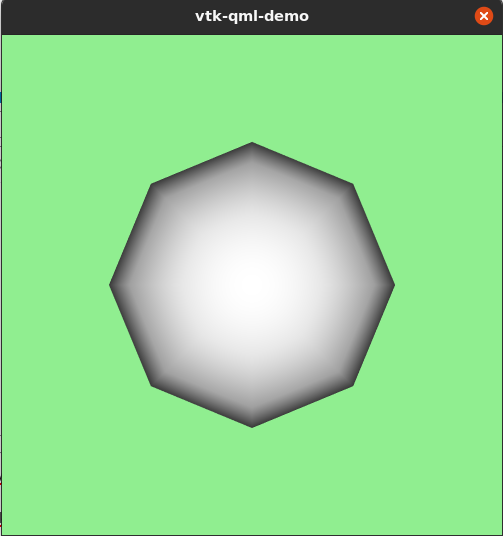
I hope this would help you 🙂
---
### Author:  [@Jiang](https://discourse.vtk.org/u/Jiang)
#### Post date: [May 31, 2023, 8:55pm UTC](https://discourse.vtk.org/t/background-color-always-black/7516/14 "2023-05-31T20:55:38Z")
Thanks @lgivord for your response. That’s very helpful.
Is that true that current vtk version does not support QQuickVTKItem standing alone in QML. I am following this sample code for QQuickVTKItem now. [https://vtk.org/doc/nightly/html/classQQuickVTKRenderItem.html](https://vtk.org/doc/nightly/html/classQQuickVTKRenderItem.html)
```auto
// import related modules
import QtQuick 2.15
import QtQuick.Controls 2.15
import QtQuick.Window 2.15
// import the VTK module
import VTK 9.0
// window containing the application
ApplicationWindow {
// title of the application
title: qsTr("VTK QtQuick App")
width: 400
height: 400
color: palette.window
SystemPalette {
id: palette
colorGroup: SystemPalette.Active
}
// Instantiate the vtk render window
VTKRenderWindow {
id: vtkwindow
width: 400
height: 400
}
// add one or more vtk render items
VTKRenderItem {
objectName: "ConeView"
x: 200
y: 200
width: 200
height: 200
// Provide the handle to the render window
renderWindow: vtkwindow
}
}
```
Looking forward to the realse of v9.3.0
---
### Author:  [@lgivord](https://discourse.vtk.org/u/lgivord)
#### Post date: [June 1, 2023, 7:07am UTC](https://discourse.vtk.org/t/background-color-always-black/7516/15 "2023-06-01T07:07:36Z")
I think yes in 9.2.6 it is not supported