# Bash: vtk command not found
**URL:** https://discourse.vtk.org/t/bash-vtk-command-not-found/8220
**Category:** Support
**Created:** [April 6, 2022, 8:18am UTC](https://discourse.vtk.org/t/bash-vtk-command-not-found/8220 "2022-04-06T08:18:27Z")
**Posts on this page:** 20
**Page:** 1
### Author:  [@Freya\_the\_Goddess](https://discourse.vtk.org/u/Freya_the_Goddess)
#### Post date: [April 6, 2022, 8:18am UTC](https://discourse.vtk.org/t/bash-vtk-command-not-found/8220/1 "2022-04-06T08:18:27Z")
Dear all,
I have installed VTK from source using CMake, and I couldn’t run
vtk mace.tcl
I see the tutorial here:
([The Visualization Toolkit](https://web.cse.ohio-state.edu/~crawfis.3/cis694L/Labs/The%20Visualization%20Toolkit.htm))
it said “vtk command not found”
I have adjusted the environment variables, and moved all the compiled
files to my destination folder for VTK.
I am using my own OS made with Linux From Scratch. I run it on Qemu/KVM.
I can run vtk from inside python interpreter. I can do “import vtk”, but on the console terminal I cannot run the .tcl file. I can run VTK with Python following this tutorial:
([Project 0: Getting VTK... to Work](https://www.cs.purdue.edu/homes/xmt/classes/CS530/Spring2013/CS530_Projects/Project_0.html)).
I just want to run vtk from bash without using Python interpreter.
Thank You
---
### Author:  [@danlipsa](https://discourse.vtk.org/u/danlipsa)
#### Post date: [April 6, 2022, 3:56pm UTC](https://discourse.vtk.org/t/bash-vtk-command-not-found/8220/2 "2022-04-06T15:56:49Z")
VTK does not wrap for TCL anymore.
See:
[https://gitlab.kitware.com/vtk/vtk/-/merge\_requests/3585](https://gitlab.kitware.com/vtk/vtk/-/merge_requests/3585)
If you want to execute a VTK python script you can use vtkpython.
Dan
---
### Author:  [@Freya\_the\_Goddess](https://discourse.vtk.org/u/Freya_the_Goddess)
#### Post date: [April 6, 2022, 11:08pm UTC](https://discourse.vtk.org/t/bash-vtk-command-not-found/8220/3 "2022-04-06T23:08:45Z")
Alright so I cannot open .tcl file anymore. Thanks
---
### Author:  [@amaclean](https://discourse.vtk.org/u/amaclean)
#### Post date: [April 7, 2022, 8:22am UTC](https://discourse.vtk.org/t/bash-vtk-command-not-found/8220/4 "2022-04-07T08:22:20Z")
That book hasn’t been updated, it uses VTK 4.2, we are now up to VTK 9.1 so Python or C++ is the way to go.
Also have a look here for Python and C++ examples: [vtk-examples](https://kitware.github.io/vtk-examples/site/). The examples will compile/run with the VTK master. Also there is a PDF of the [VTK TextBook](https://kitware.github.io/vtk-examples/site/VTKBookLaTeX/VTKTextBook/) and most of the examples in it will run with VTK 9+.
---
### Author:  [@Freya\_the\_Goddess](https://discourse.vtk.org/u/Freya_the_Goddess)
#### Post date: [April 7, 2022, 10:13am UTC](https://discourse.vtk.org/t/bash-vtk-command-not-found/8220/5 "2022-04-07T10:13:46Z")
Yes thanks for the answer, but I just figure out recently following the vtk-examples link.
I cannot run cmake on this [vtk-example](https://kitware.github.io/vtk-examples/site/Cxx/)
It said that:
**There are missing files:**
**VTKConfig.cmake**
**VTK-config.cmake**
**add the installation prefix of “VTK” to CMAKE\_PREFIX\_PATH**
**set VTK\_DIR to the above files**
---
### Author:  [@amaclean](https://discourse.vtk.org/u/amaclean)
#### Post date: [April 7, 2022, 10:25am UTC](https://discourse.vtk.org/t/bash-vtk-command-not-found/8220/6 "2022-04-07T10:25:14Z")
You need to check out and download the source files, see [ForDevelopers](https://kitware.github.io/vtk-examples/site/Instructions/ForDevelopers/), then you need to make sure CMake knows where the VTK build is.
---
### Author:  [@Freya\_the\_Goddess](https://discourse.vtk.org/u/Freya_the_Goddess)
#### Post date: [April 8, 2022, 9:12am UTC](https://discourse.vtk.org/t/bash-vtk-command-not-found/8220/7 "2022-04-08T09:12:52Z")
Hi Andrew, thanks for the reply
I am following this link:
[https://gitlab.kitware.com/vtk/vtk/-/blob/master/Documentation/dev/build.md](https://gitlab.kitware.com/vtk/vtk/-/blob/master/Documentation/dev/build.md)
I do:
`git clone --recursive https://gitlab.kitware.com/vtk/vtk.git`
then inside the vtk folder I
`mkdir build`
then
`cd build`
then I run:
`ccmake`
Now after ccmake generate files inside the build folder I run:
`make`
I am waiting now since it is compiling as I send this post.
When it is done I will do:
`make install`
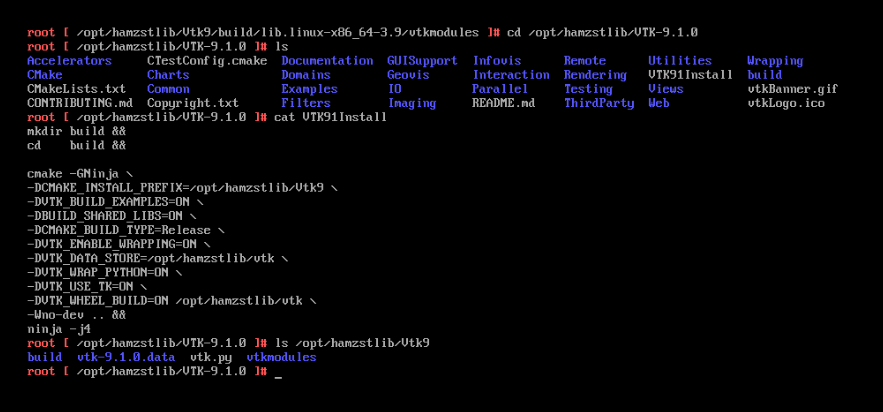
I set the CMAKE\_INSTALL\_PREFIX to /opt/hamzstlib
Previously, I have downloaded [VTK-9.1.0.tar.gz](https://www.vtk.org/files/release/9.1/VTK-9.1.0.tar.gz) from this:
[https://vtk.org/download/](https://vtk.org/download/)
But when I do ninja install / make install the installation folder does not have **lib** folder or VTKconfig.cmake file so VTK can be found in my system.
How to make sure CMake knows where the VTK build is? To make VTK works?
Thanks
---
### Author:  [@amaclean](https://discourse.vtk.org/u/amaclean)
#### Post date: [April 9, 2022, 1:39am UTC](https://discourse.vtk.org/t/bash-vtk-command-not-found/8220/8 "2022-04-09T01:39:07Z")
If you are trying to build the Python wheel, then follow the instructions in: [https://gitlab.kitware.com/vtk/vtk/-/blob/master/Documentation/dev/build.md](https://gitlab.kitware.com/vtk/vtk/-/blob/master/Documentation/dev/build.md)
Note that you need the path to the **VTK source** , in your case `/opt/hamzstlib/VTK-9.1.0`.
From what I can see,
`/opt/hamzstlib/Vtk9/build` is where your build is. This will contain `vtk-config.cmake`, so in your environment you need:
```bash
VTK_DIR=/opt/hamzstlib/Vtk9/build
```
---
### Author:  [@Freya\_the\_Goddess](https://discourse.vtk.org/u/Freya_the_Goddess)
#### Post date: [April 9, 2022, 1:06pm UTC](https://discourse.vtk.org/t/bash-vtk-command-not-found/8220/9 "2022-04-09T13:06:20Z")
The problem is I have search through the folders and files inside the build folder `/opt/hamzstlib/Vtk9/build`.
There is no `vtk-config.cmake`
I need to know whether my CMake scripts are wrong, I am trying to rebuild it again now.
---
### Author:  [@mchinand](https://discourse.vtk.org/u/mchinand)
#### Post date: [April 9, 2022, 2:41pm UTC](https://discourse.vtk.org/t/bash-vtk-command-not-found/8220/10 "2022-04-09T14:41:10Z")
What are the last few lines of output of each of the commands? If it’s taking the build command is taking a long time, the cmake command was probably successful. What are the last few lines of output of your make/ninja command for building and the last few lines of output of your make/ninja install command?
---
### Author:  [@Freya\_the\_Goddess](https://discourse.vtk.org/u/Freya_the_Goddess)
#### Post date: [April 10, 2022, 12:01am UTC](https://discourse.vtk.org/t/bash-vtk-command-not-found/8220/11 "2022-04-10T00:01:34Z")
This is the scripts to build VTK:
```auto
cmake -GNinja \
-S ./VTK-9.1.0 \
-B ./vtk-build \
-D CMAKE_INSTALL_PREFIX=/opt/hamzstlib/vtk91 \
-D VTK_BUILD_EXAMPLES=ON \
-D CMAKE_BUILD_TYPE=Release \
-D VTK_ENABLE_WRAPPING=ON \
-D VTK_WRAP_JAVA=ON \
-D VTK_WRAP_PYTHON=ON \
-D VTK_USE_TK=ON \
-D VTK_WHEEL_BUILD=ON /opt/hamzstlib/VTK-9.1.0
```
then after that a **vtk-build** folder is created and then I run:
```auto
cmake --build ./vtk-build
cmake --install ./vtk-build --prefix ./vtk-install
```
What is the correct one? what is your installation, and build scripts? Maybe it can help me.
---
### Author:  [@mchinand](https://discourse.vtk.org/u/mchinand)
#### Post date: [April 10, 2022, 12:14am UTC](https://discourse.vtk.org/t/bash-vtk-command-not-found/8220/12 "2022-04-10T00:14:30Z")
–prefix ./vtk-install
This option is overriding your CMAKE\_INSTALL\_PREFIX directive of your cmake command, so if your last command is working, your vtk files are installed in ./vtk-install.
What is in that directory? What are the last few lines of output when you run that command?
---
### Author:  [@amaclean](https://discourse.vtk.org/u/amaclean)
#### Post date: [April 10, 2022, 7:05am UTC](https://discourse.vtk.org/t/bash-vtk-command-not-found/8220/13 "2022-04-10T07:05:00Z")
@Freya_the_Goddess , my feeling is that you should start with a build in your home folder and once this works, then:
- Familarise yourself with the directory structure and what needs to be set in the environment in order to build C++ code and Python code.
- Adjust the VTK build parameters specifying what you want in cmake.
- When you are satisfied, then consider building and installing a wheel, if you want.
To help you do this I have just written and tested some instructions that will lead you step by step through the process of setting up VTK in your home folder. The instructions cover:
- what is needed to build VTK
- setting up a virtual environment for VTK
- building VTK
- running some test cases for C++ and Python.
They use the latest release of VTK.
I hope the instructions are useful.
[BuildingVTK.md](https://discourse.vtk.org/uploads/short-url/xaoJkbz19HYI8IER5AacMeQxRiN.md) (4.2 KB)
---
### Author:  [@Freya\_the\_Goddess](https://discourse.vtk.org/u/Freya_the_Goddess)
#### Post date: [April 10, 2022, 7:39am UTC](https://discourse.vtk.org/t/bash-vtk-command-not-found/8220/14 "2022-04-10T07:39:26Z")
Thanks for the reply…
Yes it is installed in ./vtk-install
The command is overriding the CMAKE\_INSTALL\_PREFIX but it is still installed anyway.
The last lines I use till vtk-install is made are:
```auto
cmake --build ./vtk-build
cmake --install ./vtk-build --prefix ./vtk-install
```
Some say that it is not right since the vtk-install should contain these directories:
`bin/ include/ lib/ share/`
that will include the VTKConfig.make and vtk-config.make as well so I can point my VTK\_DIR correctly.
What do you think ?
---
### Author:  [@Freya\_the\_Goddess](https://discourse.vtk.org/u/Freya_the_Goddess)
#### Post date: [April 10, 2022, 7:40am UTC](https://discourse.vtk.org/t/bash-vtk-command-not-found/8220/15 "2022-04-10T07:40:48Z")
Thanks for the reply Andrew,
I am looking at your build.md and will try it today.
I was suggested to create a build log to figure out my my installation folder is not the way is suppose to be. Here is my build log if you want to see it and have time:
[https://raw.githubusercontent.com/glanzkaiser/glanzshamzs/main/vtk\_build.log](https://raw.githubusercontent.com/glanzkaiser/glanzshamzs/main/vtk_build.log)
I am using ninja -j4.
---
### Author:  [@amaclean](https://discourse.vtk.org/u/amaclean)
#### Post date: [April 10, 2022, 8:09am UTC](https://discourse.vtk.org/t/bash-vtk-command-not-found/8220/16 "2022-04-10T08:09:49Z")
It looks like everything built. I strongly suggest that you try my instructions and do a build in your home directory. This will give you a good basis for:
- folder structures in the VTK build folder
- what you need to do to build your own code and how to set up Python
- once you check that there are no errors and the tests work, you can modofy with confidence
---
### Author:  [@Freya\_the\_Goddess](https://discourse.vtk.org/u/Freya_the_Goddess)
#### Post date: [April 10, 2022, 1:38pm UTC](https://discourse.vtk.org/t/bash-vtk-command-not-found/8220/17 "2022-04-10T13:38:35Z")
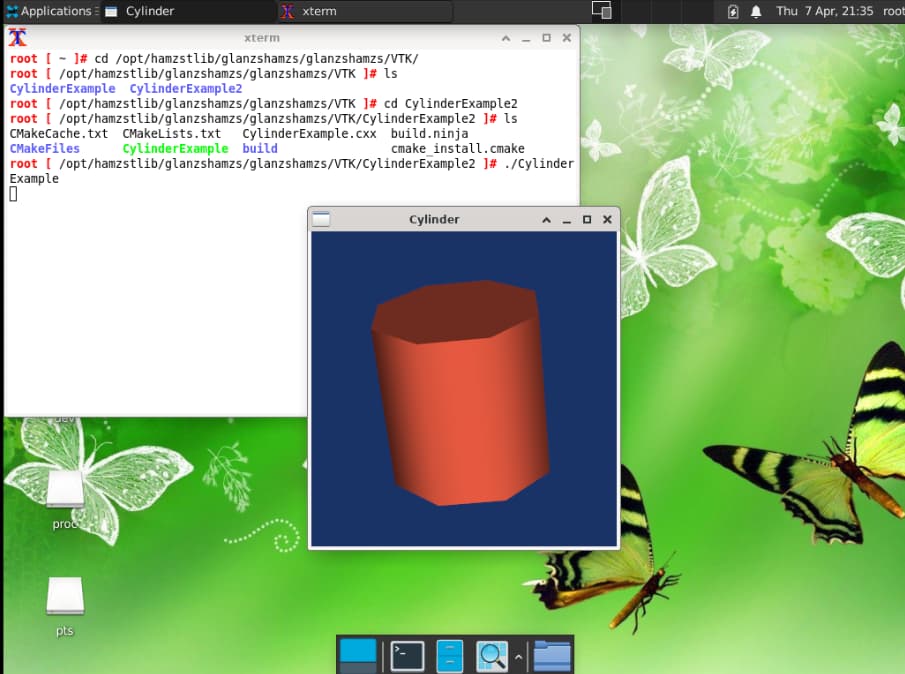
Surprise…
Thanks for everything Andrew Maclean your instruction should be spread widely.
---
### Author:  [@Freya\_the\_Goddess](https://discourse.vtk.org/u/Freya_the_Goddess)
#### Post date: [April 10, 2022, 1:49pm UTC](https://discourse.vtk.org/t/bash-vtk-command-not-found/8220/18 "2022-04-10T13:49:38Z")
A question:
What is wheel? I am new to Python too and just learning very basic now.
Is it like package or module in Python?
---
### Author:  [@Sebastien\_Jourdain](https://discourse.vtk.org/u/Sebastien_Jourdain)
#### Post date: [April 10, 2022, 9:54pm UTC](https://discourse.vtk.org/t/bash-vtk-command-not-found/8220/19 "2022-04-10T21:54:53Z")
A wheel is a Python package that you can install. Basically since you are not well verse with building VTK, you should either use a pre-built wheel version (`pip install vtk`) or build VTK with the basic options.
So far you are using conflicting build options.
In your command
```auto
cmake -GNinja \
-S ./VTK-9.1.0 \
-B ./vtk-build \
-D CMAKE_INSTALL_PREFIX=/opt/hamzstlib/vtk91 \
-D VTK_BUILD_EXAMPLES=ON \
-D CMAKE_BUILD_TYPE=Release \
-D VTK_ENABLE_WRAPPING=ON \
-D VTK_WRAP_JAVA=ON \
-D VTK_WRAP_PYTHON=ON \
-D VTK_USE_TK=ON \
-D VTK_WHEEL_BUILD=ON /opt/hamzstlib/VTK-9.1.0
```
1. You are providing the source directory twice
`-S ./VTK-9.1.0` and `/opt/hamzstlib/VTK-9.1.0 `. I don’t think it matters but still, there is no point to setting the same key to maybe two different values.
2. Why are you enabling Java? `-D VTK_WRAP_JAVA=ON` Are you planning to use Java? Java tend to require a different install tree than standard C++ library so the JVM can load those libraries easily.
3. `-D VTK_USE_TK=ON` Why?
4. ` -D VTK_WHEEL_BUILD=ON` Are you aiming to publish your VTK build to PyPI? This also imply some tree structure that might be incompatible with Java and maybe even VTK install tree for C++.
To summarize, if you don’t know what those options are for, don’t enable them. I already gave you the properties required to build VTK with Python support along with how to build an example against your build and install tree.
---
### Author:  [@Freya\_the\_Goddess](https://discourse.vtk.org/u/Freya_the_Goddess)
#### Post date: [April 10, 2022, 10:26pm UTC](https://discourse.vtk.org/t/bash-vtk-command-not-found/8220/20 "2022-04-10T22:26:11Z")
Yes I made VTK works with the basic options. Now try some examples from the website.
To asnwer your questions
> [@Sebastien\_Jourdain](#):
>
> - You are providing the source directory twice
> `-S ./VTK-9.1.0` and `/opt/hamzstlib/VTK-9.1.0 `. I don’t think it matters but still, there is no point to setting the same key to maybe two different values.
> - Why are you enabling Java? `-D VTK_WRAP_JAVA=ON` Are you planning to use Java? Java tend to require a different install tree than standard C++ library so the JVM can load those libraries easily.
> - `-D VTK_USE_TK=ON` Why?
> - ` -D VTK_WHEEL_BUILD=ON` Are you aiming to publish your VTK build to PyPI? This also imply some tree structure that might be incompatible with Java and maybe even VTK install tree for C++.
1. I didn’t know that, thanks for mentioning. I learn a lot from mistakes here
2. I didn’t know that Java will require different install tree, maybe that is why all the previous builds was not working
3. TK is for Tkinter right? I think if I want to use C++ and Python, I need TK too. Sorry if I am wrong on this.
4. So the Wheel is only to publish VTK build to PyPI not to enhance Python features in VTK?
Thank You Sebastien
[Next page](https://discourse.vtk.org/t/bash-vtk-command-not-found/8220.md?page=2)