# BillboardTextActor3D (or similar) for Python
**URL:** https://discourse.vtk.org/t/billboardtextactor3d-or-similar-for-python/9630
**Category:** Support
**Tags:** python
**Created:** [October 17, 2022, 8:47pm UTC](https://discourse.vtk.org/t/billboardtextactor3d-or-similar-for-python/9630 "2022-10-17T20:47:33Z")
**Posts on this page:** 2
**Page:** 1
### Author:  [@Kevin\_Sweeney](https://discourse.vtk.org/u/Kevin_Sweeney)
#### Post date: [October 17, 2022, 8:47pm UTC](https://discourse.vtk.org/t/billboardtextactor3d-or-similar-for-python/9630/1 "2022-10-17T20:47:33Z")
I am working in Python (`vtk` with `ipywidgets`) and want to annotate my 3D glyphs with information (i.e. data point number etc)
I see there is something available in C++ but I cannot find a method to perform the same in Python.
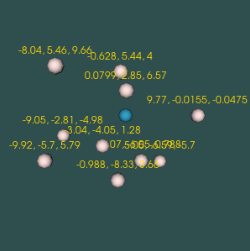
[https://kitware.github.io/vtk-examples/site/Cxx/Visualization/BillboardTextActor3D/](https://kitware.github.io/vtk-examples/site/Cxx/Visualization/BillboardTextActor3D/)
Example code of what I am currently generating
```python
class SpherePipeline:
def __init__ (self, radius=0.03):
self.radius = radius
self.sphereSrc = vtk.vtkSphereSource()
self.sphereSrc.SetRadius(self.radius)
self.glyphs = vtk.vtkGlyph3D()
self.glyphs.ScalingOff()
self.glyphs.SetSourceConnection(self.sphereSrc.GetOutputPort())
def setInput(self, data):
self.glyphs.SetInputData(data)
...
```
---
### Author:  [@amaclean](https://discourse.vtk.org/u/amaclean)
#### Post date: [October 19, 2022, 5:55am UTC](https://discourse.vtk.org/t/billboardtextactor3d-or-similar-for-python/9630/2 "2022-10-19T05:55:18Z")
Here is a python version of [BillboardTextActor3D](https://kitware.github.io/vtk-examples/site/Python/Visualization/BillboardTextActor3D/)
In the case of Python, I am not sure why a callback for the actor is even warranted, and, if it is used, the event: `vtkCommand.ModifiedEvent` will generate a set of
```auto
TypeError: 'NoneType' object is not callable
```
errors after the render. Hence the use of `vtkCommand.NoEvent` in its place.
I hope this helps.