# Black VTK widget in pyqt5 with QWebEngine on Mac
**URL:** https://discourse.vtk.org/t/black-vtk-widget-in-pyqt5-with-qwebengine-on-mac/3680
**Category:** Support
**Created:** [July 1, 2020, 10:29am UTC](https://discourse.vtk.org/t/black-vtk-widget-in-pyqt5-with-qwebengine-on-mac/3680 "2020-07-01T10:29:05Z")
**Posts on this page:** 8
**Page:** 1
### Author:  [@tgurgui](https://discourse.vtk.org/u/tgurgui)
#### Post date: [July 1, 2020, 10:29am UTC](https://discourse.vtk.org/t/black-vtk-widget-in-pyqt5-with-qwebengine-on-mac/3680/1 "2020-07-01T10:29:06Z")
Hello all,
(I’ve post this question also in qt forum: [https://forum.qt.io/topic/116371/qwebengineview-and-vtk-widget-on-mac](https://forum.qt.io/topic/116371/qwebengineview-and-vtk-widget-on-mac))
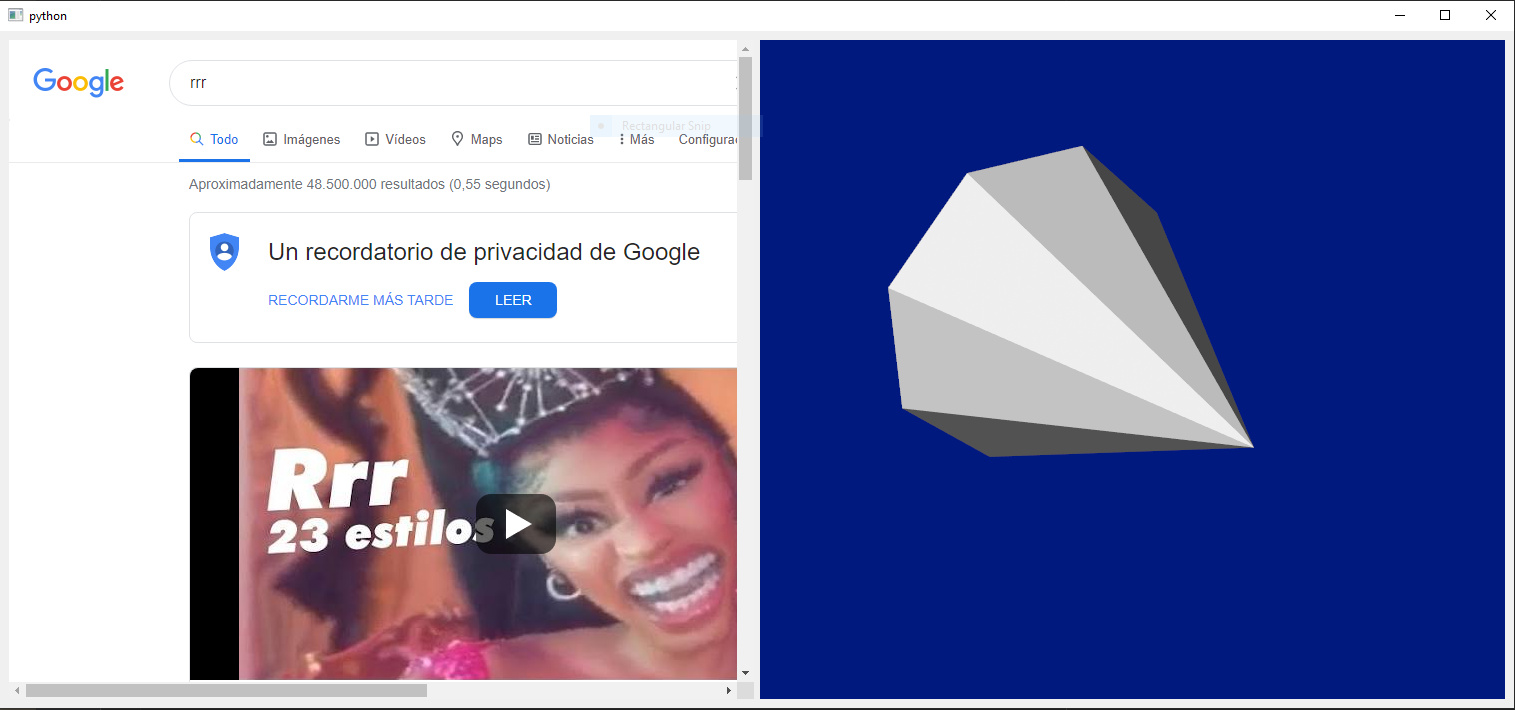
I’m building an application with a VTK widget (QVTKRenderWindowInteractor) to show 3D data and a QWebEngineView to show web pages. Under windows it works, although when I close it, it shows these messages:
```auto
2020-06-26 16:40:12.274 ( 27.459s) []vtkWin32OpenGLRenderWin:217 ERR| vtkWin32OpenGLRenderWindow (000001185E1DA8B0): wglMakeCurrent failed in MakeCurrent(), error: The handle is invalid.
2020-06-26 16:40:12.296 ( 27.481s) []vtkWin32OpenGLRenderWin:217 ERR| vtkWin32OpenGLRenderWindow (000001185E1DA8B0): wglMakeCurrent failed in MakeCurrent(), error: The handle is invalid.
2020-06-26 16:40:12.328 ( 27.513s) []vtkWin32OpenGLRenderWin:90 ERR| vtkWin32OpenGLRenderWindow (000001185E1DA8B0): wglMakeCurrent failed in Clean(), error: 6
```
Under mac, the VTK widget appears black (the widget works if `create_webengine_widget` is not called in the code below).

A code to reproduce this:
```auto
"""
Simple test of Python QVTKRenderWindowInterator,
requires either PySide2 or PyQt5.
"""
from vtkmodules.vtkFiltersSources import vtkConeSource
from vtkmodules.vtkRenderingCore import vtkActor, vtkPolyDataMapper, vtkRenderer, vtkTextActor
# load implementations for rendering and interaction factory classes
import vtkmodules.vtkRenderingOpenGL2
import vtkmodules.vtkInteractionStyle
import vtkmodules.vtkRenderingFreeType
import vtkmodules.qt
vtkmodules.qt.QVTKRWIBase = "QGLWidget"
from vtkmodules.qt.QVTKRenderWindowInteractor import QVTKRenderWindowInteractor
from vtkmodules.qt import PyQtImpl
if PyQtImpl is None:
# Autodetect the PyQt implementation to use
try:
import PyQt5
PyQtImpl = "PyQt5"
except ImportError:
import PySide2
PyQtImpl = "PySide2"
if PyQtImpl == "PyQt5":
from PyQt5.QtWidgets import QApplication
from PyQt5.QtWidgets import QMainWindow
from PyQt5.QtWidgets import QSizePolicy
from PyQt5.QtWidgets import QFrame
from PyQt5.QtWidgets import QHBoxLayout
from PyQt5.QtWebEngineWidgets import QWebEngineView
from PyQt5.QtWebEngineWidgets import QWebEngineSettings
from PyQt5.QtCore import Qt
from PyQt5.QtCore import QUrl
from PyQt5.QtCore import QCoreApplication
from PyQt5.QtGui import QSurfaceFormat
from PyQt5.QtOpenGL import QGLFormat
elif PyQtImpl == "PySide2":
from PySide2.QtWidgets import QApplication
from PySide2.QtWidgets import QMainWindow
from PySide2.QtWidgets import QFrame
from PySide2.QtWidgets import QHBoxLayout
from PySide2.QtWebEngineWidgets import QWebEngineView
from PySide2.QtWebEngineWidgets import QWebEngineSettings
from PySide2.QtCore import Qt
from PySide2.QtCore import QUrl
from PySide2.QtCore import QCoreApplication
from PySide2.QtOpenGL import QGLFormat
else:
raise ImportError("Unknown PyQt implementation " + repr(PyQtImpl))
class MainWindow(QMainWindow):
def __init__ (self, parent=None):
super(MainWindow, self). __init__ (parent)
self.frame = QFrame()
self.frame_layout = QHBoxLayout()
self.frame.setLayout(self.frame_layout)
self.setCentralWidget(self.frame)
self.create_webengine_widget()
self.frame_layout.addWidget(self.view)
self.create_vtk_widget()
self.frame_layout.addWidget(self.vtk_widget)
self.show()
self.vtk_widget.Initialize()
self.vtk_widget.Start()
self.show_formats()
def create_vtk_widget(self):
print("Create vtk widget")
# create the widget
self.vtk_widget = QVTKRenderWindowInteractor(parent=self.frame)
ren = vtkRenderer()
ren.SetBackground(0, .1, .5)
self.vtk_widget.GetRenderWindow().AddRenderer(ren)
cone = vtkConeSource()
cone.SetResolution(8)
coneMapper = vtkPolyDataMapper()
coneMapper.SetInputConnection(cone.GetOutputPort())
coneActor = vtkActor()
coneActor.SetMapper(coneMapper)
ren.AddActor(coneActor)
def create_webengine_widget(self):
print("Create webengine widget")
self.view = QWebEngineView(self.frame)
self.view.setSizePolicy(QSizePolicy(QSizePolicy.Expanding, QSizePolicy.Expanding))
self.view.settings().setAttribute(QWebEngineSettings.WebGLEnabled, False)
self.view.settings().setAttribute(QWebEngineSettings.Accelerated2dCanvasEnabled, False)
self.view.settings().setAttribute(QWebEngineSettings.LocalContentCanAccessRemoteUrls, True)
self.view.load(QUrl("http://www.google.com"))
def show_formats(self):
print("Widget format")
fmt = self.vtk_widget.format()
print(fmt.profile())
print("{}.{}".format(fmt.majorVersion(), fmt.minorVersion()))
print("-----------------")
print("QSurface format")
fmt = QSurfaceFormat.defaultFormat()
print(fmt.profile())
print(fmt.renderableType())
print("{}.{}".format(fmt.majorVersion(), fmt.minorVersion()))
print("-----------------")
print("QGLFormat")
fmt = QGLFormat.defaultFormat()
print(fmt.profile())
print("{}.{}".format(fmt.majorVersion(), fmt.minorVersion()))
print("-----------------")
if __name__ == " __main__":
print("Using " + PyQtImpl)
surfaceFormat = QGLFormat.defaultFormat()
surfaceFormat.setProfile(QGLFormat.CoreProfile)
surfaceFormat.setVersion(3, 3)
surfaceFormat.setSamples(4)
QGLFormat.setDefaultFormat(surfaceFormat)
QCoreApplication.setOrganizationName("QtExamples")
QCoreApplication.setAttribute(Qt.AA_EnableHighDpiScaling)
QCoreApplication.setAttribute(Qt.AA_ShareOpenGLContexts)
# every QT app needs an app
app = QApplication(['QVTKRenderWindowInteractor'])
window = MainWindow()
# start event processing
app.exec_()
```
Under windows, the output of ` show_formats`is
```auto
Widget format
1
3.3
-----------------
QSurface format
0
0
2.0
-----------------
QGLFormat
1
3.3
-----------------
```
and under mac:
```auto
Widget format
1
4.1
-----------------
QSurface format
0
0
2.0
-----------------
QGLFormat
1
3.3
-----------------
```
In both OS, I’m using:
- Python 3.7 from conda
- pyqt5 and pyqtwebengine 5.15.0 from pip
- vtk 9.0.1 from pip
Does anybody has any idea where this could come from? Or how to test it further?
Thanks!
T.
---
### Author:  [@lassoan](https://discourse.vtk.org/u/lassoan)
#### Post date: [July 1, 2020, 12:50pm UTC](https://discourse.vtk.org/t/black-vtk-widget-in-pyqt5-with-qwebengine-on-mac/3680/2 "2020-07-01T12:50:49Z")
These kind of errors are due to the wrong surface format. It is hard to find a combination that works and the setting is different on each platform.
Core profile should not be used on Mac. AA\_ShareOpenGLContexts may not be necessary.
---
### Author:  [@tgurgui](https://discourse.vtk.org/u/tgurgui)
#### Post date: [July 1, 2020, 1:23pm UTC](https://discourse.vtk.org/t/black-vtk-widget-in-pyqt5-with-qwebengine-on-mac/3680/3 "2020-07-01T13:23:34Z")
@lassoan
Thanks for your answer!
Is there a way to get surface’s properties/settings when it works? My idea is (`show_formats` function):
1. Execute without QWebEngineView. This way it works (vtk widget show the scene) and I might be able to get the properties/settings of the current surface.
2. Set the properties/settings to surface before creating QApplication and hope that VTK shows the scene.
In windows, both widget and surface have the same opengl version (3.3). But in mac, setting opengl version does not affect the widget’s version. Is this normal?
I’ve checked both renderer and renderwindow in both situations (with and without QWebEngineView), but I see no diferences.
I got the same result with Compatibility profile (and removing samples and verion):
```auto
surfaceFormat = QGLFormat.defaultFormat()
surfaceFormat.setProfile(QGLFormat.CompatibilityProfile)
QGLFormat.setDefaultFormat(surfaceFormat)
```
The output from `show_formats` with the above surface format is:
```auto
Widget format
Profile 0
2.1
-----------------
QSurface format
Profile 0
0
2.0
-----------------
QGLFormat
Profile 2
2.0
-----------------
```
Setting compatibility profile and opengl version to 2,1 doesn’t work either.
Also, removing AA\_ShareOpenGLContexts does not seem to affect the vtk widget (still black on mac).
Any idea on how to get the correct combination of settings will be apreciated 🙂 (even trying the code in C++ and debugging 🙃 )
---
### Author:  [@lassoan](https://discourse.vtk.org/u/lassoan)
#### Post date: [July 2, 2020, 4:38am UTC](https://discourse.vtk.org/t/black-vtk-widget-in-pyqt5-with-qwebengine-on-mac/3680/4 "2020-07-02T04:38:18Z")
Yes, it is hard to figure out working combinations for all platforms. If you want to keep your application functional then you also need to keep testing, as things break again as Qt, VTK, operating systems, and graphics hardware and drivers change. It is not enough to test on a few configurations for each operating system, but you need to test on hundreds of configurations if you want to be confident that your application works on most systems.
You have several options:
- Do some minimal testing on all platforms and accept that your application may not run everywhere.
- Do extensive testing on all platforms, on many different configurations. It is certainly doable, but it is a lot of work (on average it may be about 10-20% of a full-time software developer, as there are a couple of updates each year that require a few weeks of testing and fixing, and there are also user error reports that you need to investigate and fix).
- Build on an open-source application platform. Then all these low-level problems are taken care of, for free. VTK-based application platforms include ParaView, 3D Slicer, MITK, etc. You should be able to find something that is similar to what you want to do and customize and extend that so that it does exactly what you need.
---
### Author:  [@Jianguo](https://discourse.vtk.org/u/Jianguo)
#### Post date: [July 20, 2020, 12:04am UTC](https://discourse.vtk.org/t/black-vtk-widget-in-pyqt5-with-qwebengine-on-mac/3680/5 "2020-07-20T00:04:33Z")
I face the same problem, but I only develop in Windows. And I add some code in MainWindow to avoid the error message.
def closeEvent(self, event):
self.vtk\_widget.Finalize()
---
### Author:  [@tgurgui](https://discourse.vtk.org/u/tgurgui)
#### Post date: [July 21, 2020, 7:38am UTC](https://discourse.vtk.org/t/black-vtk-widget-in-pyqt5-with-qwebengine-on-mac/3680/6 "2020-07-21T07:38:08Z")
Thanks for your answer @Jianguo
You’re refering to this error, right?
```auto
2020-06-26 16:40:12.274 ( 27.459s) []vtkWin32OpenGLRenderWin:217 ERR| vtkWin32OpenGLRenderWindow (000001185E1DA8B0): wglMakeCurrent failed in MakeCurrent(), error: The handle is invalid.
2020-06-26 16:40:12.296 ( 27.481s) []vtkWin32OpenGLRenderWin:217 ERR| vtkWin32OpenGLRenderWindow (000001185E1DA8B0): wglMakeCurrent failed in MakeCurrent(), error: The handle is invalid.
2020-06-26 16:40:12.328 ( 27.513s) []vtkWin32OpenGLRenderWin:90 ERR| vtkWin32OpenGLRenderWindow (000001185E1DA8B0): wglMakeCurrent failed in Clean(), error: 6
```
---
### Author:  [@Jianguo](https://discourse.vtk.org/u/Jianguo)
#### Post date: [July 21, 2020, 7:46am UTC](https://discourse.vtk.org/t/black-vtk-widget-in-pyqt5-with-qwebengine-on-mac/3680/7 "2020-07-21T07:46:19Z")
yes
---
### Author:  [@dr\_ppetrov](https://discourse.vtk.org/u/dr_ppetrov)
#### Post date: [July 24, 2020, 10:07am UTC](https://discourse.vtk.org/t/black-vtk-widget-in-pyqt5-with-qwebengine-on-mac/3680/8 "2020-07-24T10:07:16Z")
do Paravaiew&Slicer use vtk 8.2 or 9.0 ?