### Author:  [@Paulo\_Carvalho](https://discourse.vtk.org/u/Paulo_Carvalho)
#### Post date: [December 10, 2024, 7:16pm UTC](https://discourse.vtk.org/t/building-vtk-9-4-0-on-windows-java/14936/41 "2024-12-10T19:16:36Z")
Is your platform `amd64` or `x86_64`? If your target platform is `x86_64` then you likely have and additional issue since I found several references to `amd64` in your latest detailed log.
---
### Author:  [@toddy](https://discourse.vtk.org/u/toddy)
#### Post date: [December 10, 2024, 11:46pm UTC](https://discourse.vtk.org/t/building-vtk-9-4-0-on-windows-java/14936/42 "2024-12-10T23:46:17Z")
The visual studio generators definitely work.
---
### Author:  [@Ngwarai](https://discourse.vtk.org/u/Ngwarai)
#### Post date: [December 11, 2024, 3:19am UTC](https://discourse.vtk.org/t/building-vtk-9-4-0-on-windows-java/14936/43 "2024-12-11T03:19:51Z")
Thanks very much Paulo. I will follow that and keep you posted. I am glad we do now have a smoking gun. Thanks again
ngwarai
---
### Author:  [@Paulo\_Carvalho](https://discourse.vtk.org/u/Paulo_Carvalho)
#### Post date: [December 11, 2024, 10:49am UTC](https://discourse.vtk.org/t/building-vtk-9-4-0-on-windows-java/14936/44 "2024-12-11T10:49:36Z")
Also, please, check whether this is your case:
>
It seems there is a kind of “AnyCPU” “Any CPU” (notice the space) configuration bug that started way back in VS2003 and was still observerd in VS2019. The other more recent answers there may also cast light on what may be wrong in the configuration of your VS installation.
---
### Author:  [@Ngwarai](https://discourse.vtk.org/u/Ngwarai)
#### Post date: [December 11, 2024, 11:44am UTC](https://discourse.vtk.org/t/building-vtk-9-4-0-on-windows-java/14936/45 "2024-12-11T11:44:46Z")
Thanks Paulo. I am cleaning VS installations on my machine. Some bits of VS date back to VS 2007. I am also taking out anything associated with a build. I will then install 2022 from scratch. I will check out the case below before starting again. Thanks very much.
ngwarai
---
### Author:  [@dgobbi](https://discourse.vtk.org/u/dgobbi)
#### Post date: [December 11, 2024, 12:38pm UTC](https://discourse.vtk.org/t/building-vtk-9-4-0-on-windows-java/14936/46 "2024-12-11T12:38:01Z")
Ngwarai, your visual studio configuration is probably fine.
Please remember that `amd64` and `x86_64` refer to the same CPU architecture. If you see them both it does _not_ mean there is anything wrong with your configuration. The important thing is that you want to use the `x64` (64-bit) version of the compiler, unless you intend to do a 32-bit build, and you want to avoid `arm64` (but standard Visual Studio installs don’t include `arm64`, so I don’t think you need to worry about it).
Yesterday, I tried building VTK/Java myself with the Visual Studio 2022 generator and msbuild, and I saw the same error that you reported:
```plaintext
Error opening dependency file F:/vtk-build-java/Wrapping/Java/CMakeFiles/vtkChartsCoreJava.dir/vtkAxis.java.d
```
Then I tried with the Ninja generator in the “x64 Native Tools Command Prompt for VS 2022”, and the build was successful. Here is the last line of the build log:
```plaintext
[16020/16020] Linking Java static library lib\java\vtk.jar
```
I ran cmake in the command prompt as follows:
```plaintext
cmake ..\VTK-9.4.0 -GNinja -DCMAKE_BUILD_TYPE=Release -DVTK_WRAP_JAVA=ON
```
Then, to build VTK in the command prompt, I just typed `ninja`:
```plaintext
ninja
```
The following is a summary of my `CMakeCache.txt`:
```cmake
BUILD_SHARED_LIBS:BOOL=ON
CMAKE_BUILD_TYPE:STRING=Release
CMAKE_CXX_COMPILER:FILEPATH=C:/Program Files/Microsoft Visual Studio/2022/Community/VC/Tools/MSVC/14.42.34433/bin/Hostx64/x64/cl.exe
CMAKE_C_COMPILER:FILEPATH=C:/Program Files/Microsoft Visual Studio/2022/Community/VC/Tools/MSVC/14.42.34433/bin/Hostx64/x64/cl.exe
CMAKE_LINKER:FILEPATH=C:/Program Files/Microsoft Visual Studio/2022/Community/VC/Tools/MSVC/14.42.34433/bin/Hostx64/x64/link.exe
CMAKE_MAKE_PROGRAM:FILEPATH=C:/PROGRA~1/MIB055~1/2022/COMMUN~1/Common7/IDE/COMMON~1/MICROS~1/CMake/Ninja/ninja.exe
VTK_WRAP_JAVA:BOOL=ON
JAVA_AWT_INCLUDE_PATH:PATH=C:/Program Files/Java/jdk1.8.0_191/include
JAVA_AWT_LIBRARY:FILEPATH=C:/Program Files/Java/jdk1.8.0_191/lib/jawt.lib
JAVA_INCLUDE_PATH:PATH=C:/Program Files/Java/jdk1.8.0_191/include
JAVA_INCLUDE_PATH2:PATH=C:/Program Files/Java/jdk1.8.0_191/include/win32
JAVA_JVM_LIBRARY:FILEPATH=C:/Program Files/Java/jdk1.8.0_191/lib/jvm.lib
Java_IDLJ_EXECUTABLE:FILEPATH=C:/Program Files/Java/jdk1.8.0_191/bin/idlj.exe
Java_JARSIGNER_EXECUTABLE:FILEPATH=C:/Program Files/Java/jdk1.8.0_191/bin/jarsigner.exe
Java_JAR_EXECUTABLE:FILEPATH=C:/Program Files/Java/jdk1.8.0_191/bin/jar.exe
Java_JAVAC_EXECUTABLE:FILEPATH=C:/Program Files/Java/jdk1.8.0_191/bin/javac.exe
Java_JAVADOC_EXECUTABLE:FILEPATH=C:/Program Files/Java/jdk1.8.0_191/bin/javadoc.exe
Java_JAVAH_EXECUTABLE:FILEPATH=C:/Program Files/Java/jdk1.8.0_191/bin/javah.exe
Java_JAVA_EXECUTABLE:FILEPATH=C:/Program Files/Java/jdk1.8.0_191/bin/java.exe
```
I used the `cmake` and `ninja` that Microsoft provides with Visual Studio 2022, but any recent version of cmake and ninja should work just as well.
```plaintext
cmake --version
cmake version 3.29.5-msvc4
```
```plaintext
ninja --version
1.12.1
```
---
### Author:  [@Ngwarai](https://discourse.vtk.org/u/Ngwarai)
#### Post date: [December 11, 2024, 12:51pm UTC](https://discourse.vtk.org/t/building-vtk-9-4-0-on-windows-java/14936/47 "2024-12-11T12:51:03Z")
Thanks David. Will note the issues you highlighted. From your own experience, it would seem confirmed that there are issues with VS 2022 on Java for 9.4.0.
I do actually use two machines. The one runs Windows 10 on a VM. It does not support OpenGL, so it is stuck on vtk 6.3.0. The other is a Sun workstation on which I’m running 8.2.0 on 32 bit / Java 8.
All along I meant to transition to Java 23 / 64 bit. I do now have not the option of 9.4.0 on Java 8.
I will try ninja again once Vs is reinstalled. Thanks very much. I will be reporting back soon. Thanks again.
ngwarai
---
### Author:  [@Ngwarai](https://discourse.vtk.org/u/Ngwarai)
#### Post date: [December 12, 2024, 9:44am UTC](https://discourse.vtk.org/t/building-vtk-9-4-0-on-windows-java/14936/48 "2024-12-12T09:44:45Z")
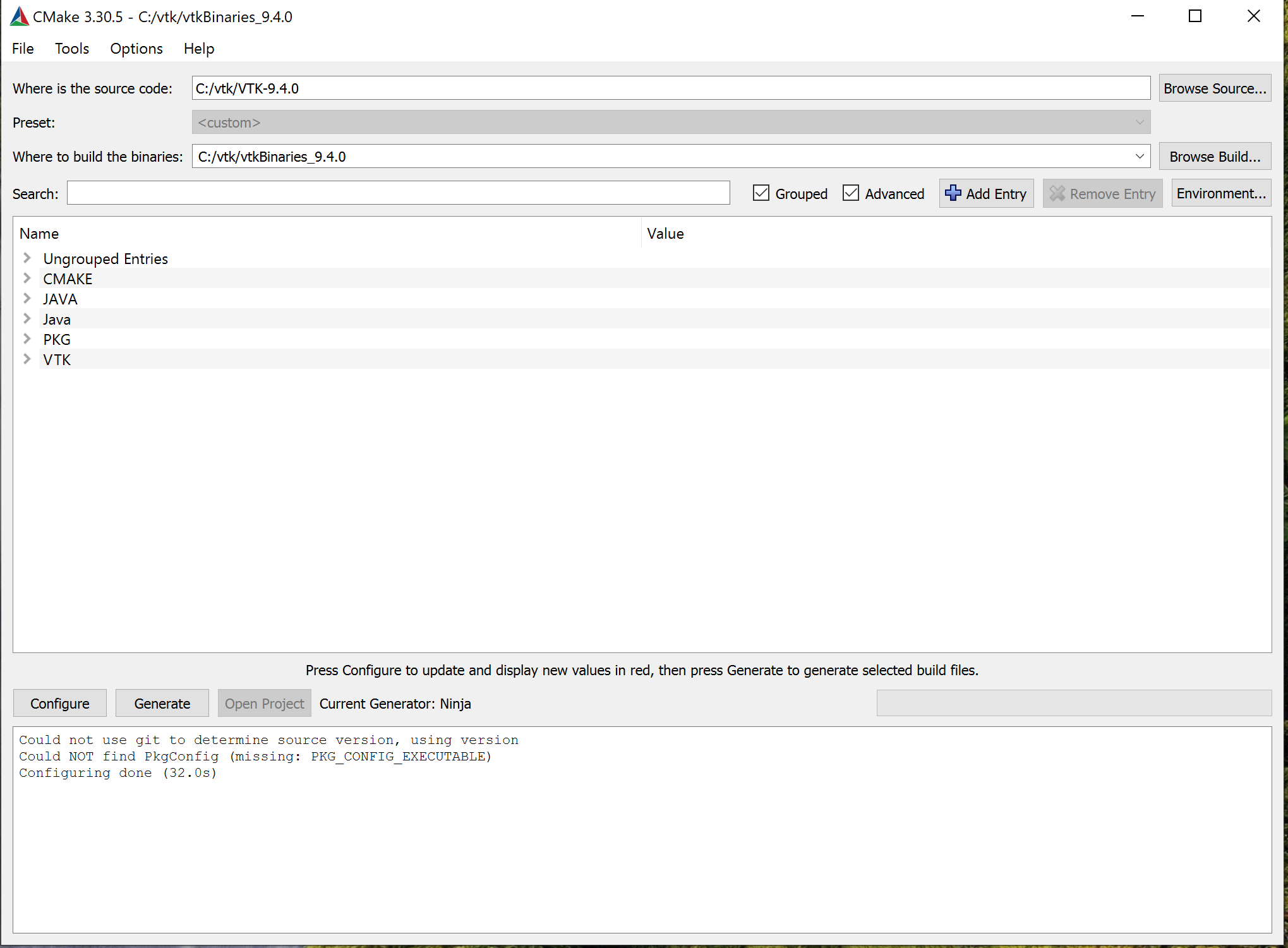
Good morning David. I have made a bit of progress towards the Ninja build. I cleaned my machine of all VS related installations. I reinstalled VS 2022 17.12. I then followed the procedure you proposed and I was able to generate a cmake project for ninja (ninja.build)
I am still reinstalling VS 2022 on the machine with Java 23. I should be able to build soon. I will report accordingly. Thanks very much.
ngwarai
> **(attachments)**
>
> 
---
### Author:  [@Ngwarai](https://discourse.vtk.org/u/Ngwarai)
#### Post date: [December 12, 2024, 10:06am UTC](https://discourse.vtk.org/t/building-vtk-9-4-0-on-windows-java/14936/49 "2024-12-12T10:06:15Z")
Good morning David. Thanks for the Ninja good news. I have now been able to configure a cmake project for ninja after reinstalling VS 2022 17.12. I should be able to try out my build soon. I should be reporting back soon.
Thanks
ngwarai
---
### Author:  [@toddy](https://discourse.vtk.org/u/toddy)
#### Post date: [December 12, 2024, 11:34am UTC](https://discourse.vtk.org/t/building-vtk-9-4-0-on-windows-java/14936/50 "2024-12-12T11:34:11Z")
Is it VTK 9.4 that broke or VS2022?
I have build the Java wrappers many times for VTK9.3 on VS2017 using the visual studio generators in CMake.
However the jar had to be built manually. [VTK 9 and Java- vtk.jar not automatically generated. Also location of wrapper dlls - #19 by toddy](https://discourse.vtk.org/t/vtk-9-and-java-vtk-jar-not-automatically-generated-also-location-of-wrapper-dlls/3354/19)
Has this step been automated now for Windows? It is causing the problem?
---
### Author:  [@Ngwarai](https://discourse.vtk.org/u/Ngwarai)
#### Post date: [December 12, 2024, 3:05pm UTC](https://discourse.vtk.org/t/building-vtk-9-4-0-on-windows-java/14936/51 "2024-12-12T15:05:08Z")
Good afternoon Todd and thanks for help and encouragement. I am no expert at these things, but I also built 9.3.1 with cmake for VS 2022, and it built clean. It had its problems but it built without errors.
It is my opinion that the 9.4.0 script has a bug in it which I have no idea where to start to look for it. Thanks again
ngwarai
---
### Author:  [@dgobbi](https://discourse.vtk.org/u/dgobbi)
#### Post date: [December 12, 2024, 3:38pm UTC](https://discourse.vtk.org/t/building-vtk-9-4-0-on-windows-java/14936/52 "2024-12-12T15:38:12Z")
The build errors complain about missing files that end in “`java.d`”, and these files are also mentioned on line 195 of [CMake/vtkModuleWrapJava.cmake](https://gitlab.kitware.com/vtk/vtk/-/blob/35fb2ed4/CMake/vtkModuleWrapJava.cmake#L195). So if anyone wants to dig deeper into why the visual studio builds fail, that would be a place to start. These “`java.d`” files are new to VTK 9.4.
---
### Author:  [@Paulo\_Carvalho](https://discourse.vtk.org/u/Paulo_Carvalho)
#### Post date: [December 15, 2024, 2:39pm UTC](https://discourse.vtk.org/t/building-vtk-9-4-0-on-windows-java/14936/53 "2024-12-15T14:39:04Z")
That “.java.d” commit was merged into 9.4: [https://gitlab.kitware.com/vtk/vtk/-/commit/0081f0066d179bb13ca3018c3389ae9a7463c7d7](https://gitlab.kitware.com/vtk/vtk/-/commit/0081f0066d179bb13ca3018c3389ae9a7463c7d7)
---
### Author:  [@dgobbi](https://discourse.vtk.org/u/dgobbi)
#### Post date: [December 15, 2024, 2:47pm UTC](https://discourse.vtk.org/t/building-vtk-9-4-0-on-windows-java/14936/54 "2024-12-15T14:47:36Z")
I have a fix here that will go into 9.4.1:
[https://gitlab.kitware.com/vtk/vtk/-/merge\_requests/11766](https://gitlab.kitware.com/vtk/vtk/-/merge_requests/11766)
---
### Author:  [@Ngwarai](https://discourse.vtk.org/u/Ngwarai)
#### Post date: [December 15, 2024, 3:10pm UTC](https://discourse.vtk.org/t/building-vtk-9-4-0-on-windows-java/14936/55 "2024-12-15T15:10:22Z")
Good afternoon Paulo. This is very encouraging and exciting. Thanks very much.
---
### Author:  [@Ngwarai](https://discourse.vtk.org/u/Ngwarai)
#### Post date: [December 15, 2024, 3:12pm UTC](https://discourse.vtk.org/t/building-vtk-9-4-0-on-windows-java/14936/56 "2024-12-15T15:12:34Z")
Thanks David. This may well be Sherlock Holmes “Elementary, my dear Watson” moment. I will hold my breath for the 9.4.1 release. Thanks again.
---
### Author:  [@toddy](https://discourse.vtk.org/u/toddy)
#### Post date: [December 16, 2024, 3:58am UTC](https://discourse.vtk.org/t/building-vtk-9-4-0-on-windows-java/14936/57 "2024-12-16T03:58:48Z")
Well done @Paulo_Carvalho and @dgobbi for tracking it down.
---
### Author:  [@vbolea](https://discourse.vtk.org/u/vbolea)
#### Post date: [December 16, 2024, 6:56pm UTC](https://discourse.vtk.org/t/building-vtk-9-4-0-on-windows-java/14936/58 "2024-12-16T18:56:54Z")
I corrected the issue of not including the JNI libs in the macOS and Linux native jars. The fix is now in current VTK master and in the latest snapshot VTK Maven packages in Github. Please try it.
> **[Package org.vtk.vtk-java1.8 · Kitware/VTK](https://github.com/Kitware/VTK/packages/2269951)**
>
> Mirror of Visualization Toolkit repository. Contribute to Kitware/VTK development by creating an account on GitHub.
---
### Author:  [@thegbiv](https://discourse.vtk.org/u/thegbiv)
#### Post date: [December 17, 2024, 5:55am UTC](https://discourse.vtk.org/t/building-vtk-9-4-0-on-windows-java/14936/59 "2024-12-17T05:55:33Z")
This is much better! Thanks. May I ask what system the natives were compiled on and with which version of libstdc++/gcc? I’m attempting to build on debian 12 but am seeing errors like this when loading the natives:
```auto
/lib/x86_64-linux-gnu/libstdc++.so.6: version `GLIBCXX_3.4.32' not found (required by /workspaces/my-app/target/native-libs/java/vtk-Linux-x86_64/libvtkCommonMathJava.so)
```
I think I need to use a different distro/gcc etc for this but before I start guessing , I figured I’d just ask 😄
---
### Author:  [@dgobbi](https://discourse.vtk.org/u/dgobbi)
#### Post date: [December 17, 2024, 1:16pm UTC](https://discourse.vtk.org/t/building-vtk-9-4-0-on-windows-java/14936/60 "2024-12-17T13:16:06Z")
Out of curiousity I checked my own system (ubuntu 22.04, which is based on debian 12). Its `libstdc++.so` provides `GLIBCXX_3.4.30`. Just a bit too old!
[Previous page](https://discourse.vtk.org/t/building-vtk-9-4-0-on-windows-java/14936.md?page=2)
[Next page](https://discourse.vtk.org/t/building-vtk-9-4-0-on-windows-java/14936.md?page=4)