# Built vtk with tkinter on MacOS (Macbook Air), Render Window breaks down on Macbook Pro
**URL:** https://discourse.vtk.org/t/built-vtk-with-tkinter-on-macos-macbook-air-render-window-breaks-down-on-macbook-pro/6635
**Category:** Support
**Created:** [September 14, 2021, 3:24pm UTC](https://discourse.vtk.org/t/built-vtk-with-tkinter-on-macos-macbook-air-render-window-breaks-down-on-macbook-pro/6635 "2021-09-14T15:24:23Z")
**Posts on this page:** 20
**Page:** 1
### Author:  [@cmengich](https://discourse.vtk.org/u/cmengich)
#### Post date: [September 14, 2021, 3:24pm UTC](https://discourse.vtk.org/t/built-vtk-with-tkinter-on-macos-macbook-air-render-window-breaks-down-on-macbook-pro/6635/1 "2021-09-14T15:24:23Z")
Hello.
I built VTK 9.0.1 with tkinter Python 3.8.5 for Macos (Intel, Big Sur) on a Macbook Air, and built an app that visualizes dicom images. App works perfectly fine on Macbook Air. Tested it on multiple devices. However, on testing the app on Macbook Pro, the render window breaks down. It minimizes, leaves the set grid position, and overlaps other widgets on the tkinter window.
What could cause this difference in behaviour?
I assumed building on macos environment would work across all mac devices (air, pro, mini, imac).
Alternatively, are there any builds of VTK available anywhere with tkinter included? That would work consistently, like the ones on pypi, but with VTK included.
---
### Author:  [@ben.boeckel](https://discourse.vtk.org/u/ben.boeckel)
#### Post date: [September 14, 2021, 5:02pm UTC](https://discourse.vtk.org/t/built-vtk-with-tkinter-on-macos-macbook-air-render-window-breaks-down-on-macbook-pro/6635/2 "2021-09-14T17:02:35Z")
My guess is that it is GPU driver related. @ken-martin?
---
### Author:  [@ken-martin](https://discourse.vtk.org/u/ken-martin)
#### Post date: [September 14, 2021, 5:18pm UTC](https://discourse.vtk.org/t/built-vtk-with-tkinter-on-macos-macbook-air-render-window-breaks-down-on-macbook-pro/6635/3 "2021-09-14T17:18:09Z")
Sounds like a tkinter version issue maybe? I would not expect a GPU driver issue to cause window sizing, positioning issues.
---
### Author:  [@cmengich](https://discourse.vtk.org/u/cmengich)
#### Post date: [September 14, 2021, 6:57pm UTC](https://discourse.vtk.org/t/built-vtk-with-tkinter-on-macos-macbook-air-render-window-breaks-down-on-macbook-pro/6635/4 "2021-09-14T18:57:00Z")
@ken-martin Could macbook pro and air on the same version of MacOS (Big Sur) have different tkinter versions? (I’m new to building apps in this environment)
The frozen app is built with tk8.6, that ships with python 3.8.
The render window itself still works, displays images, can be interacted with, on macbook pro. Just totally breaks down in terms of position and size.
---
### Author:  [@dgobbi](https://discourse.vtk.org/u/dgobbi)
#### Post date: [September 14, 2021, 7:05pm UTC](https://discourse.vtk.org/t/built-vtk-with-tkinter-on-macos-macbook-air-render-window-breaks-down-on-macbook-pro/6635/5 "2021-09-14T19:05:04Z")
I doubt that vtkTkRenderWidget will work on Retina displays. On my part, I’ve used tkinter on Windows and Linux recently, but I haven’t used tkinter on macOS for a couple years at least.
Fixing vtkTkRenderWidget for retina might be easy or might be hard.
---
### Author:  [@cmengich](https://discourse.vtk.org/u/cmengich)
#### Post date: [September 14, 2021, 7:22pm UTC](https://discourse.vtk.org/t/built-vtk-with-tkinter-on-macos-macbook-air-render-window-breaks-down-on-macbook-pro/6635/6 "2021-09-14T19:22:46Z")
I built VTK with Tkinter on Windows and Linux. The app works well on both platforms on multiple devices. It is only on MacOS that I have seen this issue.
@dgobbi What solution would you suggest? As the macbook pros I tested on definitely had retina displays.
---
### Author:  [@dgobbi](https://discourse.vtk.org/u/dgobbi)
#### Post date: [September 14, 2021, 8:47pm UTC](https://discourse.vtk.org/t/built-vtk-with-tkinter-on-macos-macbook-air-render-window-breaks-down-on-macbook-pro/6635/7 "2021-09-14T20:47:15Z")
There are a few things you can investigate:
- Try an external monitor (or even a TV) on the MacBook to check that the Retina display is the only issue.
- Check to see if there is anything in Tk itself to accommodate Retina displays.
- Try editing [vtkTkRenderWidget.cxx](https://gitlab.kitware.com/vtk/vtk/-/blob/master/Rendering/Tk/vtkTkRenderWidget.cxx) (and possibly [vtkCocoaTkUtilities.mm](https://gitlab.kitware.com/vtk/vtk/-/blob/master/Rendering/Tk/vtkCocoaTkUtilities.mm)) to modify the size and position as needed for Retina.
VTK has been made to support Retina through Qt and Cocoa, so Tk should theoretically be possible too.
---
### Author:  [@dgobbi](https://discourse.vtk.org/u/dgobbi)
#### Post date: [September 16, 2021, 3:26am UTC](https://discourse.vtk.org/t/built-vtk-with-tkinter-on-macos-macbook-air-render-window-breaks-down-on-macbook-pro/6635/8 "2021-09-16T03:26:26Z")
A quick follow-up. I tried the old squadViewer.py example on Retina and the problem really does appear to be a scaling/positioning issue and nothing more:
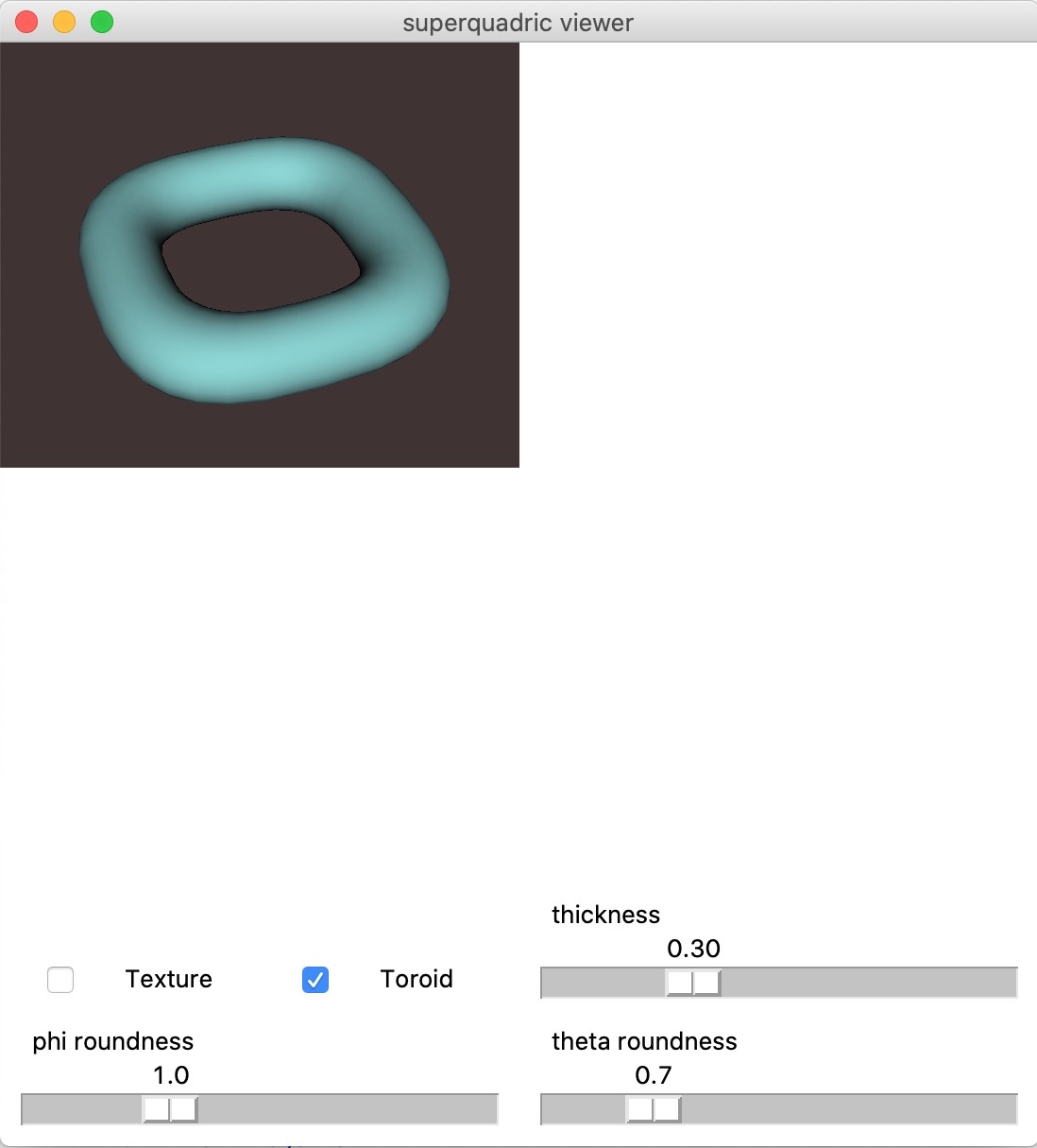
This is with tcl/tk 8.6.8 and Python 3.7.7.
---
### Author:  [@cmengich](https://discourse.vtk.org/u/cmengich)
#### Post date: [September 16, 2021, 7:40am UTC](https://discourse.vtk.org/t/built-vtk-with-tkinter-on-macos-macbook-air-render-window-breaks-down-on-macbook-pro/6635/9 "2021-09-16T07:40:25Z")
Alright. Thanks for the confirmation!
Will work on editing the size and position for retina.
---
### Author:  [@cmengich](https://discourse.vtk.org/u/cmengich)
#### Post date: [September 19, 2021, 8:41pm UTC](https://discourse.vtk.org/t/built-vtk-with-tkinter-on-macos-macbook-air-render-window-breaks-down-on-macbook-pro/6635/10 "2021-09-19T20:41:52Z")
Hi,
Following the info you mentioned earlier, that ‘VTK has been made to support Retina through Qt and Cocoa…’
I decided to make a go of building the app on qt and have been largely successful.
However, I have noticed an offset between the mouse-click position on screen, and the relative position on the render window. See the screenshot below, where to get the handle of the Box Widget, I would have to click at the cursor position.
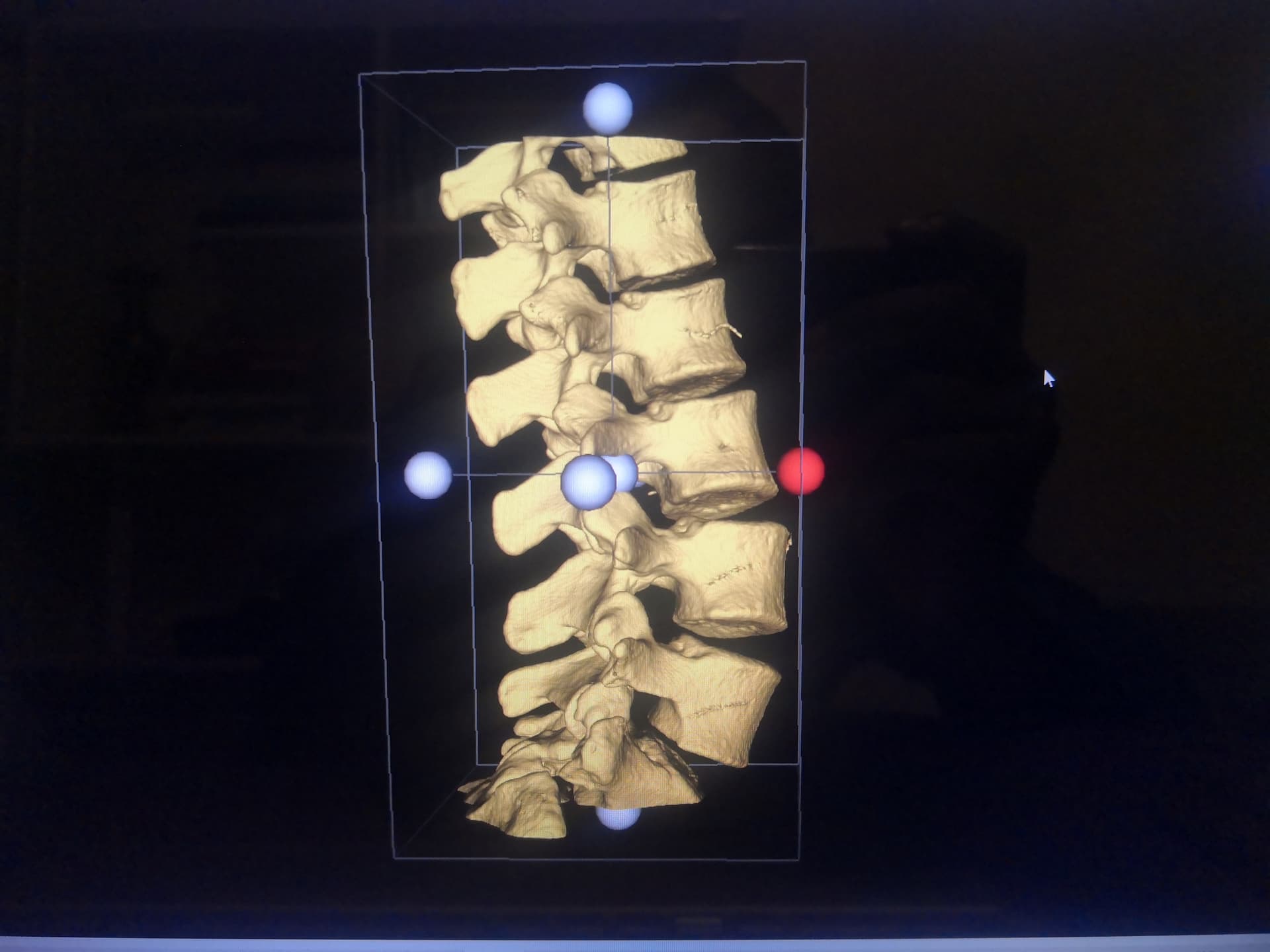
The render window is built with PySide following your guide here:
>
Do you have any idea what causes the offset @dgobbi ? And how to fix it.
I also noticed the offset when adding TextActors to the screen, and have to compensate when setting DisplayPosition.
---
### Author:  [@dgobbi](https://discourse.vtk.org/u/dgobbi)
#### Post date: [September 19, 2021, 10:01pm UTC](https://discourse.vtk.org/t/built-vtk-with-tkinter-on-macos-macbook-air-render-window-breaks-down-on-macbook-pro/6635/11 "2021-09-19T22:01:23Z")
The QVTKRenderWindowInteractor in that example is quite old, try using the [current one from the VTK master branch](https://gitlab.kitware.com/vtk/vtk/-/blob/master/Wrapping/Python/vtkmodules/qt/QVTKRenderWindowInteractor.py). I’m not sure if the retina support is complete, but the code is straightforward and should be easy to modify.
Also please note that QVTKRenderWindowInteractor.py is completely different from the QVTKOpenGLNativeWidget.cxx that is used by ParaView and other C++ applications. VTK’s C++-Qt code is tested on a regular basis by Kitware, but QVTKRenderWindowInteractor.py is a community-supported class, so it’s really only tested and patched by users such as yourself.
---
### Author:  [@cmengich](https://discourse.vtk.org/u/cmengich)
#### Post date: [September 19, 2021, 10:32pm UTC](https://discourse.vtk.org/t/built-vtk-with-tkinter-on-macos-macbook-air-render-window-breaks-down-on-macbook-pro/6635/12 "2021-09-19T22:32:31Z")
Thanks a lot. Using the QVTKRenderWindowInteractor from the VTK master branch fixed the problem!
---
### Author:  [@nicoco](https://discourse.vtk.org/u/nicoco)
#### Post date: [March 30, 2022, 2:59pm UTC](https://discourse.vtk.org/t/built-vtk-with-tkinter-on-macos-macbook-air-render-window-breaks-down-on-macbook-pro/6635/13 "2022-03-30T14:59:21Z")
Hi @cmengich,
Would you mind sharing the build steps for VTK+tk support under Mac OS X? I `brew install`ed `python-tk@3.9` and `tcl-tk`, added the right path to `$CPPFLAGS` and `$LDFLAGS` but run into this:
```auto
cmake -DVTK_BUILD_TESTING=OFF\
-DVTK_WHEEL_BUILD=ON\
-DVTK_PYTHON_VERSION=3\
-DVTK_WRAP_PYTHON=ON\
-DPython3_EXECUTABLE=(which python3)\
-DVTK_USE_TK=ON\
..
-- Could NOT find Python3 (missing: Development.Module) (found version "3.9.10")
CMake Warning (dev) at /usr/local/Cellar/cmake/3.23.0/share/cmake/Modules/FindPackageHandleStandardArgs.cmake:438 (message):
The package name passed to `find_package_handle_standard_args` (TCLTK) does
not match the name of the calling package (TCL). This can lead to problems
in calling code that expects `find_package` result variables (e.g.,
`_FOUND`) to follow a certain pattern.
Call Stack (most recent call first):
CMake/FindTCL.cmake:186 (FIND_PACKAGE_HANDLE_STANDARD_ARGS)
Rendering/Tk/CMakeLists.txt:2 (find_package)
This warning is for project developers. Use -Wno-dev to suppress it.
CMake Warning (dev) at /usr/local/Cellar/cmake/3.23.0/share/cmake/Modules/FindPackageHandleStandardArgs.cmake:438 (message):
The package name passed to `find_package_handle_standard_args` (TK) does
not match the name of the calling package (TCL). This can lead to problems
in calling code that expects `find_package` result variables (e.g.,
`_FOUND`) to follow a certain pattern.
Call Stack (most recent call first):
CMake/FindTCL.cmake:189 (FIND_PACKAGE_HANDLE_STANDARD_ARGS)
Rendering/Tk/CMakeLists.txt:2 (find_package)
This warning is for project developers. Use -Wno-dev to suppress it.
CMake Error at CMake/vtkModule.cmake:1473 (target_include_directories):
target_include_directories called with incorrect number of arguments
Call Stack (most recent call first):
Rendering/Tk/CMakeLists.txt:65 (vtk_module_include)
-- Configuring incomplete, errors occurred!
See also "/Users/nicoco/tmp/vtk/build/CMakeFiles/CMakeOutput.log".
See also "/Users/nicoco/tmp/vtk/build/CMakeFiles/CMakeError.log".
```
CMake doesn’t complain with `VTK_USE_TK=OFF`…
---
### Author:  [@cmengich](https://discourse.vtk.org/u/cmengich)
#### Post date: [March 30, 2022, 4:42pm UTC](https://discourse.vtk.org/t/built-vtk-with-tkinter-on-macos-macbook-air-render-window-breaks-down-on-macbook-pro/6635/14 "2022-03-30T16:42:18Z")
Hi @nicoco
First, I used an official python install from: [Download Python | Python.org](https://www.python.org/downloads/)
Did not use a brew version.
Secondly, when configuring with cmake, I had to provide absolute paths to each of the following:
```auto
Python3_EXECUTABLE: /Library/Frameworks/Python.framework/Versions/3.9/bin/python3.9
Python3_INCLUDE_DIR: /Library/Frameworks/Python.framework/Versions/3.9/include/python3.9
Python3_LIBRARY: /Library/Frameworks/Python.framework/Versions/3.9/lib/libpython3.9.dylib
TCL_INCLUDE_PATH: /Library/Frameworks/Python.framework/Versions/3.9/include/python3.9/tcl
TCL_LIBRARY: /Library/Frameworks/Python.framework/Versions/3.9/lib/libtcl8.6.dylib
TCL_TCLSH: /usr/bin/tclsh
TK_INCLUDE_PATH: /Library/Frameworks/Python.framework/Versions/3.9/include/python3.9/tk
TK_LIBRARY: /Library/Frameworks/Python.framework/Versions/3.9/lib/libtk8.6.dylib
TK_WISH: /usr/bin/wish
```
The python and tcl/tk paths are from the same installation.
On Mac, there are other tcl/tk within Xcode, which may cause the conflict.
I configured everything with Cmake-Gui, which made things easier. However, I’m sure you can implement this from terminal.
All ran smoothly afterwards.
---
### Author:  [@nicoco](https://discourse.vtk.org/u/nicoco)
#### Post date: [March 30, 2022, 5:23pm UTC](https://discourse.vtk.org/t/built-vtk-with-tkinter-on-macos-macbook-air-render-window-breaks-down-on-macbook-pro/6635/15 "2022-03-30T17:23:56Z")
Thanks, I used cmake GUI to point to the brew version on your advice and it now seems it’s building!
---
### Author:  [@nicoco](https://discourse.vtk.org/u/nicoco)
#### Post date: [March 31, 2022, 11:50am UTC](https://discourse.vtk.org/t/built-vtk-with-tkinter-on-macos-macbook-air-render-window-breaks-down-on-macbook-pro/6635/16 "2022-03-31T11:50:34Z")
Hey, @cmengich, it’s me again.
Didn’t you notice render window scaling issue? It seems the vtkviewport only occupies a quarter of the window. I am guessing it is HiDPI-related… @dgobbi I hope it is OK if I ping you here, since you are the author of the tk related stuff.
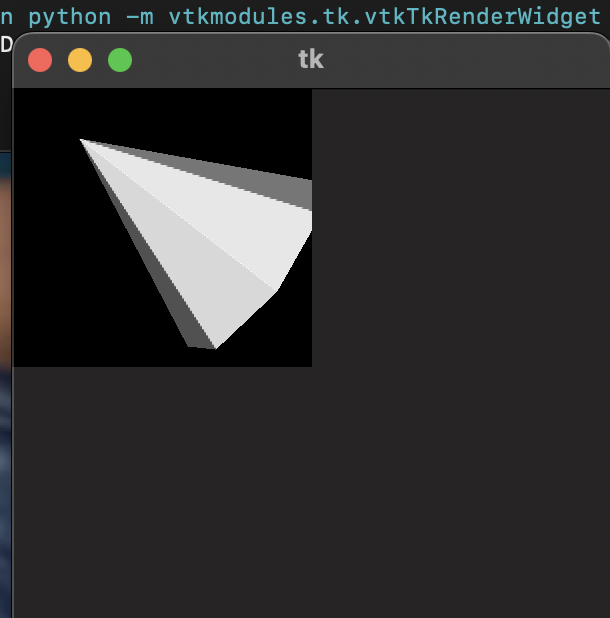
I can cheat by forcing the widget width and height to be twice the window size, but it feels wrong.
Thanks!
---
### Author:  [@dgobbi](https://discourse.vtk.org/u/dgobbi)
#### Post date: [March 31, 2022, 1:15pm UTC](https://discourse.vtk.org/t/built-vtk-with-tkinter-on-macos-macbook-air-render-window-breaks-down-on-macbook-pro/6635/17 "2022-03-31T13:15:20Z")
Hi @nicoco,
The HiDPI stuff was never implemented in the vtkTkRenderWidget (search for “retina” in this thread for previous posts on the subject). If anyone wants to dig into vtkTkRenderWidget.cxx and actually fix the issue, I’d be glad to assist.
David
---
### Author:  [@cmengich](https://discourse.vtk.org/u/cmengich)
#### Post date: [March 31, 2022, 1:22pm UTC](https://discourse.vtk.org/t/built-vtk-with-tkinter-on-macos-macbook-air-render-window-breaks-down-on-macbook-pro/6635/18 "2022-03-31T13:22:09Z")
Hi @nicoco
Yes I noticed that. It is an issue with vtkTk and Mac Retina Screens. Doesn’t show on windows computers, or MacBooks without retina.
My solution was to use qt instead of tkinter. With qt, the window is scaled correctly on all screens, including Retina.
---
### Author:  [@nicoco](https://discourse.vtk.org/u/nicoco)
#### Post date: [March 31, 2022, 10:33pm UTC](https://discourse.vtk.org/t/built-vtk-with-tkinter-on-macos-macbook-air-render-window-breaks-down-on-macbook-pro/6635/19 "2022-03-31T22:33:38Z")
Many thanks for your answers.
@dgobbi I’ll definitely take a look, but I pretty much suck at any other language than python or JS. Might be a good opportunity to skill up though 🙂
@cmengich I see, you gave up on tkinter then! I know that using Qt is the most common option but I really enjoy tkinter to write GUIs rapidly… meh, maybe I’ll change my mind in the coming weeks and just rewrite all my stuff to use Qt instead.
---
### Author:  [@nicoco](https://discourse.vtk.org/u/nicoco)
#### Post date: [April 1, 2022, 9:01am UTC](https://discourse.vtk.org/t/built-vtk-with-tkinter-on-macos-macbook-air-render-window-breaks-down-on-macbook-pro/6635/20 "2022-04-01T09:01:10Z")
First, I would like to apologize since I realize I did not event scroll in this topic before asking something that was already discussed here.
> [@dgobbi](#):
>
> I’d be glad to assist
How glad and how much would you assist me? 😛
Could it be that a simple ‘scaleFactor’ parameter has to be added [here](https://gitlab.kitware.com/vtk/vtk/-/blob/master/Rendering/Tk/vtkTkRenderWidget.cxx#L1249)?
```cpp
// Set the size
self->RenderWindow->SetSize(self->Width, self->Height);
```
If this is the case, any idea where how I should define this ‘scaleFactor’?
FWIW, my current python dirty fix is now basically:
```py
VTK_SCALE_FACTOR = 2 if sys.platform == "darwin" else 1
```
and use this both when calling `.place(xxx..., width=xxx*VTK_SCALE_FACTOR, height=xxx*VTK_SCALE_FACTOR)` to scale the viewport and
```py
vtk_point_picker.picker.Pick(
event.x * VTK_SCALE_FACTOR,
(self.interactor.winfo_height() - event.y * VTK_SCALE_FACTOR - 1),
0.0,
vtk_renderer,
)
```
to pick points on screen. This most probably does not work for non-retina display. Thought I’d share here anyway in case anybody also likes tkinter for quick GUI prototyping!
[Next page](https://discourse.vtk.org/t/built-vtk-with-tkinter-on-macos-macbook-air-render-window-breaks-down-on-macbook-pro/6635.md?page=2)