# Camera Clipping with 2 Renderers
**URL:** https://discourse.vtk.org/t/camera-clipping-with-2-renderers/2483
**Category:** Development
**Created:** [January 23, 2020, 7:59am UTC](https://discourse.vtk.org/t/camera-clipping-with-2-renderers/2483 "2020-01-23T07:59:14Z")
**Posts on this page:** 11
**Page:** 1
### Author:  [@ChristopherWaters](https://discourse.vtk.org/u/ChristopherWaters)
#### Post date: [January 23, 2020, 7:59am UTC](https://discourse.vtk.org/t/camera-clipping-with-2-renderers/2483/1 "2020-01-23T07:59:14Z")
**Current Setup:**
- I have **2 renderers** , gridRenderer and geoRenderer, within **2 layers of a render window:**
```cpp
gridRenderer->SetLayer(0);
geoRenderer->SetLayer(1);
RenderWindow()->SetNumberOfLayers(2);
RenderWindow()->AddRenderer(geoRenderer);
RenderWindow()->AddRenderer(geoRenderer);
```
- I then connect their interactor by setting both of their active cameras to the same one:
```cpp
gridRenderer->SetActiveCamera(geoRenderer->GetActiveCamera());
```
This successfully allows me to have a **grid in the background** , with a **geometry in the foreground**.
**Problem:**
- The camera’s plane clipping is only focused on the geoRenderer, causing the much larger gridRenderer’s actor to be clipped out.
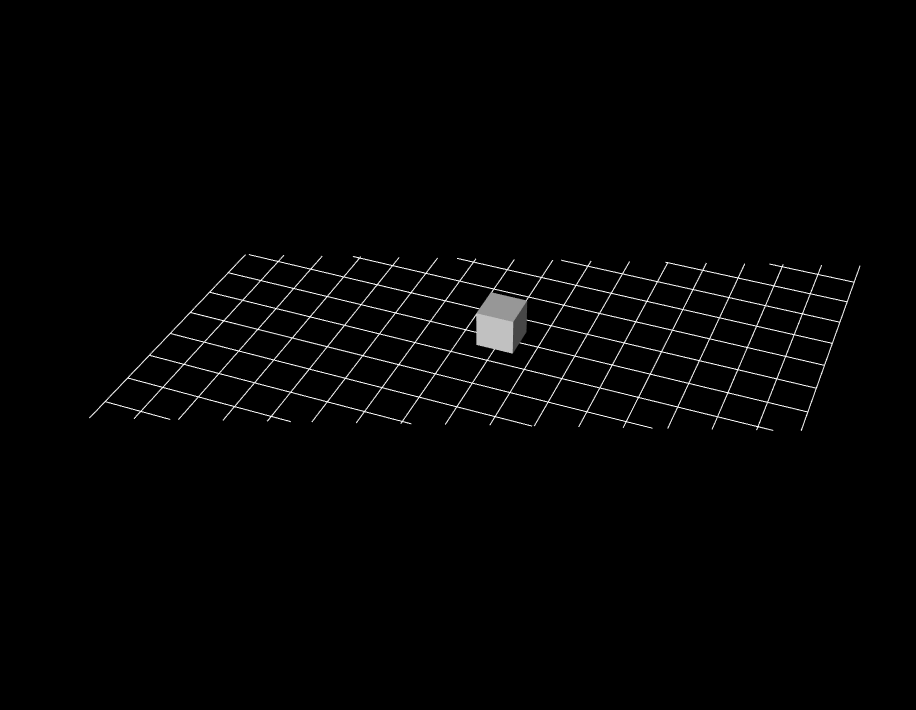
**Similar Issue:**
- [https://gitlab.kitware.com/vtk/vtk/issues/17107](https://gitlab.kitware.com/vtk/vtk/issues/17107)
- The difference between my issue and this one is that I am updating both the gridRender’s and geoRenderer’s actors, **sometimes removing all of the actors within a renderer entirely** (empty renderer could mess up the clipping planes, not rendering anything, if the camera chooses it as the active renderer).
- My assumption is that VTK is confused as to which renderer to use in order to set the shared camera’s clipping planes. I tried using `vtkRenderer::ResetCameraClippingRange()` on both of the renderer’s but cannot get the clipping planes to form properly
- **Is there someway I can tell VTK which renderer to look at when resetting the clipping planes/camera?**
---
### Author:  [@Michael](https://discourse.vtk.org/u/Michael)
#### Post date: [January 23, 2020, 2:58pm UTC](https://discourse.vtk.org/t/camera-clipping-with-2-renderers/2483/2 "2020-01-23T14:58:29Z")
You might need to disable the automatic clipping range if you set it manually.
`vtkInteractorStyle::AutoAdjustCameraClippingRange`
---
### Author:  [@Michael](https://discourse.vtk.org/u/Michael)
#### Post date: [January 23, 2020, 3:06pm UTC](https://discourse.vtk.org/t/camera-clipping-with-2-renderers/2483/3 "2020-01-23T15:06:25Z")
When calling `ResetCameraClippingRange` manually, you will have to compute the bounds for each renderer (using `ComputeVisiblePropBounds` method), combine the two bounds, and call `ResetCameraClippingRange` with the resulting bound as the argument.
---
### Author:  [@ChristopherWaters](https://discourse.vtk.org/u/ChristopherWaters)
#### Post date: [January 24, 2020, 2:54am UTC](https://discourse.vtk.org/t/camera-clipping-with-2-renderers/2483/4 "2020-01-24T02:54:09Z")
Thank you for the information, this is what I have tried along with turning off `AutoAdjustCameraClippingRange`:
```cpp
double geoCB[6];
double gridCB[6];
geoRenderer->ComputeVisiblePropBounds(geoCB);
gridRenderer->ComputeVisiblePropBounds(gridCB);
double finalCB[6];
for (int i = 0; i < 6; i++) {
if (i % 2 == 0) {
// Even Index is Min
if (geoCB[i] < gridCB[i]) {
finalCB[i] = geoCB[i];
} else {
finalCB[i] = gridCB[i];
}
} else {
// Odd Index is Max
if (geoCB[i] > gridCB[i]) {
finalCB[i] = geoCB[i];
} else {
finalCB[i] = gridCB[i];
}
}
}
geoRenderer->ResetCameraClippingRange(finalCB);
```
But the clipping ranges are now more crazy…
Perhaps my understanding of the bounding box is wrong?
---
### Author:  [@ChristopherWaters](https://discourse.vtk.org/u/ChristopherWaters)
#### Post date: [January 24, 2020, 7:27am UTC](https://discourse.vtk.org/t/camera-clipping-with-2-renderers/2483/5 "2020-01-24T07:27:48Z")
I completely misunderstood how clipping planes work. To easily fix this you simply set the minRanges to a very small number, and the maxRanges to a very large one.
---
### Author:  [@Michael](https://discourse.vtk.org/u/Michael)
#### Post date: [January 24, 2020, 8:57am UTC](https://discourse.vtk.org/t/camera-clipping-with-2-renderers/2483/6 "2020-01-24T08:57:57Z")
Be aware that doing this reduce precision of the depth buffer and you might have depth testing failures.
---
### Author:  [@ChristopherWaters](https://discourse.vtk.org/u/ChristopherWaters)
#### Post date: [January 28, 2020, 8:44am UTC](https://discourse.vtk.org/t/camera-clipping-with-2-renderers/2483/7 "2020-01-28T08:44:28Z")
What would be the best way to remedy/mitigate this?
---
### Author:  [@Michael](https://discourse.vtk.org/u/Michael)
#### Post date: [January 28, 2020, 9:23am UTC](https://discourse.vtk.org/t/camera-clipping-with-2-renderers/2483/8 "2020-01-28T09:23:52Z")
> [@ChristopherWaters](#):
>
> What would be the best way to remedy/mitigate this?
The code above is correct (you can simplify it using vtkBoundingBox methods though).
Do you reset the clipping range before each Render call?
---
### Author:  [@ChristopherWaters](https://discourse.vtk.org/u/ChristopherWaters)
#### Post date: [January 28, 2020, 12:37pm UTC](https://discourse.vtk.org/t/camera-clipping-with-2-renderers/2483/9 "2020-01-28T12:37:26Z")
Thank you for the information but I am confused with your question, are you asking if
> I reset the clipping range before each Render call
in regards to the code above?
If so no, in that implementation I only did so when updating my vtkUnstructuredGrids (the meshes of actors). Should i do it before every Render call?
---
### Author:  [@Michael](https://discourse.vtk.org/u/Michael)
#### Post date: [January 28, 2020, 12:42pm UTC](https://discourse.vtk.org/t/camera-clipping-with-2-renderers/2483/10 "2020-01-28T12:42:21Z")
Yes indeed, clipping ranges should be updated each time the camera or the actors move.
One possibility is to override `vtkRenderWindowInteractor::Render` in order to add your code before the call to `this->RenderWindow->Render()`
---
### Author:  [@ChristopherWaters](https://discourse.vtk.org/u/ChristopherWaters)
#### Post date: [January 31, 2020, 2:05am UTC](https://discourse.vtk.org/t/camera-clipping-with-2-renderers/2483/11 "2020-01-31T02:05:15Z")
Thank you so much for this advice, I didn’t have the slightest idea that you would have to do this every single time before calling `RenderWindow->Render()`.
I managed to make my own implementation of `vtkRenderWindow`, overriding `Render()`, calculating the new clipping planes before calling the standard `Render()` at the end of my override.
The depth filter literally started to die when I implemented some tessellation, and if it wasn’t for this I would of had no idea what was going wrong, so perfect timing 😄