# Cannot change size of vtkAxesActor without moving them
**URL:** https://discourse.vtk.org/t/cannot-change-size-of-vtkaxesactor-without-moving-them/15431
**Category:** Development
**Created:** [March 26, 2025, 11:33am UTC](https://discourse.vtk.org/t/cannot-change-size-of-vtkaxesactor-without-moving-them/15431 "2025-03-26T11:33:45Z")
**Posts on this page:** 3
**Page:** 1
### Author:  [@sapvi](https://discourse.vtk.org/u/sapvi)
#### Post date: [March 26, 2025, 11:33am UTC](https://discourse.vtk.org/t/cannot-change-size-of-vtkaxesactor-without-moving-them/15431/1 "2025-03-26T11:33:45Z")
```auto
def _add_axes_widget(self):
axes = vtk.vtkAxesActor()
axes.SetTotalLength(50, 50, 50)
self.axes_widget = vtk.vtkOrientationMarkerWidget()
self.axes_widget.SetOrientationMarker(axes)
self.axes_widget.SetInteractor(self.interactor)
self.axes_widget.SetViewport(0.00, 0.00, 0.15, 0.15)
self.axes_widget.SetEnabled(True)
self.axes_widget.InteractiveOff()
```
Hi all. Probably a stupid question but I cannot seem to understand how to increase the size of this actor in the code above. If I change anything in `SetViewport`, it somehow increases the size but also moves the actor, while `SetTotalLength` just seems to have no effect at all. What can I do to just increase the size of the actor (I want longer axes, text can stay as it is), but keeping it in bottom left corner without moving it further from borders?
---
### Author:  [@Paulo\_Carvalho](https://discourse.vtk.org/u/Paulo_Carvalho)
#### Post date: [March 28, 2025, 5:40pm UTC](https://discourse.vtk.org/t/cannot-change-size-of-vtkaxesactor-without-moving-them/15431/2 "2025-03-28T17:40:51Z")
Hello,
If I understood it right, to rescale the actor while preserving its position, you need to:
1. Move the actor so the center of the object is at the origin;
2. Apply scale;
3. Move the actor back to its former position;
This way you’ll get the effect of resizing geometry without moving the object.
best,
PC
---
### Author:  [@sapvi](https://discourse.vtk.org/u/sapvi)
#### Post date: [March 29, 2025, 6:52pm UTC](https://discourse.vtk.org/t/cannot-change-size-of-vtkaxesactor-without-moving-them/15431/3 "2025-03-29T18:52:44Z")
Hello, thanks for the answer. However, it seems I am still not sure how to apply it.
I have tried to do so but to no effect:
```auto
def _add_axes_widget(self, scale_factor=6.0):
axes = vtk.vtkAxesActor()
center = axes.GetCenter()
transform = vtk.vtkTransform()
transform.Translate(-center[0], -center[1], -center[2])
transform.Scale(scale_factor, scale_factor, scale_factor)
transform.Translate(center[0], center[1], center[2])
axes.SetUserTransform(transform)
self.axes_widget = vtk.vtkOrientationMarkerWidget()
self.axes_widget.SetOrientationMarker(axes)
self.axes_widget.SetInteractor(self.interactor)
self.axes_widget.SetViewport(0.00, 0.00, 0.15, 0.15)
self.axes_widget.SetEnabled(True)
self.axes_widget.InteractiveOff()
```
It does not really matter which `scale_factor` I put there, the result is still the same.
It seems that at the point of calling `SetVieport` the `vtkAxesActor` is just resized automatically to fit within the provided viewport. But it is as if this viewport has some internal padding(?) which prevents the actor to be located where I’d want it to be.
I think this because if I changed the code to `self.axes_widget.SetViewport(0.00, 0.00, 0.3, 0.3)`, the actor increases in size, again fitting to the viewport, but the padding gets bigger as well and it gets further from the borders of the widget.
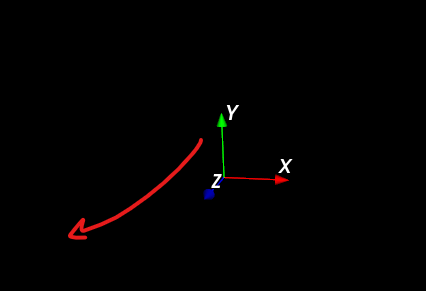
Here is the screenshot of the left bottom corner of my app: I want the axes to really be in the corner but, instead, the bigger I make the axes, the bigger seems viewport’s padding to be.