# Canvas stretch when resizing browser window
**URL:** https://discourse.vtk.org/t/canvas-stretch-when-resizing-browser-window/13029
**Category:** vtk.wasm
**Created:** [January 8, 2024, 10:00am UTC](https://discourse.vtk.org/t/canvas-stretch-when-resizing-browser-window/13029 "2024-01-08T10:00:08Z")
**Posts on this page:** 7
**Page:** 1
### Author:  [@hu243285237](https://discourse.vtk.org/u/hu243285237)
#### Post date: [January 8, 2024, 10:00am UTC](https://discourse.vtk.org/t/canvas-stretch-when-resizing-browser-window/13029/1 "2024-01-08T10:00:08Z")
I am using VTK with WebAssembly, and the canvas css has fixed dimensions of 500 pixels, not fullscreen.
The issue I encounter is that when I resize the browser, the canvas content gets stretched.
I suspect it might be related to Emscripten or SDL, but I’m unsure how to resolve it.
Can someone provide assistance? Appreciate your help.
---
### Author:  [@Sebastien\_Jourdain](https://discourse.vtk.org/u/Sebastien_Jourdain)
#### Post date: [January 8, 2024, 8:19pm UTC](https://discourse.vtk.org/t/canvas-stretch-when-resizing-browser-window/13029/2 "2024-01-08T20:19:44Z")
Based on what you are describing, it seems to be a CSS issue on your side.
If your CSS was properly defined, the canvas should keep the same size on window resize.
---
### Author:  [@Sebastien\_Jourdain](https://discourse.vtk.org/u/Sebastien_Jourdain)
#### Post date: [January 8, 2024, 8:21pm UTC](https://discourse.vtk.org/t/canvas-stretch-when-resizing-browser-window/13029/3 "2024-01-08T20:21:35Z")
Unless you kept the code to resize the RenderWindow based on the window size on the JS side.
---
### Author:  [@hu243285237](https://discourse.vtk.org/u/hu243285237)
#### Post date: [January 9, 2024, 3:31am UTC](https://discourse.vtk.org/t/canvas-stretch-when-resizing-browser-window/13029/4 "2024-01-09T03:31:02Z")
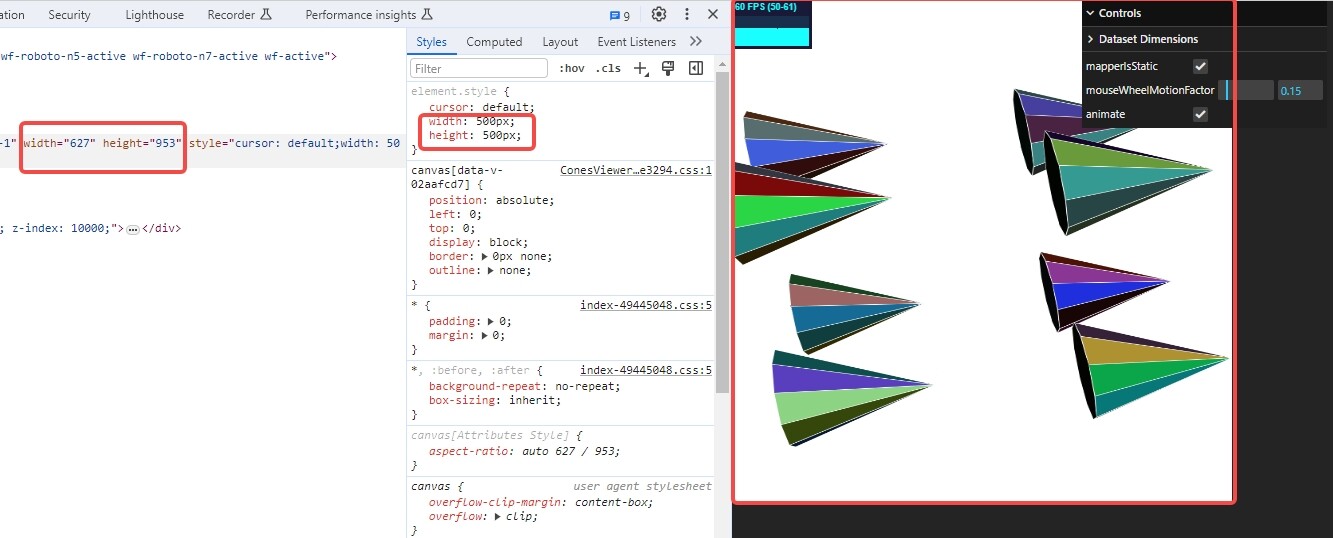
The canvas in my CSS is set with a fixed width and height, as shown in the picture.
However, whenever I resize the window, it forcefully resets the canvas width and height to match the entire browser window width and height, causing stretching.
---
### Author:  [@Sebastien\_Jourdain](https://discourse.vtk.org/u/Sebastien_Jourdain)
#### Post date: [January 10, 2024, 12:39am UTC](https://discourse.vtk.org/t/canvas-stretch-when-resizing-browser-window/13029/5 "2024-01-10T00:39:30Z")
And you don’t have a JS code that listen to the window size and set it on the vtkRenderWindow? @jaswantp any idea?
---
### Author:  [@hu243285237](https://discourse.vtk.org/u/hu243285237)
#### Post date: [January 10, 2024, 1:22am UTC](https://discourse.vtk.org/t/canvas-stretch-when-resizing-browser-window/13029/6 "2024-01-10T01:22:54Z")
Yes, I haven’t manually added any listeners on both the JS and C++ sides.
---
### Author:  [@jaswantp](https://discourse.vtk.org/u/jaswantp)
#### Post date: [January 10, 2024, 3:09pm UTC](https://discourse.vtk.org/t/canvas-stretch-when-resizing-browser-window/13029/7 "2024-01-10T15:09:28Z")
Yea, this is a known behavior. VTK forces the window’s dimensions on the canvas. Unfortunately, there isn’t much you can do right now because this event handler is setup inside the interactor in C++ - [vtkWebAssemblyRenderWindowInteractor.cxx#L43](https://gitlab.kitware.com/vtk/vtk/-/blob/master/Rendering/UI/vtkWebAssemblyRenderWindowInteractor.cxx#L43)
VTK can provide 2 options:
1. resize the canvas to window dimensions upon browser resize (current behavior)
2. canvas ignores resize events from the browser window. (this is what you need)