# Change coordinate system from right to left-handed (change direction of Z axis)
**URL:** https://discourse.vtk.org/t/change-coordinate-system-from-right-to-left-handed-change-direction-of-z-axis/4635
**Category:** Support
**Created:** [November 11, 2020, 11:56pm UTC](https://discourse.vtk.org/t/change-coordinate-system-from-right-to-left-handed-change-direction-of-z-axis/4635 "2020-11-11T23:56:47Z")
**Posts on this page:** 3
**Page:** 1
### Author:  [@kerim](https://discourse.vtk.org/u/kerim)
#### Post date: [November 11, 2020, 11:56pm UTC](https://discourse.vtk.org/t/change-coordinate-system-from-right-to-left-handed-change-direction-of-z-axis/4635/1 "2020-11-11T23:56:47Z")
Hi,
VTK standard coordinate system is right-handed wich means that cross product X \* Y gives Z (like in the picture).
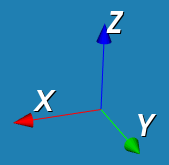
I’m wondering is there is a way to change the native right-handed VTK coordinate system to left-handed (such that X \* Y = -Z)?
I have to notice that this is not a matter of camera position but this rather a question about setting global VTK coordinates directions (set each axis increase and decrease directions).
Also simply renaming names of `vtkAxisActor` doesn’t solve the problem beacause I have many actors and rotating each of them is a bad idea I think.
If someone has ideas - please share
Regards
---
### Author:  [@amaclean](https://discourse.vtk.org/u/amaclean)
#### Post date: [November 12, 2020, 10:31pm UTC](https://discourse.vtk.org/t/change-coordinate-system-from-right-to-left-handed-change-direction-of-z-axis/4635/2 "2020-11-12T22:31:07Z")
This example may help [AnatomicalOrientation](https://kitware.github.io/vtk-examples/site/Cxx/VisualizationAlgorithms/AnatomicalOrientation/). The top-left cube is left-handed.
If you are changing the handedness of the data then you need to a apply a transform that either reverses the direction of one of the axes, say Z, or swaps two axes e.g swap X and Y.
For example, look at [TransformSphere](https://kitware.github.io/vtk-examples/site/Cxx/Rendering/TransformSphere/) and change `aTransform->Scale(1, 1.5, 2);` to `aTransform->Scale(1, 1.5, -2);` thereby changing the data from RH to LH. Now the image is black since the normals are pointing the wrong way because the surface shading uses the right-hand rule. So you need to apply a reverse sense filter:
```auto
transFilter->SetTransform(aTransform);
vtkNew reverse;
reverse->SetInputConnection(transFilter->GetOutputPort());
reverse->ReverseNormalsOn();
vtkNew colorIt;
//colorIt->SetInputConnection(transFilter->GetOutputPort());
colorIt->SetInputConnection(reverse->GetOutputPort());
```
---
### Author:  [@kerim](https://discourse.vtk.org/u/kerim)
#### Post date: [November 13, 2020, 12:58am UTC](https://discourse.vtk.org/t/change-coordinate-system-from-right-to-left-handed-change-direction-of-z-axis/4635/3 "2020-11-13T00:58:13Z")
Hi @amaclean,
From your post I made one conclusion:
_VTK uses Right-Handed coordinate system and we cannot simply change this internal coordinate system. If we need to work with Left-Handed system then we need make some transformations with every displayed VTK object (or actor). Is this true or I misunderstood you?_
If this is true then woudn’t it be **easier and faster** to apply scale to all displayed actors like `actor->SetScale(1, 1, -1);` and thus making coordinates of those actors LH (including `vtkAxisActor`)? When I say easier and faster I mean easier and faster compared to transformations on data (in my case `vtkImageData`).
I’m going to work with quite big `vtkImageData` of size from **N\*100** Megabites to **10-20** Gygabite `vtkImageData`. So the main goal of RH to LH coord. sys. transformation is to decrease CPU load and RAM load.
I don’t have much experience of working with VTK but I could not lauch my `vtkImageData` with proposed by you `vtkReverseSense`. I get error (I use Qt):

Here is my code:
```cpp
vtkSmartPointer image =
vtkSmartPointer::New();
int nx = 3;
int ny = 4;
int nz = 5;
int N = nx*ny*nz;
image->SetDimensions(nx, ny, nz);
image->SetSpacing(1.0, 1.0, 1.0);
image->SetOrigin(0.0, 0.0, 0.0);
vtkNew array;
array->SetName("Name");
for (int i = 0; i < N; i++){
array->InsertNextValue(i);
}
image->GetPointData()->SetScalars(array);
// Map the scalar values in the image to colors with a lookup table:
vtkSmartPointer lut =
vtkSmartPointer::New();
lut->SetNumberOfTableValues(256);
lut->SetRange(0.0, N-1);
lut->Build();
// Pass the original image and the lookup table to a filter to create
// a color image:
vtkSmartPointer scalarValuesToColors =
vtkSmartPointer::New();
scalarValuesToColors->SetLookupTable(lut);
scalarValuesToColors->PassAlphaToOutputOn();
scalarValuesToColors->SetInputData(image);
/* _____________________ */
vtkNew aTransform;
aTransform->Scale(1, 1, -1);
vtkNew transFilter;
transFilter->SetInputData(image);
// transFilter->SetInputConnection(scalarValuesToColors->GetOutputPort());
transFilter->SetTransform(aTransform);
vtkNew reverse;
reverse->SetInputConnection(transFilter->GetOutputPort());
reverse->ReverseNormalsOn();
vtkNew colorIt;
// colorIt->SetInputConnection(transFilter->GetOutputPort());
colorIt->SetInputConnection(reverse->GetOutputPort());
colorIt->SetLowPoint(0, 0, -1);
colorIt->SetHighPoint(0, 0, 1);
/* _____________________ */
vtkSmartPointer mapper =
vtkSmartPointer::New();
mapper->SetInputConnection(colorIt->GetOutputPort());
// Create an image actor
vtkSmartPointer actor =
vtkSmartPointer::New();
actor->SetMapper(mapper);
volumeWidget->vtkWidget->renderWindow()->GetRenderers()->
GetFirstRenderer()->AddActor(actor);
```