# Chinese characters rendering issue.
**URL:** https://discourse.vtk.org/t/chinese-characters-rendering-issue/4457
**Category:** Development
**Created:** [October 21, 2020, 2:11am UTC](https://discourse.vtk.org/t/chinese-characters-rendering-issue/4457 "2020-10-21T02:11:11Z")
**Posts on this page:** 9
**Page:** 1
### Author:  [@learn\_forever](https://discourse.vtk.org/u/learn_forever)
#### Post date: [October 21, 2020, 2:11am UTC](https://discourse.vtk.org/t/chinese-characters-rendering-issue/4457/1 "2020-10-21T02:11:11Z")
I want to add a vtkTextActor with Chinese character inputs, but got a warning vtkUnicodeString::from\_utf8(): not a valid UTF-8 string. Can any exprets give me some hints on how to solve this problem? Thanks a lot!
---
### Author:  [@lassoan](https://discourse.vtk.org/u/lassoan)
#### Post date: [October 21, 2020, 5:00am UTC](https://discourse.vtk.org/t/chinese-characters-rendering-issue/4457/2 "2020-10-21T05:00:06Z")
The error message is very clear, so we know that the issue is that you don’t pass an UTF-8 string to the actor. Where does the string come from?
---
### Author:  [@learn\_forever](https://discourse.vtk.org/u/learn_forever)
#### Post date: [October 21, 2020, 5:24am UTC](https://discourse.vtk.org/t/chinese-characters-rendering-issue/4457/3 "2020-10-21T05:24:07Z")
Hi:
I just tested with following codes. The string comes from a hard-coded Chinese character.
vtkTextActor actor15 = vtkTextActor.New();
actor15.GetTextProperty().SetFontFamily(4);
actor15.GetTextProperty().SetFontFile(“RegularScript.ttf”);
actor15.GetTextProperty().SetJustificationToCentered();
actor15.GetTextProperty().SetVerticalJustificationToCentered();
actor15.GetTextProperty().SetFontSize(18);
actor15.GetTextProperty().SetColor(0.0, 1.0, 0.7);
```
String unicodeString = @"严";
actor15.SetInput(unicodeString);
actor15.SetPosition(300, 110);
```
---
### Author:  [@lassoan](https://discourse.vtk.org/u/lassoan)
#### Post date: [October 21, 2020, 5:39am UTC](https://discourse.vtk.org/t/chinese-characters-rendering-issue/4457/4 "2020-10-21T05:39:20Z")
String is UTF-16 in C# by default, so probably a conversion is needed. I’m not familiar with how VTK’s C# wrapping works and if you are expected to do the UTF-8 conversion yourself or the wrapper should take care of that.
---
### Author:  [@learn\_forever](https://discourse.vtk.org/u/learn_forever)
#### Post date: [October 21, 2020, 6:37am UTC](https://discourse.vtk.org/t/chinese-characters-rendering-issue/4457/5 "2020-10-21T06:37:46Z")
Actually, codes wrotten with C++ have the same error.
see the code sinpet below from the link:
[https://gitlab.kitware.com/vtk/vtk/blob/master/Rendering/FreeType/Testing/Cxx/TestMathTextFreeTypeTextRenderer.cxx#L184](https://gitlab.kitware.com/vtk/vtk/blob/master/Rendering/FreeType/Testing/Cxx/TestMathTextFreeTypeTextRenderer.cxx#L184)
// UTF-8 freetype handling:
vtkNew actor15;
actor15-\>GetTextProperty()-\>SetFontFamily(VTK\_FONT\_FILE);
actor15-\>GetTextProperty()-\>SetFontFile(uncodeFontFile.c\_str());
actor15-\>GetTextProperty()-\>SetJustificationToCentered();
actor15-\>GetTextProperty()-\>SetVerticalJustificationToCentered();
actor15-\>GetTextProperty()-\>SetFontSize(18);
actor15-\>GetTextProperty()-\>SetColor(0.0, 1.0, 0.7);
actor15-\>SetInput(“UTF-8 FreeType: \xce\xa8\xd2\x94\xd2\x96\xd1\x84\xd2\xbe”);
actor15-\>SetPosition(300, 110);
On my machine,TextActor with text input(“UTF-8 FreeType: \xce\xa8\xd2\x94\xd2\x96\xd1\x84\xd2\xbe”) has no any characters shown. If I replaced the input with any other Chinese characters, I got the same warning message:vtkUnicodeString::from\_utf8(): not a valid UTF-8 string.
So how to show the unicode string correcty?
---
### Author:  [@ben.boeckel](https://discourse.vtk.org/u/ben.boeckel)
#### Post date: [October 21, 2020, 12:03pm UTC](https://discourse.vtk.org/t/chinese-characters-rendering-issue/4457/6 "2020-10-21T12:03:45Z")
> [@learn\_forever](#):
>
> \xce\xa8\xd2\x94\xd2\x96\xd1\x84\xd2\xbe
Python gives me `ΨҔҖфҾ` for these bytes when interpreted as UTF-8. Is this what you expect? We use a library for UTF-8 decoding, so maybe there’s a bug somewhere in there? I’m not seeing anything obvious though from glancing at the code 😕 .
---
### Author:  [@lassoan](https://discourse.vtk.org/u/lassoan)
#### Post date: [October 21, 2020, 3:12pm UTC](https://discourse.vtk.org/t/chinese-characters-rendering-issue/4457/7 "2020-10-21T15:12:16Z")
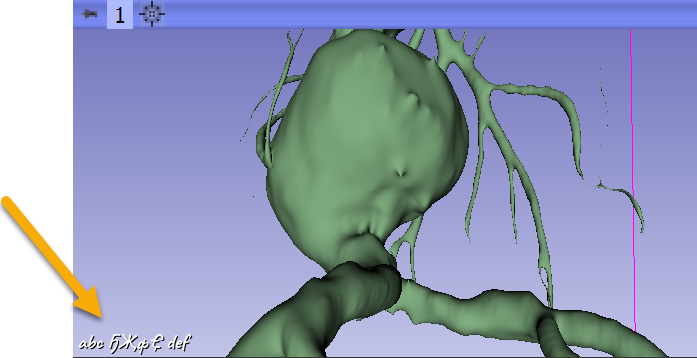
I’ve just tested this and it worked well for me in Python (in 3D Slicer, on Windows, using UTF-8 code page):
```python
someUnicodeByte = b"\xce\xa8\xd2\x94\xd2\x96\xd1\x84\xd2\xbe"
someUnicodeString = someUnicodeByte.decode('utf8')
view = slicer.app.layoutManager().threeDWidget(0).threeDView()
view.cornerAnnotation().GetTextProperty().SetFontFamily(vtk.VTK_FONT_FILE);
view.cornerAnnotation().GetTextProperty().SetFontFile('c:/Windows/Fonts/Caveat-Bold.ttf')
view.cornerAnnotation().SetText(vtk.vtkCornerAnnotation.LowerLeft,"abc " + someUnicodeString + " def")
view.forceRender()
```
---
### Author:  [@learn\_forever](https://discourse.vtk.org/u/learn_forever)
#### Post date: [October 26, 2020, 6:05am UTC](https://discourse.vtk.org/t/chinese-characters-rendering-issue/4457/8 "2020-10-26T06:05:02Z")
Thanks Ben and Andras!
I spent more time on this and here comes what I have found. Hope this can help others who are suffering by this issue.
1.Currently VTK’s C# wrapping doesn’t do the UTF-8 conversion. We need to do the wrapping by ourself.
replace internal static extern void vtkTextActor\_SetInput\_32(HandleRef pThis, string inputString);
with: internal static extern void vtkTextActor\_SetInput\_32(HandleRef pThis, ref byte inputString);
1. Whether Chinese characters can be rendered correctly depend on the given font file. I think only FREE TYPE font can be used to render the unicode string. Right?
---
### Author:  [@toddy](https://discourse.vtk.org/u/toddy)
#### Post date: [September 2, 2021, 4:03am UTC](https://discourse.vtk.org/t/chinese-characters-rendering-issue/4457/9 "2021-09-02T04:03:18Z")
You’re going to have to make changes like this in many places. I raised this issue in June. [Introduction to ActiViz Webinar - #5 by toddy](https://discourse.vtk.org/t/introduction-to-activiz-webinar/3396/5)