# Color Images Not Rendering After Upgrade to vtk.js 34.0.0
**URL:** https://discourse.vtk.org/t/color-images-not-rendering-after-upgrade-to-vtk-js-34-0-0/16104
**Category:** Web
**Tags:** vtkjs
**Created:** [October 20, 2025, 9:06pm UTC](https://discourse.vtk.org/t/color-images-not-rendering-after-upgrade-to-vtk-js-34-0-0/16104 "2025-10-20T21:06:15Z")
**Posts on this page:** 5
**Page:** 1
### Author:  [@Alireza](https://discourse.vtk.org/u/Alireza)
#### Post date: [October 20, 2025, 9:06pm UTC](https://discourse.vtk.org/t/color-images-not-rendering-after-upgrade-to-vtk-js-34-0-0/16104/1 "2025-10-20T21:06:15Z")
After upgrading from vtk.js 33.x to 34.0.0, color (RGB) images are no longer rendering in our stack viewport ([source code](https://github.com/cornerstonejs/cornerstone3D/blob/main/packages/core/src/RenderingEngine/StackViewport.ts)) , while grayscale images continue to work fine. I’ve reviewed the diff between versions 33 and 34 and checked the changelog, but I cannot locate what has changed regarding the image mapper that would cause this issue.
I noticed a lot of changes to volume mappers in version 34.0.0, but I couldn’t find any significant updates to image mappers when checking the diffs.
## **After Upgrade to vtk.js 34.0.0**
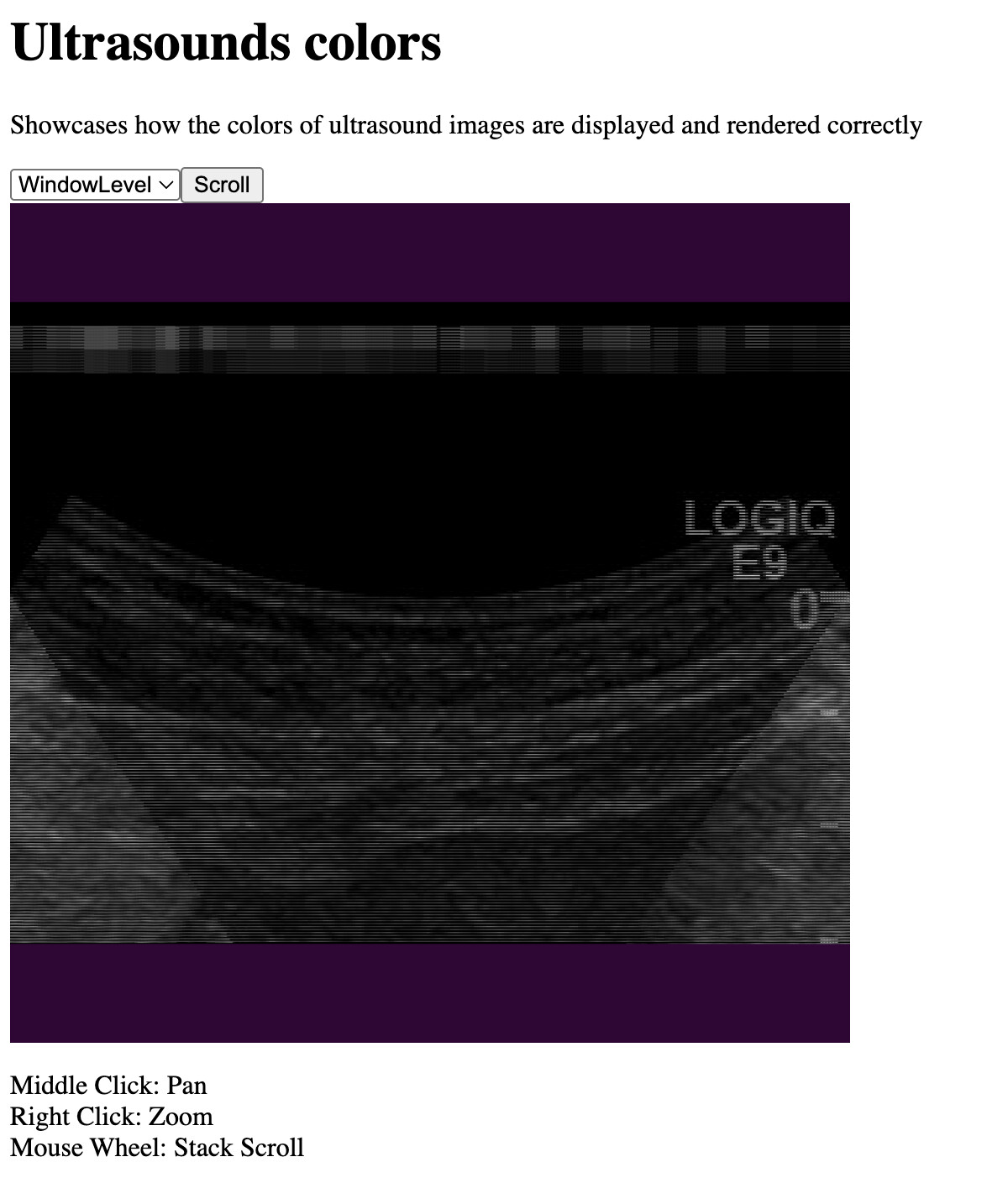
- i can confirm the number of components is set to 3
- I can confirm independent components is set to false
- i can confirm it works fine in gray scale
- i can confirm the pixel data is correctly formatted
## In vtk.js 33.xx
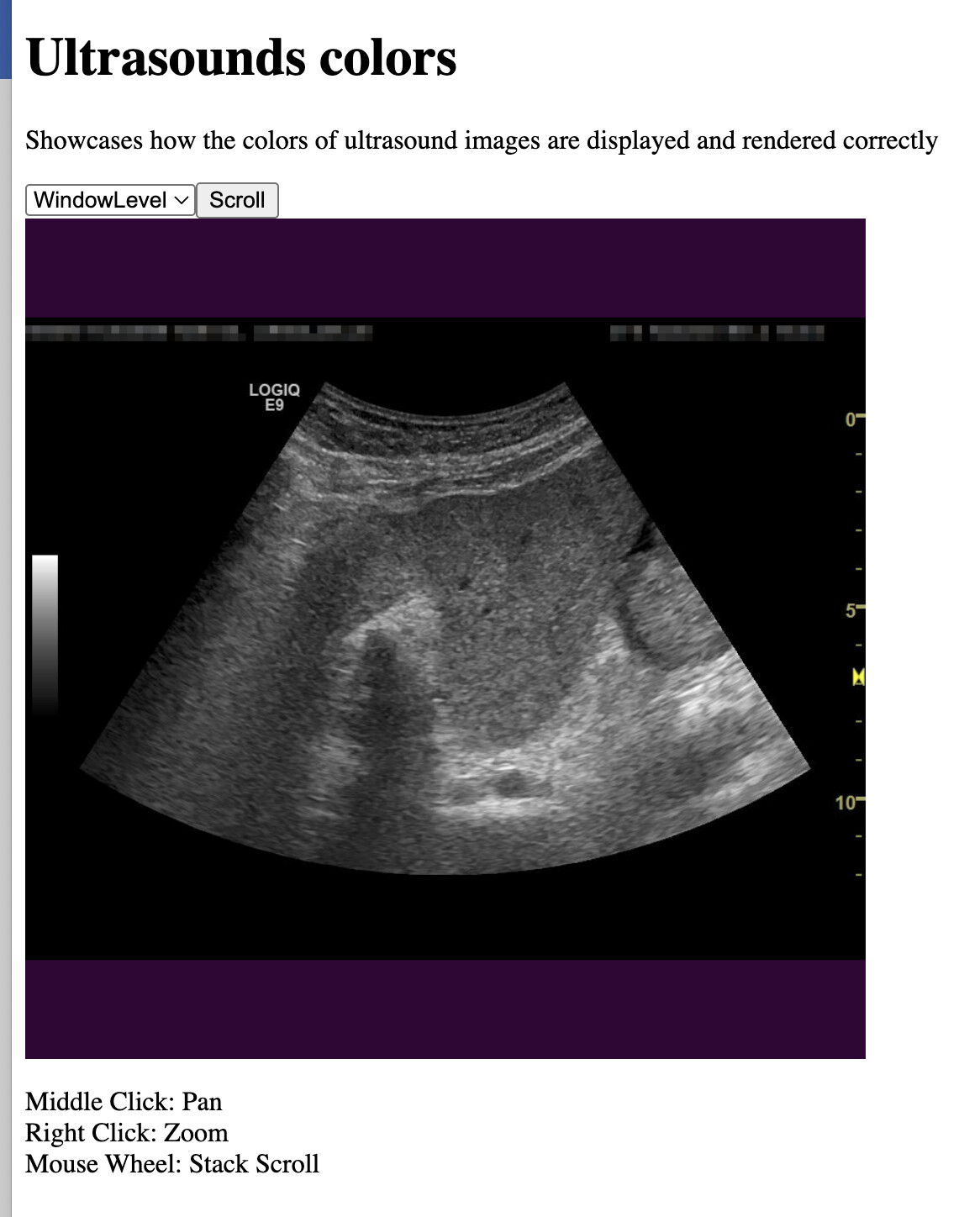
this looks like to me like different channels are not being treated correctly somehow and are concatenated?
In summary here is how we do it in Cornerstone3D with image mapper:
**Creating vtkImageData with RGB Data**
```javascript
// Creates vtkImageData with 3-component RGB data
function createVTKImageData({ origin, direction, dimensions, spacing, numberOfComponents, pixelArray }) {
const scalarArray = vtkDataArray.newInstance({
name: 'Pixels',
numberOfComponents: numberOfComponents, // 3 for RGB
values: pixelArray, // Assuming pixelArray contains the values
});
const imageData = vtkImageData.newInstance();
imageData.setDimensions(dimensions);
imageData.setSpacing(spacing);
imageData.setDirection(direction);
imageData.setOrigin(origin);
imageData.getPointData().setScalars(scalarArray);
return imageData;
}
```
**Creating Image Mapper and Actor**
```javascript
function createActorMapper(imageData) {
const mapper = vtkImageMapper.newInstance();
mapper.setInputData(imageData);
const actor = vtkImageSlice.newInstance();
actor.setMapper(mapper);
// Set independentComponents to false for RGB images
if (imageData.getPointData().getScalars().getNumberOfComponents() > 1) {
actor.getProperty().setIndependentComponents(false);
}
return actor;
}
```
Any guidance on what might have changed or what additional configuration is needed would be greatly appreciated!
The PR we are working on the upgrade from 32 → 34 is [feat: upgrade to vtk.js 34.x by daker · Pull Request #2398 · cornerstonejs/cornerstone3D · GitHub](https://github.com/cornerstonejs/cornerstone3D/pull/2398)
checkout the PR (branch)
- `yarn install `
- `yarn run example ultrasoundColors`
---
### Author:  [@daker](https://discourse.vtk.org/u/daker)
#### Post date: [October 21, 2025, 8:48am UTC](https://discourse.vtk.org/t/color-images-not-rendering-after-upgrade-to-vtk-js-34-0-0/16104/2 "2025-10-21T08:48:57Z")
maybe @finetjul can help us
---
### Author:  [@finetjul](https://discourse.vtk.org/u/finetjul)
#### Post date: [October 21, 2025, 4:50pm UTC](https://discourse.vtk.org/t/color-images-not-rendering-after-upgrade-to-vtk-js-34-0-0/16104/3 "2025-10-21T16:50:12Z")
The issue may come from the 2 following changes:
- [Image reslice multi component by finetjul · Pull Request #3158 · Kitware/vtk-js · GitHub](https://github.com/Kitware/vtk-js/pull/3158/files)
- [Add VolumeMapper multi component using multiple image data by finetjul · Pull Request #3157 · Kitware/vtk-js · GitHub](https://github.com/Kitware/vtk-js/pull/3157/files)
But I can’t see why it has an impact…
I don’t recall if @Thibault_Bruyere has tested rendering with RGB volumes.
---
### Author:  [@Alireza](https://discourse.vtk.org/u/Alireza)
#### Post date: [October 21, 2025, 5:47pm UTC](https://discourse.vtk.org/t/color-images-not-rendering-after-upgrade-to-vtk-js-34-0-0/16104/4 "2025-10-21T17:47:00Z")
Thanks it is not a volume mapper, though have not tested our RGB volumes yet but the issue i posted about is the image mapper. I will check the image reslice multi component. Thanks a lot
---
### Author:  [@Alireza](https://discourse.vtk.org/u/Alireza)
#### Post date: [October 21, 2025, 6:43pm UTC](https://discourse.vtk.org/t/color-images-not-rendering-after-upgrade-to-vtk-js-34-0-0/16104/5 "2025-10-21T18:43:30Z")
I think there is a bug, i create a reproducible branch with dicom drag and drop
>
>
> \### Bug description
>
> I'm not able to render ImageMapper with RGB DICOM after 34.…0.0. It renders like this
>
> \ >
> \### Steps to reproduce
>
> Create a sample example here
>
> https://github.com/sedghi/vtk-js/tree/fix/reproduce
>
> \- clone
> \- npm install
> \- npm run example LocalDICOMViewer
> \- Drag and Drop from the following \[dropbox\](https://www.dropbox.com/scl/fo/10vi94iqhiq0t8hy5awxz/ABbuu32Q2ALsC2XNWOJdw3E?rlkey=52j2gy9hysaod5cho79yreppa&dl=0) - ct loads fine, Ultrasound (RGB does not)
>
> \### Detailed Behavior
>
> It appears that RGB independent components does not render correctly
>
> \### Expected Behavior
>
> Renders like this
>
> \
>
> \### Steps to reproduce
>
> Create a sample example here
>
> https://github.com/sedghi/vtk-js/tree/fix/reproduce
>
> \- clone
> \- npm install
> \- npm run example LocalDICOMViewer
> \- Drag and Drop from the following \[dropbox\](https://www.dropbox.com/scl/fo/10vi94iqhiq0t8hy5awxz/ABbuu32Q2ALsC2XNWOJdw3E?rlkey=52j2gy9hysaod5cho79yreppa&dl=0) - ct loads fine, Ultrasound (RGB does not)
>
> \### Detailed Behavior
>
> It appears that RGB independent components does not render correctly
>
> \### Expected Behavior
>
> Renders like this
>
> \ >
> \### Environment
>
> \- vtk.js version: 34.x
> \- Browsers: Chrome
> \- OS: macOS
>
> \### Environment
>
> \- vtk.js version: 34.x
> \- Browsers: Chrome
> \- OS: macOS