# Color specific mesh elements
**URL:** https://discourse.vtk.org/t/color-specific-mesh-elements/1447
**Category:** Support
**Created:** [July 30, 2019, 11:17am UTC](https://discourse.vtk.org/t/color-specific-mesh-elements/1447 "2019-07-30T11:17:52Z")
**Posts on this page:** 4
**Page:** 1
### Author:  [@anon64829896](https://discourse.vtk.org/u/anon64829896)
#### Post date: [July 30, 2019, 11:17am UTC](https://discourse.vtk.org/t/color-specific-mesh-elements/1447/1 "2019-07-30T11:17:52Z")
Hi!
I want to plot my STL-Model (or general 3D object) using VTK. For this, I used the STLReader.
My next step is to give some facets of the model different colors, so e.g.:
Face 1-10 shall be red
Face 11 - 20 shall be blue.
Since I am relatively new to VTK and the intellisense of my IDE is not giving me further interesting options, it’s hard for me to achieve this task.
I read a lot about color lookup tables and scalararrays which are applied to the mapper but somehow, all I’ve done so far does not work.
I am using Python for VTK.
Can somebody help me here?
Best regards
Benny
---
### Author:  [@lorensen](https://discourse.vtk.org/u/lorensen)
#### Post date: [July 30, 2019, 2:55pm UTC](https://discourse.vtk.org/t/color-specific-mesh-elements/1447/2 "2019-07-30T14:55:39Z")
Benny,
These examples from the [VTK Examples Project](https://lorensen.github.io/VTKExamples/site/.). may help. They coth color individual cells.
1. [ColorCells](https://lorensen.github.io/VTKExamples/site/Cxx/PolyData/ColorCells/)
2. [ColorCellsWithRGB](https://lorensen.github.io/VTKExamples/site/Cxx/PolyData/ColorCellsWithRGB/)
Enjoy VTK,
Bill
---
### Author:  [@marcomusy](https://discourse.vtk.org/u/marcomusy)
#### Post date: [July 31, 2019, 11:56pm UTC](https://discourse.vtk.org/t/color-specific-mesh-elements/1447/3 "2019-07-31T23:56:29Z")
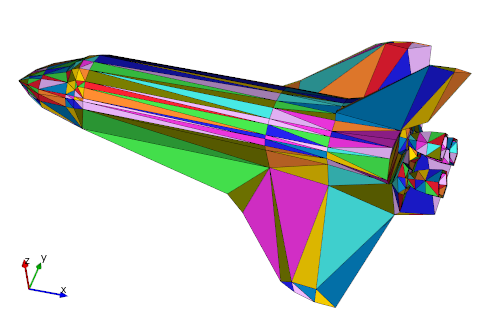
With vtkplotter helper module:
```python
from vtkplotter import *
s = load(datadir+'shuttle.stl')
cols, als = [], []
for i in range(s.NCells()):
cols.append(i) # i-th color
als.append(i/s.NCells()) #opacity
s.colorCellsByArray(cols, als).lw(1).show()
```
---
### Author:  [@anon64829896](https://discourse.vtk.org/u/anon64829896)
#### Post date: [August 7, 2019, 11:11am UTC](https://discourse.vtk.org/t/color-specific-mesh-elements/1447/4 "2019-08-07T11:11:36Z")
Thanks for your answers, I solved the problem using following exemplary code:
> reader = vtkOFFReader()
> reader.SetFileName(meshfile)
>
> vtkpolydata = reader.GetPolyData()
> scalarArray = numpy\_support.numpy\_to\_vtk(scalararray)
>
> vtkpolydata.GetCellData().SetScalars(scalarArray)
>
> lut = vtk.vtkLookupTable()
> lut.SetNumberOfTableValues(len(labels.Categories))
> lut.SetTableRange(0,len(labels.Categories)-1)
> lut.SetHueRange(0.2,0.667);
> lut.Build()