# Color Surface with thinkness values
**URL:** https://discourse.vtk.org/t/color-surface-with-thinkness-values/7749
**Category:** Support
**Created:** [February 1, 2022, 10:30am UTC](https://discourse.vtk.org/t/color-surface-with-thinkness-values/7749 "2022-02-01T10:30:26Z")
**Posts on this page:** 2
**Page:** 1
### Author:  [@LuisFco](https://discourse.vtk.org/u/LuisFco)
#### Post date: [February 1, 2022, 10:30am UTC](https://discourse.vtk.org/t/color-surface-with-thinkness-values/7749/1 "2022-02-01T10:30:26Z")
Hi,
I’m trying to color a surface generated from vtkImageData using the values from another vtkImageData. This is the code to generate the surface:
```auto
surface = vtk.vtkMarchingCubes()
surface.SetInputData(imgstenc.GetOutput())
surface.ComputeNormalsOn()
surface.SetValue(0, 127.5)
```
Where “imgstenc” is an vtkImageStencil object that generates a binary image from a bone surface mesh. Then I process the binary image to compute the thickness of the bone. Results are in another vtkImageData variable called “thickness” with the same dimensions, origin and spacing than “imgstenc”.
I’m trying to color each cell from the surface object using the values from the “thickness” vtkImageData to obtain something like this:
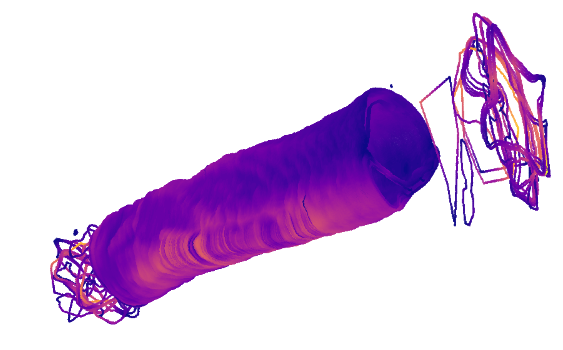
Where warmer colors mean larger values of thickness. I’ve been trying to assign the thickness value to each surface cell with something like this:
```auto
color = vtk.vtkUnsignedCharArray()
color.SetNumberOfComponents(1)
color.SetNumberOfTuples( surface.GetOutput().GetNumberOfCells() )
for i in range(surface.GetOutput().GetNumberOfCells()):
color.InsertTuple(i, )
```
But I don’t know how to extract the corresponding thickness value to each surface cell. Any idea??
Thanks a lot!
---
### Author:  [@LuisFco](https://discourse.vtk.org/u/LuisFco)
#### Post date: [February 15, 2022, 10:39am UTC](https://discourse.vtk.org/t/color-surface-with-thinkness-values/7749/2 "2022-02-15T10:39:35Z")
I finaly sorted this out. Those are the steps.
1. Create surface from the vtkImageStencil object:
```auto
surface = vtk.vtkMarchingCubes()
surface.SetInputData(imgstenc.GetOutput())
surface.ComputeNormalsOn()
surface.SetValue(0, 127.5)
```
1. Create a ProbeFilter sampling your vtkImageData with the thickness values with the points of your PolyData surface mesh:
```auto
probe = vtk.vtkProbeFilter()
probe.SetInputData(surface.GetOutput())
probe.SetSourceData(thickness)
probe.Update()
```
1. Plot the sampled points with the thickness values:
```auto
rng = thickness.GetScalarRange()
fMin = rng[0]
fMax = rng[1]
print("RANGE:", rng[0],rng[1])
# Make the lookup table.
lut = vtk.vtkLookupTable()
lut.SetTableRange(fMin, fMax)
lut.SetSaturationRange(0.5, 1)
lut.SetHueRange(0.7, 0.9)
lut.SetValueRange(0, 5)
lut.Build()
normals = vtk.vtkPolyDataNormals()
normals.SetInputConnection(probe.GetOutputPort())
mapper = vtk.vtkPolyDataMapper()
mapper.ScalarVisibilityOn()
mapper.SetLookupTable(lut)
mapper.SetInputConnection(normals.GetOutputPort())
mapper.SetScalarRange(fMin, fMax)
actor = vtk.vtkActor()
actor.SetMapper(mapper)
```
That worked for me.