# Color Volume Rendering: vtkDataArray Indexing
**URL:** https://discourse.vtk.org/t/color-volume-rendering-vtkdataarray-indexing/5695
**Category:** Web
**Created:** [May 3, 2021, 11:40pm UTC](https://discourse.vtk.org/t/color-volume-rendering-vtkdataarray-indexing/5695 "2021-05-03T23:40:20Z")
**Posts on this page:** 6
**Page:** 1
### Author:  [@Alireza](https://discourse.vtk.org/u/Alireza)
#### Post date: [May 3, 2021, 11:40pm UTC](https://discourse.vtk.org/t/color-volume-rendering-vtkdataarray-indexing/5695/1 "2021-05-03T23:40:21Z")
I’m trying to do a color volume rendering for a 3D segmentation that has RGB values.
To have a color image, I started by drawing a Red box, for some reason I’m not able to get a color volume rendering of it at all.
My questions is what is the order of RGB in the vtkDataArray? is it [R,G,B,R,G,B, …] ?
To create a full red box, my code is:
```auto
const numComponents = 3;
const scalarData = new Float32Array(
dimensions[0] * dimensions[1] * dimensions[2] * numComponents
);
const yStride = dimensions[0] * numComponents;
const zStride = dimensions[0] * dimensions[1] * numComponents;
for (let i = 30; i < 40; i++) {
for (let j = 30; j < 40; j++) {
for (let k = 30; k < 40; k++) {
const position = [i, j, k];
const scalarIndex =
position[2] * zStride + position[1] * yStride + position[0];
scalarData[scalarIndex * numComponents] = 255;
scalarData[scalarIndex * numComponents + 1] = 0;
scalarData[scalarIndex * numComponents + 2] = 0;
}
}
}
const scalarArray = vtkDataArray.newInstance({
name: "Pixels",
numberOfComponents: 3,
values: scalarData
});
```
I’m also setting the `setIndependentComponents(false)` per my research in this forum.
I have created a working example here
> **[volume-rendering-color - CodeSandbox](https://codesandbox.io/s/volume-rendering-color-1x45o?file=%2Fsrc%2Findex.js)**
>
> volume-rendering-color by sedghi using kw-web-suite, parcel-bundler, vtk.js

---
### Author:  [@sankhesh](https://discourse.vtk.org/u/sankhesh)
#### Post date: [May 4, 2021, 2:26am UTC](https://discourse.vtk.org/t/color-volume-rendering-vtkdataarray-indexing/5695/2 "2021-05-04T02:26:50Z")
The volume mapper expects either 2 components (LA) or 4 components (RGBA) when `vtkVolumeProperty::IndependentComponents == false`. See [https://vtk.org/doc/nightly/html/classvtkVolumeProperty.html#a78e28600f54dedb13cb2f6d7247f9770](https://vtk.org/doc/nightly/html/classvtkVolumeProperty.html#a78e28600f54dedb13cb2f6d7247f9770)
In your case, you should add a fourth component such that your array layout is [R, G, B, A, R, G, B, A…].
---
### Author:  [@Alireza](https://discourse.vtk.org/u/Alireza)
#### Post date: [May 4, 2021, 2:57am UTC](https://discourse.vtk.org/t/color-volume-rendering-vtkdataarray-indexing/5695/3 "2021-05-04T02:57:14Z")
Thanks for your reply @sankhesh
I can see that with 3 number of components in vtkDataArray, it already has the 4 components.
The first is
```auto
colorChannels: 3
grayTransferFunction: null
rGBTransferFunction: Object
scalarOpacity: Object
scalarOpacityUnitDistance: 1
opacityMode: 0
gradientOpacityMinimumValue: 0
gradientOpacityMinimumOpacity: 0
gradientOpacityMaximumValue: 1
gradientOpacityMaximumOpacity: 1
useGradientOpacity: false
componentWeight: 1
```
and the component 2,3,4 are the following which don’t have any transfer functions
```auto
colorChannels: 1
grayTransferFunction: null
rGBTransferFunction: null
scalarOpacity: null
scalarOpacityUnitDistance: 1
opacityMode: 0
gradientOpacityMinimumValue: 0
gradientOpacityMinimumOpacity: 0
gradientOpacityMaximumValue: 1
gradientOpacityMaximumOpacity: 1
useGradientOpacity: false
componentWeight: 1
```
I tried your solution for 4 components here but still nothing shows up
> **[volume-rendering-color-RGBA - CodeSandbox](https://codesandbox.io/s/volume-rendering-color-rgba-luj7e?file=%2Fsrc%2Findex.js)**
>
> volume-rendering-color-RGBA by sedghi using kw-web-suite, parcel-bundler, vtk.js
---
### Author:  [@Alireza](https://discourse.vtk.org/u/Alireza)
#### Post date: [May 4, 2021, 4:34pm UTC](https://discourse.vtk.org/t/color-volume-rendering-vtkdataarray-indexing/5695/4 "2021-05-04T16:34:02Z")
I found my problem
I was applying \*numComponents twice, once in the stride and once in the scalarIndex
this
```auto
const yStride = dimensions[0] * numComponents;
const zStride = dimensions[0] * dimensions[1] * numComponents;
```
should be
```auto
const yStride = dimensions[0];
const zStride = dimensions[0] * dimensions[1];
``
```
---
### Author:  [@pieper](https://discourse.vtk.org/u/pieper)
#### Post date: [May 4, 2021, 5:38pm UTC](https://discourse.vtk.org/t/color-volume-rendering-vtkdataarray-indexing/5695/5 "2021-05-04T17:38:03Z")
Hi @Alireza and @sankhesh -
Regarding RGBA rendering, Sankesh and I discussed some issues I was running into so I did a dive into the shader code and was able to fix an issue to calculate shading from the alpha channel and get color from the RGB channels like in the image below (there’s also a link to a movie of it). I didn’t have a chance to do a pull request, but the diff with the fixes is included below in case it helps.
-Steve
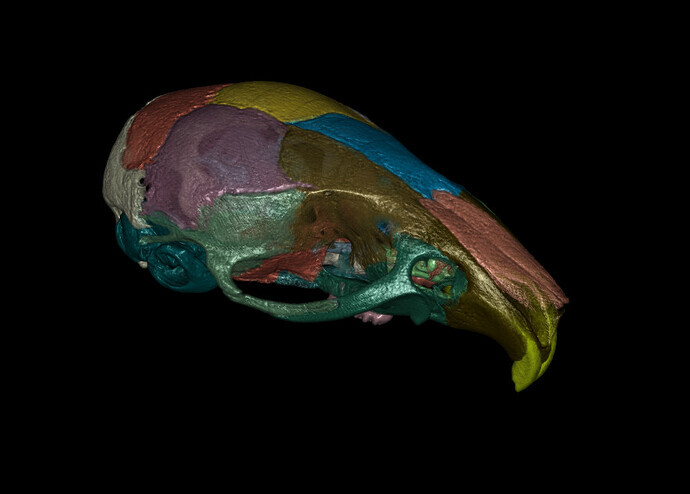
> **[2021.01.19 Hangout](https://discourse.slicer.org/t/2021-01-19-hangout/15585/7?u=pieper)**
>
> Yes, exactly. This image uses the CT as alpha, so you get nice detail with the coloring, but we should also do the option where the segmentation opacity controls the alpha channel. We’ll need to do the local smoothing / surface fitting in the GPU...
```auto
diff --git a/Rendering/VolumeOpenGL2/vtkVolumeShaderComposer.h b/Rendering/VolumeOpenGL2/vtkVolumeShaderComposer.h
index 6f4962cc6f..e894ff1770 100644
--- a/Rendering/VolumeOpenGL2/vtkVolumeShaderComposer.h
+++ b/Rendering/VolumeOpenGL2/vtkVolumeShaderComposer.h
@@ -678,15 +678,15 @@ namespace vtkvolume
\n }\
\n if (nDotL > 0.0)\
\n {\
- \n diffuse = nDotL * in_diffuse[component] *\
+ \n diffuse = nDotL * in_diffuse[0] *\
\n in_lightDiffuseColor[0] * color.rgb;\
\n }\
- \n specular = pow(nDotH, in_shininess[component]) *\
- \n in_specular[component] *\
+ \n specular = pow(nDotH, in_shininess[0]) *\
+ \n in_specular[0] *\
\n in_lightSpecularColor[0];\
\n // For the headlight, ignore the light's ambient color\
\n // for now as it is causing the old mapper tests to fail\
- \n finalColor.xyz = in_ambient[component] * color.rgb +\
+ \n finalColor.xyz = in_ambient[0] * color.rgb +\
\n diffuse + specular;\
\n");
}
@@ -734,13 +734,13 @@ namespace vtkvolume
\n if (nDotH > 0.0)\
\n {\
\n specular = in_lightSpecularColor[lightNum] *\
- \n pow(nDotH, in_shininess[component]);\
+ \n pow(nDotH, in_shininess[0]);\
\n }\
\n ambient += in_lightAmbientColor[lightNum];\
\n }\
- \n finalColor.xyz = in_ambient[component] * ambient +\
- \n in_diffuse[component] * diffuse * color.rgb +\
- \n in_specular[component] * specular;"
+ \n finalColor.xyz = in_ambient[0] * ambient +\
+ \n in_diffuse[0] * diffuse * color.rgb +\
+ \n in_specular[0] * specular;"
);
}
else if (lightingComplexity == 3)
@@ -811,14 +811,14 @@ namespace vtkvolume
\n }\
\n if (nDotH > 0.0)\
\n {\
- \n float sf = attenuation * pow(nDotH, in_shininess[component]);\
+ \n float sf = attenuation * pow(nDotH, in_shininess[0]);\
\n specular += (sf * in_lightSpecularColor[lightNum]);\
\n }\
\n ambient += in_lightAmbientColor[lightNum];\
\n }\
- \n finalColor.xyz = in_ambient[component] * ambient +\
- \n in_diffuse[component] * diffuse * color.rgb +\
- \n in_specular[component] * specular;\
+ \n finalColor.xyz = in_ambient[0] * ambient +\
+ \n in_diffuse[0] * diffuse * color.rgb +\
+ \n in_specular[0] * specular;\
");
}
}
@@ -930,15 +930,15 @@ namespace vtkvolume
\n }\
\n if (nDotL > 0.0)\
\n {\
- \n diffuse = nDotL * in_diffuse[component] *\
+ \n diffuse = nDotL * in_diffuse[0] *\
\n in_lightDiffuseColor[0] * color.rgb;\
\n }\
- \n specular = pow(nDotH, in_shininess[component]) *\
- \n in_specular[component] *\
+ \n specular = pow(nDotH, in_shininess[0]) *\
+ \n in_specular[0] *\
\n in_lightSpecularColor[0];\
\n // For the headlight, ignore the light's ambient color\
\n // for now as it is causing the old mapper tests to fail\
- \n finalColor.xyz = in_ambient[component] * color.rgb +\
+ \n finalColor.xyz = in_ambient[0] * color.rgb +\
\n diffuse + specular;\
\n");
}
@@ -1061,16 +1061,29 @@ namespace vtkvolume
\n {\
\n return computeLighting(vec4(texture2D(" + colorTableMap[0] + ",\
\n vec2(scalar.x, 0.0)).xyz,\
- \n opacity), 0);\
+ \n opacity), 1);\
+ \n }");
+ return shaderStr;
+ }
+ else if (noOfComponents == 4 && !independentComponents)
+ {
+ shaderStr += std::string("\
+ \nvec4 computeColor(vec4 scalar, float opacity)\
+ \n {\
+ \n return computeLighting(vec4(scalar.xyz, opacity), 3);\
\n }");
return shaderStr;
}
else
{
+ // invalid combination: more than one component but not 2 or 4
+ // and not treated independently, so treat it the same as 2 component
shaderStr += std::string("\
\nvec4 computeColor(vec4 scalar, float opacity)\
\n {\
- \n return computeLighting(vec4(scalar.xyz, opacity), 0);\
+ \n return computeLighting(vec4(texture2D(" + colorTableMap[0] + ",\
+ \n vec2(scalar.x, 0.0)).xyz,\
+ \n opacity), 1);\
\n }");
return shaderStr;
}
@@ -1534,7 +1547,7 @@ namespace vtkvolume
else
{
shader <<
- "g_gradients_0[0] = computeGradient(g_dataPos, 0, in_volume[0], 0);\n";
+ "g_gradients_0[0] = computeGradient(g_dataPos, 3, in_volume[0], 0);\n";
}
return shader.str();
```
---
### Author:  [@Alireza](https://discourse.vtk.org/u/Alireza)
#### Post date: [May 5, 2021, 4:38pm UTC](https://discourse.vtk.org/t/color-volume-rendering-vtkdataarray-indexing/5695/6 "2021-05-05T16:38:46Z")
Thank you Steve for the code,
This is an advance visualization! Looks amazing.