# Colors of vtkAnnotatedCubeActor faces (with vtkOrientationMarkerWidget)
**URL:** https://discourse.vtk.org/t/colors-of-vtkannotatedcubeactor-faces-with-vtkorientationmarkerwidget/934
**Category:** Support
**Created:** [May 9, 2019, 7:49am UTC](https://discourse.vtk.org/t/colors-of-vtkannotatedcubeactor-faces-with-vtkorientationmarkerwidget/934 "2019-05-09T07:49:25Z")
**Posts on this page:** 1
**Showing post:** 4
### Author:  [@figueiredo](https://discourse.vtk.org/u/figueiredo)
#### Post date: [May 14, 2019, 7:39am UTC](https://discourse.vtk.org/t/colors-of-vtkannotatedcubeactor-faces-with-vtkorientationmarkerwidget/934/4 "2019-05-14T07:39:11Z")
Hi Marco!
The best solution I could think of is to compose the letters from the `vtkAnnotatedCubeActor` with a basic cube actor of the same size with colored faces. In order to do that, you should:
1. _Hide_ the annotated cube faces by setting it’s opacity property to `0`
2. Create an array to hold the six colors for the faces
3. Create a actor based on the `vtkCubeSource` setting its CellData Scalars to use the color array
4. _Merge_ the `vtkAnnotatedCubeActor` and colored actor using `vtkPropAssembly`
5. Use the `vtkPropAssembly` output as your marker for the `vtkOrientationMarkerWidget`
I tried to simplify the coloring part, to avoid difficulties for you to choose what colors go in what faces:
```auto
vtkSmartPointer face_colors = vtkSmartPointer::New();
face_colors->SetNumberOfComponents(3);
unsigned char face_x_plus[3] = { 255,0,0 };
unsigned char face_x_minus[3] = { 0,255,0 };
unsigned char face_y_plus[3] = { 0,0,255 };
unsigned char face_y_minus[3] = { 255,255,0 };
unsigned char face_z_plus[3] = { 0,255,255 };
unsigned char face_z_minus[3] = { 255,0,255 };
face_colors->InsertNextTypedTuple(face_x_minus);
face_colors->InsertNextTypedTuple(face_x_plus);
face_colors->InsertNextTypedTuple(face_y_minus);
face_colors->InsertNextTypedTuple(face_y_plus);
face_colors->InsertNextTypedTuple(face_z_minus);
face_colors->InsertNextTypedTuple(face_z_plus);
```
Anyways, follow attached the modified example I made to test it. [main.cpp](https://discourse.vtk.org/uploads/default/original/1X/5c76b2bfcf82184e6b26092cde947216a47f511a.cpp) (4.6 KB)
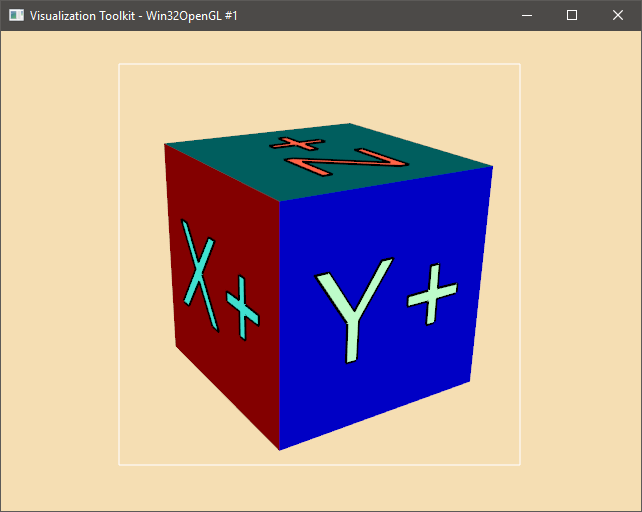
Hope this is useful.
Have a fruitful week!
Rodrigo Figueiredo.
---
_[View the full topic](https://discourse.vtk.org/t/colors-of-vtkannotatedcubeactor-faces-with-vtkorientationmarkerwidget/934)._