# Combining vtkVolume with vtkImageActor - opacity issues
**URL:** https://discourse.vtk.org/t/combining-vtkvolume-with-vtkimageactor-opacity-issues/11582
**Category:** Support
**Created:** [May 31, 2023, 8:41am UTC](https://discourse.vtk.org/t/combining-vtkvolume-with-vtkimageactor-opacity-issues/11582 "2023-05-31T08:41:13Z")
**Posts on this page:** 2
**Page:** 1
### Author:  [@mortifiedpenguin](https://discourse.vtk.org/u/mortifiedpenguin)
#### Post date: [May 31, 2023, 8:41am UTC](https://discourse.vtk.org/t/combining-vtkvolume-with-vtkimageactor-opacity-issues/11582/1 "2023-05-31T08:41:13Z")
I’m visualizing a CT dataset as a vtkVolume. Then, I display an arbitrary oblique slice in the dataset. This works fine with vtkReslice and vtkImageActor, setting the position and orientation. However, it seems that the volume is always rendered on top of the actor.
See the sample here, the lower portion of the leg should not be visible as it is located behind the plane.
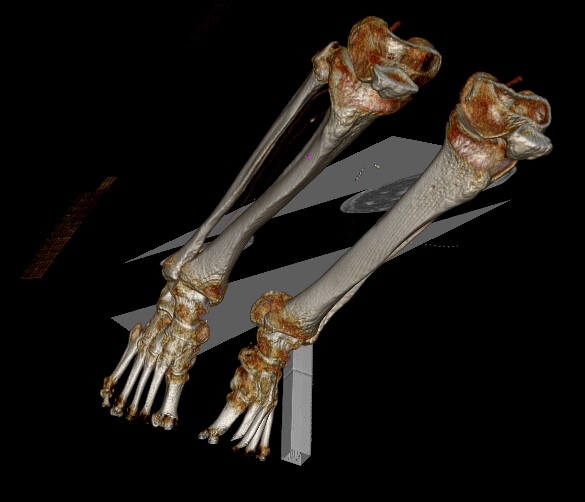
I also performed some tests with a vtkCursor3D, this works fine, if the cursor is located behind a opaque structure it becomes invisible as expected.
Thanks for any help.
---
### Author:  [@mortifiedpenguin](https://discourse.vtk.org/u/mortifiedpenguin)
#### Post date: [May 31, 2023, 10:06am UTC](https://discourse.vtk.org/t/combining-vtkvolume-with-vtkimageactor-opacity-issues/11582/2 "2023-05-31T10:06:17Z")
I managed to solve this with enabling UseDepthPeeling / UseDepthPeelingForVolumes on the renderer. Not sure why this is required as the plane does not use transparency, but it works.