# Computing Isosurface on a chosen attribute
**URL:** https://discourse.vtk.org/t/computing-isosurface-on-a-chosen-attribute/7283
**Category:** Support
**Created:** [November 26, 2021, 11:37am UTC](https://discourse.vtk.org/t/computing-isosurface-on-a-chosen-attribute/7283 "2021-11-26T11:37:45Z")
**Posts on this page:** 2
**Page:** 1
### Author:  [@Martin3d](https://discourse.vtk.org/u/Martin3d)
#### Post date: [November 26, 2021, 11:37am UTC](https://discourse.vtk.org/t/computing-isosurface-on-a-chosen-attribute/7283/1 "2021-11-26T11:37:45Z")
Hi,
I work with an unstructured grid containing multiple attributes. I wish to **process the isosurface of one of these attributes** , which has been prototyped with Paraview successfully. I thrive to do the same with VTK based on the [vtkFlyingEdge3D example](https://kitware.github.io/vtk-examples/site/Cxx/Modelling/MarchingCubes/).
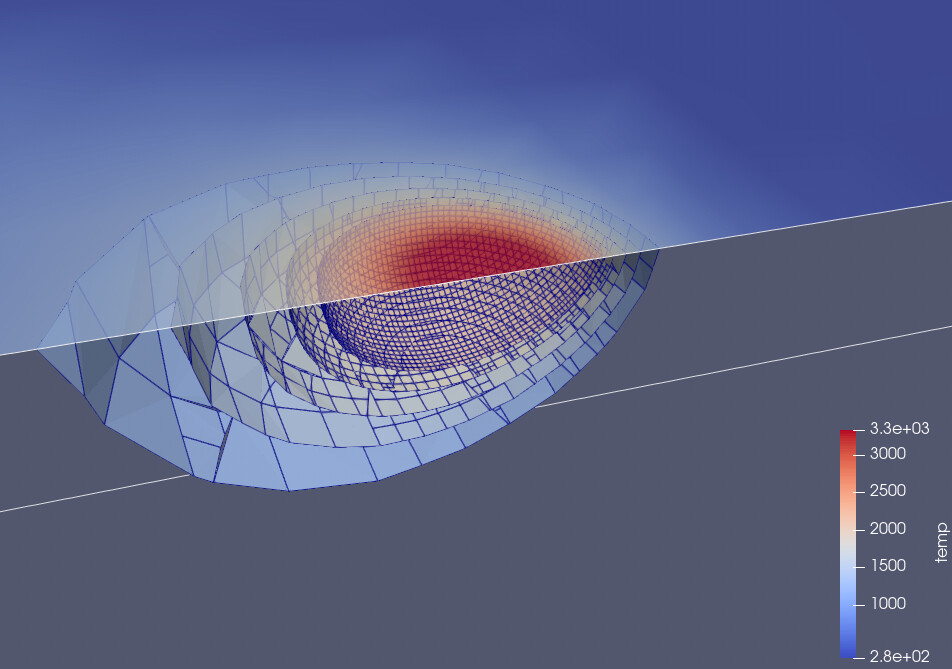
The main point is that I want to express the contour levels in terms of **this attribute value range**. However, when using **vtkVoxelModeler and vtkImageData** as preprocessing for vtkFlyingEdges3D, I can only express contour in terms of values in range [0;1] (i.e. [background; foreground] values of vtkVoxelModeller).
**How should I adapt my pipeline to process contours of this attribute?**
Here is a summary of my program inspired by vtkFlyingEdges3D
```auto
String propertyName = "temp";
double[] levels = {800, 1000, 1200, 1400, 1600, 1800, 2000};
vtkUnstructuredGrid ugrid = ... // load exodus file
ugrid.GetPointData().SetActiveScalars(propertyName);
// Convert to poly data
vtkGeometryFilter toPoly = new vtkGeometryFilter();
toPoly.SetInputData(uGrid);
// Converts to a voxel representation
vtkVoxelModeller voxelModeller = new vtkVoxelModeller();
voxelModeller.SetSampleDimensions(10, 10, 10);
voxelModeller.SetScalarTypeToDouble();
voxelModeller.SetModelBounds(toPoly.GetOutput().GetBounds());
voxelModeller.SetInputConnection(toPoly.GetOutputPort());
// Copy voxel to image data structure
vtkImageData volume = new vtkImageData();
volume.DeepCopy(voxelModeller.GetOutput());
// Apply contour surface to voxels
vtkFlyingEdges3D isoSurface = new vtkFlyingEdges3D();
isoSurface.SetInputData(volume);
isoSurface.SetNumberOfContours(levels.length);
for (int i = 0; i < levels.length; i++) {
isoSurface.SetValue(i, levels[i]);
}
isoSurface.Update();
System.out.println("Number of contour : " + isoSurface.GetNumberOfContours());
System.out.println("Number of cells : " + isoSurface.GetOutput().GetNumberOfCells());
```
I got an empty output
```auto
Number of contour : 7
Number of cells : 0 // <<<<<<<< PROBLEM
```
If I however uses **levels in [0;1]**
```auto
double[] levels = {0.08, 0.10, 0.12, 0.14, 0.16, 0.18, 0.20};
```
I got something
```auto
Number of contour : 7
Number of cells : 5488
```
---
### Author:  [@Hilcovm](https://discourse.vtk.org/u/Hilcovm)
#### Post date: [December 1, 2021, 7:21am UTC](https://discourse.vtk.org/t/computing-isosurface-on-a-chosen-attribute/7283/2 "2021-12-01T07:21:14Z")
Hi Martin,
It seems your data is already in a 3D cells format. This means you could use something like the vtkContourFilter directly on the grid ([https://vtk.org/doc/nightly/html/classvtkContourFilter.html#details](https://vtk.org/doc/nightly/html/classvtkContourFilter.html#details)) or vtkMarchingContourFilter.
So, you would have something like:
```auto
String propertyName = "temp";
double[] levels = {800, 1000, 1200, 1400, 1600, 1800, 2000};
vtkUnstructuredGrid ugrid = ... // load exodus file
ugrid.GetPointData().SetActiveScalars(propertyName);
vtkNew isoSurface;
isoSurface->SetInputData(ugrid);
for (int i = 0; i < levels.length; i++) {
isoSurface.SetValue(i, levels[i]);
}
isoSurface.Update();
```
Cheers,
Hilco