# Concave polygon, issue with solid representation and vtkDelaunay2D
**URL:** https://discourse.vtk.org/t/concave-polygon-issue-with-solid-representation-and-vtkdelaunay2d/9823
**Category:** Development
**Created:** [November 15, 2022, 9:32am UTC](https://discourse.vtk.org/t/concave-polygon-issue-with-solid-representation-and-vtkdelaunay2d/9823 "2022-11-15T09:32:30Z")
**Posts on this page:** 3
**Page:** 1
### Author:  [@ugis](https://discourse.vtk.org/u/ugis)
#### Post date: [November 15, 2022, 9:32am UTC](https://discourse.vtk.org/t/concave-polygon-issue-with-solid-representation-and-vtkdelaunay2d/9823/1 "2022-11-15T09:32:30Z")
Dear developers,
I was trying to test some functionality with a simple concave polygon but hit the following issue - after I draw the desired shape, only the wireframe is correct, but solid representation does not show the original shape. The vtkDelaunay2D also does not preserve the concave shape. This is the outcome I get:
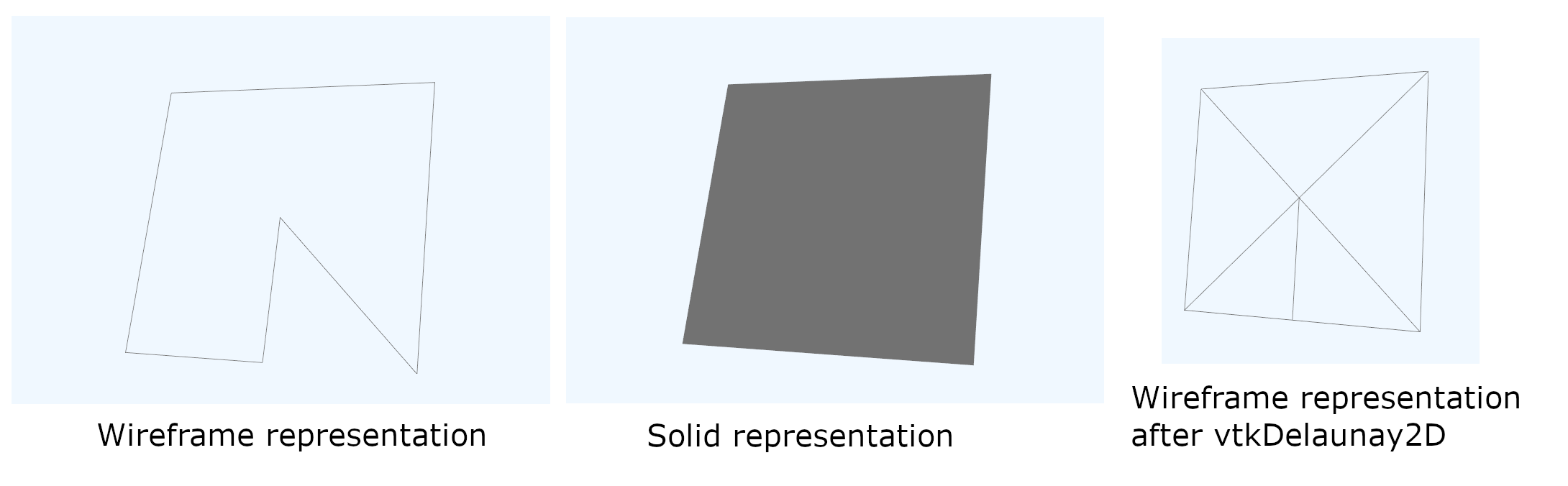
when running this Python code:
[python\_minEx\_drawPolygon.py](https://discourse.vtk.org/uploads/short-url/h6QQf3FWI3qzwj2MXOT0DbJQTD8.py) (2.7 KB)
Am I doing something wrong or perhaps this is a bug? I found some similar issues reported [here](https://discourse.vtk.org/t/complex-concave-polygons/2857) and [here](https://discourse.vtk.org/t/vtkdelaunay2d-failed-to-triangulate-some-special-concav-polygons/9811), but no apparent solution seemed to emerge.
Best wishes,
Ugis
---
### Author:  [@will.schroeder](https://discourse.vtk.org/u/will.schroeder)
#### Post date: [November 15, 2022, 10:38am UTC](https://discourse.vtk.org/t/concave-polygon-issue-with-solid-representation-and-vtkdelaunay2d/9823/2 "2022-11-15T10:38:25Z")
1. Rendering engines (e.g., OpenGL) typically do not tessellate concave polygons correctly (they typically use some sort of greedy fan triangulation). This is why your “solid” polygon is rendered incorrectly. Try vtkTriangleFilter.
2. vtkDelaunay produces convex triangulations of the input points. You’ll have to specify constraint edges/loops to produce convex tessellations.
---
### Author:  [@ugis](https://discourse.vtk.org/u/ugis)
#### Post date: [November 15, 2022, 11:08am UTC](https://discourse.vtk.org/t/concave-polygon-issue-with-solid-representation-and-vtkdelaunay2d/9823/3 "2022-11-15T11:08:53Z")
Hi Will,
Thanks a lot for the quick answer and explanation. Indeed, vtkTriangleFilter and specifying constraint solved both issues (when having the correct rotational order of the constraint loop). Problem solved!
If anyone else have the issue, this is the fixed Python code:
[python\_minEx\_drawPolygon.py](https://discourse.vtk.org/uploads/short-url/vljDTVNwkGMeFfHerjEGCPHNeEi.py) (2.9 KB)