# Configuring VTK with Qt in windows
**URL:** https://discourse.vtk.org/t/configuring-vtk-with-qt-in-windows/1999
**Category:** Support
**Created:** [October 29, 2019, 9:59am UTC](https://discourse.vtk.org/t/configuring-vtk-with-qt-in-windows/1999 "2019-10-29T09:59:50Z")
**Posts on this page:** 10
**Page:** 1
### Author:  [@Pooja](https://discourse.vtk.org/u/Pooja)
#### Post date: [October 29, 2019, 9:59am UTC](https://discourse.vtk.org/t/configuring-vtk-with-qt-in-windows/1999/1 "2019-10-29T09:59:50Z")
Hello,
I have installed Qt 5.12.5 on my Wiindows 10 computer. I also have VTK 8.2.0 and cmake.
I have followed following tutorial.
[https://vtk.org/Wiki/VTK/Configure\_and\_Build](https://vtk.org/Wiki/VTK/Configure_and_Build)
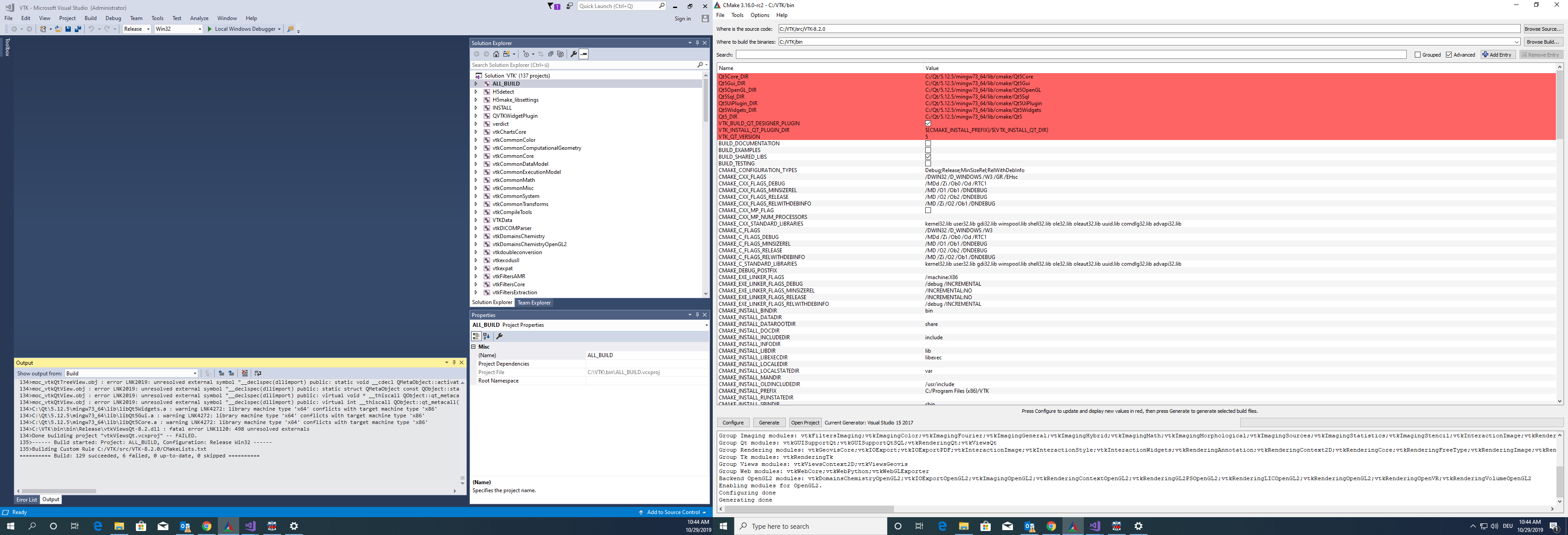
I have compiled the VTK using cmake gui with qt. But when I am trying to build “vtk.sln” file in Visual Studio 15 2017, by building “All\_BUILD”,
It is showing " Build: 129 succeeded, 6 failed".
What should I do to build all files successfully? Please provide me solution.
---
### Author:  [@ben.boeckel](https://discourse.vtk.org/u/ben.boeckel)
#### Post date: [October 29, 2019, 1:00pm UTC](https://discourse.vtk.org/t/configuring-vtk-with-qt-in-windows/1999/2 "2019-10-29T13:00:33Z")
It appears as though you either have a 32bit Qt and are building 64bit or have 64bit Qt and are building 32bit. I suspect the latter based on your generator on the right. There should be a selection somewhere to make “Win64” binaries in the GUI. You’ll need to clean your build and start from scratch to change architectures.
---
### Author:  [@Pooja](https://discourse.vtk.org/u/Pooja)
#### Post date: [October 29, 2019, 1:51pm UTC](https://discourse.vtk.org/t/configuring-vtk-with-qt-in-windows/1999/3 "2019-10-29T13:51:41Z")
I have 64bit Qt. But in Visual studio 15 2017, it is building with Win32 configuration (Release mode). Do I have to change it? And how to change it?
---
### Author:  [@ben.boeckel](https://discourse.vtk.org/u/ben.boeckel)
#### Post date: [October 29, 2019, 2:33pm UTC](https://discourse.vtk.org/t/configuring-vtk-with-qt-in-windows/1999/4 "2019-10-29T14:33:25Z")
There should be an option when you’re choosing the generator in the GUI for a new build tree.
---
### Author:  [@cory.quammen](https://discourse.vtk.org/u/cory.quammen)
#### Post date: [October 29, 2019, 3:13pm UTC](https://discourse.vtk.org/t/configuring-vtk-with-qt-in-windows/1999/5 "2019-10-29T15:13:24Z")
That option is “Optional platform for generator (…)” shown here:
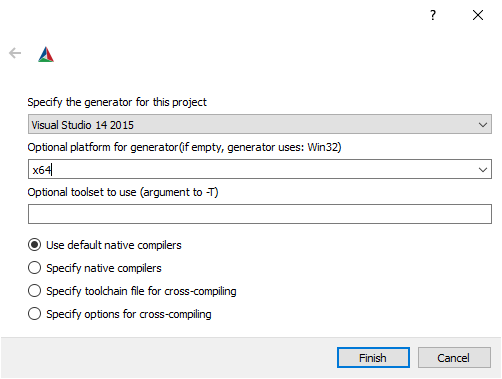
Set it to x64 and you should be good to go.
You will need to either delete all the files in your current build directory or start with a fresh configuration in a new build directory. Once the generate is set, it cannot be changed in the same build directory.
---
### Author:  [@Pooja](https://discourse.vtk.org/u/Pooja)
#### Post date: [October 29, 2019, 3:38pm UTC](https://discourse.vtk.org/t/configuring-vtk-with-qt-in-windows/1999/6 "2019-10-29T15:38:05Z")
Thank you. It is working now. But after building ALL\_BUILD and INSTALL in Visual studio 2017, I am trying to run VTK example “/SideBySideRenderWindowsQt” using Cmake gui.
But it is showing me following error.
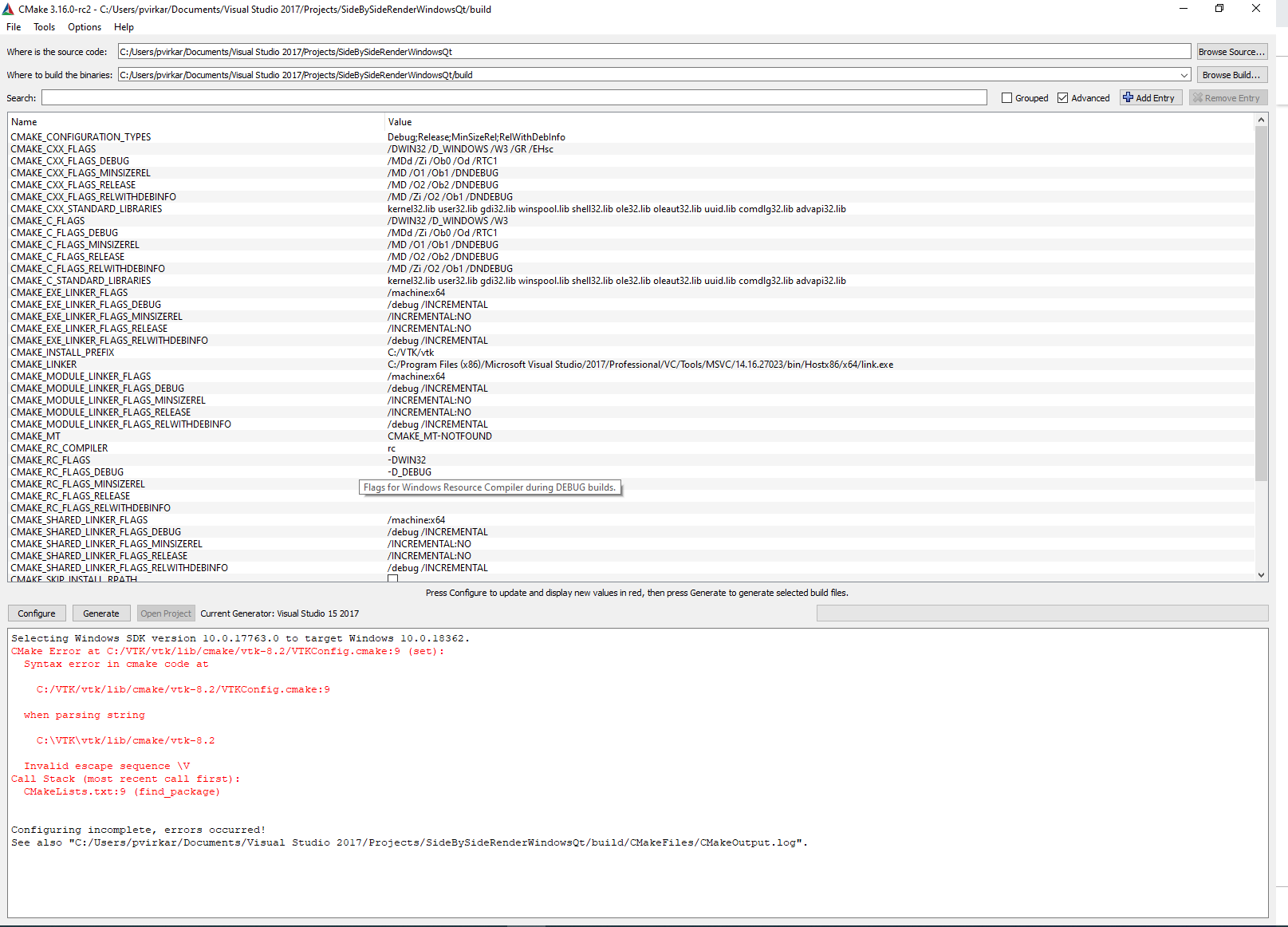
CMake Error at C:/VTK/vtk/lib/cmake/vtk-8.2/VTKConfig.cmake:9 (set):
Syntax error in cmake code at
```
C:/VTK/vtk/lib/cmake/vtk-8.2/VTKConfig.cmake:9
```
when parsing string
```
C:\VTK\vtk/lib/cmake/vtk-8.2
```
Invalid escape sequence \V
Call Stack (most recent call first):
CMakeLists.txt:9 (find\_package)
Is it problem because of CMAKE\_INSTALL\_PREFIX? Earlier it was of Program files (x86), but i changed it to other directory.
What should i do now to run vtk examples with qt?
---
### Author:  [@cory.quammen](https://discourse.vtk.org/u/cory.quammen)
#### Post date: [October 29, 2019, 3:46pm UTC](https://discourse.vtk.org/t/configuring-vtk-with-qt-in-windows/1999/7 "2019-10-29T15:46:30Z")
CMake want’s forward slashes (/) instead of backslashes. Just change `CMAKE_INSTALL_PREFIX` to `C:/VTK/vtk`.
---
### Author:  [@Pooja](https://discourse.vtk.org/u/Pooja)
#### Post date: [October 29, 2019, 3:59pm UTC](https://discourse.vtk.org/t/configuring-vtk-with-qt-in-windows/1999/8 "2019-10-29T15:59:21Z")
I changed it. but it is still showing the same error.
---
### Author:  [@cory.quammen](https://discourse.vtk.org/u/cory.quammen)
#### Post date: [October 29, 2019, 5:27pm UTC](https://discourse.vtk.org/t/configuring-vtk-with-qt-in-windows/1999/9 "2019-10-29T17:27:05Z")
I should have been more specific. Change it in your VTK configuration, not this project configuration.
---
### Author:  [@Pooja](https://discourse.vtk.org/u/Pooja)
#### Post date: [October 30, 2019, 9:16am UTC](https://discourse.vtk.org/t/configuring-vtk-with-qt-in-windows/1999/10 "2019-10-30T09:16:34Z")
Thanks. It is working now.