# Content behind window is visible
**URL:** https://discourse.vtk.org/t/content-behind-window-is-visible/4532
**Category:** Support
**Created:** [October 30, 2020, 3:28pm UTC](https://discourse.vtk.org/t/content-behind-window-is-visible/4532 "2020-10-30T15:28:46Z")
**Posts on this page:** 7
**Page:** 1
### Author:  [@Ariel](https://discourse.vtk.org/u/Ariel)
#### Post date: [October 30, 2020, 3:28pm UTC](https://discourse.vtk.org/t/content-behind-window-is-visible/4532/1 "2020-10-30T15:28:47Z")
Hi community,
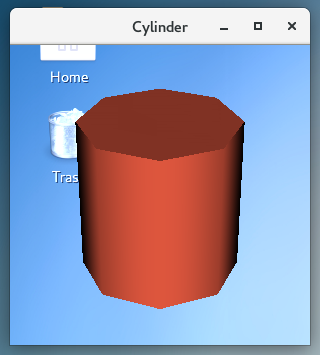
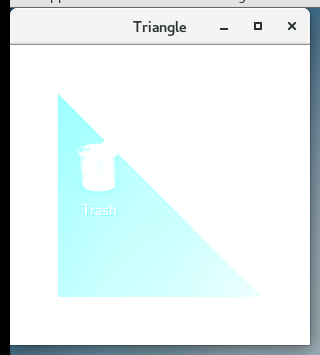
I have a problem where the content behind VTK window is visible (showed in the attachments). I have two examples where this happened:
1. I copied the first example of the VTK examples ([[https://lorensen.github.io/VTKExamples/site/Python/GeometricObjects/CylinderExample/](https://lorensen.github.io/VTKExamples/site/Python/GeometricObjects/CylinderExample/)]) and the content behind the background is visible.
2. The second example is a triangle with middle level of opacity in a white background. The content is visible behind the triangle. If the background is changed to any other color, the background also becomes translucent (can’t upload the code since I’m a new user but it is similar in structure to the Cylinder example but the actor has an opacity value).
At this point I do not know if I did something wrong or it’s something else. Any guidance will be helpful!
Thanks,
Ariel.
---
### Author:  [@ben.boeckel](https://discourse.vtk.org/u/ben.boeckel)
#### Post date: [October 30, 2020, 5:01pm UTC](https://discourse.vtk.org/t/content-behind-window-is-visible/4532/2 "2020-10-30T17:01:49Z")
This sounds like a driver issue of some kind. What video card and driver are you using (looks like Linux)?
@ken-martin
---
### Author:  [@Ariel](https://discourse.vtk.org/u/Ariel)
#### Post date: [October 30, 2020, 5:28pm UTC](https://discourse.vtk.org/t/content-behind-window-is-visible/4532/3 "2020-10-30T17:28:52Z")
Hi Ben, Yes, it is Linux. The system is running on a VM so the video card and drivers are recognized for VM, but it was reproducible in other machines with Centos 7. BTW the problem happened with mesa 17 and 20.
---
### Author:  [@ben.boeckel](https://discourse.vtk.org/u/ben.boeckel)
#### Post date: [October 31, 2020, 12:51am UTC](https://discourse.vtk.org/t/content-behind-window-is-visible/4532/4 "2020-10-31T00:51:32Z")
This seems to be a Mesa/driver bug to me. Could to submit the information to the Mesa developers? I wonder if the VM is also doing weird things here. Feel free to link to it from here so others can follow along if they want.
FYI @Chuck_Atkins
---
### Author:  [@jaswantp](https://discourse.vtk.org/u/jaswantp)
#### Post date: [November 3, 2020, 12:59pm UTC](https://discourse.vtk.org/t/content-behind-window-is-visible/4532/5 "2020-11-03T12:59:39Z")
This happens with x11 on Linux. The workaround: skip ARGB visuals,
```auto
export XLIB_SKIP_ARGB_VISUALS=1
```
But now, you won’t have alpha blending. A workaround: use a discrete GPU with drivers and avoid mesa. I’m not sure if there’s any other way around it other than hacking vtkXOpenGLRenderWindow somewhere around [this](https://github.com/Kitware/VTK/blob/master/Rendering/OpenGL2/vtkXOpenGLRenderWindow.cxx#L157) line and [here](https://github.com/Kitware/VTK/blob/master/Rendering/OpenGL2/vtkXOpenGLRenderWindow.cxx#L122).
Check [this](https://xorg.freedesktop.narkive.com/Cb31B1If/xlib-skip-argb-visuals-and-qt-opengl-application-with-mesa) for details if you choose to go down that road.
---
### Author:  [@ben.boeckel](https://discourse.vtk.org/u/ben.boeckel)
#### Post date: [November 3, 2020, 1:40pm UTC](https://discourse.vtk.org/t/content-behind-window-is-visible/4532/6 "2020-11-03T13:40:39Z")
Could be an out-of-date Mesa as well (or a new bug I suppose!). I don’t think we’ve noticed it with 18.2.2, but that isn’t the newest release by a long shot.
---
### Author:  [@Ariel](https://discourse.vtk.org/u/Ariel)
#### Post date: [November 4, 2020, 1:13pm UTC](https://discourse.vtk.org/t/content-behind-window-is-visible/4532/7 "2020-11-04T13:13:30Z")
Thanks for the workaround tips. I will evaluate if it is necessary to modify VTK. If I submit the information to Mesa devs, I will link it so other users can follow what is happening.
Thanks!