### Author:  [@ferdymercury](https://discourse.vtk.org/u/ferdymercury)
#### Post date: [August 31, 2021, 9:35am UTC](https://discourse.vtk.org/t/convert-python-mesh-object-to-vtkpolydata/6512/1 "2021-08-31T09:35:18Z")
Hello,
In Python, I have an object of the following type:
```auto
your_mesh
>>> your_mesh.points
array([[250., -475., -100., -250., -475., -100., -250., -475., 1900.],
[250., -475., -100., -250., -475., 1900., 250., -475., 1900.],
[250., -515., -100., 250., -475., -100., 250., -475., 1900.],
[250., -515., -100., 250., -475., 1900., 250., -515., 1900.],
[-250., -515., -100., 250., -515., -100., 250., -515., 1900.],
[-250., -515., -100., 250., -515., 1900., -250., -515., 1900.],
[-250., -475., -100., -250., -515., -100., -250., -515., 1900.],
[-250., -475., -100., -250., -515., 1900., -250., -475., 1900.],
[-250., -515., -100., 250., -475., -100., 250., -515., -100.],
[-250., -475., -100., 250., -475., -100., -250., -515., -100.],
[250., -475., 1900., -250., -515., 1900., 250., -515., 1900.],
[250., -475., 1900., -250., -475., 1900., -250., -515., 1900.]],
dtype=float32)
>>> your_mesh.normals
array([[0., 1000000., 0.],
[0., 1000000., -0.],
[80000., 0., 0.],
[80000., 0., 0.],
[0., -1000000., 0.],
[0., -1000000., 0.],
[-80000., 0., 0.],
[-80000., 0., 0.],
[0., 0., -20000.],
[0., 0., -20000.],
[0., 0., 20000.],
[0., 0., 20000.]], dtype=float32)
```
And I was wondering if there is any short way to convert it to a vtkPolyData format, using Python. Something like:
```auto
import vtk
myData = vtk.vtkPolyData(your_mesh.points, your_mesh.normals)
```
Thanks in advance!
---
### Author:  [@Paulo\_Carvalho](https://discourse.vtk.org/u/Paulo_Carvalho)
#### Post date: [August 31, 2021, 5:45pm UTC](https://discourse.vtk.org/t/convert-python-mesh-object-to-vtkpolydata/6512/2 "2021-08-31T17:45:18Z")
Hello,
There is a LOT of information missing. You have a set of XYZ coordinates in an array. So, what? I mean, how do they relate? Is the mesh a surface? Are they triangles? Are they quads with an implicit 4th edge? Are they tetras? Is the mesh a volume? Are they tetras? Are they hexas?
Essentially, you gave only the dots but you forgot to give us a clue of how to connect the dots.
regards,
Paulo
---
### Author:  [@ferdymercury](https://discourse.vtk.org/u/ferdymercury)
#### Post date: [August 31, 2021, 8:47pm UTC](https://discourse.vtk.org/t/convert-python-mesh-object-to-vtkpolydata/6512/3 "2021-08-31T20:47:07Z")
Thanks for the reply. Sorry, I forgot to mention that this mesh object comes from an STL file, so triangles. The file is originally opened using numpy-stl:
```auto
from stl import mesh
your_mesh = mesh.Mesh.from_file('testfile.stl')
```
So my question would be how to convert from a numpy-stl-mesh object to a vtkPolyData. (I know that I could open the STL file directly in VTK using the STLreader, but for one application I would better use a conversion step between mesh and vtkPolyData).
---
### Author:  [@marcomusy](https://discourse.vtk.org/u/marcomusy)
#### Post date: [August 31, 2021, 11:59pm UTC](https://discourse.vtk.org/t/convert-python-mesh-object-to-vtkpolydata/6512/4 "2021-08-31T23:59:45Z")
this would be easy with either [vedo](https://github.com/marcomusy/vedo) or [pyvista](https://github.com/pyvista/pyvista) (with similar syntax), e.g.:
```python
from stl import mesh
import vedo
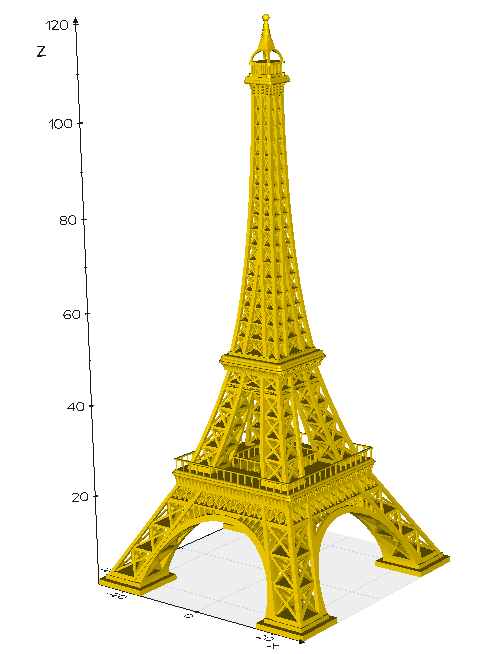
fpath = vedo.download("https://ozeki.hu/attachments/116/Eiffel_tower_sample.STL")
your_mesh = mesh.Mesh.from_file(fpath)
verts, faces = [], []
for i in range(len(your_mesh.v0)):
verts.append(your_mesh.v0[i])
verts.append(your_mesh.v1[i])
verts.append(your_mesh.v2[i])
faces.append([i*3,i*3+1,i*3+2])
vmesh = vedo.Mesh([verts, faces]).clean()
vmesh.show(axes=1)
print(type(vmesh.polydata())) #vtkPolyData
```
---
### Author:  [@ferdymercury](https://discourse.vtk.org/u/ferdymercury)
#### Post date: [September 1, 2021, 10:05am UTC](https://discourse.vtk.org/t/convert-python-mesh-object-to-vtkpolydata/6512/5 "2021-09-01T10:05:55Z")
Thanks Marco for the nice example, works like a charm. I have adapted it slightly to avoid the for-loop and make it more compact:
```auto
import itertools
from stl import mesh
import vedo
fpath = vedo.download("https://ozeki.hu/attachments/116/Eiffel_tower_sample.STL")
your_mesh = mesh.Mesh.from_file(fpath)
verts = list(itertools.chain(*(your_mesh.vectors)))
faces = [[i*3, i*3+1, i*3+2] for i in range(len(verts)//3)]
vpoly = vedo.Mesh([verts, faces]).clean().polydata()
```