# Convert vessel centerline from vtkPolyData to a Nifti binary mask
**URL:** https://discourse.vtk.org/t/convert-vessel-centerline-from-vtkpolydata-to-a-nifti-binary-mask/8844
**Category:** Support
**Tags:** file-formats
**Created:** [July 1, 2022, 7:14pm UTC](https://discourse.vtk.org/t/convert-vessel-centerline-from-vtkpolydata-to-a-nifti-binary-mask/8844 "2022-07-01T19:14:37Z")
**Posts on this page:** 12
**Page:** 1
### Author:  [@RomanStriker](https://discourse.vtk.org/u/RomanStriker)
#### Post date: [July 1, 2022, 7:14pm UTC](https://discourse.vtk.org/t/convert-vessel-centerline-from-vtkpolydata-to-a-nifti-binary-mask/8844/1 "2022-07-01T19:14:37Z")
Hi,
I have generated a center line for a sample of hepatic vessel tree in form of vertices and edges. I converted the vertices and edges to a vtkGraph and then used vtkGraphToPolyData() to convert it into vtkPolyData.
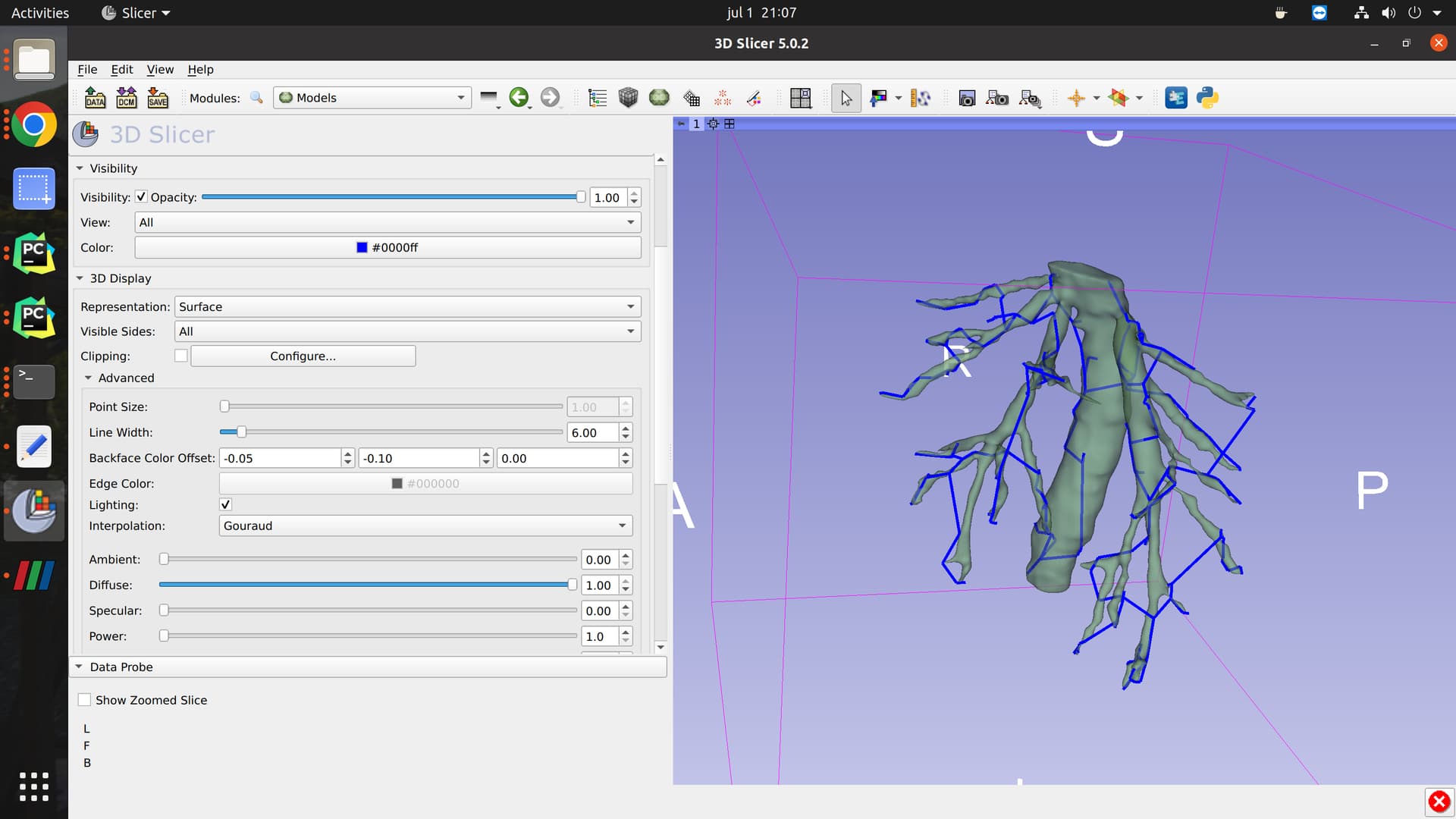
I want to convert this PolyData to binary mask in Nifti or mhd format. I tried using vtkPolyDataToImageStencil() but the output image is empty. I would really appreciate any help. I used the following code to convert the polydata to Nifti file.
```auto
reader = vtk.vtkPolyDataReader()
reader.SetFileName(vtk_path)
reader.Update()
polydata = reader.GetOutput()
dx, dy, dz = [272, 224, 224] # Dimensions (size of original image)
sx, sy, sz = [1, 1, 1] # Spacing
ox, oy, oz = [0, 0, 0] # Origin
image = vtk.vtkImageData()
image.SetSpacing((sx, sy, sz))
image.SetDimensions((dx, dy, dz))
image.SetExtent(0, dx - 1, 0, dy - 1, 0, dz - 1)
image.SetOrigin((ox, oy, oz))
image.AllocateScalars(vtk.VTK_UNSIGNED_CHAR, 1)
inval = 1
outval = 0
for i in range(image.GetNumberOfPoints()):
image.GetPointData().GetScalars().SetTuple1(i, inval)
pol2stenc = vtk.vtkPolyDataToImageStencil()
pol2stenc.SetInputData(polydata)
pol2stenc.SetOutputOrigin((ox, oy, oz))
pol2stenc.SetOutputSpacing((sx, sy, sz))
pol2stenc.SetOutputWholeExtent(image.GetExtent())
pol2stenc.Update()
imgstenc = vtk.vtkImageStencil()
imgstenc.SetInputData(image)
imgstenc.SetStencilConnection(pol2stenc.GetOutputPort())
imgstenc.ReverseStencilOff()
imgstenc.SetBackgroundValue(outval)
imgstenc.Update()
writer = vtk.vtkNIFTIImageWriter()
writer.SetFileName(output_path)
writer.SetInputConnection(imgstenc.GetOutputPort())
writer.Write()
```
---
### Author:  [@lassoan](https://discourse.vtk.org/u/lassoan)
#### Post date: [July 1, 2022, 8:14pm UTC](https://discourse.vtk.org/t/convert-vessel-centerline-from-vtkpolydata-to-a-nifti-binary-mask/8844/2 "2022-07-01T20:14:20Z")
If you still have the original polydata that VMTK generated then you can use it as input of a vtkTubeFilter. You can even use the radius scalar values to set the radius of the tube. Once you have the tube, you can use vtkPolyDataToImageStencil to create the binary image. Note that VMTK also has [example Python scripts](https://github.com/vmtk/vmtk/tree/master/vmtkScripts) for all these operations.
---
### Author:  [@RomanStriker](https://discourse.vtk.org/u/RomanStriker)
#### Post date: [July 4, 2022, 5:30pm UTC](https://discourse.vtk.org/t/convert-vessel-centerline-from-vtkpolydata-to-a-nifti-binary-mask/8844/3 "2022-07-04T17:30:04Z")
Thanks for the help. I got the binary mask as a Nifty image but there is a problem when converting the tubes into image data.
Polydata Tubes:

Image Data:
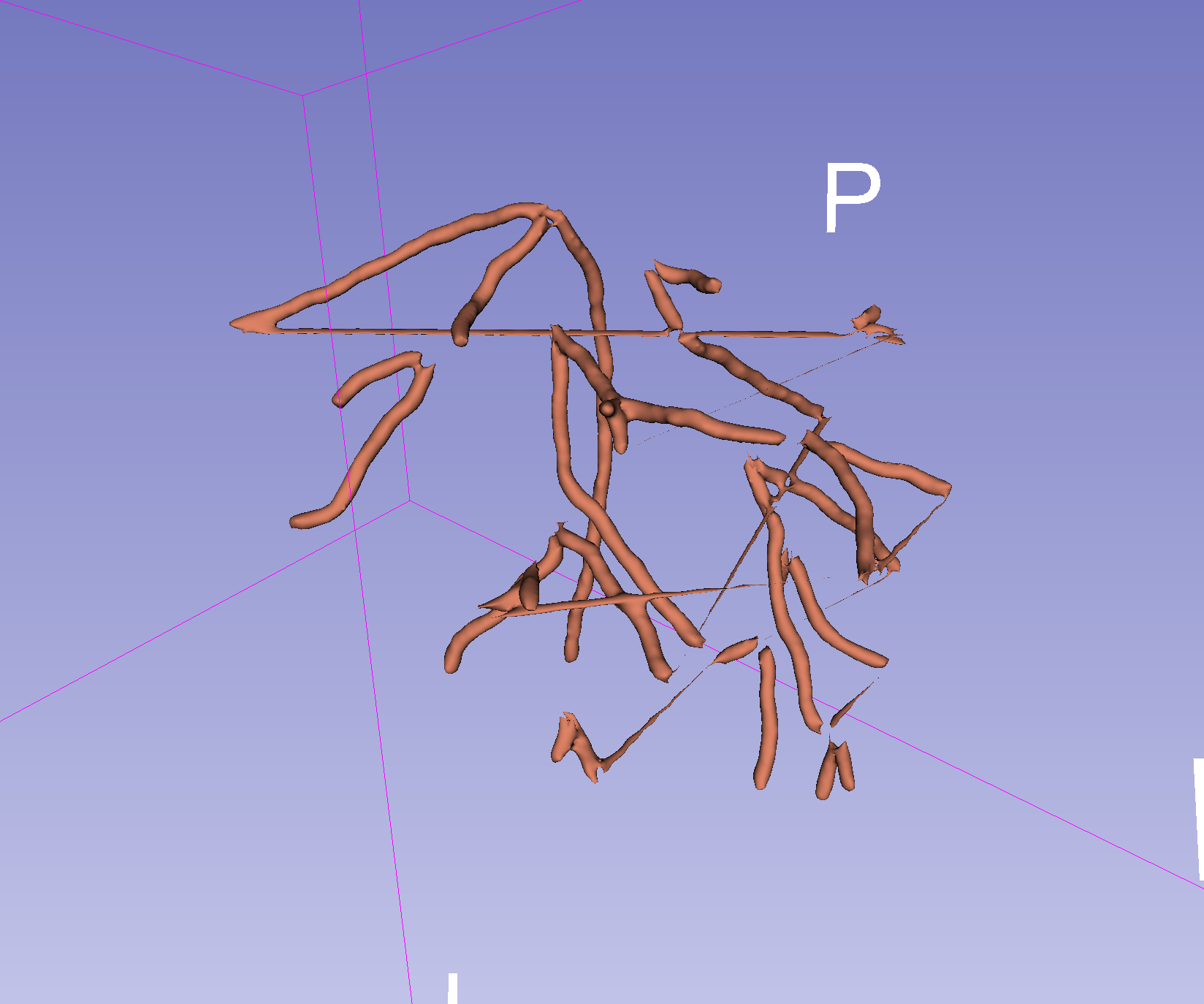
Any idea what could be causing this? The final output does change slightly when changing the value in tubeFilter.SetNumberOfSides().
My code now looks as below:
```auto
import vtk
from vtkmodules.vtkFiltersCore import vtkTubeFilter
from vtkmodules.vtkImagingStencil import (
vtkImageStencil,
vtkPolyDataToImageStencil
)
import nibabel as nib
import numpy as np
from nilearn.image import resample_img
def main():
main_dir = "path/to/root"
reference_image_path = main_dir + "seg.nii.gz" # To get output image size
vtk_path = main_dir + "centerline_model.vtk" # path to VMTK output
ref_proxy = nib.load(reference_image_path)
# Read VMTK output as polydata
reader = vtk.vtkPolyDataReader()
reader.SetFileName(vtk_path)
reader.Update()
# Use tube filter on the VMTK output to get tubes around the lines
tubeFilter = vtkTubeFilter()
tubeFilter.SetInputConnection(reader.GetOutputPort())
tubeFilter.SetRadius(2)
tubeFilter.SetNumberOfSides(10)
tubeFilter.Update()
# save the tube filter output
writer = vtk.vtkPolyDataWriter()
writer.SetInputConnection(tubeFilter.GetOutputPort())
writer.SetFileName(main_dir + "centerline_tube.vtk")
writer.Write()
# Have to rotate the polydata by 180 degrees to get the proper
# orientation and unity affine matrix in the output nifty
bounds = [0] * 6
tubeFilter.GetOutput().GetBounds(bounds)
angle = np.radians(180)
transform = vtk.vtkTransform()
matrix_vtk = vtk.vtkMatrix4x4()
matrix_vtk.DeepCopy((np.cos(angle), -np.sin(angle), 0, 0,
np.sin(angle), np.cos(angle), 0, 0,
0, 0, 1, 0,
0, 0, 0, 1))
transform.SetMatrix(matrix_vtk)
transform_filter = vtk.vtkTransformPolyDataFilter()
transform_filter.SetInputConnection(tubeFilter.GetOutputPort())
transform_filter.SetTransform(transform)
# write the transformed tube filter output (this does not have
# proper orientation but after conversion to nifty image the
# orientation is good)
writer = vtk.vtkPolyDataWriter()
writer.SetInputConnection(transform_filter.GetOutputPort())
writer.SetFileName(main_dir + "centerline_tube_trans.vtk")
writer.Write()
# prepare the binary image's voxel grid
whiteImage = vtk.vtkImageData()
spacing = [1, 1, 1] # desired volume spacing
whiteImage.SetSpacing(spacing)
# compute dimensions
bounds = [0] * 6
transform_filter.GetOutput().GetBounds(bounds)
dim = ref_proxy.shape
whiteImage.SetDimensions(dim)
whiteImage.SetExtent(0, dim[0] - 1, 0, dim[1] - 1, 0, dim[2] - 1)
origin = [bounds[0], bounds[2], bounds[4]]
whiteImage.SetOrigin(origin)
whiteImage.AllocateScalars(vtk.VTK_UNSIGNED_CHAR, 1)
# fill the image with foreground voxels:
inval = 1
outval = 0
count = whiteImage.GetNumberOfPoints()
for i in range(count):
whiteImage.GetPointData().GetScalars().SetTuple1(i, inval)
# Convert polydata to image stencil
pol2stenc = vtkPolyDataToImageStencil()
pol2stenc.SetInputConnection(transform_filter.GetOutputPort()) ##
pol2stenc.SetOutputOrigin(origin)
pol2stenc.SetOutputSpacing(spacing)
pol2stenc.SetOutputWholeExtent(whiteImage.GetExtent())
pol2stenc.Update()
# Cut the corresponding white image and set the background:
imgstenc = vtkImageStencil()
imgstenc.SetInputData(whiteImage)
imgstenc.SetStencilConnection(pol2stenc.GetOutputPort())
imgstenc.ReverseStencilOff()
imgstenc.SetBackgroundValue(outval)
imgstenc.Update()
# Save image as nifty file
writer = vtk.vtkNIFTIImageWriter()
writer.SetFileName(main_dir + "centerline_tube.nii.gz")
writer.SetInputConnection(imgstenc.GetOutputPort())
writer.Write()
# Optional: resample nifti with unit affine
final_image = nib.load(main_dir + "centerline_tube.nii.gz")
resampled_image = resample_img(final_image, target_affine=np.eye(4) * float(1), interpolation='nearest')
nib.save(resampled_image, main_dir + "centerline_tube_resampled.nii.gz")
if __name__ == ' __main__':
main()
```
---
### Author:  [@lassoan](https://discourse.vtk.org/u/lassoan)
#### Post date: [July 4, 2022, 5:52pm UTC](https://discourse.vtk.org/t/convert-vessel-centerline-from-vtkpolydata-to-a-nifti-binary-mask/8844/4 "2022-07-04T17:52:31Z")
One potential root cause of the issue is that you have forgot to enable capping in the tube filter, so the stencil cannot know what is inside and what is outside near the end of the tubes.
Artifacts are also expected at sharp edges or branching points due to self-intersection. `vtkTubeBender` might handle sharp edges better. For clean branching points you may need to use a modeling filter, such as those in VMTK (for example, `vtkvmtkPolyBallLine` should be able to provide a perfect, artifact-free labelmap for every centerline with varying radius and arbitrary branching).
---
### Author:  [@RomanStriker](https://discourse.vtk.org/u/RomanStriker)
#### Post date: [July 5, 2022, 4:32pm UTC](https://discourse.vtk.org/t/convert-vessel-centerline-from-vtkpolydata-to-a-nifti-binary-mask/8844/5 "2022-07-05T16:32:59Z")
I enabled capping and that got rid of sections emerging from the ends of branches, but there are still artifacts like missing branches of the tree. vtkTubeBender didn’t seem to help, I also tried smoothing the tube output but the end branches are still missing.
Now, I am trying to use the vtkvmtkPolyBallModeller() by following the [vmtkcenterlinemodeller](https://github.com/vmtk/vmtk/blob/master/vmtkScripts/vmtkcenterlinemodeller.py), but the output does not seem reasonable and the script takes around 25 mins to run. The intensity values in the output nifti file ranges from 19k to 99k. I am using the following code:
```auto
import vtk
from vmtk import vtkvmtk
from vtk.util import numpy_support
import numpy as np
def main():
main_dir = "/home/roman/Downloads/test3/2/"
reference_image_path = main_dir + "seg.nii.gz" # To get output image size
vtk_path = main_dir + "centerline_model.vtk" # path to VMTK output
# Read image
nifti_reader = vtk.vtkNIFTIImageReader()
nifti_reader.SetFileName(reference_image_path)
nifti_reader.Update()
nifti_image = nifti_reader.GetOutput()
# Read VMTK output as polydata
reader = vtk.vtkPolyDataReader()
reader.SetFileName(vtk_path)
reader.Update()
centerline_polydata = reader.GetOutput()
radii_n = np.ones(centerline_polydata.GetNumberOfPoints())
radii_vtk = numpy_support.numpy_to_vtk(num_array=radii_n.ravel(), deep=True, array_type=vtk.VTK_DOUBLE)
radii_vtk.SetName("UnitRadius")
centerline_polydata.GetPointData().AddArray(radii_vtk) # Adding additional array for fixed radius
modeller = vtkvmtk.vtkvmtkPolyBallModeller()
modeller.SetInputData(centerline_polydata)
modeller.SetRadiusArrayName('UnitRadius')
modeller.SetReferenceImage(nifti_image)
modeller.UsePolyBallLineOn()
modeller.SetNegateFunction(0)
modeller.Update()
# Save image as nifty file
writer = vtk.vtkNIFTIImageWriter()
writer.SetFileName(main_dir + "centerline_tube.nii.gz")
writer.SetInputConnection(modeller.GetOutputPort())
writer.Write()
if __name__ == ' __main__':
main()
```
I would appreciate anymore tips. Thanks.
---
### Author:  [@dgobbi](https://discourse.vtk.org/u/dgobbi)
#### Post date: [July 5, 2022, 9:01pm UTC](https://discourse.vtk.org/t/convert-vessel-centerline-from-vtkpolydata-to-a-nifti-binary-mask/8844/6 "2022-07-05T21:01:41Z")
Although it won’t be very fast, you can try vtkImplicitPolyDataDistance. Use the vessel tree as input. Feed the output into vtkImplicitFunctionToImageStencil. Use SetThreshold(2.0) to select a 2 mm radius for binarization. Also use ReverseStencilOn() when you apply vtkImageStencil to get the image.
---
### Author:  [@dgobbi](https://discourse.vtk.org/u/dgobbi)
#### Post date: [July 5, 2022, 9:19pm UTC](https://discourse.vtk.org/t/convert-vessel-centerline-from-vtkpolydata-to-a-nifti-binary-mask/8844/7 "2022-07-05T21:19:31Z")
Actually [vtkImplicitModeller](https://vtk.org/doc/nightly/html/classvtkImplicitModeller.html) might be able to do this more efficiently than vtkImplicitPolyDataDistance. There are quite a few examples, none specific to vessels, but there doesn’t seem to be any reason why it wouldn’t work.
---
### Author:  [@lassoan](https://discourse.vtk.org/u/lassoan)
#### Post date: [July 6, 2022, 1:10am UTC](https://discourse.vtk.org/t/convert-vessel-centerline-from-vtkpolydata-to-a-nifti-binary-mask/8844/8 "2022-07-06T01:10:09Z")
The built-in VTK modelers should work well, but I think they only support uniform radius. VMTK can generate the centerline with varying radius. @mau_igna_06 has just used VMTK for this recently. I think he ended up using vtkvmtkPolyBallLine.
---
### Author:  [@mau\_igna\_06](https://discourse.vtk.org/u/mau_igna_06)
#### Post date: [July 6, 2022, 10:46am UTC](https://discourse.vtk.org/t/convert-vessel-centerline-from-vtkpolydata-to-a-nifti-binary-mask/8844/9 "2022-07-06T10:46:05Z")
Yes. That’s true
---
### Author:  [@HuiLin0220](https://discourse.vtk.org/u/HuiLin0220)
#### Post date: [April 18, 2023, 2:30pm UTC](https://discourse.vtk.org/t/convert-vessel-centerline-from-vtkpolydata-to-a-nifti-binary-mask/8844/10 "2023-04-18T14:30:43Z")
Hi, I have a similar converting problem: I have a Left atrium (LA) in a VTK format. LA is part of a heart. I have a heart MRI scan (a dicom series), and the size is h_w_z. I want to convert the VTK file of LA to a 3D binary mask that can map MRIs exactly. But I am sure how to set up the origins, spacings, etc. Since there are three coordinate systems: patient, Dicom, and VTk system. Am I right? Could you help me with this problem? Thank you so much!
---
### Author:  [@dgobbi](https://discourse.vtk.org/u/dgobbi)
#### Post date: [April 18, 2023, 2:43pm UTC](https://discourse.vtk.org/t/convert-vessel-centerline-from-vtkpolydata-to-a-nifti-binary-mask/8844/11 "2023-04-18T14:43:23Z")
Hi Hui, it is better if you open a new topic for your question. Because even though it is related, it does not fit the description “Convert vessel centerline from vtkPolyData to a Nifti binary mask”.
---
### Author:  [@HuiLin0220](https://discourse.vtk.org/u/HuiLin0220)
#### Post date: [April 18, 2023, 4:25pm UTC](https://discourse.vtk.org/t/convert-vessel-centerline-from-vtkpolydata-to-a-nifti-binary-mask/8844/12 "2023-04-18T16:25:21Z")
Sure, I am posting one