writer;
writer->SetFileName("selection.png");
writer->SetInputConnection(stencilToImage->GetOutputPort());
writer->Write();
```
---
### Author:  [@AndreAhmed](https://discourse.vtk.org/u/AndreAhmed)
#### Post date: [February 24, 2023, 12:02pm UTC](https://discourse.vtk.org/t/converting-closed-surface-to-binary-image/10780/3 "2023-02-24T12:02:07Z")
@lassoan
Hello I hope you are doing fine. Can you help me with that issue please ?
---
### Author:  [@AndreAhmed](https://discourse.vtk.org/u/AndreAhmed)
#### Post date: [February 24, 2023, 12:12pm UTC](https://discourse.vtk.org/t/converting-closed-surface-to-binary-image/10780/4 "2023-02-24T12:12:39Z")
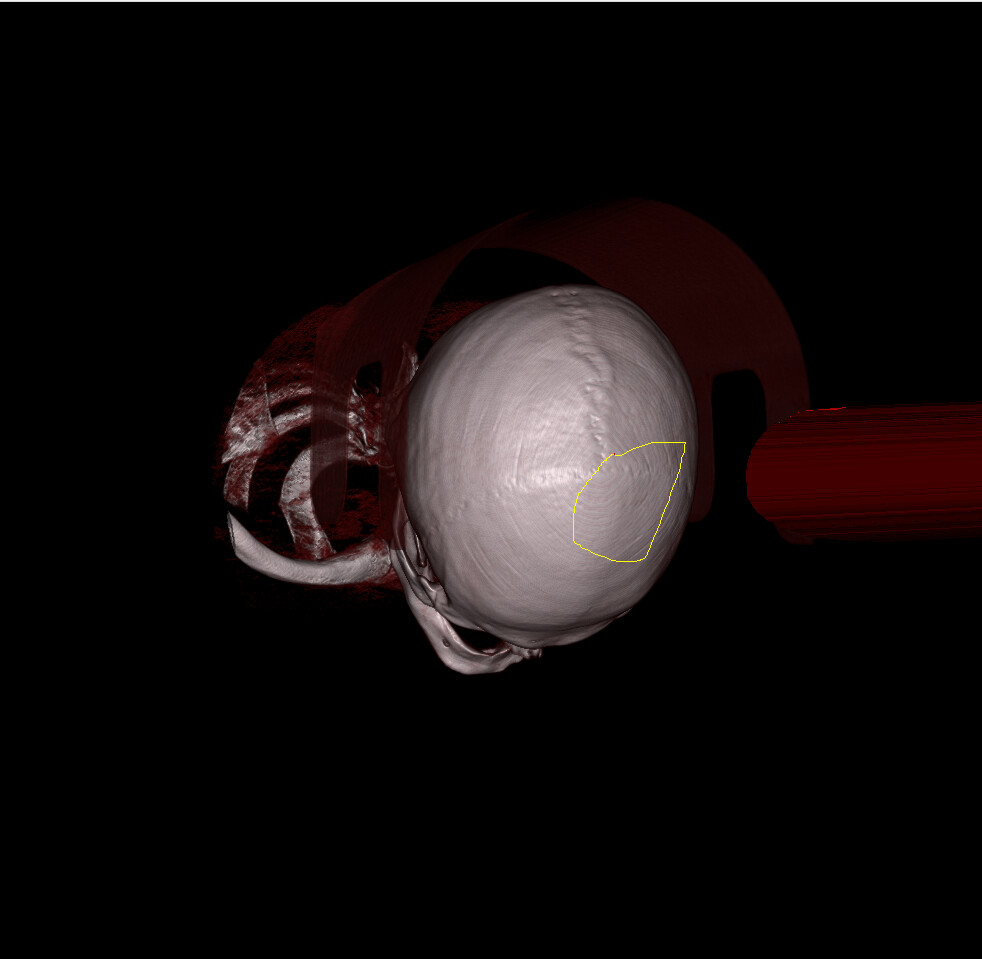
I also noticed something weird, when I constructed the closed\_surface polydata, it’s drawen as 3D Lasso, but when I change the zooming of camera, or rotate the scene, the closed surface gets distored, and gets disappearing out of the scene
---
### Author:  [@lassoan](https://discourse.vtk.org/u/lassoan)
#### Post date: [February 24, 2023, 12:18pm UTC](https://discourse.vtk.org/t/converting-closed-surface-to-binary-image/10780/5 "2023-02-24T12:18:08Z")
You can use the image stencil to modify the
> [@AndreAhmed](#):
>
> how do I color specific voxels that are under the Lasso (Selected by it )
See [how to clip vtkImageData with the specified mask? - #2 by zhang-qiang-github](https://discourse.vtk.org/t/how-to-clip-vtkimagedata-with-the-specified-mask/8352/2)
---
### Author:  [@AndreAhmed](https://discourse.vtk.org/u/AndreAhmed)
#### Post date: [February 24, 2023, 12:19pm UTC](https://discourse.vtk.org/t/converting-closed-surface-to-binary-image/10780/6 "2023-02-24T12:19:22Z")
@lassoan
Thanks for your quick reply. But can you give me an intrepretation to the above problem of the distorion and disappearing?
2. How the mask under the lasso should be created ?
Sorry about disturbing you
---
### Author:  [@AndreAhmed](https://discourse.vtk.org/u/AndreAhmed)
#### Post date: [February 24, 2023, 12:55pm UTC](https://discourse.vtk.org/t/converting-closed-surface-to-binary-image/10780/7 "2023-02-24T12:55:15Z")
@lassoan Hello Hope you’re doing fine.
This is the current pipeline, but all I get is black image that is written to disc. Still I have problem of distortionn and disappearing of 3D Lasso while moving the camera.
```auto
vtkNew closedSurfacePolyData;
closedSurfacePolyData->SetPoints(closedSurfacePoints.GetPointer());
closedSurfacePolyData->SetStrips(closedSurfaceStrips.GetPointer());
closedSurfacePolyData->SetPolys(closedSurfacePolys.GetPointer());
this->BrushPolyDataNormals = vtkSmartPointer::New();
this->BrushPolyDataNormals->AutoOrientNormalsOn();
this->BrushPolyDataNormals->SetInputData(closedSurfacePolyData.GetPointer());
this->BrushPolyDataNormals->Update();
this->WorldToModifierLabelmapIjkTransformer = vtkSmartPointer::New();
this->WorldToModifierLabelmapIjkTransform = vtkSmartPointer::New();
this->WorldToModifierLabelmapIjkTransformer->SetTransform(this->WorldToModifierLabelmapIjkTransform);
this->WorldToModifierLabelmapIjkTransformer->SetInputConnection(this->BrushPolyDataNormals->GetOutputPort());
this->BrushPolyDataToStencil = vtkSmartPointer::New();
this->BrushPolyDataToStencil->SetOutputSpacing(mVolume->GetXSpacing(), mVolume->GetYSpacing(), mVolume->GetZSpacing());
this->BrushPolyDataToStencil->SetOutputOrigin(mVolume->GetOrigin().x(), mVolume->GetOrigin().y(), mVolume->GetOrigin().z());
this->BrushPolyDataToStencil->SetOutputWholeExtent(0, mVolume->GetWidth(), 0, mVolume->GetHeight(), 0, mVolume->GetDepth());
this->BrushPolyDataToStencil->SetInputConnection(this->WorldToModifierLabelmapIjkTransformer->GetOutputPort());
this->BrushPolyDataToStencil->Update();
vtkNew stencilToImage;
stencilToImage->SetInputConnection(this->BrushPolyDataToStencil->GetOutputPort());
stencilToImage->SetInsideValue(0);
stencilToImage->SetOutsideValue(1);
stencilToImage->Update();
vtkNew imageImport;
imageImport->SetOutput(stencilToImage->GetOutput());
unsigned int xSize = mVolume->GetXSize();
unsigned int ySize = mVolume->GetYSize();
unsigned int zSize = mVolume->GetZSize();
auto origin = mVolume->GetOrigin();
double spacing[3]{
mVolume->GetXSpacing() * 10.0,
mVolume->GetYSpacing() * 10.0,
mVolume->GetZSpacing() * 10.0
};
imageImport->SetDataSpacing(spacing);
imageImport->SetDataOrigin(
origin.x() * 10.0,
origin.y() * 10.0,
origin.z() * 10.0
);
imageImport->SetDataExtent(
0, xSize - 1,
0, ySize - 1,
0, zSize - 1);
imageImport->SetWholeExtent(
0, xSize - 1,
0, ySize - 1,
0, zSize - 1);
short* data = mVolume->GetData().get();
imageImport->SetDataScalarTypeToUnsignedShort() ;
imageImport->SetImportVoidPointer(data);
imageImport->Update();
```
---
### Author:  [@AndreAhmed](https://discourse.vtk.org/u/AndreAhmed)
#### Post date: [February 24, 2023, 1:29pm UTC](https://discourse.vtk.org/t/converting-closed-surface-to-binary-image/10780/8 "2023-02-24T13:29:11Z")
@lassoan
Here is an image of what I mean, if you notice, the RED cone is the lasso. After I rotate the camera it appears like that, and it seems its not projected on the volume itself.
---
### Author:  [@AndreAhmed](https://discourse.vtk.org/u/AndreAhmed)
#### Post date: [February 24, 2023, 6:08pm UTC](https://discourse.vtk.org/t/converting-closed-surface-to-binary-image/10780/9 "2023-02-24T18:08:57Z")
@lassoan I hope you can help me 🙂
---
### Author:  [@AndreAhmed](https://discourse.vtk.org/u/AndreAhmed)
#### Post date: [February 24, 2023, 6:29pm UTC](https://discourse.vtk.org/t/converting-closed-surface-to-binary-image/10780/10 "2023-02-24T18:29:44Z")
This is the current pipeline, getting volume data, and overwrite it. closedSurface, is lasso3D from the code in slicer.[Slicer/qSlicerSegmentEditorScissorsEffect.cxx at 83a84a0f72baa0fcd1bb3653cedae7b02ca3bd1b · Slicer/Slicer · GitHub](https://github.com/Slicer/Slicer/blob/83a84a0f72baa0fcd1bb3653cedae7b02ca3bd1b/Modules/Loadable/Segmentations/EditorEffects/qSlicerSegmentEditorScissorsEffect.cxx#L544-L866)
```auto
finalPolyData->SetPoints(closedSurfacePoints.GetPointer());
finalPolyData->SetStrips(closedSurfaceStrips.GetPointer());
finalPolyData->SetPolys(closedSurfacePolys.GetPointer());
vtkNew whiteImage;
double bounds[6];
finalPolyData->GetBounds(bounds);
double spacing[3]; // desired volume spacing
spacing[0] = 0.5;
spacing[1] = 0.5;
spacing[2] = 0.5;
whiteImage->SetSpacing(spacing);
// compute dimensions
int dim[3];
for (int i = 0; i < 3; i++)
{
dim[i] = static_cast(
ceil((bounds[i * 2 + 1] - bounds[i * 2]) / spacing[i]));
}
whiteImage->SetDimensions(dim);
whiteImage->SetExtent(0, dim[0] - 1, 0, dim[1] - 1, 0, dim[2] - 1);
double origin[3];
origin[0] = bounds[0] + spacing[0] / 2;
origin[1] = bounds[2] + spacing[1] / 2;
origin[2] = bounds[4] + spacing[2] / 2;
whiteImage->SetOrigin(origin);
whiteImage->AllocateScalars(VTK_UNSIGNED_CHAR, 1);
// fill the image with foreground voxels:
unsigned char inval = 255;
unsigned char outval = 0;
vtkIdType count = whiteImage->GetNumberOfPoints();
for (vtkIdType i = 0; i < count; ++i)
{
whiteImage->GetPointData()->GetScalars()->SetTuple1(i, inval);
}
// polygonal data --> image stencil:
vtkNew pol2stenc;
pol2stenc->SetInputData(finalPolyData);
pol2stenc->SetOutputOrigin(origin);
pol2stenc->SetOutputSpacing(spacing);
pol2stenc->SetOutputWholeExtent(whiteImage->GetExtent());
pol2stenc->Update();
// cut the corresponding white image and set the background:
imgstenc->SetInputData(whiteImage);
imgstenc->SetStencilConnection(pol2stenc->GetOutputPort());
imgstenc->ReverseStencilOff();
imgstenc->SetBackgroundValue(outval);
imgstenc->Update();
//imageMapper->SetInputConnection(imgstenc->GetOutputPort());
vtkImageData* image = vtkImageData::New();
//GetStencilDataAsImageData(imgstenc->GetStencil(), image);
short* labelData = mVolume->GetData().get();
//#pragma omp parallel for
for (int z = 0; z < mVolume->GetDepth(); z++)
{
for (int y = 0; y < mVolume->GetHeight(); y++)
{
for (int x = 0; x < mVolume->GetWidth(); x++)
{
if (imgstenc->GetStencil()->IsInside(x, y, z))
{
int image_linear_index = z * mVolume->GetWidth() * mVolume->GetHeight() + y * mVolume->GetWidth() + x;
labelData[image_linear_index] = 0;
}
}
}
}
```