# Could VTK be used to re-construct colorful 3D using colorful CT images?
**URL:** https://discourse.vtk.org/t/could-vtk-be-used-to-re-construct-colorful-3d-using-colorful-ct-images/4605
**Category:** Development
**Created:** [November 9, 2020, 1:08am UTC](https://discourse.vtk.org/t/could-vtk-be-used-to-re-construct-colorful-3d-using-colorful-ct-images/4605 "2020-11-09T01:08:20Z")
**Posts on this page:** 14
**Page:** 1
### Author:  [@ardeal](https://discourse.vtk.org/u/ardeal)
#### Post date: [November 9, 2020, 1:08am UTC](https://discourse.vtk.org/t/could-vtk-be-used-to-re-construct-colorful-3d-using-colorful-ct-images/4605/1 "2020-11-09T01:08:20Z")
Hi,
There are 300 colorful CT slice images. Could I use VTK to re-construct colorful 3D using those colorful CT images? Is there any example code for my reference?
Thanks and Best Regards,
Ardeal
---
### Author:  [@lassoan](https://discourse.vtk.org/u/lassoan)
#### Post date: [November 9, 2020, 1:47am UTC](https://discourse.vtk.org/t/could-vtk-be-used-to-re-construct-colorful-3d-using-colorful-ct-images/4605/2 "2020-11-09T01:47:32Z")
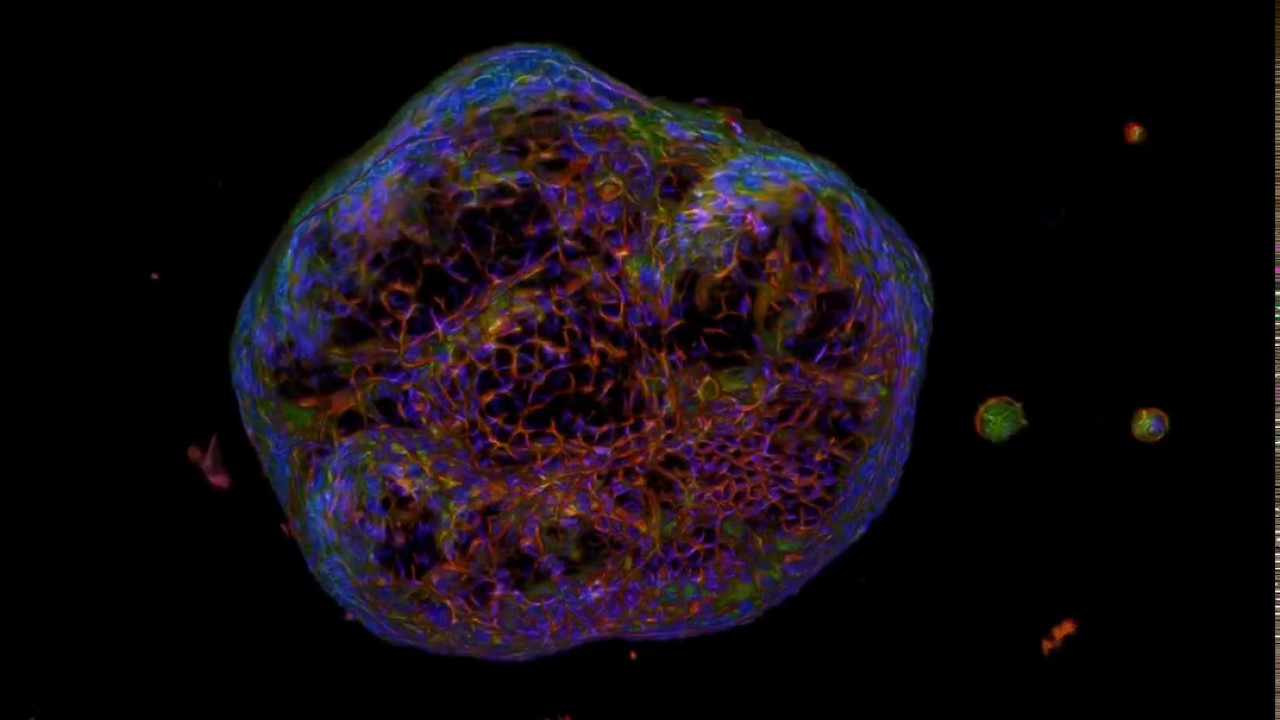
Yes, VTK can render beautiful 4D (3D + color) RGB volumes. You can use any of the volume rendering examples, in the volume property set scalar opacity transfer function as usual, but instead of setting a color transfer function, set `IndependentComponents` to False. See this example:
[ ](https://www.youtube.com/watch?v=o5I_XWkm1nk)
If you want to use a GUI to set up volume rendering then you can use 3D Slicer as explained in this post:
> **[Retain Image Color in Volume Rendering](https://discourse.slicer.org/t/retain-image-color-in-volume-rendering/12294/10?u=lassoan)**
>
> I’ve downloaded your images and used this script to convert it to add an alpha channel and enable direct RGBA volume rendering (just copy-paste it into Slicer’s Python console after you loaded your data set): # Find loaded vector volume...
---
### Author:  [@ardeal](https://discourse.vtk.org/u/ardeal)
#### Post date: [November 9, 2020, 2:18am UTC](https://discourse.vtk.org/t/could-vtk-be-used-to-re-construct-colorful-3d-using-colorful-ct-images/4605/3 "2020-11-09T02:18:09Z")
Hi,
Many thanks for your reply!
Is there any complete example about the 4D(3D + color) volumes?
I am sorry that I am not good at VTK, especially not good at 4D using VTK.
---
### Author:  [@lassoan](https://discourse.vtk.org/u/lassoan)
#### Post date: [November 9, 2020, 6:15pm UTC](https://discourse.vtk.org/t/could-vtk-be-used-to-re-construct-colorful-3d-using-colorful-ct-images/4605/4 "2020-11-09T18:15:33Z")
There are a number of tests that shows how IndependentComponents=false can be used. If you create a small standalone example then it would be great if you could contribute to the [VTK examples site](https://gitlab.kitware.com/vtk/vtk-examples).
Since you work with CT images, it could make sense to use VTK in Slicer’s Python environment, because then you can get nice volume rendering using a few lines of Python code and/or set it up or adjust parameters using interactive GUI (if you need help using Slicer then post on the [Slicer forum](https://discourse.slicer.org/)).
---
### Author:  [@ardeal](https://discourse.vtk.org/u/ardeal)
#### Post date: [November 10, 2020, 12:43am UTC](https://discourse.vtk.org/t/could-vtk-be-used-to-re-construct-colorful-3d-using-colorful-ct-images/4605/5 "2020-11-10T00:43:16Z")
Hi,
I could run 3D reconstruction, and my test code is on github:[https://github.com/ardeal/vtk\_4d\_ct](https://github.com/ardeal/vtk_4d_ct).
The upper code only works on 3D.
I am very glad to contribute to VTK examples site. However the upper code doesn’t work on 4D.
Could you help to tell me how to change the upper code to make it work on 4D(colorful CT slice images)?
Once it work, I will upload it to VTK examples site.
Thanks and Best Regards,
Ardeal
---
### Author:  [@lassoan](https://discourse.vtk.org/u/lassoan)
#### Post date: [November 10, 2020, 12:54am UTC](https://discourse.vtk.org/t/could-vtk-be-used-to-re-construct-colorful-3d-using-colorful-ct-images/4605/6 "2020-11-10T00:54:17Z")
1. The single most-important thing for rendering RGB volumes is to set IndependentComponents to false. You don’t set that in your code.
2. Probably it is theoretically possible to save 3D RGB color volume in DICOM format but such images would be extremely rare. What software did produce the RGB volume (the “300 colorful CT slice images”)? What image format it is stored in?
---
### Author:  [@ardeal](https://discourse.vtk.org/u/ardeal)
#### Post date: [November 10, 2020, 1:03am UTC](https://discourse.vtk.org/t/could-vtk-be-used-to-re-construct-colorful-3d-using-colorful-ct-images/4605/7 "2020-11-10T01:03:56Z")
I don’t know where to set IndependentComponents = flase. Could you help to change the code directly?
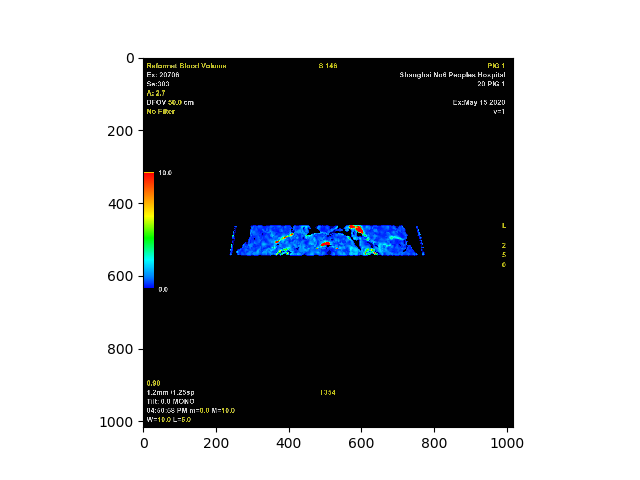
I use the CT to generate gray images which are then used to generate colorful images. The generated images are dicom format. I could read and display the colorful dicom images using pydicom successfully.
By the way, if Slicer you mentioned works for my colorful images, I am willing to try it. however I could not access it. Perhaps, there is something wrong with my network.
The following image is the dicom file plotted in pydicom:
---
### Author:  [@lassoan](https://discourse.vtk.org/u/lassoan)
#### Post date: [November 10, 2020, 2:45am UTC](https://discourse.vtk.org/t/could-vtk-be-used-to-re-construct-colorful-3d-using-colorful-ct-images/4605/8 "2020-11-10T02:45:18Z")
This looks like a plain scalar volume displayed with a color look-up-table. Since this is not a vector volume (a voxel is not RGB triplet but a simple scalar value), you can use any VTK medical volume rendering examples, as is, without disabling IndependentComponents. You can set up the blue-green-red coloring in the color transfer function.
---
### Author:  [@ardeal](https://discourse.vtk.org/u/ardeal)
#### Post date: [November 10, 2020, 2:54am UTC](https://discourse.vtk.org/t/could-vtk-be-used-to-re-construct-colorful-3d-using-colorful-ct-images/4605/9 "2020-11-10T02:54:11Z")
Hi,
No matter what the dicom file is, I would like to know how to set IndependentComponents=false.
in my code: [https://github.com/ardeal/vtk\_4d\_ct](https://github.com/ardeal/vtk_4d_ct), Could you tell me where and how to set this property?
I pasted the code as follows:
```
int main(int argc, char *argv[])
```
{
```
const char * dirname = "D:\\aaa\\dicom\\1data\\PA0\\ST0\\SE1";
int clip = 0;
//------------------------------- Read DICOM images
vtkSmartPointer reader = vtkSmartPointer::New();
vtkSmartPointer input = vtkSmartPointer::New();
vtkSmartPointer dicomReader = vtkSmartPointer::New();
dicomReader->SetDirectoryName(dirname);
dicomReader->Update();
input = dicomReader->GetOutput();
reader = dicomReader;
//------------------------------- Set the colors.
vtkSmartPointer colors = vtkSmartPointer::New();
std::array skinColor{ { 255, 125, 64 } };
colors->SetColor("SkinColor", skinColor.data());
std::array bkg{ { 51, 77, 102, 255 } };
colors->SetColor("BkgColor", bkg.data());
//------------------------------- Skin
// An isosurface, or contour value of 500 is known to correspond to the skin of the patient.
// The triangle stripper is used to create triangle strips from the isosurface; these render much faster on many systems.
vtkSmartPointer skinExtractor = vtkSmartPointer::New();
skinExtractor->SetInputConnection(reader->GetOutputPort());
skinExtractor->SetValue(0, 100);
vtkSmartPointer skinStripper = vtkSmartPointer::New();
skinStripper->SetInputConnection(skinExtractor->GetOutputPort());
vtkSmartPointer skinMapper = vtkSmartPointer::New();
skinMapper->SetInputConnection(skinStripper->GetOutputPort());
skinMapper->ScalarVisibilityOff();
vtkSmartPointer skin = vtkSmartPointer::New();
skin->SetMapper(skinMapper);
skin->GetProperty()->SetDiffuseColor(colors->GetColor3d("SkinColor").GetData());
skin->GetProperty()->SetSpecular(.3);
skin->GetProperty()->SetSpecularPower(20);
skin->GetProperty()->SetOpacity(.5);
```
#if 1
//------------------------------- Bone
// An isosurface, or contour value of 1150 is known to correspond to the bone of the patient.
// The triangle stripper is used to create triangle strips from the isosurface; these render much faster on may systems.
vtkSmartPointer boneExtractor = vtkSmartPointer::New();
boneExtractor-\>SetInputConnection(reader-\>GetOutputPort());
boneExtractor-\>SetValue(0, 300);
```
vtkSmartPointer boneStripper = vtkSmartPointer::New();
boneStripper->SetInputConnection(boneExtractor->GetOutputPort());
vtkSmartPointer boneMapper = vtkSmartPointer::New();
boneMapper->SetInputConnection(boneStripper->GetOutputPort());
boneMapper->ScalarVisibilityOff();
vtkSmartPointer bone = vtkSmartPointer::New();
bone->SetMapper(boneMapper);
bone->GetProperty()->SetDiffuseColor(colors->GetColor3d("Ivory").GetData());
```
#endif
```
//------------------------------- Outline // An outline provides context around the data.
vtkSmartPointer outlineData = vtkSmartPointer::New();
outlineData->SetInputConnection(reader->GetOutputPort());
vtkSmartPointer mapOutline = vtkSmartPointer::New();
mapOutline->SetInputConnection(outlineData->GetOutputPort());
vtkSmartPointer outline = vtkSmartPointer::New();
outline->SetMapper(mapOutline);
outline->GetProperty()->SetColor(colors->GetColor3d("Black").GetData());
//------------------------------- camera
// It is convenient to create an initial view of the data. The FocalPoint and Position form a vector direction. Later on (ResetCamera() method)
// this vector is used to position the camera to look at the data in this direction.
vtkSmartPointer aCamera = vtkSmartPointer::New();
aCamera->SetViewUp(0, 0, -1);
aCamera->SetPosition(0, -1, 0);
aCamera->SetFocalPoint(0, 0, 0);
aCamera->ComputeViewPlaneNormal();
aCamera->Azimuth(30.0);
aCamera->Elevation(30.0);
//------------------------------- create winwow
// Create the renderer, the render window, and the interactor.
// The renderer draws into the render window, the interactor enables mouse- and keyboard-based interaction with the data within the render window.
vtkSmartPointer aRenderer = vtkSmartPointer::New();
vtkSmartPointer renWin = vtkSmartPointer::New();
renWin->AddRenderer(aRenderer);
vtkSmartPointer iren = vtkSmartPointer::New();
iren->SetRenderWindow(renWin);
//------------------------------- display
// Actors are added to the renderer. An initial camera view is created. The Dolly() method moves the camera towards the FocalPoint, thereby enlarging the image.
//aRenderer->AddActor(outline);
//aRenderer->AddActor(skin);
aRenderer->AddActor(bone);
aRenderer->SetActiveCamera(aCamera);
aRenderer->ResetCamera();
aCamera->Dolly(1.5);
// Set a background color for the renderer and set the size of the render window (expressed in pixels).
aRenderer->SetBackground(colors->GetColor3d("BkgColor").GetData());
renWin->SetSize(640, 480);
// Note that when camera movement occurs (as it does in the Dolly() method), the clipping planes often need adjusting. Clipping planes consist of two planes: near and far along the view direction.
// The near plane clips out objects in front of the plane; the far plane clips out objects behind the plane. This way only what is drawn between the planes is actually rendered.
aRenderer->ResetCameraClippingRange();
// Initialize the event loop and then start it.
renWin->Render();
iren->Initialize();
iren->Start();
return EXIT_SUCCESS;
```
}
---
### Author:  [@lassoan](https://discourse.vtk.org/u/lassoan)
#### Post date: [November 10, 2020, 2:57am UTC](https://discourse.vtk.org/t/could-vtk-be-used-to-re-construct-colorful-3d-using-colorful-ct-images/4605/10 "2020-11-10T02:57:29Z")
IndependentComponents can be enabled/disabled in [volume property object](https://vtk.org/doc/nightly/html/classvtkVolumeProperty.html#a2534a6dc500be42c9a842d405c4ee0bb).
---
### Author:  [@ardeal](https://discourse.vtk.org/u/ardeal)
#### Post date: [November 10, 2020, 3:03am UTC](https://discourse.vtk.org/t/could-vtk-be-used-to-re-construct-colorful-3d-using-colorful-ct-images/4605/11 "2020-11-10T03:03:59Z")
In my code, there isn’t such a property.
the objects defined in my code are:
```
vtkSmartPointer skinExtractor = vtkSmartPointer::New();
vtkSmartPointer skinStripper = vtkSmartPointer::New();
vtkSmartPointer skinMapper = vtkSmartPointer::New();
vtkSmartPointer skin = vtkSmartPointer::New();
```
Which should have this property?
---
### Author:  [@Gresliebear](https://discourse.vtk.org/u/Gresliebear)
#### Post date: [November 10, 2020, 8:01pm UTC](https://discourse.vtk.org/t/could-vtk-be-used-to-re-construct-colorful-3d-using-colorful-ct-images/4605/12 "2020-11-10T20:01:41Z")
> [@Numpy 3D array into VTK data types for volume rendering?](https://discourse.vtk.org/t/numpy-3d-array-into-vtk-data-types-for-volume-rendering/3455):
>
> Hi, everyone I am attempting to convert 3D numpy array into volume rendering function in pythonVTK or C++ code of VTK. Data type conversion of numpy array data into 3D volumes is an issue for me, I cant seem to find an alternative to file formats or conversion to data file formats of VTK itself.
We have tried to volume render CT scans or DICOM files by going directly to numpy arrays and using pyvista. pyvista is python wrappings on top of C++ of VTK. Long term I think its better just learn C++ and make it work but for prototyping its possibly to accomplish.
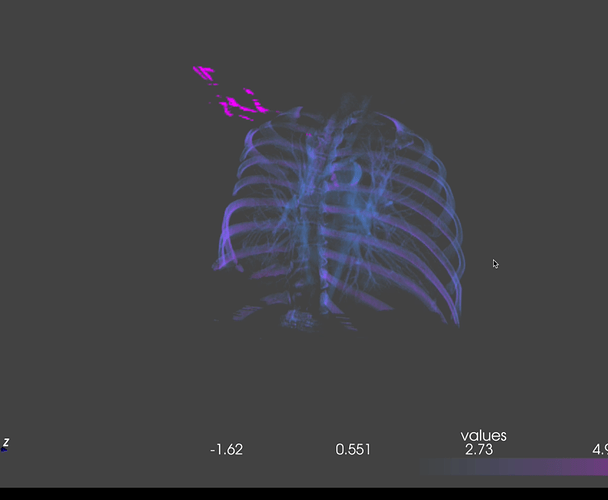
We have had success but there is still a lot of development required, I think to make the conversion of CT scans to 3D objects.
```
def displayer(numpy_mask):
data_matrix = numpy_mask
opacity = [0, 0, 0, 4, 8, 0, 0]
data = pv.wrap(data_matrix)
pv.set_plot_theme("night")
#print(type(data)) #pyvista.core.grid.UniformGrid'
#print(dir(data)) #x = pickle.dumps(data) #print(x)
#print(BytesIO(data))
return data
```
if you ever want to talk [lesliemwubbel@gmail.com](mailto:lesliemwubbel@gmail.com)
---
### Author:  [@ardeal](https://discourse.vtk.org/u/ardeal)
#### Post date: [November 11, 2020, 1:12am UTC](https://discourse.vtk.org/t/could-vtk-be-used-to-re-construct-colorful-3d-using-colorful-ct-images/4605/13 "2020-11-11T01:12:39Z")
Hi,
I don’t understand what you mean. I would like to re-construct 4D using colorful CT slice images. Do you mean that VTK doesn’t support re-construct 4D using colorful CT slice images?
You are going to re-construct 4D using the pyvista which is on the top of C++ of VTK. is my understanding correct?
---
### Author:  [@Gresliebear](https://discourse.vtk.org/u/Gresliebear)
#### Post date: [November 11, 2020, 3:06pm UTC](https://discourse.vtk.org/t/could-vtk-be-used-to-re-construct-colorful-3d-using-colorful-ct-images/4605/14 "2020-11-11T15:06:50Z")
yes what I am saying is it’s possible to create a 4D color CT slice images. like you can totally do it but I was recommending pyvista maybe could be a solution to get what you want.
to your question yes that is what I am saying