# Create Depth-Map for vtkDepthImageToPointCloud
**URL:** https://discourse.vtk.org/t/create-depth-map-for-vtkdepthimagetopointcloud/11380
**Category:** Development
**Created:** [May 4, 2023, 8:18pm UTC](https://discourse.vtk.org/t/create-depth-map-for-vtkdepthimagetopointcloud/11380 "2023-05-04T20:18:11Z")
**Posts on this page:** 9
**Page:** 1
### Author:  [@Alejandro\_Rugero](https://discourse.vtk.org/u/Alejandro_Rugero)
#### Post date: [May 4, 2023, 8:18pm UTC](https://discourse.vtk.org/t/create-depth-map-for-vtkdepthimagetopointcloud/11380/1 "2023-05-04T20:18:11Z")
Hi, good morning, I’m trying to make a Depth-Map for Create Depth-Map for vtkDepthImageToPointCloud, for 3d reconstruction of jpeg or png images, but I can’t get the Depth-Map image to work as it should, I don’t know if I’m doing it right And I’m very frustrated because I can’t find how to do it, the image that I’m trying to create looks white and of course the 3d model is distorted, I would really appreciate some help, please.
```auto
std::string filename = "img/" + std::to_string(i) + ".jpg";
reader->SetFileName(filename.c_str());
reader->Update();
cast->SetInputData(reader->GetOutput());
cast->SetSplitModeToSlab();
cast->SetOutputScalarTypeToFloat();
cast->Update();
gaussianSmooth->SetInputData(cast->GetOutput());
gaussianSmooth->SetDimensionality(1);
gaussianSmooth->SetStandardDeviation(2.0);
gaussianSmooth->SetSplitModeToSlab();
const double derivations[3]{0.0, 30.0, 100.0};
gaussianSmooth->SetStandardDeviations(derivations);
gaussianSmooth->Update();
shiftScale->SetInputData(gaussianSmooth->GetOutput());
shiftScale->SetOutputScalarTypeToChar();
shiftScale->SetShift(0.0);
shiftScale->SetScale(255.0);
shiftScale->SetSplitModeToSlab();
shiftScale->Update();
depthImageToPointCloud->SetInputData(shiftScale->GetOutput());
depthImageToPointCloud->SetCamera(camera);
depthImageToPointCloud->CullNearPointsOn();
depthImageToPointCloud->CullFarPointsOn();
depthImageToPointCloud->Update();
```
---
### Author:  [@Paulo\_Carvalho](https://discourse.vtk.org/u/Paulo_Carvalho)
#### Post date: [May 5, 2023, 10:21pm UTC](https://discourse.vtk.org/t/create-depth-map-for-vtkdepthimagetopointcloud/11380/2 "2023-05-05T22:21:02Z")
Hello,
If I understood it right, you’re trying to get a depth map of some 3D scene and you’re getting a white image. So, before trying to save the rendered scene as image, what are you getting on screen?
best,
PC
---
### Author:  [@Alejandro\_Rugero](https://discourse.vtk.org/u/Alejandro_Rugero)
#### Post date: [May 5, 2023, 10:24pm UTC](https://discourse.vtk.org/t/create-depth-map-for-vtkdepthimagetopointcloud/11380/3 "2023-05-05T22:24:18Z")
Hello, what I want to do is a Depth-Map image, but I don’t have the results I want and I can’t find how to do it, then I’ll make the 3d model.
---
### Author:  [@Paulo\_Carvalho](https://discourse.vtk.org/u/Paulo_Carvalho)
#### Post date: [May 6, 2023, 12:03pm UTC](https://discourse.vtk.org/t/create-depth-map-for-vtkdepthimagetopointcloud/11380/4 "2023-05-06T12:03:28Z")
Hi,
How are you getting the depth buffer image?
Since the code posted seems to be incomplete, you can use the `vtkWindowToImageFilter` class ([https://vtk.org/doc/nightly/html/classvtkWindowToImageFilter.html](https://vtk.org/doc/nightly/html/classvtkWindowToImageFilter.html)) to save z-buffer values as an image. Specifically, you need to call its `SetInputBufferTypeToZBuffer()` to obtain an image like this:
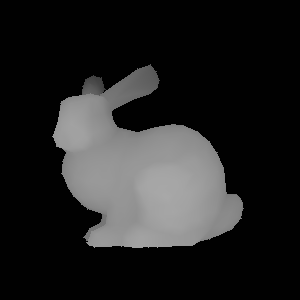
In the case above, the brighter the closer a pixel is (you may use another convention).
Also, please, check whether the solution to this question: [https://discourse.vtk.org/t/z-buffer-values-problem-with-camera/2224/2](https://discourse.vtk.org/t/z-buffer-values-problem-with-camera/2224/2) works for you. Likewise, the user was getting a blank image.
regards,
PC
---
### Author:  [@Jens\_Munk\_Hansen](https://discourse.vtk.org/u/Jens_Munk_Hansen)
#### Post date: [May 6, 2023, 2:43pm UTC](https://discourse.vtk.org/t/create-depth-map-for-vtkdepthimagetopointcloud/11380/5 "2023-05-06T14:43:29Z")
I struggled with this myself and ended up designing my own filter, which outputs data as a `vtkRectilinearGrid` for better performance (less memory). After seen this post, I made a small solution using `vtkDepthImageToPointCloud`. What made it work for me was to call Render before hooking up the rest of the pipeline. I have attached a small python snippet that works.
```
winColors = vtkRenderWindow()
winColors.SetSize(widthResolution, heightResolution)
winColors.SetOffScreenRendering(1)
renColors = vtkRenderer()
renColors.AddActor(yourActor)
winColors.AddRenderer(renColors)
winDepth = vtkRenderWindow()
winDepth.SetSize(widthResolution, heightResolution)
winDepth.SetOffScreenRendering(1)
renDepth = vtkRenderer()
renDepth.AddActor(yourActor)
winDepth.AddRenderer(renDepth)
winDepth.Render()
winColors.Render()
w2iColors = vtkWindowToImageFilter()
w2iColors.SetInput(winColors)
w2iColors.SetInputBufferTypeToRGBA()
w2iColors.Update()
w2iDepth = vtkWindowToImageFilter()
w2iDepth.SetInput(winDepth)
w2iDepth.SetInputBufferTypeToZBuffer()
w2iDepth.Update()
d2p = vtkDepthImageToPointCloud()
d2p.SetOutputPointsPrecision(0)
d2p.SetInputConnection(0, w2iDepth.GetOutputPort())
d2p.SetInputConnection(1, w2iColors.GetOutputPort())
d2p.SetCamera(yourCamera)
d2p.Update()
```
Note that the `vtkDepthImageToPointCloud` does not have points centered at the center of the pixels. There is a small offset. Unfortunately, you need to recompile the filter to fix this. I am considering making an update to this filter to also allow for a small `vtkRectilinearGrid` output, where colors as well as depths are stored in the point data.
It is enough with one shared renderer…
---
### Author:  [@Alejandro\_Rugero](https://discourse.vtk.org/u/Alejandro_Rugero)
#### Post date: [May 6, 2023, 3:28pm UTC](https://discourse.vtk.org/t/create-depth-map-for-vtkdepthimagetopointcloud/11380/6 "2023-05-06T15:28:43Z")
Hello, thanks for the help to both of you, I’ll try to see if I get it, thanks.
---
### Author:  [@Jens\_Munk\_Hansen](https://discourse.vtk.org/u/Jens_Munk_Hansen)
#### Post date: [May 6, 2023, 4:27pm UTC](https://discourse.vtk.org/t/create-depth-map-for-vtkdepthimagetopointcloud/11380/7 "2023-05-06T16:27:59Z")
I realized now why I created my own filter. I never succeeded in getting more than one output from filter. I have tried manually updating the previous filters and explicitly calling Render on the render windows.
---
### Author:  [@Alejandro\_Rugero](https://discourse.vtk.org/u/Alejandro_Rugero)
#### Post date: [May 6, 2023, 8:31pm UTC](https://discourse.vtk.org/t/create-depth-map-for-vtkdepthimagetopointcloud/11380/8 "2023-05-06T20:31:51Z")
Hello, here is everything I try to do to create the depth map, but I get an error that I don’t know why, the image is not because I tried with several images, and I have it right in the directory.
```auto
#include
#include "vtkActor.h"
#include
#include
#include
#include
#include
#include "vtkLight.h"
#include "vtkCamera.h"
#include
#include
#include
#include
#include "vtkTexture.h"
#include
#include
VTK_MODULE_INIT(vtkRenderingOpenGL2);
VTK_MODULE_INIT(vtkInteractionStyle);
int main(int argc, char* argv[])
{
vtkSmartPointer actor = vtkSmartPointer::New();
vtkSmartPointer reader = vtkSmartPointer::New();
vtkSmartPointer camera = vtkSmartPointer::New();
vtkSmartPointer light = vtkSmartPointer::New();
vtkSmartPointer colorsFondo = vtkSmartPointer::New();
vtkSmartPointer colors = vtkSmartPointer::New();
vtkSmartPointer interactor = vtkSmartPointer::New();
vtkSmartPointer interactorStyle = vtkSmartPointer::New();
vtkSmartPointer texture = vtkSmartPointer::New();
vtkSmartPointer renderWindow = vtkSmartPointer::New();
vtkSmartPointer render = vtkSmartPointer::New();
vtkSmartPointer windowToImageFilter = vtkSmartPointer::New();
//vtkSmartPointer depthImageToPointCloud = vtkSmartPointer::New();
try
{
reader->SetFileName("foto.png");
reader->Update();
texture->SetInputConnection(reader->GetOutputPort());
texture->SetQualityToDefault();
texture->Update();
camera->SetPosition(0, 0, 500);
camera->SetFocalPoint(0, 0, 0);
light->SetPosition(0, 0, 500);
light->SetDiffuseColor(colors->GetColor3d("White").GetData());
light->SetSpecularColor(colors->GetColor3d("White").GetData());
light->SetIntensity(1.0);
actor->SetTexture(texture);
actor->SetCoordinateSystemToWorld();
windowToImageFilter->SetInput(renderWindow);
windowToImageFilter->SetInputBufferTypeToZBuffer();
windowToImageFilter->SetReadFrontBuffer(false);
windowToImageFilter->SetProgressShiftScale(-1.0, 0.02);
windowToImageFilter->Update();
/*
depthImageToPointCloud->SetOutputPointsPrecision(0);
depthImageToPointCloud->SetInputConnection(0, windowToImageFilter->GetOutputPort());
depthImageToPointCloud->SetCamera(camera);
depthImageToPointCloud->Update();
*/
render->AddActor(actor);
render->AddLight(light);
render->GetActiveCamera();
renderWindow->AddRenderer(render);
renderWindow->Render();
renderWindow->SetSize(800, 800);
renderWindow->SetWindowName("depth-map image");
interactor->SetInteractorStyle(interactorStyle);
interactor->SetRenderWindow(renderWindow);
interactor->Initialize();
interactor->Start();
}
catch (const std::exception& e) {
std::cerr << "Error: " << e.what() << std::endl;
return EXIT_FAILURE;
}
catch (...) {
std::cerr << "Error desconocido." << std::endl;
return EXIT_FAILURE;
}
return 0;
}
```
ERROR: In vtkImageData.cxx, line 1548
vtkImageData (000002708AA701A0): GetScalarPointer: Pixel (0, 0, 0) not in memory.
Current extent= (0, -1, 0, -1, 0, 0)
---
### Author:  [@Jens\_Munk\_Hansen](https://discourse.vtk.org/u/Jens_Munk_Hansen)
#### Post date: [May 7, 2023, 8:58pm UTC](https://discourse.vtk.org/t/create-depth-map-for-vtkdepthimagetopointcloud/11380/9 "2023-05-07T20:58:14Z")
It is not strange that this doesn’t work. When you update the `vtkWindowToImageFilter` the renderWindow has no renderer. Try to translate what wrote above and you will get a point cloud.