# Create MPR view with independent cross sectional hairs cursor between views
**URL:** https://discourse.vtk.org/t/create-mpr-view-with-independent-cross-sectional-hairs-cursor-between-views/8714
**Category:** Support
**Tags:** python
**Created:** [June 13, 2022, 9:19am UTC](https://discourse.vtk.org/t/create-mpr-view-with-independent-cross-sectional-hairs-cursor-between-views/8714 "2022-06-13T09:19:24Z")
**Posts on this page:** 4
**Page:** 1
### Author:  [@florian](https://discourse.vtk.org/u/florian)
#### Post date: [June 13, 2022, 9:19am UTC](https://discourse.vtk.org/t/create-mpr-view-with-independent-cross-sectional-hairs-cursor-between-views/8714/1 "2022-06-13T09:19:24Z")
Hello everyone,
I am trying to build a MPR view with vtkResliceCursor but I got problem with the interaction. It seems that the interaction of the cross sectional hairs applies even outside the render where the vtkResliceCursorThickLineRepresentation is defined.
For instance I can move the Green plane (top left render) even when I click on the 3D view (top right render), it looks like cross sectional hairs are way bigger than the renderer (second image)
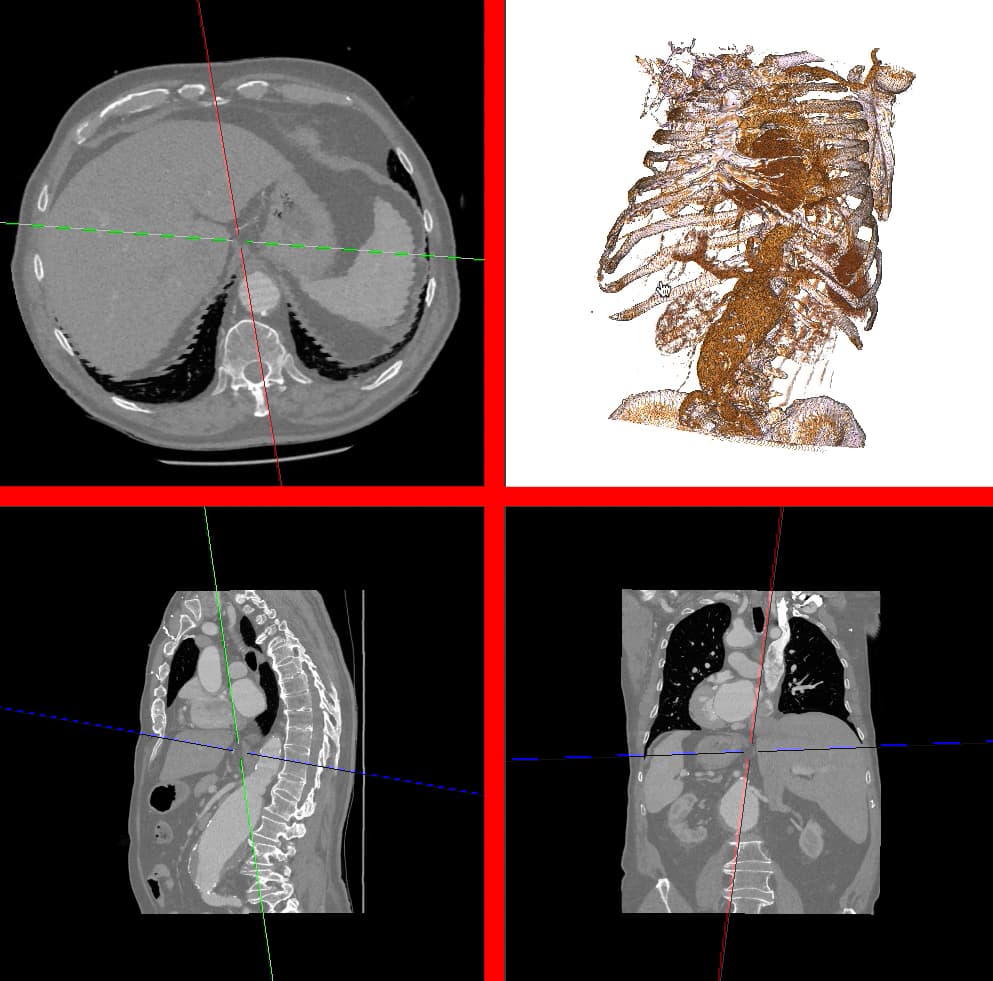

Am I doing something wrong or is it the expected functionality ?
Is there a way of removing this ? I tried to change the size of the cross sectional hairs but I can’t find a way to do so.
Thank you for you help ! (python version 3.6 and vtk 8.1)
Florian
```auto
import vtk
def setDicomPath():
#TODO : setup a dialog box to set fileName
fileName = 'pathToDICOMFolder'
print(fileName)
return fileName
if __name__ ==" __main__":
# thresholds for volume rendering
thresh1 = 150
thresh2 = 320
thresh3 = 440
nbDim = 3
#Reading dicom
myFile = setDicomPath()
readDICOM = vtk.vtkDICOMImageReader()
readDICOM.SetDirectoryName(myFile)
readDICOM.Update()
myDicom = readDICOM.GetOutput()
wholeExtent = myDicom.GetDimensions()
scalarRange = myDicom.GetScalarRange()
# Define main Renderer window and interactor
renWin = vtk.vtkRenderWindow()
renWin.SetSize(1000,1000)
renWin.BordersOn()
iren = vtk.vtkRenderWindowInteractor()
# irenStyle = vtk.vtkInteractorStyleImage()
irenStyle = vtk.vtkInteractorStyleTrackballCamera()
iren.SetInteractorStyle(irenStyle)
picker = vtk.vtkCellPicker()
picker.SetTolerance(0.005)
iren.SetRenderWindow(renWin)
iren.SetPicker(picker)
iren.GetPickingManager().SetEnabled(1)
iren.GetPickingManager().AddPicker(picker)
iren.Initialize()
# Define viewport ranges in renderwindow
xmins = [0, .51, 0, .51]
xmaxs = [0.49, 1, 0.49, 1]
ymins = [0, 0, .51, .51]
ymaxs = [0.49, 0.49, 1, 1]
# TODO : confirm if this camera orientation is good for 3D echo
viewUp = [[0, 0, -1],[0, 0, -1],[0, 1, 0]]
# Define 3 MPR views using image plane widgets and reslice cursor
ipws = []
rens = []
rcws = []
rcwReps = []
# First renderer, used to display volume3D or slice planes in 3D
firstRen = vtk.vtkRenderer()
rens.append(firstRen)
renWin.AddRenderer(firstRen)
firstRen.SetViewport(xmins[3], ymins[3], xmaxs[3], ymaxs[3])
# Reslice cursor generating the 3 slice planes
resliceCursor = vtk.vtkResliceCursor()
resliceCursor.SetCenter(myDicom.GetCenter())
resliceCursor.SetThickMode(0)
# ~ resliceCursor.SetThickness(10, 10, 10)
resliceCursor.SetImage(myDicom)
for i in range(nbDim):
# One renderer for each slice orientation
ren = vtk.vtkRenderer()
rens.append(ren)
renWin.AddRenderer(ren)
ren.SetViewport(xmins[i], ymins[i], xmaxs[i], ymaxs[i])
# One vtkResliceCursorWidget for each slice orientation, based on common Reslice cursor
rcw = vtk.vtkResliceCursorWidget()
rcws.append(rcw)
rcw.SetInteractor(iren)
rcwRep = vtk.vtkResliceCursorThickLineRepresentation()
rcwReps.append(rcwRep)
rcwRep.SetRestrictPlaneToVolume(1)
rcw.SetRepresentation(rcwRep)
rcwRep.GetResliceCursorActor().GetCursorAlgorithm().SetResliceCursor(resliceCursor)
rcwRep.GetResliceCursorActor().GetCursorAlgorithm().SetReslicePlaneNormal(i)
rcwRep.ManipulationMode = 2;
rcw.SetDefaultRenderer(ren)
rcw.SetEnabled(1)
# Setting right camera orientation
ren.GetActiveCamera().SetFocalPoint(0, 0, 0)
camPos = [0, 0, 0]
camPos[i] = 1
ren.GetActiveCamera().SetPosition(camPos)
ren.GetActiveCamera().ParallelProjectionOn()
ren.GetActiveCamera().SetViewUp(viewUp[i])
ren.ResetCamera()
# Initialize the window level to a sensible value
rcwRep.SetWindowLevel(scalarRange[1] - scalarRange[0], (scalarRange[0] + scalarRange[1]) / 2.0)
# Make all slice plane share the same color map.
rcwRep.SetLookupTable(rcwReps[0].GetLookupTable())
rcw.On()
# 3D Raycast Viewer
colorTransferFunction = vtk.vtkColorTransferFunction()
colorTransferFunction.AddRGBPoint(scalarRange[0], 0.0, 0.0, 0.0)
colorTransferFunction.AddRGBPoint(thresh1, 140/255, 64/255, 38/255)
colorTransferFunction.AddRGBPoint(thresh2, 225/255, 154/255, 74/255)
colorTransferFunction.AddRGBPoint(thresh3, 255/255, 239/255, 243/255)
colorTransferFunction.AddRGBPoint(scalarRange[1], 211/255, 168/255, 255/255)
funcOpacityScalar = vtk.vtkPiecewiseFunction()
funcOpacityScalar.AddPoint(scalarRange[0], 0)
funcOpacityScalar.AddPoint(thresh1, 0)
funcOpacityScalar.AddPoint(thresh2, 0.45)
funcOpacityScalar.AddPoint(thresh3, 0.63)
funcOpacityScalar.AddPoint(scalarRange[1], 0.63)
volumeMapper = vtk.vtkGPUVolumeRayCastMapper()
volumeMapper.SetInputData(myDicom)
volumeMapper.SetBlendModeToComposite()
volumeMapper.AutoAdjustSampleDistancesOn()
volumeProperty = vtk.vtkVolumeProperty()
volumeProperty.ShadeOn()
volumeProperty.SetScalarOpacity(funcOpacityScalar)
volumeProperty.SetInterpolationTypeToLinear()
volumeProperty.SetColor(colorTransferFunction)
volumeProperty.SetAmbient(0.20)
volumeProperty.SetDiffuse(1.00)
volumeProperty.SetSpecular(0.00)
volumeProperty.SetSpecularPower(0.00)
actorVolume = vtk.vtkVolume()
actorVolume.SetMapper(volumeMapper)
actorVolume.SetProperty(volumeProperty)# Define renderer for Volume
rens[0].SetBackground(255/255, 255/255, 255/255)
rens[0].AddVolume(actorVolume)
rens[0].ResetCameraClippingRange()
renWin.Render()
iren.Start()
```
---
### Author:  [@fraser29](https://discourse.vtk.org/u/fraser29)
#### Post date: [June 17, 2022, 1:08pm UTC](https://discourse.vtk.org/t/create-mpr-view-with-independent-cross-sectional-hairs-cursor-between-views/8714/2 "2022-06-17T13:08:41Z")
Hi,
I flagged this same issue recently.
> [@How to limit extent of planes in ResliceCursorWidget](https://discourse.vtk.org/t/how-to-limit-extent-of-planes-in-reslicecursorwidget/8527):
>
> I am working with a vtkResliceCusorWidget in a FourPlaneViewer-like application. I would like to know how I can limit the size of the plane widgets that are generated by vtkResliceCursorLineRepresentation. If, for instance, I use GetRepresentation().GetResliceCursorActor() on my vtkResliceCursorWidget then the resulting actor is many times larger than the image data it is acting on. If I check the bounds on my vtkResliceCursorLineRepresentation however, then they match the bounds of my underl…
My work around was to apply a callback on MouseMoveEvent and then use this to SetPriority on the ResliceCursorWidgets (your rcws array).
Doesn’t solve your oversized planes, but fixes the interaction with them.
I think that probably separate RenderWindows rather than one with frames would work.
Hope that helps.
Fraser
---
### Author:  [@florian](https://discourse.vtk.org/u/florian)
#### Post date: [June 17, 2022, 2:18pm UTC](https://discourse.vtk.org/t/create-mpr-view-with-independent-cross-sectional-hairs-cursor-between-views/8714/3 "2022-06-17T14:18:44Z")
Thank you @fraser29 for your answer, I’ll try to apply the callback on MouseMoveEvent and see how it works on my side.
For multiple separate RenderWindows, I thought about it too but I couldn’t find a way to put several RenderWindow inside one main window and I don’t want to have 3 separated windows.
I found a code for that but it uses QT library that I don’t have : [[Modified VTK sample code of [VTK][DICOM]](https://programmer.group/modified-vtk-sample-code-of-vtk-dicom.html)]
---
### Author:  [@dbtruong](https://discourse.vtk.org/u/dbtruong)
#### Post date: [February 1, 2024, 1:47am UTC](https://discourse.vtk.org/t/create-mpr-view-with-independent-cross-sectional-hairs-cursor-between-views/8714/4 "2024-02-01T01:47:29Z")
Hello @fraser29 @florian
I have a question: how to change the slice without moving the cursor?
Thanks for your help.