# Custom shader code in vtk
**URL:** https://discourse.vtk.org/t/custom-shader-code-in-vtk/14766
**Category:** Development
**Tags:** code
**Created:** [October 25, 2024, 8:21am UTC](https://discourse.vtk.org/t/custom-shader-code-in-vtk/14766 "2024-10-25T08:21:13Z")
**Posts on this page:** 3
**Page:** 1
### Author:  [@Lincac](https://discourse.vtk.org/u/Lincac)
#### Post date: [October 25, 2024, 8:21am UTC](https://discourse.vtk.org/t/custom-shader-code-in-vtk/14766/1 "2024-10-25T08:21:13Z")
I used my own defined shader code in vtk and passed it into the “vtkOpenGLActor”. What I wanted to achieve was a semi transparent effect on the model, but the rendering result was unexpected. When the camera moved to certain angles, the model suddenly became opaque and accompanied by problems like scan lines appearing on the model. I am not sure what the reason is
```auto
std::string vShader = R"(
#version 150 core
#define attribute in
#define varying out
in vec4 vertexMC;
in vec3 normalMC;
uniform mat4 MCDCMatrix;
uniform mat4 MCVCMatrix;
uniform mat3 normalMatrix;
out vec4 ViewPos;
out vec3 ViewNormal;
void main()
{
ViewPos = MCVCMatrix * vertexMC;
ViewNormal = normalMatrix * normalMC;
gl_Position = MCDCMatrix * vertexMC;
}
)";
std::string fShader = R"(
#version 150 core
#define varying in
out vec4 fragOutput0;
in vec4 ViewPos;
in vec3 ViewNormal;
uniform float opacity;
void main()
{
vec3 N = normalize(ViewNormal);
vec3 V = normalize(-ViewPos.xyz);
if(gl_FrontFacing == false){ N = -N;}
float ndv = clamp(dot(N,V),0,1);
vec4 color = vec4( vec3(0.4, 0.7392, 0.3667) * ndv, opacity);
fragOutput0 = color;
}
)";
Actor->GetShaderProperty()->SetVertexShaderCode(vShader.c_str());
Actor->GetShaderProperty()->SetFragmentShaderCode(fShader.c_str());
Actor->GetShaderProperty()->GetFragmentCustomUniforms()->SetUniformf("opacity", 0.7);
```
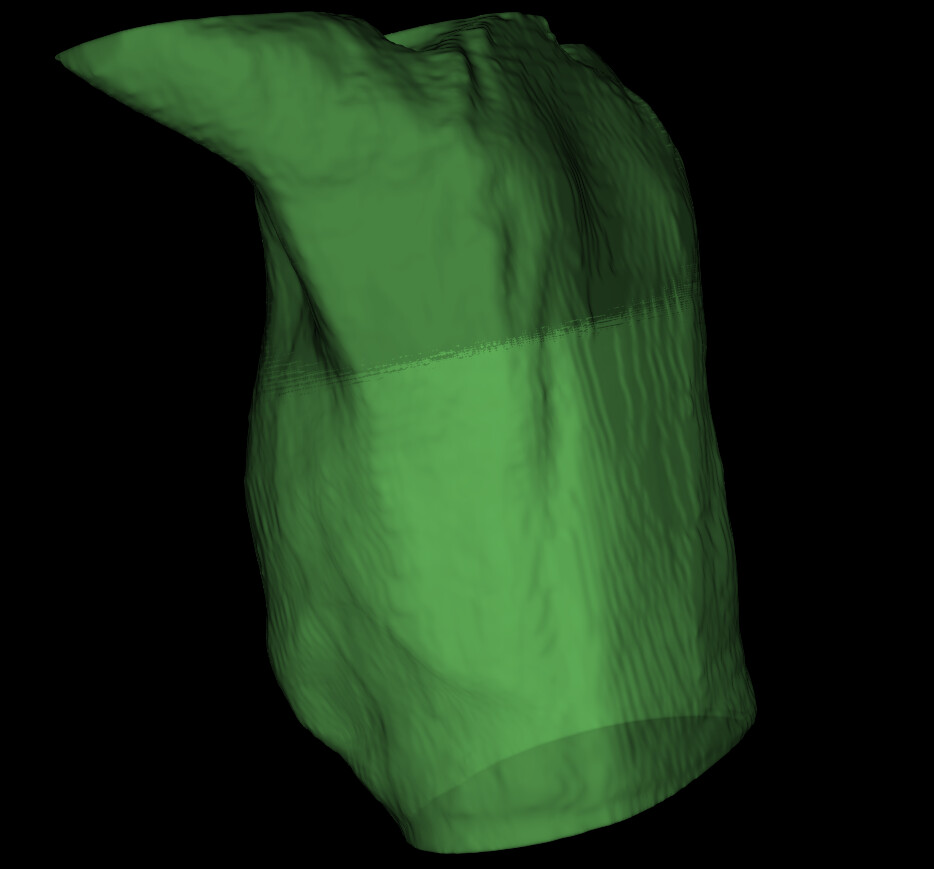
---
### Author:  [@jaswantp](https://discourse.vtk.org/u/jaswantp)
#### Post date: [November 12, 2024, 11:51pm UTC](https://discourse.vtk.org/t/custom-shader-code-in-vtk/14766/2 "2024-11-12T23:51:32Z")
Hey, There are easier ways to achieve translucency rather than customizing shader code. How about `actor->GetProperty()->SetOpacity(0.7)` instead?
---
### Author:  [@Lincac](https://discourse.vtk.org/u/Lincac)
#### Post date: [November 13, 2024, 1:00am UTC](https://discourse.vtk.org/t/custom-shader-code-in-vtk/14766/3 "2024-11-13T01:00:31Z")
Thank you, you’re right