# Delaunay2/3D VTK.js
**URL:** https://discourse.vtk.org/t/delaunay2-3d-vtk-js/6692
**Category:** Web
**Created:** [September 24, 2021, 12:27pm UTC](https://discourse.vtk.org/t/delaunay2-3d-vtk-js/6692 "2021-09-24T12:27:02Z")
**Posts on this page:** 16
**Page:** 1
### Author:  [@Kevin\_Sweeney](https://discourse.vtk.org/u/Kevin_Sweeney)
#### Post date: [September 24, 2021, 12:27pm UTC](https://discourse.vtk.org/t/delaunay2-3d-vtk-js/6692/1 "2021-09-24T12:27:02Z")
Firstly, as a confirmation, am I correct in saying that Delaunay2/3D is not currently available in VTK.js?
Within a project, would it be possible to create the Delaunay actor / mapper in Python for a given set of points and then to port this to Javascript? As a simple option, could it be saved as a .vtp file of sorts and then load this into JS for it to be rendered?
---
### Author:  [@Sebastien\_Jourdain](https://discourse.vtk.org/u/Sebastien_Jourdain)
#### Post date: [September 24, 2021, 2:45pm UTC](https://discourse.vtk.org/t/delaunay2-3d-vtk-js/6692/2 "2021-09-24T14:45:34Z")
Delaunay is not available in VTK.js indeed.
You can use Python to compute the mesh and load it in vtk.js.
If you want the computation to happen on the JS side, only a VTK/WebAssembly approach will let you do that.
---
### Author:  [@Kevin\_Sweeney](https://discourse.vtk.org/u/Kevin_Sweeney)
#### Post date: [September 27, 2021, 9:19am UTC](https://discourse.vtk.org/t/delaunay2-3d-vtk-js/6692/3 "2021-09-27T09:19:29Z")
Thanks @Sebastien_Jourdain
I have tried to generate the `Delaunay2D` actor and write that to VTP but it is specifying that a `vtkDataObject` is required
```auto
...
triangulator = vtk.vtkDelaunay2D()
triangulator.SetAlpha(alphaValue)
triangulator.SetInputDataObject(polydata)
writer = vtk.vtkXMLPolyDataWriter()
writer.SetFileName(filename)
if vtk.VTK_MAJOR_VERSION >= 6:
writer.SetInputData(triangulator)
else:
writer.SetInput(triangulator)
writer.SetDataModeToAscii()
writer.Write()
```
My thoughts were that I should be able to save this “`triangulator`” as a `.vtp` file and then read it in in VTK.js and attach it to a `vtkDataSetMapper` as I do in Python.
What am I missing?
---
### Author:  [@Sebastien\_Jourdain](https://discourse.vtk.org/u/Sebastien_Jourdain)
#### Post date: [September 27, 2021, 2:59pm UTC](https://discourse.vtk.org/t/delaunay2-3d-vtk-js/6692/4 "2021-09-27T14:59:39Z")
triangulator is a vtkAlgorithm not a vtkDataSet.
```auto
writer.SetInputData(vtkDataSet)
or
writer.SetInputConnection(vtkAlgo.GetOutputPort())
```
---
### Author:  [@Kevin\_Sweeney](https://discourse.vtk.org/u/Kevin_Sweeney)
#### Post date: [September 27, 2021, 3:18pm UTC](https://discourse.vtk.org/t/delaunay2-3d-vtk-js/6692/5 "2021-09-27T15:18:43Z")
Thanks @Sebastien_Jourdain
Getting the following which seems to have an issue with the `writer.Write`:
`2021-09-27 16:14:18.432 ( 28.314s) [604E3]vtkDemandDrivenPipeline:760 ERR| vtkCompositeDataPipeline (0x7fd7e14552a0): Input for connection index 0 on input port index 0 for algorithm vtkXMLPolyDataWriter(0x7fd7e1454720) is of type vtkUnstructuredGrid, but a vtkPolyData is required.`
**Code**
```auto
projection.triangulator = vtk.vtkDelaunay2D()
projection.triangulator.SetAlpha(alphaValue)
projection.triangulator.SetInputDataObject(projection.polydata)
writer = vtk.vtkXMLPolyDataWriter()
writer.SetFileName(filename)
writer.SetInputConnection(projection.triangulator.GetOutputPort())
writer.SetDataModeToAscii()
writer.Write()
```
---
### Author:  [@Sebastien\_Jourdain](https://discourse.vtk.org/u/Sebastien_Jourdain)
#### Post date: [September 27, 2021, 3:21pm UTC](https://discourse.vtk.org/t/delaunay2-3d-vtk-js/6692/6 "2021-09-27T15:21:54Z")
To convert a vtkUntructuredGrid into a vtkPolyData you need to use a filter like the vtkGeometryFilter.
---
### Author:  [@Kevin\_Sweeney](https://discourse.vtk.org/u/Kevin_Sweeney)
#### Post date: [September 27, 2021, 3:24pm UTC](https://discourse.vtk.org/t/delaunay2-3d-vtk-js/6692/7 "2021-09-27T15:24:23Z")
The writer works if I change it to a `vtkXMLUnstructuredGridWriter`. Will this cause issues on the Javascript side when trying to read the data in (in a Delaunay format) and therefore I should convert to polydata?
---
### Author:  [@Sebastien\_Jourdain](https://discourse.vtk.org/u/Sebastien_Jourdain)
#### Post date: [September 27, 2021, 3:26pm UTC](https://discourse.vtk.org/t/delaunay2-3d-vtk-js/6692/8 "2021-09-27T15:26:57Z")
JavaScript can only render vtkPolyData (and therefore reading only vtp files)
---
### Author:  [@Kevin\_Sweeney](https://discourse.vtk.org/u/Kevin_Sweeney)
#### Post date: [September 27, 2021, 3:41pm UTC](https://discourse.vtk.org/t/delaunay2-3d-vtk-js/6692/9 "2021-09-27T15:41:43Z")
Thanks again @Sebastien_Jourdain
Seems to be working now (at least writing to the file)
For anyone looking in the future:
**Python Code**
```auto
projection.triangulator = vtk.vtkDelaunay3D()
projection.triangulator.SetAlpha(alphaValue)
projection.triangulator.SetInputDataObject(projection.polydata)
# Needs to be converted to a PolyData (from unstructured Grid) as JS only accepts PolyData
projection.triangulator_polydata = vtk.vtkGeometryFilter()
projection.triangulator_polydata.SetInputConnection(projection.triangulator.GetOutputPort())
projection.triangulator_polydata.Update()
writer = vtk.vtkXMLPolyDataWriter()
writer.SetFileName(filename)
writer.SetInputConnection(data.GetOutputPort())
writer.SetDataModeToBinary()
writer.Write()
```
---
### Author:  [@Kevin\_Sweeney](https://discourse.vtk.org/u/Kevin_Sweeney)
#### Post date: [September 28, 2021, 10:32am UTC](https://discourse.vtk.org/t/delaunay2-3d-vtk-js/6692/10 "2021-09-28T10:32:35Z")
@Sebastien_Jourdain
I have been able to read in the `.vtp` file and create the Delaunay3D mesh in Javascript. However, I am unable to get the colour to update based on the look-up table that I have specified. Below shows what I have against what I desire.
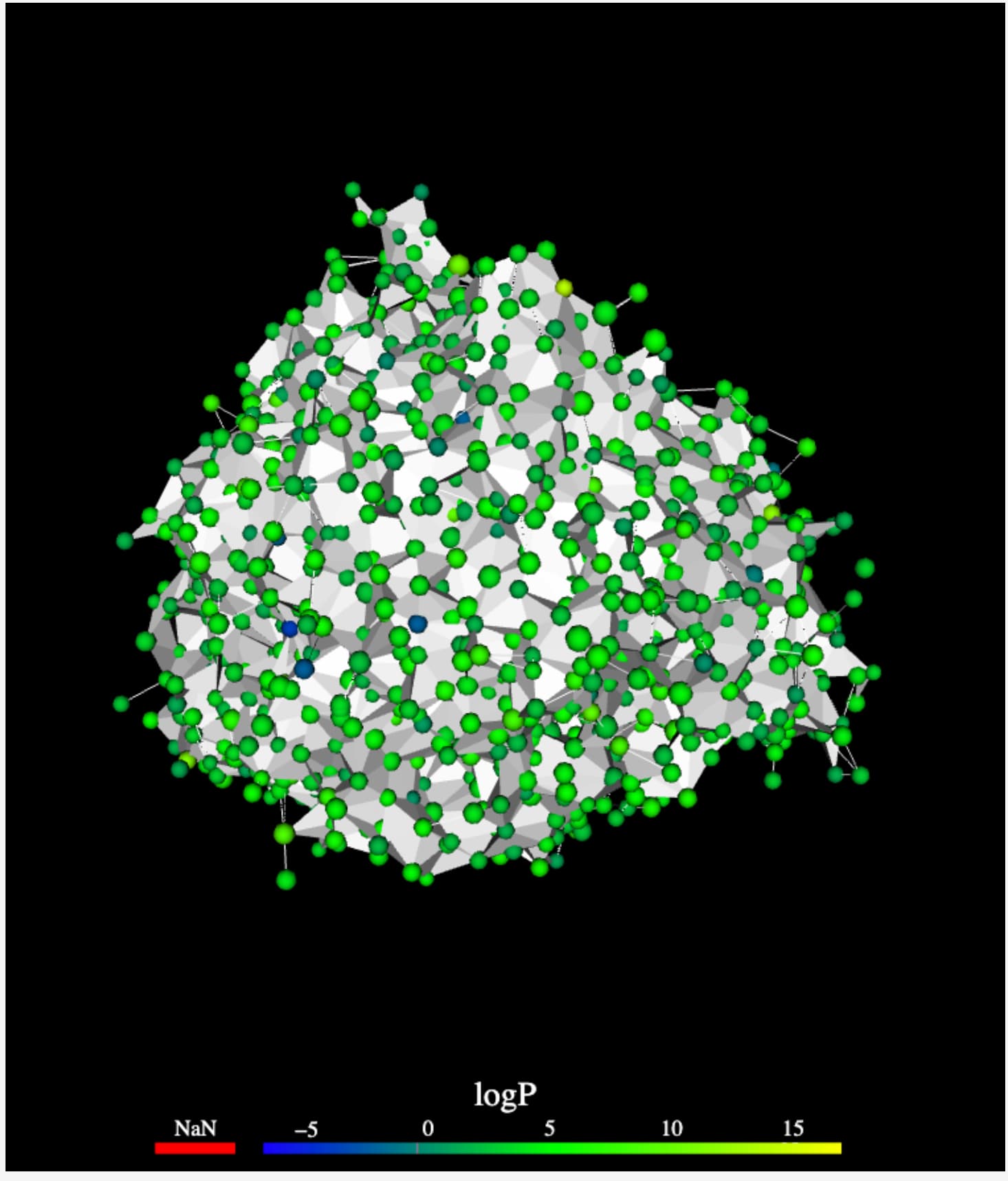 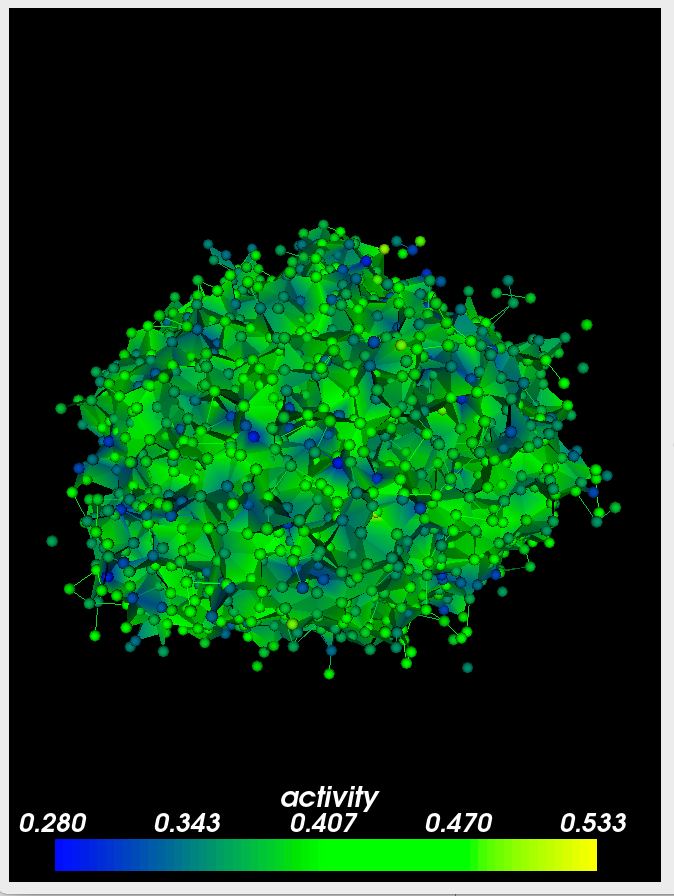
I am using basically the same code to generate the connections as I am the spheres. (different actor / mapper types etc)
Any idea why the look up table colour map is not being applied to the polydata?
**Code - JS**
Firstly, this is how I am reading the data from the `.vtp` file.
(No issues here I believe, but just to show full steps)
```auto
let file = "../Data/temp/" + app.delaunayFilename
fetch(file)
.then(response => response.text())
.then(data => {
const vtpReader = vtk.IO.XML.vtkXMLPolyDataReader.newInstance();
const textEncoder = new TextEncoder();
vtpReader.parseAsArrayBuffer(textEncoder.encode(data));
app.delaunaySource = vtpReader.getOutputData(0);
// Needs to be called after the dealaunay source has been saved to ensure the data is available
createVTKWindow()
});
```
This is where I am performing the Delaunay steps:
```auto
setupPipeline(data, delaunaySource, activeScalar) {
this.vtkData = data
// Determine the Range of the active Scalar
const scalars = this.vtkData.getPointData().getScalars();
const dataRange = [].concat(scalars ? scalars.getRange() : [0, 1]);
// Create a new Look Up Table
var lookupTable = vtk.Rendering.Core.vtkColorTransferFunction.newInstance();
// Create the color Map used for the VTK
let colorMap = this.create_colorMap()
lookupTable = this.applyPreset(lookupTable, colorMap, dataRange);
// Lookup Table Actor
this.lutActor = vtk.Rendering.Core.vtkScalarBarActor.newInstance()
this.actor2Ds.push(this.lutActor)
// Set up the Delaunay Source
this.triangulator = delaunaySource
// Mapper for the Delaunay Source
this.vtkMapper = vtk.Rendering.Core.vtkMapper.newInstance({
interpolateScalarsBeforeMapping: false,
useLookupTableScalarRange: true,
lookupTable,
scalarVisibility: false,
});
const vtkActor = vtk.Rendering.Core.vtkActor.newInstance();
vtkActor.getProperty().setOpacity(1.0);
/* -------------------------------------------- */
/* Update the colour based on the active Scalar */
let colorByArrayName = activeScalar.toLowerCase()
const interpolateScalarsBeforeMapping = true;
const colorMode = 1; // vtk.Rendering.Core.Mapper.ColorMode.MAP_SCALARS;
const scalarMode = 3; // vtk.Rendering.Core.Mapper.Constants.ScalarMode.USE_POINT_FIELD_DATA
const scalarVisibility = true;
// Get the array we want to colour by
const scalarArray = this.vtkData.getPointData().getArrayByName(colorByArrayName.toLowerCase());
// Update the lookup table based on the new range
const newDataRange = scalarArray.getRange();
dataRange[0] = newDataRange[0];
dataRange[1] = newDataRange[1];
lookupTable = this.applyPreset(lookupTable, colorMap, dataRange);
const numberOfComponents = scalarArray.getNumberOfComponents();
if (numberOfComponents > 1) {
// always start on magnitude setting
if (this.vtkMapper.getLookupTable()) {
const lut = this.vtkMapper.getLookupTable();
lut.setVectorModeToMagnitude();
}
}
// Updates the Lookup Table actor with a title and ensures that it is visible
this.lutActor.setAxisLabel(activeScalar);
this.lutActor.setVisibility(true);
// Updates the glyph3D Mapper with the new info.
this.vtkMapper.set({
colorByArrayName,
colorMode,
interpolateScalarsBeforeMapping,
scalarMode,
scalarVisibility,
});
/* ---------- */
vtkActor.setMapper(this.vtkMapper);
this.vtkMapper.setInputData(this.triangulator)
this.actors.push(vtkActor)
this.lutActor.setScalarsToColors(this.vtkMapper.getLookupTable());
this.lut = lookupTable
this.triangulatorActor = vtkActor
this.actors.push(this.triangulatorActor)
}
```
---
### Author:  [@Sebastien\_Jourdain](https://discourse.vtk.org/u/Sebastien_Jourdain)
#### Post date: [September 28, 2021, 2:45pm UTC](https://discourse.vtk.org/t/delaunay2-3d-vtk-js/6692/11 "2021-09-28T14:45:15Z")
Does `this.vtkData.getPointData().getScalars()` return something?
Also `scalarVisibility: false,` needs to be true if you want to see colors.
You need to provide similar settings as the ones in the GlyphMapper if you want the coloring.
```auto
colorByArrayName,
colorMode,
interpolateScalarsBeforeMapping,
scalarMode,
scalarVisibility,
```
---
### Author:  [@Kevin\_Sweeney](https://discourse.vtk.org/u/Kevin_Sweeney)
#### Post date: [September 28, 2021, 3:10pm UTC](https://discourse.vtk.org/t/delaunay2-3d-vtk-js/6692/12 "2021-09-28T15:10:36Z")
@Sebastien_Jourdain
_Does `this.vtkData.getPointData().getScalars()` return something?_
It does indeed. For example, if I run scalars.getRange on the result I get `[0.2800199091434479, 0.5333471298217773]` which is used to set the colour range.
I followed some example online (sorry cannot remember the exact one) It sets the mapper up with init values and then updates the mapper after the colour etc has been determined. This can be seen at the bottom of my snippet above. Below you can see the same with the values hardcoded in. In this, I have set the `scalarVisibility: true`
```auto
...
this.vtkMapper.set({
colorByArrayName,
colorMode: 1, // vtk.Rendering.Core.Mapper.ColorMode.MAP_SCALARS;
interpolateScalarsBeforeMapping: true,
scalarMode: 3, // vtk.Rendering.Core.Mapper.Constants.ScalarMode.USE_POINT_FIELD_DATA
scalarVisibility: true,
});
...
```
---
### Author:  [@Sebastien\_Jourdain](https://discourse.vtk.org/u/Sebastien_Jourdain)
#### Post date: [September 28, 2021, 3:29pm UTC](https://discourse.vtk.org/t/delaunay2-3d-vtk-js/6692/13 "2021-09-28T15:29:01Z")
I’m not sure, if you actually get the array properly it should work. There is quite some weird code. Maybe cleaning it may highlight a typo in the array name or else.
---
### Author:  [@Kevin\_Sweeney](https://discourse.vtk.org/u/Kevin_Sweeney)
#### Post date: [September 28, 2021, 8:36pm UTC](https://discourse.vtk.org/t/delaunay2-3d-vtk-js/6692/14 "2021-09-28T20:36:42Z")
Thanks @Sebastien_Jourdain . I have cleaned the code up a good bit and removed redundant code so hopefully will make a bit more sense. Below is the code for the Delaunay mesh. This code is the exact same as that used to generate the Spheres apart from in three (3) places.
**1.**
`this.source = delaunaySource` **instead of**
`this.source = vtk.Filters.Sources.vtkSphereSource.newInstance();`
**2.**
`this.mapper = vtk.Rendering.Core.vtkMapper.newInstance({` **instead of**
`this.mapper = vtk.Rendering.Core.vtkGlyph3DMapper.newInstance({`
**3.**
`this.mapper.setInputData(this.source)` **instead of**
`this.mapper.setInputData(this.vtkData, 0) this.mapper.setInputConnection(this.source.getOutputPort(), 1) `
**Full Code**
```auto
this.vtkData = data // Type: vtkPolyData
this.source = delaunaySource // Type: vtkPolyData
var lookupTable = vtk.Rendering.Core.vtkColorTransferFunction.newInstance();
this.actor = vtk.Rendering.Core.vtkActor.newInstance();
this.lutActor = vtk.Rendering.Core.vtkScalarBarActor.newInstance()
// Get the scalar we want to colour by
let colorByArrayName = activeScalar.toLowerCase()
const scalarArray = this.vtkData.getPointData().getArrayByName(colorByArrayName.toLowerCase());
// Create the color Map used for the VTK
let colorMap = this.create_colorMap()
// Update the Look Up Table
lookupTable = this.applyPreset(lookupTable, colorMap, scalarArray.getRange());
// Updates the Lookup Table actor with a title and ensures that it is visible
this.lutActor.setAxisLabel(activeScalar);
this.lutActor.setVisibility(true);
// Mapper for the collection of Spheres
this.mapper = vtk.Rendering.Core.vtkMapper.newInstance({
colorByArrayName,
colorMode: 1, // vtk.Rendering.Core.Mapper.ColorMode.MAP_SCALARS;,
interpolateScalarsBeforeMapping: true,
scalarMode: 3, // vtk.Rendering.Core.Mapper.Constants.ScalarMode.USE_POINT_FIELD_DATA
scalarVisibility: true,
useLookupTableScalarRange: true,
lookupTable,
});
this.actor.getProperty().setOpacity(1.0);
this.actor.setMapper(this.mapper);
this.mapper.setInputData(this.source)
this.lutActor.setScalarsToColors(this.mapper.getLookupTable());
this.lut = lookupTable
this.actor2Ds.push(this.lutActor) // Code uses classes, so same as this.renderer.addActor2D(actor)
this.actors.push(this.actor) // Code uses classes, so same as this.renderer.addActor(actor)
```
I can see no reason for the difference in output.
I tried adding the `vtkData` as input to the mapper (`this.mapper.addInputData(this.vtkData`) but this did not change the output. Reversing and setting the `vtkData` and adding the `source` removes the mesh from the view completely
---
### Author:  [@Kevin\_Sweeney](https://discourse.vtk.org/u/Kevin_Sweeney)
#### Post date: [September 29, 2021, 10:44am UTC](https://discourse.vtk.org/t/delaunay2-3d-vtk-js/6692/16 "2021-09-29T10:44:01Z")
@Sebastien_Jourdain
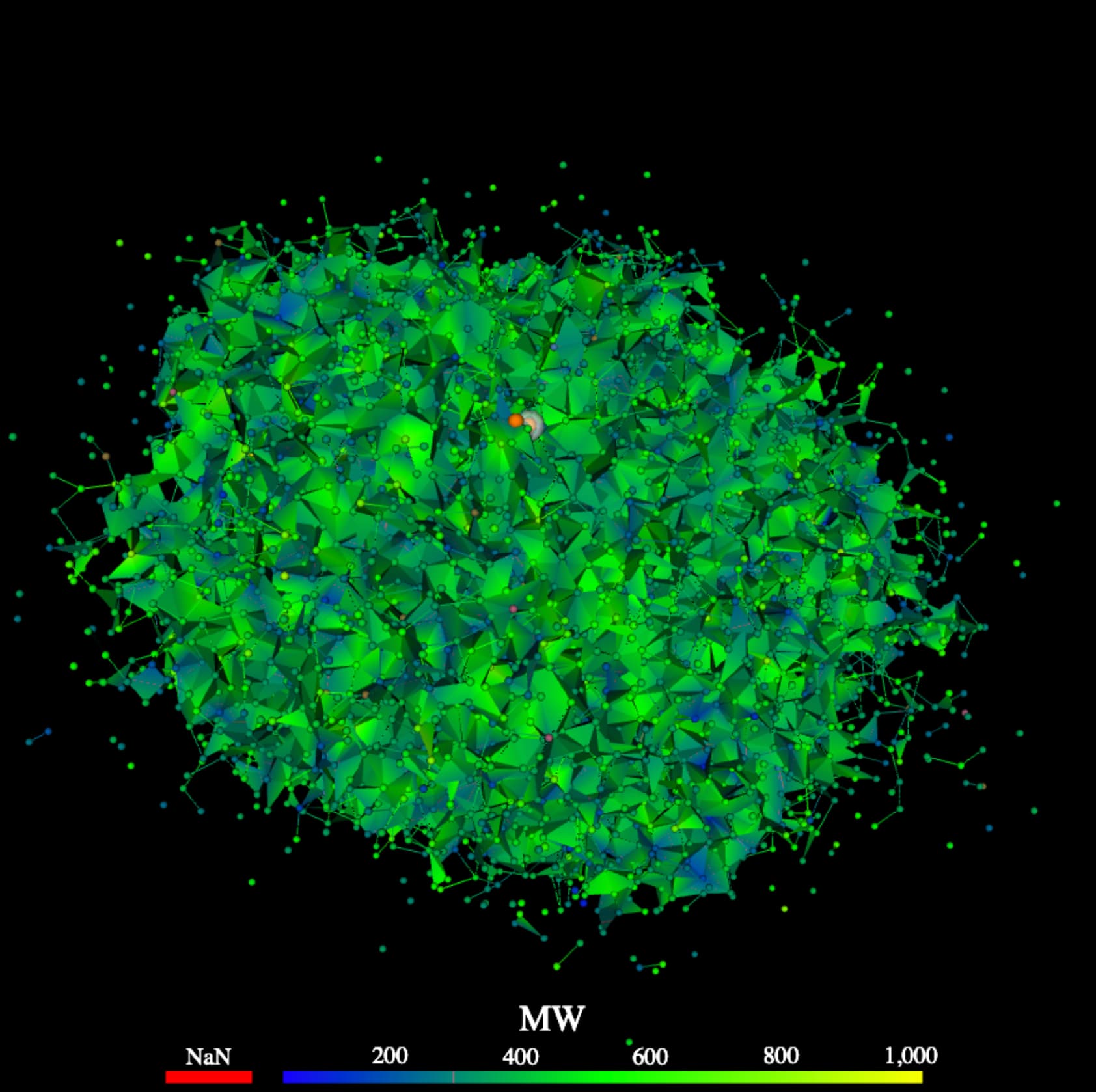
Thank you and I finally got it sorted. The issue was that the polydata being read in from the .vtp did not have the scalars attached to it. The code was reading the range from the scalars within the `vtkData` but the same scalars were not in the Delaunay source. In the sphere example code, this `vtkData` was being added to the `vtk3DGlyphMapper`.
I really appreciate your help on this!
* * *
**Final Code** - for anyone looking to do something similar in the future
**Python** - Generate Delaunay mesh and save to .vtp
```auto
...
delaunay = vtk.vtkDelaunay3D()
delaunay.SetAlpha(alphaValue)
delaunay.SetInputDataObject(polydata)
# Needs to be converted to a PolyData (from unstructured Grid)
delaunay_polydata = vtk.vtkGeometryFilter()
delaunay_polydata.SetInputConnection(delaunay.GetOutputPort())
delaunay_polydata.Update()
writer = vtk.vtkXMLPolyDataWriter()
writer.SetFileName(filename)
writer.SetInputConnection(delaunay_polydata.GetOutputPort())
writer.SetDataModeToBinary()
writer.Write()
```
**Javascript** - Read in the .vtp file
```auto
fetch(file)
.then(response => response.text())
.then(data => {
const vtpReader = vtk.IO.XML.vtkXMLPolyDataReader.newInstance();
const textEncoder = new TextEncoder();
vtpReader.parseAsArrayBuffer(textEncoder.encode(data));
delaunaySource = vtpReader.getOutputData(0);
delaunaySource = addScalarsToPolydata(delaunaySource)
});
```
**Javascript** - Add the Scalars
```auto
function addScalarsToPolydata(polydata) {
var scalarAr = vtk.Common.Core.vtkDataArray.newInstance({
numberOfComponents: 1,
values: scalarValues,
name: 'Scalar Name'.toLowerCase()
});
polydata.getPointData().setScalars(scalarAr);
}
```
**Javascript** - Generate the Delaunay mesh in JS
```auto
source = delaunaySource // Type: vtkPolyData
actor = vtk.Rendering.Core.vtkActor.newInstance();
var lookupTable = vtk.Rendering.Core.vtkColorTransferFunction.newInstance();
lutActor = vtk.Rendering.Core.vtkScalarBarActor.newInstance()
// Get the scalar we want to colour by
let colorByArrayName = activeScalar.toLowerCase()
const scalarArray = source.getPointData().getArrayByName(colorByArrayName.toLowerCase());
// Create the color Map used for the VTK
let colorMap = create_colorMap()
// Update the Look Up Table
lookupTable = applyPreset(lookupTable, colorMap, scalarArray.getRange());
// Updates the Lookup Table actor with a title and ensures that it is visible
lutActor.setAxisLabel(activeScalar);
lutActor.setVisibility(true);
// Mapper for the collection of Spheres
mapper = vtk.Rendering.Core.vtkMapper.newInstance({
colorByArrayName,
colorMode: 1, // vtk.Rendering.Core.Mapper.ColorMode.MAP_SCALARS;,
interpolateScalarsBeforeMapping: true,
scalarMode: 3, // vtk.Rendering.Core.Mapper.Constants.ScalarMode.USE_POINT_FIELD_DATA
scalarVisibility: true,
useLookupTableScalarRange: true,
lookupTable,
});
actor.getProperty().setOpacity(1.0);
actor.setMapper(this.mapper);
mapper.setInputData(this.source);
lutActor.setScalarsToColors(this.mapper.getLookupTable());
renderer.addActor2D(lutActor)
renderer.addActor(actor)
```
**Javascript** - Other referenced funcs
```auto
function linspace(startValue, stopValue, cardinality) {
var arr = [];
var step = (stopValue - startValue) / (cardinality - 1);
for (var i = 0; i < cardinality; i++) {
arr.push(startValue + (step * i));
}
return arr;
}
function create_colorMap(){
let zero_to_one =linspace(0, 1, 128)
let one_to_zero = linspace(1, 0, 128)
let ones = linspace(1, 1, 128)
let zeros = linspace(0, 0, 128)
let idxs = linspace(0, 1, 256)
// Add the RGB colours for Blue to Yellow through Green
let rgb = [idxs, zeros.concat(zero_to_one), zero_to_one.concat(ones), one_to_zero.concat(zeros)]
// Invert the matrix so that we can concatenate the array to a 1D array in the right format
rgb = rgb[0].map((_, colIndex) => rgb.map(row => row[colIndex]));
rgb = [].concat(...rgb)
// Create the required object
let colorMap = {
"ColorSpace": "Diverging",
"Name": "blue to yellow through green",
"NanColor": [1, 0, 0],
"RGBPoints": rgb
}
return colorMap
}
function applyPreset(lookupTable, colorMap, dataRange) {
lookupTable.applyColorMap(colorMap);
lookupTable.setMappingRange(dataRange[0], dataRange[1]);
lookupTable.updateRange();
return lookupTable
}
```
---
### Author:  [@Sebastien\_Jourdain](https://discourse.vtk.org/u/Sebastien_Jourdain)
#### Post date: [September 29, 2021, 6:22pm UTC](https://discourse.vtk.org/t/delaunay2-3d-vtk-js/6692/17 "2021-09-29T18:22:06Z")
Glad you figure it out. I guess that was my initial question, by me making sure you actually have some data on you mesh you wanted to see… I guess I did not noticed they were 2 different dataset.