# Delete the overlapping of the same Polygon(polydata)

**URL:** https://discourse.vtk.org/t/delete-the-overlapping-of-the-same-polygon-polydata/13180
**Category:** Support
**Tags:** code
**Created:** [January 30, 2024, 7:38am UTC](https://discourse.vtk.org/t/delete-the-overlapping-of-the-same-polygon-polydata/13180 "2024-01-30T07:38:00Z")
**Posts on this page:** 5
**Page:** 1

<div class="post-metadata">

### Author: ![Hedwig\_Huang](https://discourse.vtk.org/user_avatar/discourse.vtk.org/hedwig_huang/32/7745_2.png) [@Hedwig\_Huang](https://discourse.vtk.org/u/Hedwig_Huang)
#### Post date: [January 30, 2024, 7:38am UTC](https://discourse.vtk.org/t/delete-the-overlapping-of-the-same-polygon-polydata/13180/1 "2024-01-30T07:38:00Z")

</div>

![image](https://discourse.vtk.org/uploads/default/original/2X/9/9dc1050d4330e908608e3545f15196f415ada6de.jpeg)

Hi there, I push some points in `vtkPoints` and generate `vtkCellArray` to get a track of mouse with `vtkActor2D` and `vtkPolydataMapper2D` to clip the body. Before I execute clipping volume, I found that the overlapping of polygon is showed like the picture above.

What I want is like this, to detect the overlapping points and unregister them  
 ![image](https://discourse.vtk.org/uploads/default/original/2X/5/50b80894a5d0dbf9ac933d2eaab2a5847c2ce755.png)  
(the original site is [How to only render one vtkRender in vtkRenderWindow with two vtkRenders - Development - VTK](https://discourse.vtk.org/t/how-to-only-render-one-vtkrender-in-vtkrenderwindow-with-two-vtkrenders/11425/8))

Could you give me some advice to deal with the polydata? I tried to use `vtkCleanPolydata` to update but make no sense.

Here is some of my code:

```auto
	m_pTitleRenderer->SetLayer(1);

	m_pBMRenderer->SetDisplayPoint(fx, fy, 0);
	double worldcoortemp[4];
	m_pBMRenderer->DisplayToWorld();
	m_pBMRenderer->GetWorldPoint(worldcoortemp);

	wVector2<float> temp;
	temp.x = fx;
	temp.y = fy;
	m_fSaveClipPoints.push_back(temp);

	m_pPoints = vtkSmartPointer<vtkPoints>::New();
	for (int i = 0; i < m_fSaveClipPoints.size(); i++) {
		m_pPoints->InsertNextPoint(m_fSaveClipPoints[i].x, m_fSaveClipPoints[i].y, 0.0);
	}

	int pointnum = m_pPoints->GetNumberOfPoints();

	m_pDisplayPlane = vtkSmartPointer<vtkCellArray>::New();
	m_pDisplayPlane->InsertNextCell(m_pPoints->GetNumberOfPoints() + 1);
	for (int i = 0; i < m_fSaveClipPoints.size(); i++) {
		m_pDisplayPlane->InsertCellPoint(i);
	}
	m_pDisplayPlane->InsertCellPoint(0); // start points

	int cellnum = m_pDisplayPlane->GetNumberOfCells();

	// polydata
	m_pPolygonTrack->SetPoints(m_pPoints);
	m_pPolygonTrack->SetPolys(m_pDisplayPlane);

        ////// It seems some processing here to deal with the polygon

	// polyline property setting
	vtkNew<vtkProperty2D> _ptpro;
	_ptpro->SetLineWidth(5);
	_ptpro->SetColor(1.0, 1.0, 0);
	_ptpro->SetOpacity(0.4);
	_ptpro->SetPointSize(5);

	m_pDisplayActor->SetProperty(_ptpro);

	m_pDisplayMapper->SetInputData(m_pPolygonTrack);
	m_pDisplayActor->SetMapper(m_pDisplayMapper);
	m_pTitleRenderer->AddActor(m_pDisplayActor);

	m_pRenderWnd->Render();

	m_nPointCount++;

```

Thanks for any advice!!!

---

<div class="post-metadata">

### Author: ![Hedwig\_Huang](https://discourse.vtk.org/user_avatar/discourse.vtk.org/hedwig_huang/32/7745_2.png) [@Hedwig\_Huang](https://discourse.vtk.org/u/Hedwig_Huang)
#### Post date: [January 31, 2024, 12:43am UTC](https://discourse.vtk.org/t/delete-the-overlapping-of-the-same-polygon-polydata/13180/2 "2024-01-31T00:43:50Z")

</div>

@dgobbi  
Hi, Mr!  
I notice that you had given some useful advice in the post([How to only render one vtkRender in vtkRenderWindow with two vtkRenders - #8 by Pisces2018](https://discourse.vtk.org/t/how-to-only-render-one-vtkrender-in-vtkrenderwindow-with-two-vtkrenders/11425/8)) Could you please give me some help about this problem?  
Great thanks!

---

<div class="post-metadata">

### Author: ![dgobbi](https://discourse.vtk.org/user_avatar/discourse.vtk.org/dgobbi/32/18_2.png) [@dgobbi](https://discourse.vtk.org/u/dgobbi)
#### Post date: [January 31, 2024, 3:33am UTC](https://discourse.vtk.org/t/delete-the-overlapping-of-the-same-polygon-polydata/13180/3 "2024-01-31T03:33:04Z")

</div>

First thing is, always triangulate the track to make the polygon.

```c++
  track->SetPoints(m_pPoints);
  track->SetLines(m_pDisplayPlane);

  auto segments = vtkSmartPointer<vtkTriangleFilter>::New();
  segments->SetInputData(track);
  segments->Update();

  auto triangulator = vtkSmartPointer<vtkContourTriangulator>::New();
  triangulator->SetInputData(segments->GetOutput());
  triangulator->Update();

  m_Polygon = triangulator->GetOutput();

```

But triangulation isn’t enough to properly display the “hole”. You will probably also have to find all the places where the track intersects itself (where line segments cross), generate a new point at every intersection point, and then cut the intersecting line segments in half:

```plaintext
     o o
     | |
   o-+--o -> o-o--o
     | |
     o o

```

This would have to be done before the triangulation.

---

<div class="post-metadata">

### Author: ![Hedwig\_Huang](https://discourse.vtk.org/user_avatar/discourse.vtk.org/hedwig_huang/32/7745_2.png) [@Hedwig\_Huang](https://discourse.vtk.org/u/Hedwig_Huang)
#### Post date: [February 1, 2024, 12:53am UTC](https://discourse.vtk.org/t/delete-the-overlapping-of-the-same-polygon-polydata/13180/4 "2024-02-01T00:53:41Z")

</div>

Thanks for your advice!  
Later I used `vtkTriangleFilter` and the closed track could be considered as edge and the filter could divide it into bunch of triangles, but the granularity of the triangle seems the reason for the coarse “hole” happening? I tried to recalculate the cross point and update `vtkPoints` but didn’t make it better, so now I try to interpolate more `vtkPoints` or sth else make the polygon curve more smooth, in order to fit smaller triangles to fine the “hole”.  
Is it workable?

---

<div class="post-metadata">

### Author: ![Hedwig\_Huang](https://discourse.vtk.org/user_avatar/discourse.vtk.org/hedwig_huang/32/7745_2.png) [@Hedwig\_Huang](https://discourse.vtk.org/u/Hedwig_Huang)
#### Post date: [February 1, 2024, 7:49am UTC](https://discourse.vtk.org/t/delete-the-overlapping-of-the-same-polygon-polydata/13180/5 "2024-02-01T07:49:48Z")

</div>

Good news! I fixed this problem for smoothing curve with the guidance of [https://www.weiy.city/2021/12/vtk-make-interpolation-spline-curve-smoother/](https://www.weiy.city/2021/12/vtk-make-interpolation-spline-curve-smoother/). The curve now looks like this:  
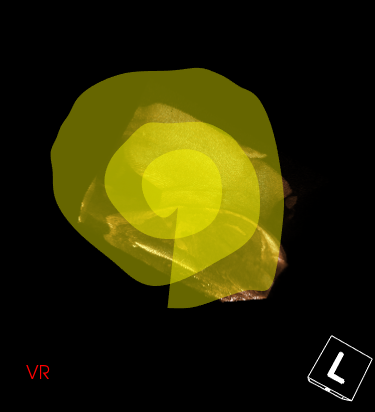
 ![image](https://discourse.vtk.org/uploads/default/original/2X/1/12f6f2b693ca72dc57811655976d722098223ac5.png)

But unfortunately, the triangles could not be generated normally, still generating huge triangles…
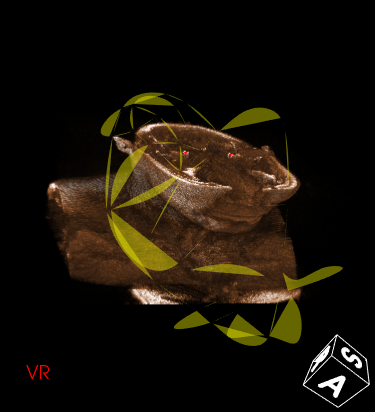
![image](https://discourse.vtk.org/uploads/default/original/2X/a/a7027ddd492cfee7f2184d5fe5b00af794beed8b.png)

And now I have a new idea, with the cross point as the dividing line to generate more polygons, with different polygons colored.? Is this ok? But I think this method kinda stupid…
