# "Display data histogram" Breaks on Windows
**URL:** https://discourse.vtk.org/t/display-data-histogram-breaks-on-windows/6554
**Category:** Development
**Created:** [September 4, 2021, 8:40pm UTC](https://discourse.vtk.org/t/display-data-histogram-breaks-on-windows/6554 "2021-09-04T20:40:38Z")
**Posts on this page:** 5
**Page:** 1
### Author:  [@adamgranthendry](https://discourse.vtk.org/u/adamgranthendry)
#### Post date: [September 4, 2021, 8:40pm UTC](https://discourse.vtk.org/t/display-data-histogram-breaks-on-windows/6554/1 "2021-09-04T20:40:38Z")
Opening a DICOM stack, visualizing as a `Volume`, and then opening the `Color Map Editor` and choosing `Dislay data histogram` causes ParaView to crash (program hangs and then shuts down unexpectedly).
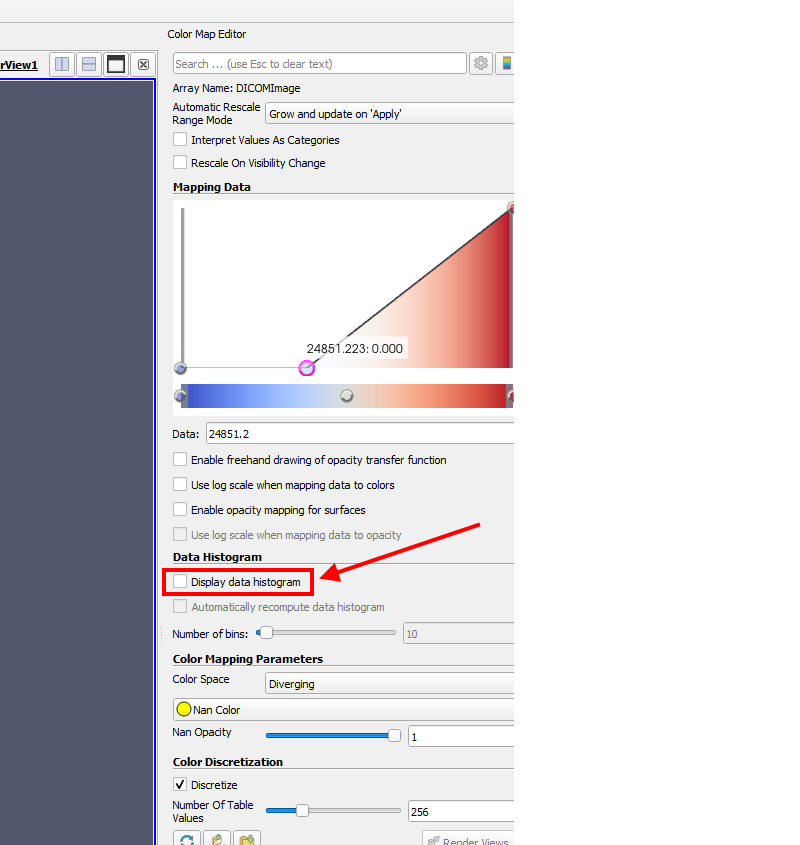
### System Hardware
**OS:** Windows 10 Enterprise, x64-bit, Build 1909
**CPU:** 2x Intel(R) Xeon(R) Gold 6248R
**Disk:** 2TB NVMe M.2 SSD
**RAM:** 192 GB DDR4
**Compute GPUs:** 2x NVIDIA Quadro RTX8000 in TCC mode with NVLink
**Display GPU:** 1x NVIDIA Quadro RTX4000
### Relevant Software
**Paraview:** [ParaView-5.9.1-MPI-Windows-Python3.8-msvc2017-64bit.exe](https://www.paraview.org/download/) (_used pre-built binary installer on ParaView Downloads website_)
**Visual Studio:** [Visual Studio 16 2019 Community][1]
**Windows SDK:** [10.0.19041.0][2], targeting 10.0.18363
**Python:** [3.8.10 x64-bit][3]
**CMake:** [3.21.1][4] (_I use `CMake-GUI`_)
Does anyone know:
1. Why does this happen?
2. How to fix the problem?
Thank you!
---
### Author:  [@adamgranthendry](https://discourse.vtk.org/u/adamgranthendry)
#### Post date: [September 4, 2021, 8:45pm UTC](https://discourse.vtk.org/t/display-data-histogram-breaks-on-windows/6554/2 "2021-09-04T20:45:22Z")
See [Issue 20936](https://gitlab.kitware.com/paraview/paraview/-/issues/20936) created on ParaView GitLab page (issues tracker).
---
### Author:  [@lassoan](https://discourse.vtk.org/u/lassoan)
#### Post date: [September 6, 2021, 4:55am UTC](https://discourse.vtk.org/t/display-data-histogram-breaks-on-windows/6554/3 "2021-09-06T04:55:40Z")
By adding 3 GPUs to your system, 2 of them linked, your hardware configuration is an outlier. Drivers, software libraries, and applications are not tested thoroughly (if at all) on such configurations, therefore it is much more likely that you will run into issues that nobody else discovered, developers cannot reproduce, and/or decide not worth to fix, because impacts so few users. You can try to simplify things - use just one GPU in one process, maybe unlink or remove GPUs, or put them into a separate computer, to see if it helps.
Simarly, you can try to be more mainstream with your application configuration, too. Try the basic release, without MPI. Once you confirm that it works, you can try more exotic configurations.
Finally, if you process DICOM data then you may find more suitable software platforms than ParaView. ParaView is very flexible and powerful, it just targets a different application domain and have many limitations when it comes to medical imaging. For example, it can only import images from DICOM, and only works correctly for basic 2D and 3D data, mostly just CT/MRI/PET, only if slice spacing is uniform, axes are orthogonal, and axis directions are aligned with LPS directions. In contrast, [3D Slicer](https://www.slicer.org) is developed specifically for DICOM data visualization and analysis, and does not have any of these limitations. Slicer can also import (and export) segmentations, transformations, radiation therapy data objects, etc. and has visualization tools and presets optimized for medical images.
---
### Author:  [@adamgranthendry](https://discourse.vtk.org/u/adamgranthendry)
#### Post date: [September 6, 2021, 5:14am UTC](https://discourse.vtk.org/t/display-data-histogram-breaks-on-windows/6554/4 "2021-09-06T05:14:50Z")
> [@lassoan](#):
>
> By adding 3 GPUs to your system, 2 of them linked, your hardware configuration is an outlier.
Distinction without a difference, providing nothing helpful.
> You can try to simplify things - use just one GPU in one process, maybe unlink or remove GPUs, or put them into a separate computer, to see if it helps.
That is where I started. What else you got?
> Finally, if you process DICOM data then you may find more suitable software platforms than ParaView.
Suggesting an alternative to a broken system is not a solution to a broken system. What else you got?
---
### Author:  [@lassoan](https://discourse.vtk.org/u/lassoan)
#### Post date: [September 6, 2021, 5:56am UTC](https://discourse.vtk.org/t/display-data-histogram-breaks-on-windows/6554/5 "2021-09-06T05:56:44Z")
Even if you don’t find an answer particularly useful, it is still better to show some appreciation to keep people wanting to help you. If you then provide more details, ask specific questions, etc. then you might be able to keep the discussion going, get more people engaged, and in the end hopefully find a good answer.