# Does it have to keep two 3d images has the same spacing and origin when using vtkImageBlend to blend them?
**URL:** https://discourse.vtk.org/t/does-it-have-to-keep-two-3d-images-has-the-same-spacing-and-origin-when-using-vtkimageblend-to-blend-them/8017
**Category:** Development
**Created:** [March 10, 2022, 2:36am UTC](https://discourse.vtk.org/t/does-it-have-to-keep-two-3d-images-has-the-same-spacing-and-origin-when-using-vtkimageblend-to-blend-them/8017 "2022-03-10T02:36:11Z")
**Posts on this page:** 3
**Page:** 1
### Author:  [@snow](https://discourse.vtk.org/u/snow)
#### Post date: [March 10, 2022, 2:36am UTC](https://discourse.vtk.org/t/does-it-have-to-keep-two-3d-images-has-the-same-spacing-and-origin-when-using-vtkimageblend-to-blend-them/8017/1 "2022-03-10T02:36:11Z")
I have 2 3d images ,which have different dimension, origin and spacing ,they both are Grayscale image . When i use volume rendering or put them in 3dSclicer , Their spatial positions match well.
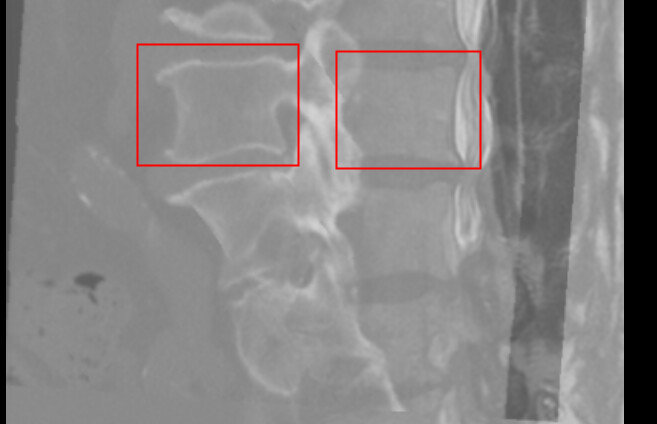
but when i use vtkimageblend to blend them , Their spatial positions dismatch ,i’m not sure the reason.Dose it matter with the image’s dimension,origin or spacing?
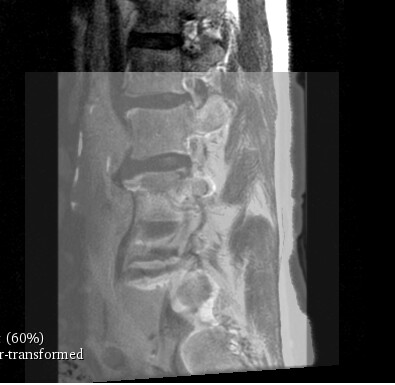
this image shows the spatial positions match well
this image shows the result of blend , you can see the dismatch from the image
Does anyone have any suggestions for me?
---
### Author:  [@dgobbi](https://discourse.vtk.org/u/dgobbi)
#### Post date: [March 10, 2022, 6:42pm UTC](https://discourse.vtk.org/t/does-it-have-to-keep-two-3d-images-has-the-same-spacing-and-origin-when-using-vtkimageblend-to-blend-them/8017/2 "2022-03-10T18:42:53Z")
The vtkImageBlend filter only considers the Extent. It assumes that the voxels of the two images are already in the same positions. It ignores the spatial position and scale that are defined by the spacing and origin.
Before applying vtkImageBlend, the voxels in the overlay image can be resampled with vtkImageReslice to match the voxels in the base image. Something like this:
```auto
reslice->SetInputData(overlayImage);
reslice->SetInformationInput(baseImage); // reslice like base image
reslice->SetInterpolationModeToLinear();
reslice->Update();
...
blend->SetInputData(0, baseImage);
blend->SetInputData(1, reslice->GetOutput());
```
---
### Author:  [@snow](https://discourse.vtk.org/u/snow)
#### Post date: [March 11, 2022, 1:40am UTC](https://discourse.vtk.org/t/does-it-have-to-keep-two-3d-images-has-the-same-spacing-and-origin-when-using-vtkimageblend-to-blend-them/8017/4 "2022-03-11T01:40:31Z")
Thank you for your suggestion. , I’ve tried with your code,it works well .