# Error importing vtkTkRenderWindowInteractor in vtk 8.2.0
**URL:** https://discourse.vtk.org/t/error-importing-vtktkrenderwindowinteractor-in-vtk-8-2-0/856
**Category:** Support
**Created:** [April 27, 2019, 1:12pm UTC](https://discourse.vtk.org/t/error-importing-vtktkrenderwindowinteractor-in-vtk-8-2-0/856 "2019-04-27T13:12:23Z")
**Posts on this page:** 20
**Page:** 1
### Author:  [@Julie](https://discourse.vtk.org/u/Julie)
#### Post date: [April 27, 2019, 1:12pm UTC](https://discourse.vtk.org/t/error-importing-vtktkrenderwindowinteractor-in-vtk-8-2-0/856/1 "2019-04-27T13:12:23Z")
Hi, everyone
I am writing a simple GUI with simple inputs and vtk rendering in Python. One article about this is combing **tk** and **vtk** , namely **vtkTkRenderWindowInteractor** , the error and code is as below:
## (1) Error-------------------------------------------------------
TclError Traceback (most recent call last)
in
22 # Setup for rendering window interactor
23 renWinInteract = vtkTkRenderWindowInteractor(root,
—\> 24 rw=renWindow, width=400, height=400)
25 renWinInteract.Initialize()
26 renWinInteract.pack(side=‘top’, fill=‘both’, expand=1)
~/anaconda2/envs/py3/lib/python3.6/site-packages/vtkmodules/tk/vtkTkRenderWindowInteractor.py in **init** (self, master, cnf, \*\*kw)
53 “”"
54 # load the necessary extensions into tk
—\> 55 vtkLoadPythonTkWidgets(master.tk)
56
57 try: # check to see if a render window was specified
~/anaconda2/envs/py3/lib/python3.6/site-packages/vtkmodules/tk/vtkLoadPythonTkWidgets.py in vtkLoadPythonTkWidgets(interp)
85
86 # re-generate the error
—\> 87 interp.call(‘load’, filename, pkgname)
* * *
TclError Traceback (most recent call last)
in
22 # Setup for rendering window interactor
23 renWinInteract = vtkTkRenderWindowInteractor(root,
—\> 24 rw=renWindow, width=400, height=400)
25 renWinInteract.Initialize()
26 renWinInteract.pack(side=‘top’, fill=‘both’, expand=1)
~/anaconda2/envs/py3/lib/python3.6/site-packages/vtkmodules/tk/vtkTkRenderWindowInteractor.py in **init** (self, master, cnf, \*\*kw)
53 “”"
54 # load the necessary extensions into tk
—\> 55 vtkLoadPythonTkWidgets(master.tk)
56
57 try: # check to see if a render window was specified
~/anaconda2/envs/py3/lib/python3.6/site-packages/vtkmodules/tk/vtkLoadPythonTkWidgets.py in vtkLoadPythonTkWidgets(interp)
85
86 # re-generate the error
—\> 87 interp.call(‘load’, filename, pkgname)
**TclError: dlopen(libvtkRenderingPythonTkWidgets-8.2.dylib, 6): image not found**
(2) Code-------------------------------------------------------
import tkinter
import sys
import vtk
from vtk.tk.vtkTkRenderWindowInteractor import vtkTkRenderWindowInteractor
# Setup for root window
root = tkinter.Tk()
root.title( “Tkinter Test” )
frame = tkinter.Frame( root )
frame.pack( fill=tkinter.BOTH, expand=1, side=tkinter.TOP )
# Setup for renderer
render = vtk.vtkRenderer()
render.SetBackground( 0.329412, 0.34902, 0.427451 )
render.ResetCameraClippingRange()
# Setup for rendering window
renWindow = vtk.vtkRenderWindow()
renWindow.AddRenderer(render)
# Setup for rendering window interactor
renWinInteract = vtkTkRenderWindowInteractor(root,
rw=renWindow, width=400, height=400)
renWinInteract.Initialize()
renWinInteract.pack(side=‘top’, fill=‘both’, expand=1)
renWinInteract.Start()
# Begin execution by updating the renderer and
# starting the Tkinter loop
renWindow.Render()
root.mainloop()
(3) Other information-------------------------------------------------------
vtk: 8.2.0
python: 3.6
os: macOS
**Any solution to this?**
Many thanks.
* * *
---
### Author:  [@dgobbi](https://discourse.vtk.org/u/dgobbi)
#### Post date: [April 27, 2019, 3:46pm UTC](https://discourse.vtk.org/t/error-importing-vtktkrenderwindowinteractor-in-vtk-8-2-0/856/2 "2019-04-27T15:46:08Z")
Hi Julie,
The libvtkRenderingPythonTkWidgets dylib is the Tk extension that allows VTK to be used with Tkinter. If it is missing, then it was probably not built. Where did you get your VTK package from? You should contact the maintainer and see if they can build VTK with `VTK_USE_TK` turned on.
I notice that the official pypi package for VTK 8.1.2 wasn’t built with Tk support, either.
---
### Author:  [@Julie](https://discourse.vtk.org/u/Julie)
#### Post date: [April 27, 2019, 3:52pm UTC](https://discourse.vtk.org/t/error-importing-vtktkrenderwindowinteractor-in-vtk-8-2-0/856/3 "2019-04-27T15:52:45Z")
Hi, David
Thank you for your fast response.
I installed the vtk package directly from anaconda (conda install -n py3 vtk=8.2.0).
Do you mean I should compile vtk using CMAKE to turn on VTK\_USE\_TK?
Thanks.
---
### Author:  [@dgobbi](https://discourse.vtk.org/u/dgobbi)
#### Post date: [April 27, 2019, 4:16pm UTC](https://discourse.vtk.org/t/error-importing-vtktkrenderwindowinteractor-in-vtk-8-2-0/856/4 "2019-04-27T16:16:46Z")
Yes, if you build VTK yourself then you can tell cmake to turn on `VTK_USE_TK`. I recommend building the release branch of VTK ([https://gitlab.kitware.com/vtk/vtk/tree/release](https://gitlab.kitware.com/vtk/vtk/tree/release)), which will become 8.2.1. It has many fixes that aren’t in the 8.2.0 release.
After building, make sure there is a libvtkRenderingPythonTkWidgets-8.2.dylib in the build tree.
---
### Author:  [@Julie](https://discourse.vtk.org/u/Julie)
#### Post date: [April 27, 2019, 5:02pm UTC](https://discourse.vtk.org/t/error-importing-vtktkrenderwindowinteractor-in-vtk-8-2-0/856/5 "2019-04-27T17:02:45Z")
Hi, David
Thank you. I’ll try it.
---
### Author:  [@Julie](https://discourse.vtk.org/u/Julie)
#### Post date: [April 29, 2019, 2:35pm UTC](https://discourse.vtk.org/t/error-importing-vtktkrenderwindowinteractor-in-vtk-8-2-0/856/6 "2019-04-29T14:35:51Z")
Hi, David
I tried your method, building the vtk 8.2.1. However, the `VTK_USE_TK` parameter does not exist. The new error I got running the script is ad below:
**TclError: couldn’t load file “libvtkRenderingPythonTkWidgets-8.2.so”: libvtkRenderingPythonTkWidgets-8.2.so: cannot open shared object file: No such file or directory**
It seems some file is still missing.
---
### Author:  [@dgobbi](https://discourse.vtk.org/u/dgobbi)
#### Post date: [April 29, 2019, 2:40pm UTC](https://discourse.vtk.org/t/error-importing-vtktkrenderwindowinteractor-in-vtk-8-2-0/856/7 "2019-04-29T14:40:07Z")
That’s strange. If you set `Module_vtkRenderingTk:BOOL=ON`, does `VTK_USE_TK` appear?
---
### Author:  [@Julie](https://discourse.vtk.org/u/Julie)
#### Post date: [April 29, 2019, 3:42pm UTC](https://discourse.vtk.org/t/error-importing-vtktkrenderwindowinteractor-in-vtk-8-2-0/856/8 "2019-04-29T15:42:11Z")
Neither did I find the `Module_vtkRenderingTk`, the only one related to TK is ‘VTK\_Group\_tk’, after I turned it on. The error is still the same.
Could that be related to the version of QT? I installed qt5.9.7, but the manual mentions that 5.2.1 is recommended. However, it is always stuck installing 5.2.1.
---
### Author:  [@dgobbi](https://discourse.vtk.org/u/dgobbi)
#### Post date: [April 29, 2019, 3:48pm UTC](https://discourse.vtk.org/t/error-importing-vtktkrenderwindowinteractor-in-vtk-8-2-0/856/9 "2019-04-29T15:48:00Z")
The Qt settings are independent of the Tk settings.
From what you describe, it seems that VTK 8.2 has some config bugs related to Tk. You will probably have to add `VTK_USE_TK:BOOL=ON` directly to your CMakeLists.txt file (or run cmake with `-DVTK_USE_TK:BOOL=ON`). Let me know if that works.
---
### Author:  [@dgobbi](https://discourse.vtk.org/u/dgobbi)
#### Post date: [April 29, 2019, 6:53pm UTC](https://discourse.vtk.org/t/error-importing-vtktkrenderwindowinteractor-in-vtk-8-2-0/856/10 "2019-04-29T18:53:17Z")
I just tested VTK 8.2 on my own mac (using the system Python and Tcl, though).
`VTK_USE_TK` didn’t appear at first, but it appeared after I enabled `VTK_Group_Tk`.
The detected `TCL_LIBRARY` and `TK_LIBRARY` were incorrect, so I had to set them manually.
After that, the build succeeded and the vtkTkRenderWindowInteractor tests worked.
---
### Author:  [@Julie](https://discourse.vtk.org/u/Julie)
#### Post date: [April 29, 2019, 6:57pm UTC](https://discourse.vtk.org/t/error-importing-vtktkrenderwindowinteractor-in-vtk-8-2-0/856/11 "2019-04-29T18:57:43Z")
Thank you. I will try that tomorrow. 😀
---
### Author:  [@Julie](https://discourse.vtk.org/u/Julie)
#### Post date: [April 30, 2019, 8:08am UTC](https://discourse.vtk.org/t/error-importing-vtktkrenderwindowinteractor-in-vtk-8-2-0/856/12 "2019-04-30T08:08:22Z")
Hi, David,
It still does not work. the error message is same as last time. By the way, where is the `TCL_LIBRARY` and `TK_LIBRARY`?
I did not see them in the configuration.
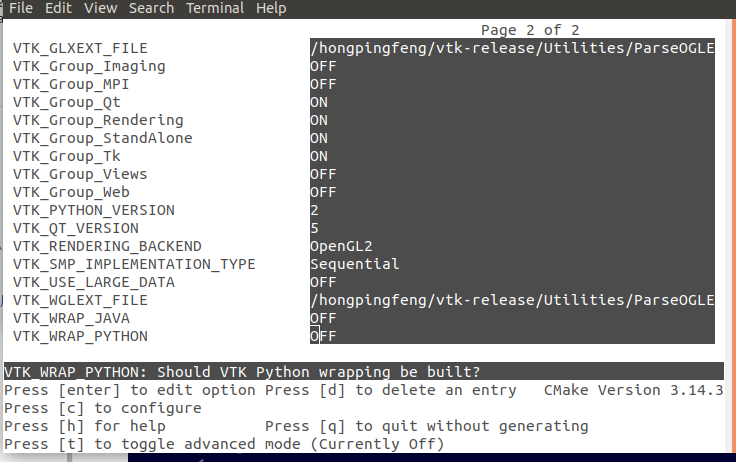
Here are the screenshots of my current configuration.
---
### Author:  [@dgobbi](https://discourse.vtk.org/u/dgobbi)
#### Post date: [April 30, 2019, 9:20am UTC](https://discourse.vtk.org/t/error-importing-vtktkrenderwindowinteractor-in-vtk-8-2-0/856/13 "2019-04-30T09:20:38Z")
The `TCL_LIBRARY` and `TK_LIBRARY` are advanced options, so you’ll see them if you toggle the advanced mode (or open CMakeCache.txt in a text editor).
If VTK is using /usr/bin/python (the system Python), then it will need to link to Apple’s Tcl/Tk 8.5 (e.g. /System/Library/Frameworks/Tcl.framework/Tcl and /System/Library/Frameworks/Tk.framework/Tk).
If VTK is using a different Python, then it will probably require Tcl/Tk 8.6.
---
### Author:  [@dgobbi](https://discourse.vtk.org/u/dgobbi)
#### Post date: [April 30, 2019, 9:26am UTC](https://discourse.vtk.org/t/error-importing-vtktkrenderwindowinteractor-in-vtk-8-2-0/856/14 "2019-04-30T09:26:40Z")
You’ll also have to turn on `VTK_WRAP_PYTHON`.
The `libvtkRenderingPythonTkWidgets-8.2.dylib` will not be built unless `VTK_WRAP_PYTHON` and `VTK_USE_TK` are both ON.
---
### Author:  [@Julie](https://discourse.vtk.org/u/Julie)
#### Post date: [April 30, 2019, 10:09am UTC](https://discourse.vtk.org/t/error-importing-vtktkrenderwindowinteractor-in-vtk-8-2-0/856/15 "2019-04-30T10:09:53Z")
Hi, David
Thank you so much for your help. After I turn on `VTK_WRAP_PYTHON`, I can see `VTK_USE_TK` in the list of parameters. And now I can find the `libvtkRenderingPythonTkWidgets-8.2.so` file under the **VTK-build** folder.
One more question, how could I let anaconda know now it should use the new built vtk, instead of the previous one build from conda?
Thanks.
---
### Author:  [@dgobbi](https://discourse.vtk.org/u/dgobbi)
#### Post date: [April 30, 2019, 12:34pm UTC](https://discourse.vtk.org/t/error-importing-vtktkrenderwindowinteractor-in-vtk-8-2-0/856/16 "2019-04-30T12:34:34Z")
Well, I’m confused about why you’re calling it “libvtkRenderingPythonTkWidgets-8.2.so” instead of “libvtkRenderingPythonTkWidgets-8.2.dylib”. You are still working on OS X, aren’t you? Be sure to test vtkTkRenderWindowInteractor before going any further.
It might be possible to replace the VTK libraries etc. that conda installed with the ones that you built, by setting `CMAKE_INSTALL_PREFIX` appropriately and then doing `make install`. You’ll definitely want to have a backup ready, though.
---
### Author:  [@Julie](https://discourse.vtk.org/u/Julie)
#### Post date: [May 4, 2019, 8:28am UTC](https://discourse.vtk.org/t/error-importing-vtktkrenderwindowinteractor-in-vtk-8-2-0/856/17 "2019-05-04T08:28:22Z")
Hi, David,
Thank you very much for your help all these days.
Previously, I was building vtk in ubuntu, and it succeeded importing “vtkTkRenderWindowInteractor”. And the **new** error message is about **libvtkRenderingPythonTkWidgets-8.2.so** , not **libvtkRenderingPythonTkWidgets-8.2.dylib**.
Now I am repeating the process on my Mac. The missing file in the error message is **libvtkRenderingPythonTkWidgets-8.2.dylib**. When I did **make** , it succeeded. And I can also find the **libvtkRenderingPythonTkWidgets-8.2.dylib** in the lib of my vtk install folder. But then, when I was doing **make install** , I got the following error.
**error:** /Applications/Xcode.app/Contents/Developer/Toolchains/XcodeDefault.xctoolchain/usr/bin/install\_name\_tool: no LC\_RPATH load command with path: /Users/julievon/anaconda2/envs/vtk/lib found in: /Users/julievon/anaconda2/envs/vtk/bin/vtkpython (for architecture x86\_64), required for specified option “-delete\_rpath /Users/julievon/anaconda2/envs/vtk/lib”
**error:** /Applications/Xcode.app/Contents/Developer/Toolchains/XcodeDefault.xctoolchain/usr/bin/install\_name\_tool: no LC\_RPATH load command with path: /Users/julievon/anaconda2/lib found in: /Users/julievon/anaconda2/envs/vtk/bin/vtkpython (for architecture x86\_64), required for specified option “-delete\_rpath /Users/julievon/anaconda2/lib”
Is there any parameter I set wrong?
Following is the cmake configuration.
 
Thanks.
---
### Author:  [@dgobbi](https://discourse.vtk.org/u/dgobbi)
#### Post date: [May 6, 2019, 2:12pm UTC](https://discourse.vtk.org/t/error-importing-vtktkrenderwindowinteractor-in-vtk-8-2-0/856/18 "2019-05-06T14:12:02Z")
Hi Julie,
Use “`otool -l`” to check to see how the paths are set in the vtkpython executable. When “`make install`” runs, the “`-delete_rpath`” is used to remove any paths that point to the build tree. So it’s strange to see “`-delete_rpath /Users/julievon/anaconda2/lib`”, since this path is in the install tree. I don’t see anything wrong with your cmake configuration. This could be a conflict of sorts between the VTK that you are installing, and the VTK installed by conda.
You could try restoring the anaconda vtk from backup, and then manually copy just “libvtkRenderingPythonTkWidgets-8.2.dylib” to the “`site-packages`” within the anaconda directory tree. Here, again, “`otool -l`” can be used to check to see what libraries it links to.
---
### Author:  [@Julie](https://discourse.vtk.org/u/Julie)
#### Post date: [May 7, 2019, 12:42pm UTC](https://discourse.vtk.org/t/error-importing-vtktkrenderwindowinteractor-in-vtk-8-2-0/856/19 "2019-05-07T12:42:49Z")
Hi David,
Thank you so much for your help, always.
I still can not make it. It nearly drove me crazy. I tried many combinations by tuning the parameters. And to make the environment clean, I uninstalled all the vtk packages previously installed via conda or pip. It still failed. But I also have some progress.
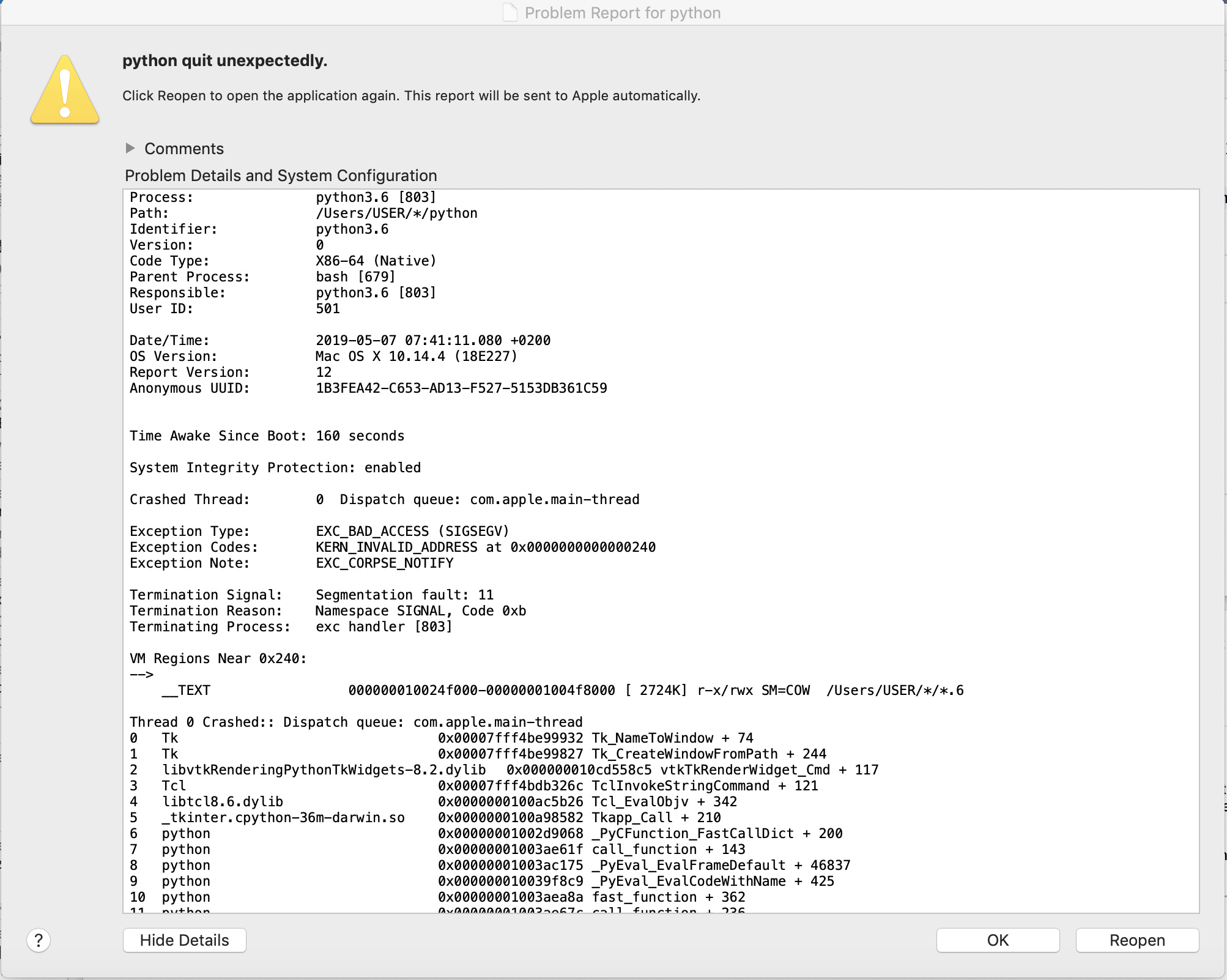
It failed when I “import vtk”, it seems the files are not installed in the correct place. Then I tried to find the difference with the bin&include&lib files between conda-install and source-install, I found the later one put the vtkmodules folder and vtk.py under /lib/python2.7/site-packages, but not /lib/python3.6/site-packages. After I copy these files to /lib/python3.6/site-packages, “import vtk” succeeded. However when I try to run the code which includes **vtkTkRenderWindowInteractor** , the program crashed, shown as below.
Another interesting thing: if I directly use the stable vtk version 8.2, I can successfully “import vtk”, after building, it does not make any mistake of python version (2.7 vs 3.6). However, the same thing is: when I try to run the code which includes **vtkTkRenderWindowInteractor** , the program crashed.
Do you know what the possible root cause is?
Thank you very much.
Best,
Julie
---
### Author:  [@dgobbi](https://discourse.vtk.org/u/dgobbi)
#### Post date: [May 7, 2019, 1:53pm UTC](https://discourse.vtk.org/t/error-importing-vtktkrenderwindowinteractor-in-vtk-8-2-0/856/20 "2019-05-07T13:53:45Z")
A crash like this often suggests that a library that was linked at compile time doesn’t match the library that gets linked at runtime. The stack trace suggests that the Tk library is the one causing the problem. Make sure that the “`_tkinter.cpython-36m-darwin.so`” mentioned is linking to the same libtk and libtcl as “`libvtkRenderingPythonTkWidgets-8.2.dylib`” (use “otool -l” to do the check). Also make sure that this matches the libtk and libtcl in your cmake config.
One suspicious thing about the stack trace is that it references both “Tcl” and “libtcl8.6.dylib” as tcl libraries. When it references “Tcl”, it means the framework Tcl (i.e. in /Library/Frameworks or /System/Library/Frameworks) but when it references “libtcl.8.6.dylib” it means a tcl installed somewhere else, e.g. a tcl that is part of anaconda.
[Next page](https://discourse.vtk.org/t/error-importing-vtktkrenderwindowinteractor-in-vtk-8-2-0/856.md?page=2)