# Error: vtkXOpenGLRenderWindow: bad X server connection
**URL:** https://discourse.vtk.org/t/error-vtkxopenglrenderwindow-bad-x-server-connection/11301
**Category:** Support
**Tags:** python
**Created:** [April 25, 2023, 5:29pm UTC](https://discourse.vtk.org/t/error-vtkxopenglrenderwindow-bad-x-server-connection/11301 "2023-04-25T17:29:45Z")
**Posts on this page:** 4
**Page:** 1
### Author:  [@automata](https://discourse.vtk.org/u/automata)
#### Post date: [April 25, 2023, 5:29pm UTC](https://discourse.vtk.org/t/error-vtkxopenglrenderwindow-bad-x-server-connection/11301/1 "2023-04-25T17:29:45Z")
We are trying to run a Python script that imports VTK and uses pyvirtualdisplay (Xvfb) to render images while running in a Kubernetes pod.
We installed VTK through `pip install vtk` (making sure we had the required `libgl1-mesa-dev`, `libopenmpi-dev` and other required packages installed from `deb https://apt.kitware.com/ubuntu/ bionic main` repository) using Python 3.7 on Ubuntu 18.04, as a Docker image.
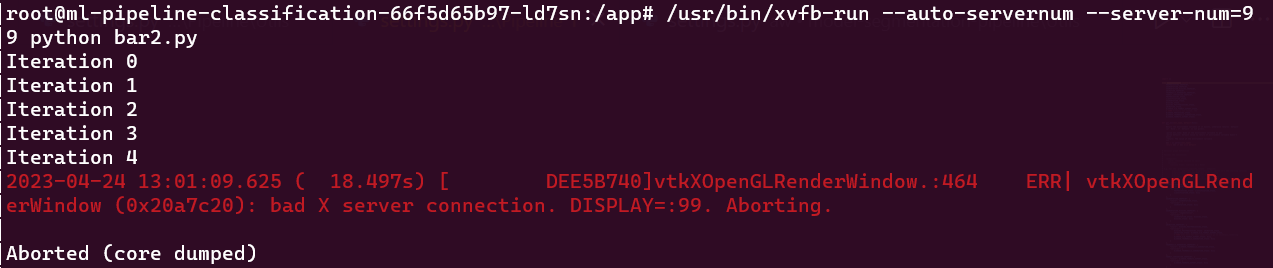
The following error happens randomly (more frequently while running in the k8s pod, however we were able to reproduce it running in a local Docker image as well):
Because of IP restrictions, I’m trying to share pieces of the script that seems relevant for the discussion:
```python
import vtk
from pyvirtualdisplay import Display
def render(i, x, y, z):
transform = vtk.vtkTransform()
...
ren = vtk.vtkRenderer()
ren_win = vtk.vtkRenderWindow()
ren_win.SetOffScreenRendering(1)
ren_win.AddRenderer(ren)
ren_win.Render()
window_to_image_filter = vtk.vtkWindowToImageFilter()
window_to_image_filter.SetInput(ren_win)
window_to_image_filter.Update()
...
writer.Write()
def capture():
with Display():
file = "input.obj"
reader = vtk.vtkOBJReader()
...
rotate_models(i, 1, 0, 0)
rotate_models(i, 0, 1, 0)
rotate_models(i, 0, 0, 1)
for i in range(30):
capture()
```
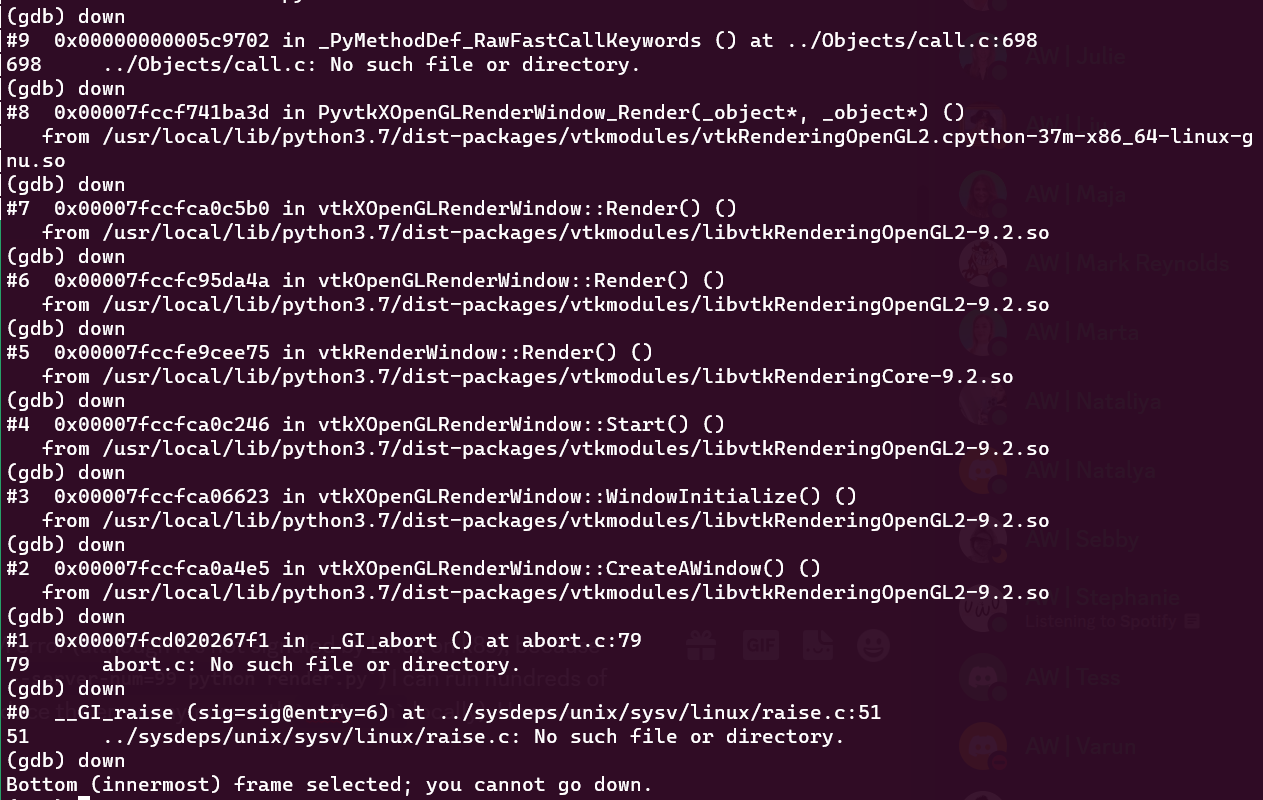
We opened the generated core dump file in `gdb` and drilled down as much as possible, and it seems the issues is related with rendering window not being able to render:
While searching for solutions, we found some options like using Paraview’s VTK (built with OSMESA) and also building VTK ourselves with OSMESA support ([Offscreen Rendering In Linux // patricksnape // Computer Vision and Machine Learning Engineer](https://patricksnape.github.io/2014/offscreen_rendering/)).
Should we build a software rendering VTK ourselves or is there any other possible solution? We would be more than happy to share any other supporting information and collaborate on fixing this issue.
Thank you in advance.
---
### Author:  [@Sebastien\_Jourdain](https://discourse.vtk.org/u/Sebastien_Jourdain)
#### Post date: [April 25, 2023, 8:59pm UTC](https://discourse.vtk.org/t/error-vtkxopenglrenderwindow-bad-x-server-connection/11301/2 "2023-04-25T20:59:51Z")
You can use our pre-built version of VTK with OSMesa like we use here:
>
---
### Author:  [@automata](https://discourse.vtk.org/u/automata)
#### Post date: [April 27, 2023, 10:37am UTC](https://discourse.vtk.org/t/error-vtkxopenglrenderwindow-bad-x-server-connection/11301/3 "2023-04-27T10:37:44Z")
@Sebastien_Jourdain it worked as expected! Thank you so much!
---
### Author:  [@automata](https://discourse.vtk.org/u/automata)
#### Post date: [May 5, 2023, 1:35pm UTC](https://discourse.vtk.org/t/error-vtkxopenglrenderwindow-bad-x-server-connection/11301/4 "2023-05-05T13:35:43Z")
@Sebastien_Jourdain sorry, it’s a bit offtopic, but we were able to build our Docker image with success until yesterday and use vtk-osmesa. However the Ubuntu bionic repository seems not valid anymore. Has Kitware stopped supporting Ubuntu 18.04?
We are having the following error:
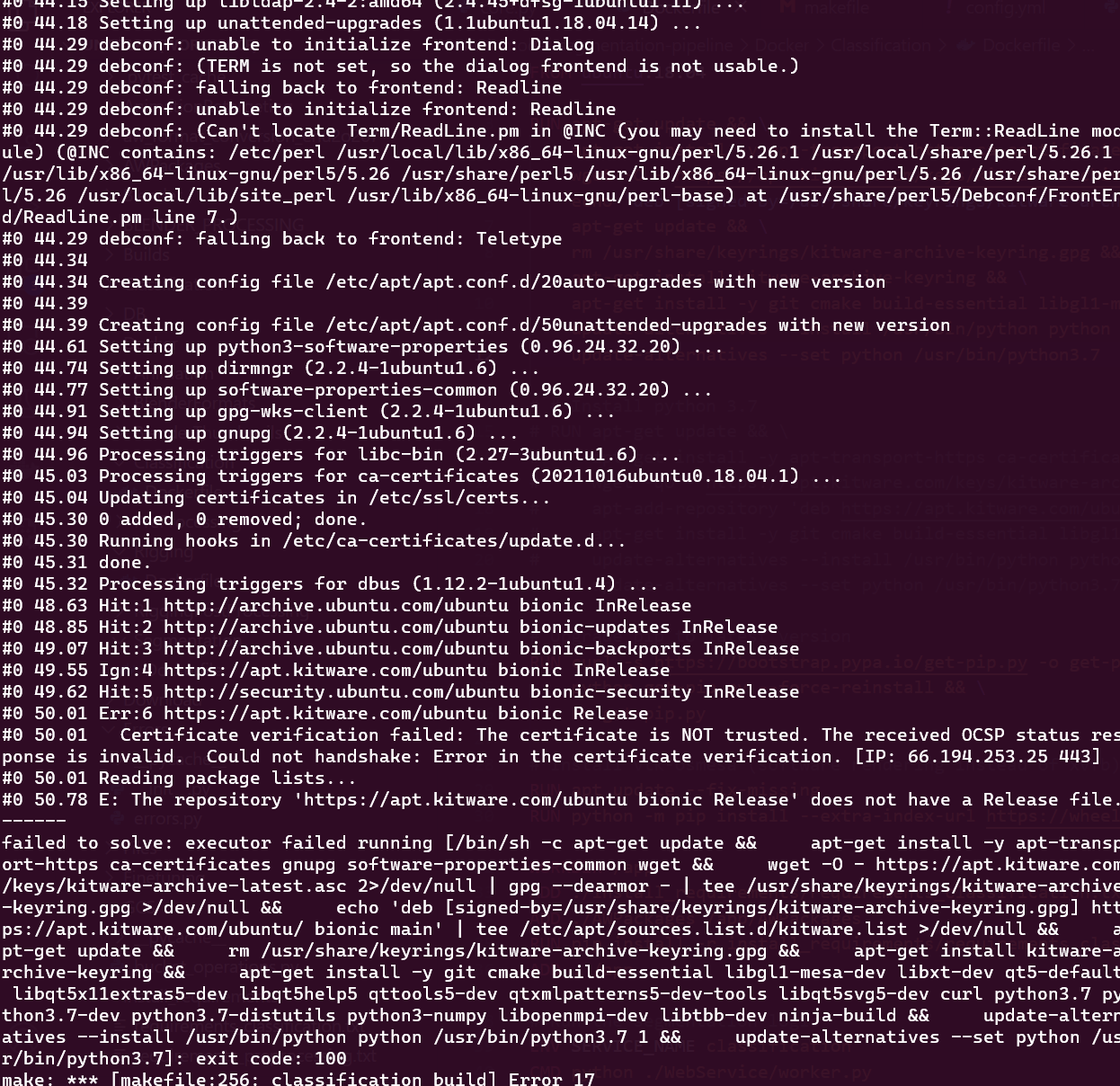
When trying to build based on the following Dockerfile:
```auto
FROM ubuntu:18.04
RUN apt-get update && \
apt-get install -y apt-transport-https ca-certificates gnupg software-properties-common wget && \
wget -O - https://apt.kitware.com/keys/kitware-archive-latest.asc 2>/dev/null | gpg --dearmor - | tee /usr/share/keyrings/kitware-archive-keyring.gpg >/dev/null && \
echo 'deb [signed-by=/usr/share/keyrings/kitware-archive-keyring.gpg] https://apt.kitware.com/ubuntu/ bionic main' | tee /etc/apt/sources.list.d/kitware.list >/dev/null && \
apt-get update && \
rm /usr/share/keyrings/kitware-archive-keyring.gpg && \
apt-get install kitware-archive-keyring && \
apt-get install -y git cmake build-essential libgl1-mesa-dev libxt-dev qt5-default libqt5x11extras5-dev libqt5help5 qttools5-dev qtxmlpatterns5-dev-tools libqt5svg5-dev curl python3.7 python3.7-dev python3.7-distutils python3-numpy libopenmpi-dev libtbb-dev ninja-build && \
update-alternatives --install /usr/bin/python python /usr/bin/python3.7 1 && \
update-alternatives --set python /usr/bin/python3.7
# Install vtk-osmesa (software rendering instead of xvfb)
RUN apt update --fix-missing
RUN python -m pip install --extra-index-url https://wheels.vtk.org vtk-osmesa
```