# Example C++ VolumeRendering SimpleRayCast
**URL:** https://discourse.vtk.org/t/example-c-volumerendering-simpleraycast/1059
**Category:** Support
**Created:** [May 31, 2019, 11:48am UTC](https://discourse.vtk.org/t/example-c-volumerendering-simpleraycast/1059 "2019-05-31T11:48:34Z")
**Posts on this page:** 17
**Page:** 1
### Author:  [@1111](https://discourse.vtk.org/u/1111)
#### Post date: [May 31, 2019, 11:48am UTC](https://discourse.vtk.org/t/example-c-volumerendering-simpleraycast/1059/1 "2019-05-31T11:48:34Z")
I have run the sample code (SimpleRayCast).
The build is successful, but SimpleRayCast.exe can not run using the command prompt.
When “SimpleRayCast ironProt.vtk” is entered on the command prompt, errors occurs and operation stops.
Operating environment, VTK-7.1.1, visual studio2012.
---
### Author:  [@Kenichiro-Yoshimi](https://discourse.vtk.org/u/Kenichiro-Yoshimi)
#### Post date: [June 1, 2019, 4:26am UTC](https://discourse.vtk.org/t/example-c-volumerendering-simpleraycast/1059/2 "2019-06-01T04:26:09Z")
Hi,
Could you please give more detailed error output? It is difficult for someone to help without knowing what’s wrong.
Here is an example for printing errors to the log file:
[https://lorensen.github.io/VTKExamples/site/Cxx/Utilities/FileOutputWindow/](https://lorensen.github.io/VTKExamples/site/Cxx/Utilities/FileOutputWindow/)
---
### Author:  [@1111](https://discourse.vtk.org/u/1111)
#### Post date: [June 1, 2019, 6:38am UTC](https://discourse.vtk.org/t/example-c-volumerendering-simpleraycast/1059/3 "2019-06-01T06:38:39Z")
To Kenichiro Yoshimi,
Thanks for your reply.
I will attach an error screen.
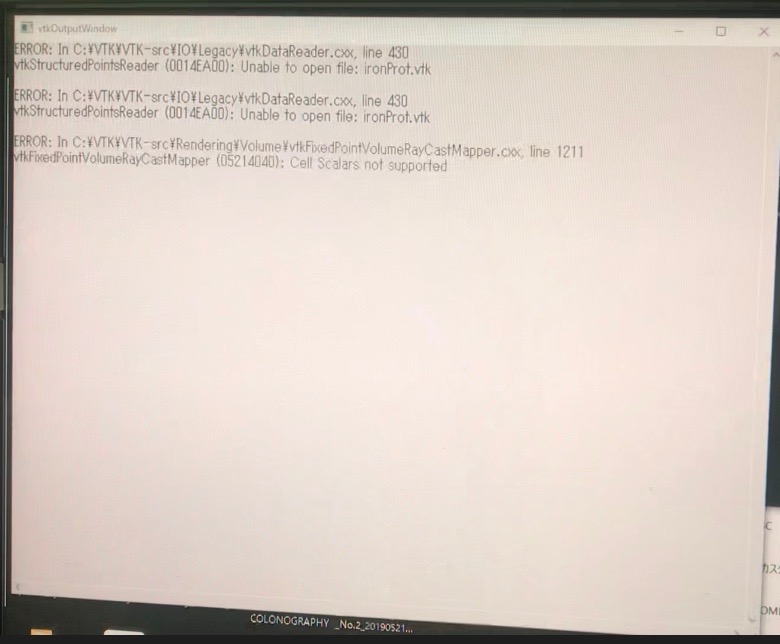
After the above error screen is displayed for a few seconds, the command prompt disappears from the screen.
---
### Author:  [@Kenichiro-Yoshimi](https://discourse.vtk.org/u/Kenichiro-Yoshimi)
#### Post date: [June 1, 2019, 11:31am UTC](https://discourse.vtk.org/t/example-c-volumerendering-simpleraycast/1059/4 "2019-06-01T11:31:01Z")
Hi,
The error you get indicates that .exe does not find ironProt.vtk in the execution directory. Could you confirm if ironProt.vtk file is really placed in the execution directory?
---
### Author:  [@1111](https://discourse.vtk.org/u/1111)
#### Post date: [June 1, 2019, 11:47am UTC](https://discourse.vtk.org/t/example-c-volumerendering-simpleraycast/1059/5 "2019-06-01T11:47:43Z")
Hi,
Thanks for your reply.
I was able to understand the contents of the error.
May I ask you questions in Japanese if possible?
---
### Author:  [@1111](https://discourse.vtk.org/u/1111)
#### Post date: [June 3, 2019, 1:19am UTC](https://discourse.vtk.org/t/example-c-volumerendering-simpleraycast/1059/6 "2019-06-03T01:19:27Z")
Thank you for replying the other day.
I understood the meaning of the error.
I was also able to confirm the location of the file.
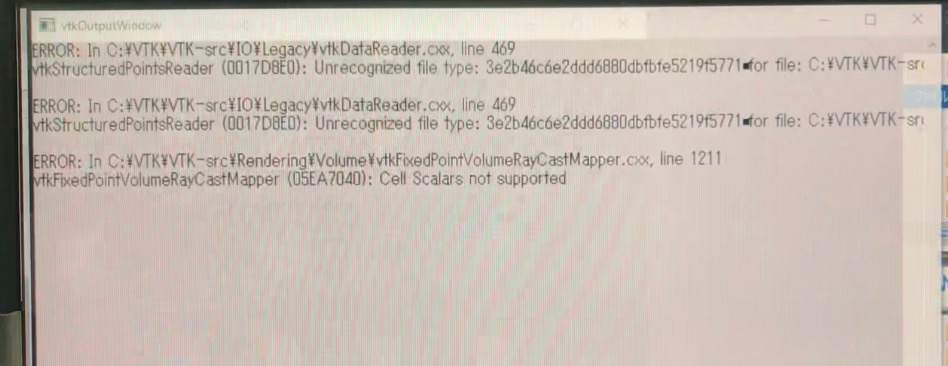
The following error was displayed as a result of specifying Path and executing it.
The file format is .md5
---
### Author:  [@Kenichiro-Yoshimi](https://discourse.vtk.org/u/Kenichiro-Yoshimi)
#### Post date: [June 3, 2019, 4:42am UTC](https://discourse.vtk.org/t/example-c-volumerendering-simpleraycast/1059/7 "2019-06-03T04:42:11Z")
The MD5 hash does not contain actual content but checksum in extracting the external data into actual content.
By the way, it seems likely that you can directly download the data under link:
[https://data.kitware.com/#item/588272dc8d777f4f3f3077ca](https://data.kitware.com/#item/588272dc8d777f4f3f3077ca)
---
### Author:  [@1111](https://discourse.vtk.org/u/1111)
#### Post date: [June 3, 2019, 6:24am UTC](https://discourse.vtk.org/t/example-c-volumerendering-simpleraycast/1059/8 "2019-06-03T06:24:41Z")
Thank you for your reply.
I was able to understand the question.
Download and try it once.
---
### Author:  [@1111](https://discourse.vtk.org/u/1111)
#### Post date: [June 3, 2019, 8:22am UTC](https://discourse.vtk.org/t/example-c-volumerendering-simpleraycast/1059/9 "2019-06-03T08:22:01Z")
I was able to display ironProt.vtk
Thank you for the advice.
We hope to create volume rendering of raw data (512x512x512) in the future.
Is it possible to display raw data directly?
Or do you need to convert to another extension?
---
### Author:  [@Kenichiro-Yoshimi](https://discourse.vtk.org/u/Kenichiro-Yoshimi)
#### Post date: [June 3, 2019, 11:16am UTC](https://discourse.vtk.org/t/example-c-volumerendering-simpleraycast/1059/10 "2019-06-03T11:16:57Z")
You can definitely read 3D raw data (.raw/.mhd) with vtkImageReader. Here the \*.mhd file is a header file called Meta Image Data file and it is easily filled with some meta information about the stored raw data.
[https://itk.org/Wiki/ITK/MetaIO/Documentation](https://itk.org/Wiki/ITK/MetaIO/Documentation)
---
### Author:  [@1111](https://discourse.vtk.org/u/1111)
#### Post date: [June 4, 2019, 1:43am UTC](https://discourse.vtk.org/t/example-c-volumerendering-simpleraycast/1059/11 "2019-06-04T01:43:55Z")
Thank you for your reply.
I have .raw 3D data.
As a conversion method, do you use MetaImageImporter or convert with the following source code?
ObjectType = Image
NDims = 3
DimSize = 256 256 256
ElementType = MET\_USHORT
HeaderSize = -1
ElementSize = 1 1 3
ElementSpacing = 1 1 1
ElementByteOrderMSB = False
ElementDataFile = image.raw
---
### Author:  [@Kenichiro-Yoshimi](https://discourse.vtk.org/u/Kenichiro-Yoshimi)
#### Post date: [June 4, 2019, 3:34am UTC](https://discourse.vtk.org/t/example-c-volumerendering-simpleraycast/1059/12 "2019-06-04T03:34:11Z")
I created the mhd header manually. But at this point, you can do whatever you want.
---
### Author:  [@1111](https://discourse.vtk.org/u/1111)
#### Post date: [June 4, 2019, 4:34am UTC](https://discourse.vtk.org/t/example-c-volumerendering-simpleraycast/1059/13 "2019-06-04T04:34:18Z")
Can you tell me how to create manually?
---
### Author:  [@Kenichiro-Yoshimi](https://discourse.vtk.org/u/Kenichiro-Yoshimi)
#### Post date: [June 4, 2019, 6:23am UTC](https://discourse.vtk.org/t/example-c-volumerendering-simpleraycast/1059/14 "2019-06-04T06:23:41Z")
I had discovered the right values in the mhd header with a little trial and error. I am sorry I don’t know more straightforward approach to set up them.
---
### Author:  [@1111](https://discourse.vtk.org/u/1111)
#### Post date: [June 4, 2019, 6:53am UTC](https://discourse.vtk.org/t/example-c-volumerendering-simpleraycast/1059/15 "2019-06-04T06:53:11Z")
Thanks.
It was possible to convert to .mhd.
May I tell you how to enter .mhd into VTK(Ray Cast Program)?
---
### Author:  [@Kenichiro-Yoshimi](https://discourse.vtk.org/u/Kenichiro-Yoshimi)
#### Post date: [June 5, 2019, 12:56am UTC](https://discourse.vtk.org/t/example-c-volumerendering-simpleraycast/1059/16 "2019-06-05T00:56:01Z")
You need to read a mhd file by vtkMetaImageReader instead of vtkStructuredPointsReader. I hope the following example is helpful:
[https://lorensen.github.io/VTKExamples/site/Cxx/IO/MetaImageReader/](https://lorensen.github.io/VTKExamples/site/Cxx/IO/MetaImageReader/)
---
### Author:  [@1111](https://discourse.vtk.org/u/1111)
#### Post date: [June 5, 2019, 6:05am UTC](https://discourse.vtk.org/t/example-c-volumerendering-simpleraycast/1059/17 "2019-06-05T06:05:47Z")
Thank you for reply.
It was executed using the code of MetaImageReader.
I was able to convert .raw to .mhd and display 2D images.
ImageSliceIteratorWithIndexTest.mha downloaded from the following URL can be adjusted on VTK when displayed.
However, I can not do that with the data I have.
If you know, can you tell me?
[https://data.kitware.com/#folder/5c77024e8d777f072b6c4347](https://data.kitware.com/#folder/5c77024e8d777f072b6c4347)