# Fill area between lines with different colors
**URL:** https://discourse.vtk.org/t/fill-area-between-lines-with-different-colors/2681
**Category:** Support
**Created:** [February 22, 2020, 11:31pm UTC](https://discourse.vtk.org/t/fill-area-between-lines-with-different-colors/2681 "2020-02-22T23:31:00Z")
**Posts on this page:** 2
**Page:** 1
### Author:  [@kerim](https://discourse.vtk.org/u/kerim)
#### Post date: [February 22, 2020, 11:31pm UTC](https://discourse.vtk.org/t/fill-area-between-lines-with-different-colors/2681/1 "2020-02-22T23:31:00Z")
Hi,
Is there a way to plot line that has three dimensions **(x, y, z)** on two dimensional **XY** axes and fill the area between this line and some baseline (usually baseline is a constant value line) with color coded by **z** -values?
In other words the line is represented by three vectors: **x** , **y** and **z**.
Here is the example of it (2nd and 3rd plots): [https://www.mathworks.com/matlabcentral/mlc-downloads/downloads/submissions/38691/versions/2/screenshot.png](https://www.mathworks.com/matlabcentral/mlc-downloads/downloads/submissions/38691/versions/2/screenshot.png)
In Matlab it is done via patch() function [https://www.mathworks.com/help/matlab/ref/patch.html](https://www.mathworks.com/help/matlab/ref/patch.html)
Best regards
---
### Author:  [@kerim](https://discourse.vtk.org/u/kerim)
#### Post date: [February 24, 2020, 7:25pm UTC](https://discourse.vtk.org/t/fill-area-between-lines-with-different-colors/2681/2 "2020-02-24T19:25:09Z")
Seems to me I have found a way to do this.
I’m going to use **vtkPlotArea** from [example](https://lorensen.github.io/VTKExamples/site/Cxx/Plotting/AreaPlot/).
The idea is to select the points that have the same color via virtual void [vtkPlot::SetSelection(vtkIdTypeArray \*id)](https://vtk.org/doc/nightly/html/classvtkPlot.html#aecbe4306a590789fb04144cbafd10c63) and apply [vtkPlot::GetSelectionBrush( )](https://vtk.org/doc/nightly/html/classvtkPlot.html#a065c0e18c75eb29c380045eb18cb687c) that should fill selected region with specified color.
The problem that it doesn’t work 🙃
**I write the code:**
/\* Color object \*/
`vtkNew colors;`
`vtkColor3d color3d = colors->GetColor3d("tomato");`
/\* Create area object \*/
`vtkPlotArea* area = dynamic_cast(chart->AddPlot(vtkChart::AREA)); // `
/\* select 10 first elements \*/
` vtkNew arrSelect;`
` arrSelect->SetName("Selection");`
` arrSelect->InsertNextValue(0);`
` arrSelect->InsertNextValue(1);`
` arrSelect->InsertNextValue(2);`
` arrSelect->InsertNextValue(3);`
` arrSelect->InsertNextValue(4);`
` arrSelect->InsertNextValue(5);`
` arrSelect->InsertNextValue(6);`
` arrSelect->InsertNextValue(7);`
` arrSelect->InsertNextValue(8);`
` arrSelect->InsertNextValue(9);`
` area->SetSelection(arrSelect);`
/\* Fill selected area with specified color \*/
`area->GetSelectionBrush()->SetColorF(color3d.GetRed(), color3d.GetGreen(), color3d.GetBlue(), .6);`
When I run the code the hole area is filled with black (i.e. colors didn’t work).
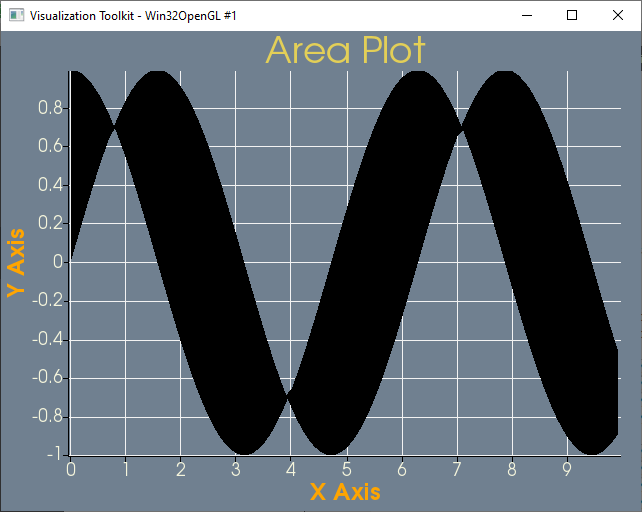
If somebody has idea what do I do incorrect please give me a hint
Best regards