# Flip the ResliceImageViewer
**URL:** https://discourse.vtk.org/t/flip-the-resliceimageviewer/14752
**Category:** Support
**Created:** [October 22, 2024, 9:29am UTC](https://discourse.vtk.org/t/flip-the-resliceimageviewer/14752 "2024-10-22T09:29:01Z")
**Posts on this page:** 5
**Page:** 1
### Author:  [@christeen](https://discourse.vtk.org/u/christeen)
#### Post date: [October 22, 2024, 9:29am UTC](https://discourse.vtk.org/t/flip-the-resliceimageviewer/14752/1 "2024-10-22T09:29:01Z")
I based my code on the FourPaneViewer. In my coronal viewer (vtkResliceImageViewer), the image is displayed, but it appears flipped like a mirror image. I’m trying to correct it to display in the normal orientation.
I attempted to adjust the camera by rotating it with Yaw and Pitch, but this caused the coronal image viewer to become blank. I also tried using `SetViewUp(0, -1, 0)` to fix the flipped image, but that didn’t work either. Then, I experimented with `vtkImageFlip`, but it also didn’t resolve the issue. When I used it, the unflipped image was still displayed. I even tried using `vtkImageMandelbrotSource` and applying the `vtkImageFlip` operation, but the expected result wasn’t achieved.
---
### Author:  [@dgobbi](https://discourse.vtk.org/u/dgobbi)
#### Post date: [October 22, 2024, 2:29pm UTC](https://discourse.vtk.org/t/flip-the-resliceimageviewer/14752/2 "2024-10-22T14:29:38Z")
The FourPaneViewer uses vtkInteractorStyleImage, which is a “camera” interactor style, which means that orienting the camera is the responsibility of the interactor style. When using this, it’s best not to call SetViewUp(), Roll(), Yaw(), etc. on the camera yourself.
Instead, use interactorStyle-\>SetXViewUpVector(ux, uy, uz) and interactorStyle-\>SetXViewRightVector(vx, vy, vz) to adjust the coronal slice orientation. You can choose whatever you want for (ux,uy,uz) and (vx,vy,vz) as long as they are orthonormal.
---
### Author:  [@christeen](https://discourse.vtk.org/u/christeen)
#### Post date: [October 24, 2024, 4:08am UTC](https://discourse.vtk.org/t/flip-the-resliceimageviewer/14752/3 "2024-10-24T04:08:42Z")
It isn’t working at the moment. I’ve tried many times using your suggestion, but the image remains unflipped.
Here’s the code (I’m not very familiar with VTK, so if there’s a mistake, please correct me):
```auto
double upVector[3] = { 0.0, 0.0, 1.0 }; // Coronal up vector (z-axis)
double rightVector[3] = { 1.0, 0.0, 0.0 }; // Coronal right vector (x-axis)
m_InteractorStyleCoronal->SetXViewUpVector(upVector[0], upVector[1], upVector[2]);
m_InteractorStyleCoronal->SetXViewRightVector(rightVector[0], rightVector[1], rightVector[2]);
```
---
### Author:  [@dgobbi](https://discourse.vtk.org/u/dgobbi)
#### Post date: [October 24, 2024, 12:02pm UTC](https://discourse.vtk.org/t/flip-the-resliceimageviewer/14752/4 "2024-10-24T12:02:52Z")
Oops, I made a mistake in my suggestion: for coronal, it would be “SetY…” instead of “SetX…”.
But I took a closer look at the vtkResliceImageViewer.cxx code, and it hard-codes the view orientations in its UpdateOrientation() method, so you won’t be able to customize the orientations via the interactor style as I had suggested.
Your best option might be to write your own custom viewer class, based on your app’s requirements.
---
### Author:  [@christeen](https://discourse.vtk.org/u/christeen)
#### Post date: [November 27, 2024, 10:51am UTC](https://discourse.vtk.org/t/flip-the-resliceimageviewer/14752/5 "2024-11-27T10:51:23Z")
The Expected Output:

But Received,
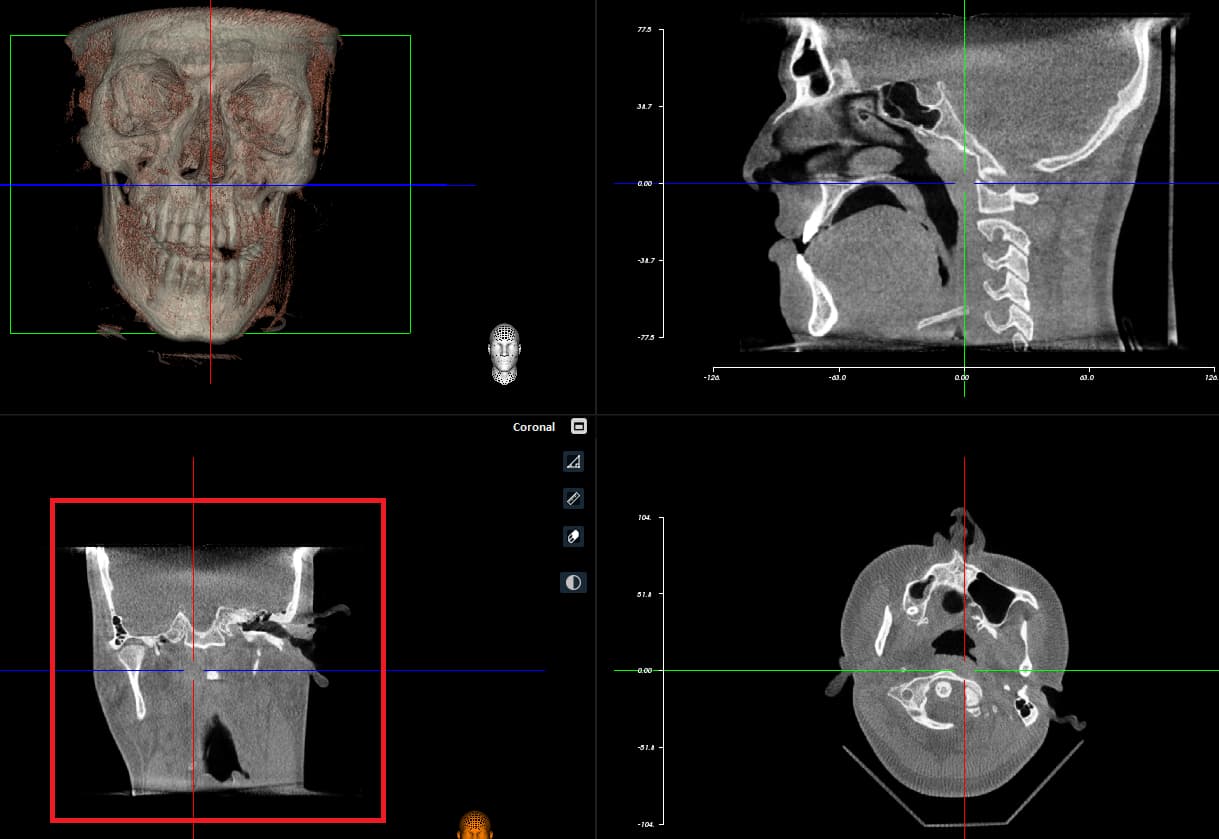
How Can I resolve this