# Function to change view mode to ZPlane
**URL:** https://discourse.vtk.org/t/function-to-change-view-mode-to-zplane/11126
**Category:** Support
**Created:** [April 4, 2023, 11:33am UTC](https://discourse.vtk.org/t/function-to-change-view-mode-to-zplane/11126 "2023-04-04T11:33:46Z")
**Posts on this page:** 8
**Page:** 1
### Author:  [@Kevin\_Sweeney](https://discourse.vtk.org/u/Kevin_Sweeney)
#### Post date: [April 4, 2023, 11:33am UTC](https://discourse.vtk.org/t/function-to-change-view-mode-to-zplane/11126/1 "2023-04-04T11:33:46Z")
I am creating a `view` instance in `itkwidgets` (i.e. `projection_view = itkwidgets.view(geometries=None, background=[0.0, 0.0, 0.0])`) and want to be able to, at a later stage, set the view mode to ZPlane.
How do I do this through code? I can do it by clicking on the icon but cannot seem to find the appropriate function.
Thanks
---
### Author:  [@Kevin\_Sweeney](https://discourse.vtk.org/u/Kevin_Sweeney)
#### Post date: [April 5, 2023, 10:39pm UTC](https://discourse.vtk.org/t/function-to-change-view-mode-to-zplane/11126/2 "2023-04-05T22:39:28Z")
When trying some things I can see that
```auto
TraitError: The 'mode' trait of a Viewer instance expected any of ['x', 'y', 'z', 'v']
```
but setting `projection_view.mode = 'z'` has no effect
---
### Author:  [@Paulo\_Carvalho](https://discourse.vtk.org/u/Paulo_Carvalho)
#### Post date: [April 12, 2023, 11:39am UTC](https://discourse.vtk.org/t/function-to-change-view-mode-to-zplane/11126/3 "2023-04-12T11:39:30Z")
Hello,
Is this about ITK or using VTK to render ITK objects?
best,
PC
---
### Author:  [@Kevin\_Sweeney](https://discourse.vtk.org/u/Kevin_Sweeney)
#### Post date: [April 19, 2023, 1:01pm UTC](https://discourse.vtk.org/t/function-to-change-view-mode-to-zplane/11126/4 "2023-04-19T13:01:34Z")
Apologies @Paulo_Carvalho but I am a bit confused by your question. Maybe a bit more explanation on my part would help.
Basically using this example:
```python
from pyvista import examples
from itkwidgets import view
mesh = examples.download_lidar()
viewer = view(geometries=mesh)
viewer
```
Is there a way to set the view mode to X, Y or Z axis by calling something like `viewer.mode = 'z'`
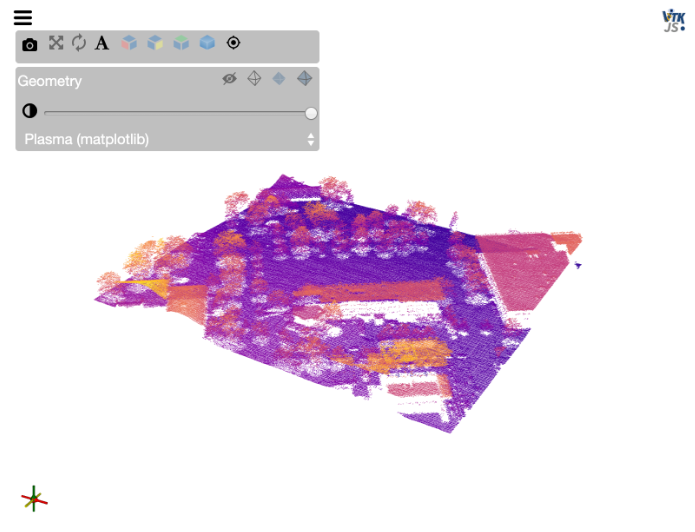
Basically I want the axis set when I create the viewer.
---
### Author:  [@Paulo\_Carvalho](https://discourse.vtk.org/u/Paulo_Carvalho)
#### Post date: [April 19, 2023, 1:53pm UTC](https://discourse.vtk.org/t/function-to-change-view-mode-to-zplane/11126/5 "2023-04-19T13:53:42Z")
Hello,
I know how to do it in VTK. However, after a bit of googling around, I found that `viewer` is an object of a class named `viewer`, but I couldn’t find any on-line docs about it. I’d start by doing some exploratory programming (e.g. do a `type(viewer)` to look for a method like `lookDownXAxis()`) or anything along those lines… other than that I can only guess.
take care,
PC
---
### Author:  [@bnmajor](https://discourse.vtk.org/u/bnmajor)
#### Post date: [April 19, 2023, 3:04pm UTC](https://discourse.vtk.org/t/function-to-change-view-mode-to-zplane/11126/6 "2023-04-19T15:04:40Z")
Hi @Kevin_Sweeney! Depending on which version you are currently using there are two ways to do this:
1. For the main release (v0.x) you can do:
```auto
viewer = view(image=...)
...
viewer.mode = 'z'
```
1. For the pre-release (v1.0ax) you can do:
```auto
viewer = view(image=...)
...
viewer.set_view_mode('ZPlane')
```
For either version you can call `view?` to get the doc string back with all of the available setters and their expected parameters.
---
### Author:  [@Kevin\_Sweeney](https://discourse.vtk.org/u/Kevin_Sweeney)
#### Post date: [April 20, 2023, 11:44am UTC](https://discourse.vtk.org/t/function-to-change-view-mode-to-zplane/11126/7 "2023-04-20T11:44:02Z")
Thanks for the reply @bnmajor
So, I am using the main release.
However it seems this `viewer.mode = 'z'` only works on `image` type inputs.
For example, this works:
```python
from urllib.request import urlretrieve
import os
import itk
file_name = '005_32months_T2_RegT1_Reg2Atlas_ManualBrainMask_Stripped.nrrd'
if not os.path.exists(file_name):
url = 'https://data.kitware.com/api/v1/file/564a5b078d777f7522dbfaa6/download'
urlretrieve(url, file_name)
image = itk.imread(file_name)
viewer1 = view(image, rotate=True, axes=True, vmin=4000, vmax=17000, gradient_opacity=0.9)
viewer1
# In a new cell
viewer1.mode = 'z'
```
But this does not:
```python
import numpy as np
from itkwidgets import view
number_of_points = 3000
gaussian_1_mean = [0.0, 0.0, 0.0]
gaussian_1_cov = [[1.0, 0.0, 0.0], [0.0, 2.0, 0.0], [0.0, 0.0, 0.5]]
point_set_1 = np.random.multivariate_normal(gaussian_1_mean, gaussian_1_cov,
number_of_points)
gaussian_2_mean = [4.0, 6.0, 7.0]
gaussian_2_cov = [[2.0, 0.0, 0.0], [0.0, 2.0, 0.0], [0.0, 0.0, 1.5]]
point_set_2 = np.random.multivariate_normal(gaussian_2_mean, gaussian_2_cov,
number_of_points)
gaussian_3_mean = [4.0, 0.0, 7.0]
gaussian_3_cov = [[4.0, 0.0, 0.0], [0.0, 1.0, 0.0], [0.0, 0.0, 3.5]]
point_set_3 = np.random.multivariate_normal(gaussian_3_mean, gaussian_3_cov,
number_of_points)
viewer2 = view(point_sets=[point_set_1, point_set_2, point_set_3])
viewer2
# In a new cell
viewer2.mode = 'z'
```
---
### Author:  [@Kevin\_Sweeney](https://discourse.vtk.org/u/Kevin_Sweeney)
#### Post date: [April 20, 2023, 1:20pm UTC](https://discourse.vtk.org/t/function-to-change-view-mode-to-zplane/11126/8 "2023-04-20T13:20:46Z")
On investigation it seems that this is the desired result from the code.
in `itk-vtk-viewer` package → `createViewer.js` → `publicAPI.setViewMode` (used by `itkwidgets`), it specifies to only change the view mode if it is an image. I have overwritten it and it then works for point sets etc. too.
I am unsure as to why it should have been set for images only.