# Generate surface mesh from label mask image volume
**URL:** https://discourse.vtk.org/t/generate-surface-mesh-from-label-mask-image-volume/4720
**Category:** Support
**Created:** [November 23, 2020, 8:59pm UTC](https://discourse.vtk.org/t/generate-surface-mesh-from-label-mask-image-volume/4720 "2020-11-23T20:59:12Z")
**Posts on this page:** 3
**Page:** 1
### Author:  [@isuruwi](https://discourse.vtk.org/u/isuruwi)
#### Post date: [November 23, 2020, 8:59pm UTC](https://discourse.vtk.org/t/generate-surface-mesh-from-label-mask-image-volume/4720/1 "2020-11-23T20:59:12Z")
I have generated a segmentation mask for a CT volume and and saved it as a nifti format. This image volume consists of below set of categories.
0: Background (None of the following organs)
1: Liver
2: Bladder
3: Lungs
4: Kidneys
5: Bone
6: Brain
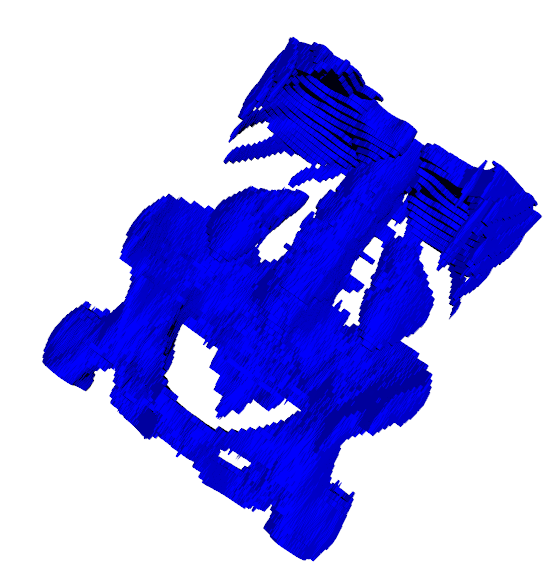
In order to extract the surface mesh which belongs to the liver (i.e. 1) from this label mask I simply applied the vtkImageThreshold filter followed by vtkDiscreteMarchingCubes filter.
But I’m not able to extract the liver surface mesh and the resulted output image you can see below.
Please help me on this matter. Thank you very much for your time and consideration.
```
binary_mask_file = './mask-0.nii'
mask_reader = vtk.vtkNIFTIImageReader()
mask_reader.SetFileName(binary_mask_file)
mask_reader.Update()
threshold = vtk.vtkImageThreshold()
threshold.SetInputConnection(mask_reader.GetOutputPort())
threshold.ThresholdByLower(5)
threshold.ThresholdByUpper(2)
threshold.ReplaceInOn()
threshold.SetInValue(0)
threshold.ReplaceOutOn()
threshold.SetOutValue(1)
threshold.Update()
dmc = vtk.vtkDiscreteMarchingCubes()
dmc.SetInputConnection(threshold.GetOutputPort())
dmc.GenerateValues(1, 1, 1)
dmc.Update()
mapper = vtk.vtkPolyDataMapper()
mapper.SetInputConnection(dmc.GetOutputPort())
actor = vtk.vtkActor()
actor.SetMapper(mapper)
ren = vtk.vtkRenderer()
renWin = vtk.vtkRenderWindow()
renWin.AddRenderer(ren)
iren = vtk.vtkRenderWindowInteractor()
iren.SetRenderWindow(renWin)
# Add the actors to the renderer, set the background and size
ren.AddActor(actor)
ren.SetBackground(1.0, 1.0, 1.0)
renWin.SetSize(600, 600)
iren.Initialize()
# We'll zoom in a little by accessing the camera and invoking a "Zoom"
# method on it.
ren.ResetCamera()
#ren.GetActiveCamera().Zoom(1.5)
renWin.Render()
# Start the event loop.
iren.Start()
```
---
### Author:  [@Joachim\_P](https://discourse.vtk.org/u/Joachim_P)
#### Post date: [November 25, 2020, 10:27pm UTC](https://discourse.vtk.org/t/generate-surface-mesh-from-label-mask-image-volume/4720/2 "2020-11-25T22:27:07Z")
Hi,
You are successively using `ThresholdByLower()` and `ThresholdByUpper()`. Both those functions set the lower and upper thresholds (meaning the second call will cancel the first one). You might want to consider `ThresholdBetween()` instead - and here, calling `threshold.ThresholdBetween(1, 1)`.
Also be careful with your settings on InValue and OutValue. The InValue corresponds to the value that will be set to the pixels/voxels that pass the threshold while the OutValue corresponds to the value that will be set to the pixels/voxels that do not pass the thresold.
Hope this helps,
J.
---
### Author:  [@lassoan](https://discourse.vtk.org/u/lassoan)
#### Post date: [November 28, 2020, 2:38am UTC](https://discourse.vtk.org/t/generate-surface-mesh-from-label-mask-image-volume/4720/3 "2020-11-28T02:38:19Z")
Note that you don’t need to threshold the labelmap volume, you can specify all the values that you would like to extract. As far as I remember, the contour value is saved as cell data in the output mesh.