# GLEW could not be initialized: Missing GL version ubuntu 20.04
**URL:** https://discourse.vtk.org/t/glew-could-not-be-initialized-missing-gl-version-ubuntu-20-04/10870
**Category:** Support
**Tags:** python
**Created:** [March 3, 2023, 12:03pm UTC](https://discourse.vtk.org/t/glew-could-not-be-initialized-missing-gl-version-ubuntu-20-04/10870 "2023-03-03T12:03:27Z")
**Posts on this page:** 4
**Page:** 1
### Author:  [@sotodela](https://discourse.vtk.org/u/sotodela)
#### Post date: [March 3, 2023, 12:03pm UTC](https://discourse.vtk.org/t/glew-could-not-be-initialized-missing-gl-version-ubuntu-20-04/10870/1 "2023-03-03T12:03:27Z")
Hi,
Previously I was able to run my programs using vtk on python 3.8, after installing GPU drivers it stopped working and I get the error message “ERR| vtkXOpenGLRenderWindow (0x5194010): GLEW could not be initialized: Missing GL version” . I tried already what is suggested here : [issue with vtkOpenGLRenderWindow on linux with vtk=9.1 - #5 by dgobbi](https://discourse.vtk.org/t/issue-with-vtkopenglrenderwindow-on-linux-with-vtk-9-1/8576/5), and the cylinder example works fine.
I am using vtk version 9.1.0 and the drivers I am using for OpenGL:
OpenGL vendor string: NVIDIA Corporation
OpenGL renderer string: Quadro P2200/PCIe/SSE2
OpenGL core profile version string: 4.6.0 NVIDIA 525.85.12
What could be the problem?
---
### Author:  [@Aron\_Helser](https://discourse.vtk.org/u/Aron_Helser)
#### Post date: [March 3, 2023, 8:36pm UTC](https://discourse.vtk.org/t/glew-could-not-be-initialized-missing-gl-version-ubuntu-20-04/10870/2 "2023-03-03T20:36:35Z")
Just a guess, did you reboot after installing the drivers?
---
### Author:  [@zhang-qiang-github](https://discourse.vtk.org/u/zhang-qiang-github)
#### Post date: [March 4, 2023, 10:10am UTC](https://discourse.vtk.org/t/glew-could-not-be-initialized-missing-gl-version-ubuntu-20-04/10870/3 "2023-03-04T10:10:05Z")
I met this problem before. Twice !!! And it really make me crazy.
I will introduce the two experience.
The first time, the GPU is incorrect. My system is `windows server 2019`, but my `GPU` is incorrect for `windows server`. So, you must make sure whether the GPU can be used for ubuntu.
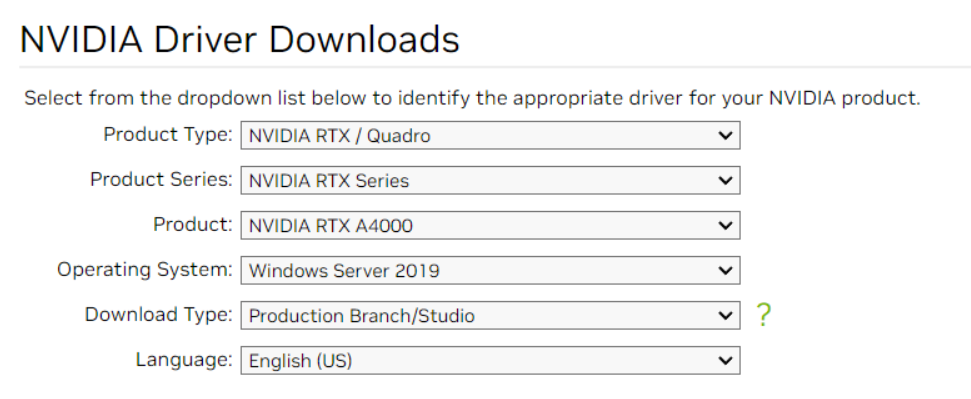
For the second time, my GPU driver is incorrect. The used driver is download from [this](https://www.nvidia.com/download/index.aspx#), and it is:
And the correct driver is download from [this](https://www.nvidia.com/download/find.aspx#), and it is:
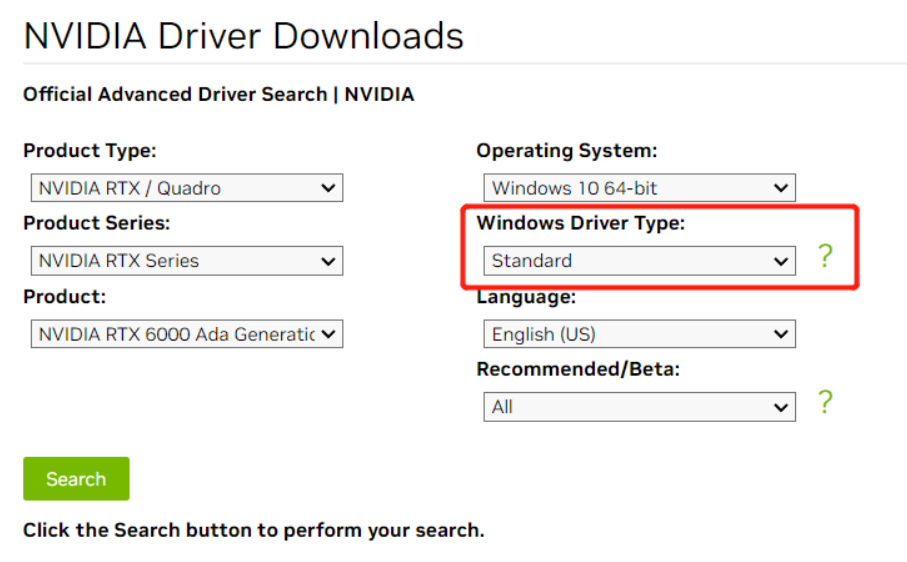
The `Standard` is necessary.
Hope it helps.
---
### Author:  [@sotodela](https://discourse.vtk.org/u/sotodela)
#### Post date: [March 8, 2023, 7:45pm UTC](https://discourse.vtk.org/t/glew-could-not-be-initialized-missing-gl-version-ubuntu-20-04/10870/4 "2023-03-08T19:45:47Z")
Thanks! I will reinstall the drivers and try it out again.