# Half border pixels in viewer
**URL:** https://discourse.vtk.org/t/half-border-pixels-in-viewer/4371
**Category:** Support
**Created:** [October 7, 2020, 12:23pm UTC](https://discourse.vtk.org/t/half-border-pixels-in-viewer/4371 "2020-10-07T12:23:25Z")
**Posts on this page:** 2
**Page:** 1
### Author:  [@Nil](https://discourse.vtk.org/u/Nil)
#### Post date: [October 7, 2020, 12:23pm UTC](https://discourse.vtk.org/t/half-border-pixels-in-viewer/4371/1 "2020-10-07T12:23:25Z")
Wanting to understand why there are thin/half border voxels in the viewer, I filled [this bug report](https://gitlab.kitware.com/vtk/vtk/-/issues/17935) 3 months ago. Moreover, I just found the [ImageMapToColors example](https://vtk.org/Wiki/VTK/Examples/Cxx/Images/ImageMapToColors) which shows the same behavior. **tl;dr** as we can see in this image, only the half of the border voxels is visible.
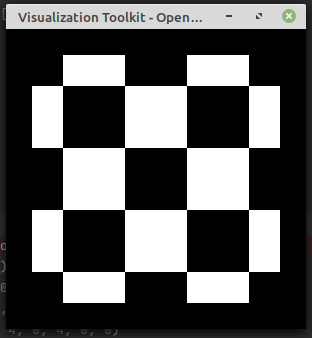
Is there a way to disable that “feature”? What the rationale behind this decision?
---
### Author:  [@lassoan](https://discourse.vtk.org/u/lassoan)
#### Post date: [October 7, 2020, 3:27pm UTC](https://discourse.vtk.org/t/half-border-pixels-in-viewer/4371/2 "2020-10-07T15:27:45Z")
Image data values are point samples at the center of each voxel. You can enable/disable half-voxel extrapolation over the first/last sample using [`Border` property of the image mapper](https://vtk.org/doc/nightly/html/classvtkImageMapper3D.html#adcfbb95d42536ae08a19df5cfb4f5dbe).