# \[Help\] Discrepancy between ParaView and VTK C++: vtkCleanPolyData works, but mesh shatters after computing normals

**URL:** https://discourse.vtk.org/t/help-discrepancy-between-paraview-and-vtk-c-vtkcleanpolydata-works-but-mesh-shatters-after-computing-normals/16227
**Category:** Support
**Tags:** code
**Created:** [January 13, 2026, 10:53am UTC](https://discourse.vtk.org/t/help-discrepancy-between-paraview-and-vtk-c-vtkcleanpolydata-works-but-mesh-shatters-after-computing-normals/16227 "2026-01-13T10:53:43Z")
**Posts on this page:** 3
**Page:** 1

<div class="post-metadata">

### Author: ![zhichaozheng322](https://discourse.vtk.org/letter_avatar_proxy/v4/letter/z/edb3f5/32.png) [@zhichaozheng322](https://discourse.vtk.org/u/zhichaozheng322)
#### Post date: [January 13, 2026, 10:53am UTC](https://discourse.vtk.org/t/help-discrepancy-between-paraview-and-vtk-c-vtkcleanpolydata-works-but-mesh-shatters-after-computing-normals/16227/1 "2026-01-13T10:53:43Z")

</div>

**Hi everyone,**

I am implementing a mesh cutting feature using `vtkBoxClipDataSet` on **arbitrary meshes**.

- **Input:** Arbitrary `vtkPolyData` constructed from triangle parameters (in my current test case, the geometry happens to be a cylinder, but it could be any shape).

- **Pipeline:** `vtkBoxClipDataSet` → `vtkTriangleFilter` → `vtkCleanPolyData` → `vtkPolyDataNormals`.

I have prototyped this workflow in **ParaView** , and it produces a smooth, continuous surface. However, when I implement the exact same pipeline in **C++** , the result looks “shattered” (hard edges everywhere), as if every triangle is detached.

#### **My Investigation & Evidence**

To isolate the issue, I exported `.vtp` files at every stage of my C++ pipeline and compared them with manual filters in ParaView (A/B testing).

**1. Confirming “Clean” works in C++**

- **File A:** `04_Outside_cleaner_Computed.vtp` (Exported after C++ `vtkCleanPolyData`).

- **File B:** `04_Outside_triFilter_Computed.vtp` (Exported after C++ Triangulation) → Manually applied `Clean` filter in ParaView.

- **Observation:** Both File A and File B have the **exact same number of points and cells** (Point count reduced from ~15k to ~4k).

- **Conclusion:** This confirms that my C++ `vtkCleanPolyData` (using `SetToleranceIsAbsolute(true)` with `1e-3`) is correctly merging vertices. The topology is closed at this stage.

**2. The discrepancy happens at the “Normals” step** I compared three scenarios for normal generation:

- **Scenario 1 (Pure C++ Pipeline):** Automated code execution.

- **Scenario 2 (Hybrid):** Load Code-Cleaned `04_Outside_cleaner_Computed.vtp` → Manually apply `Generate Surface Normals` in ParaView.

- **Scenario 3 (Pure ParaView Pipeline):** Load Triangulated data → ParaView Manual `Clean` → ParaView Manual `Generate Surface Normals`.

#### **My Conclusion & Questions**

Since **Scenario 3** (Pure ParaView) succeeds while **Scenario 1** (Pure Code) fails—despite the intermediate “Clean” data being identical—I suspect the issue lies in the `vtkPolyDataNormals` configuration, specifically the **Feature Angle** or **Splitting** logic.

In my C++ code, I set the Feature Angle to **30.0 degrees**.

1. **Feature Angle Sensitivity:** Is **30.0 degrees** generally too low for a standard tessellated cylinder? Does this cause `SplittingOn()` to incorrectly identify the angle between smooth curved faces as “sharp edges,” effectively re-splitting the vertices I just merged?

2. **ParaView Defaults:** Does ParaView’s “Generate Surface Normals” filter use a default Feature Angle of **60.0**? Or does it apply some extra logic to prevent over-splitting?

**Here is my C++ implementation:**

C++

```auto
// 1. Clean (Verified to work via export)
auto cleaner = vtkSmartPointer<vtkCleanPolyData>::New();
cleaner->SetInputData(triFilter->GetOutput());
cleaner->PointMergingOn();
cleaner->SetPieceInvariant(true);
// I used absolute tolerance to handle floating point noise from vtkBoxClipDataSet
cleaner->SetToleranceIsAbsolute(true);
cleaner->SetAbsoluteTolerance(0.001); // 1e-3
cleaner->Update();

// 2. Normals (Suspected Culprit)
auto normalGen = vtkSmartPointer<vtkPolyDataNormals>::New();
normalGen->SetInputData(cleaner->GetOutput());
normalGen->ComputePointNormalsOn();
normalGen->SplittingOn(); // I suspect this is re-splitting my welded vertices
normalGen->SetNonManifoldTraversal(true);
normalGen->ConsistencyOn();

// I used 30.0 degrees. Is this the cause?
normalGen->SetFeatureAngle(30.0); 

if (isClosedMesh && IsWatertight(mesh)) {
    normalGen->AutoOrientNormalsOn();
} else {
    normalGen->AutoOrientNormalsOff();
}

normalGen->Update();

```
 ![image](https://discourse.vtk.org/uploads/default/original/2X/7/7d2ee9ea5b771076245ab9787d5680422bee9be5.png)  
 ![image](https://discourse.vtk.org/uploads/default/original/2X/7/7c89965d70a3bec95b65b53567f16565a89fd611.png)  
 ![image](https://discourse.vtk.org/uploads/default/original/2X/c/cb2307ee2e06f7f9465205409771287d9fd2b0c4.png)

#### **Step-by-Step Verification via Exported Files**

I exported the model as a `.vtp` file after every processing step to compare the results.

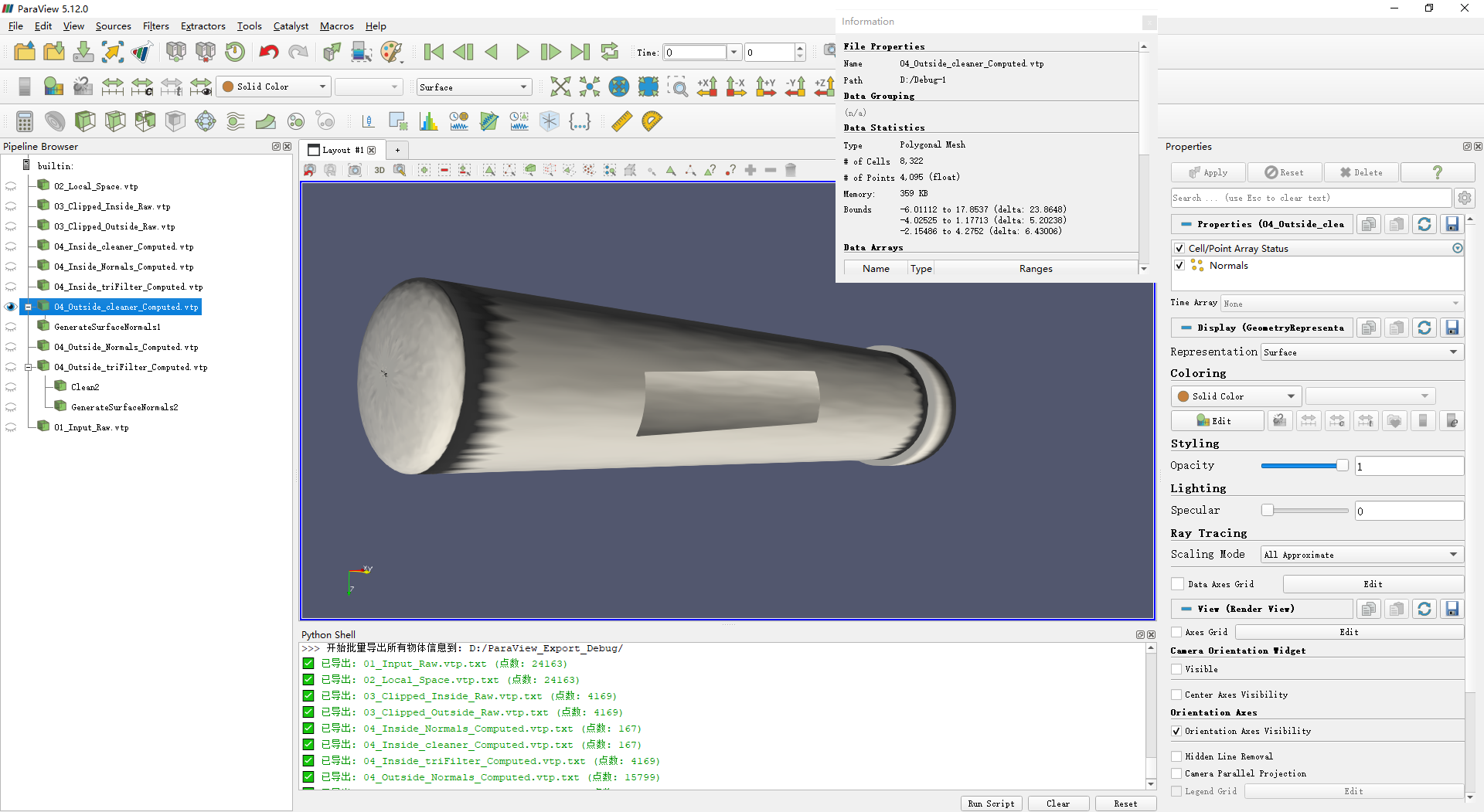
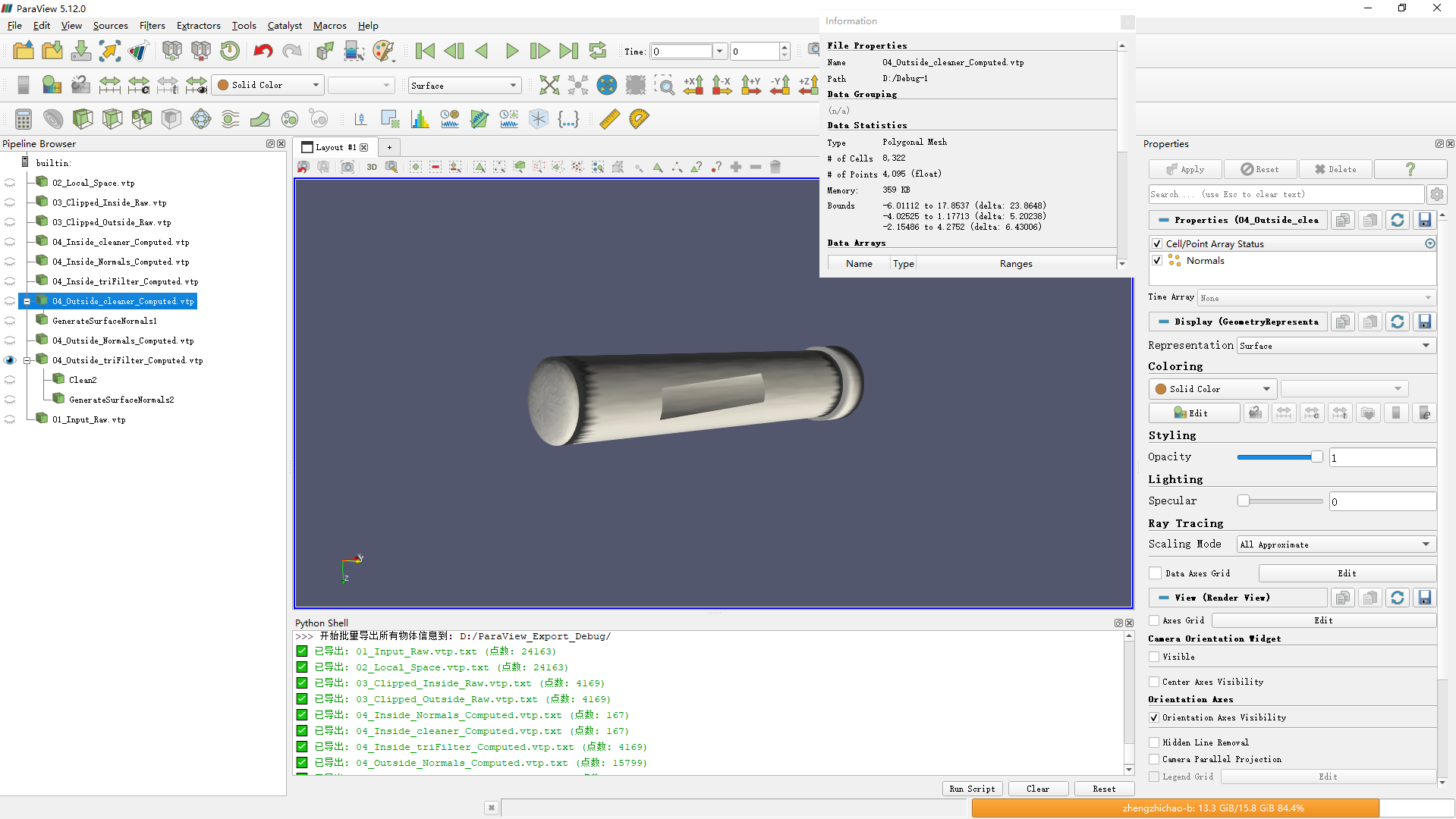
1. **`04_Outside_cleaner_Computed.vtp`** : This is the model generated by the C++ code after passing through `vtkTriangleFilter` and `vtkCleanPolyData`.
2. **`04_Outside_triFilter_Computed.vtp`** : This is the model generated by the C++ code after `vtkTriangleFilter` (before cleaning). I loaded this file into ParaView and manually applied the **Clean** filter.

- **Observation:** Both of the above have the **exact same number of points and cells**. This confirms the C++ Clean step is working identically to ParaView’s Clean step regarding topology.

However, the divergence happens at the Normals step:

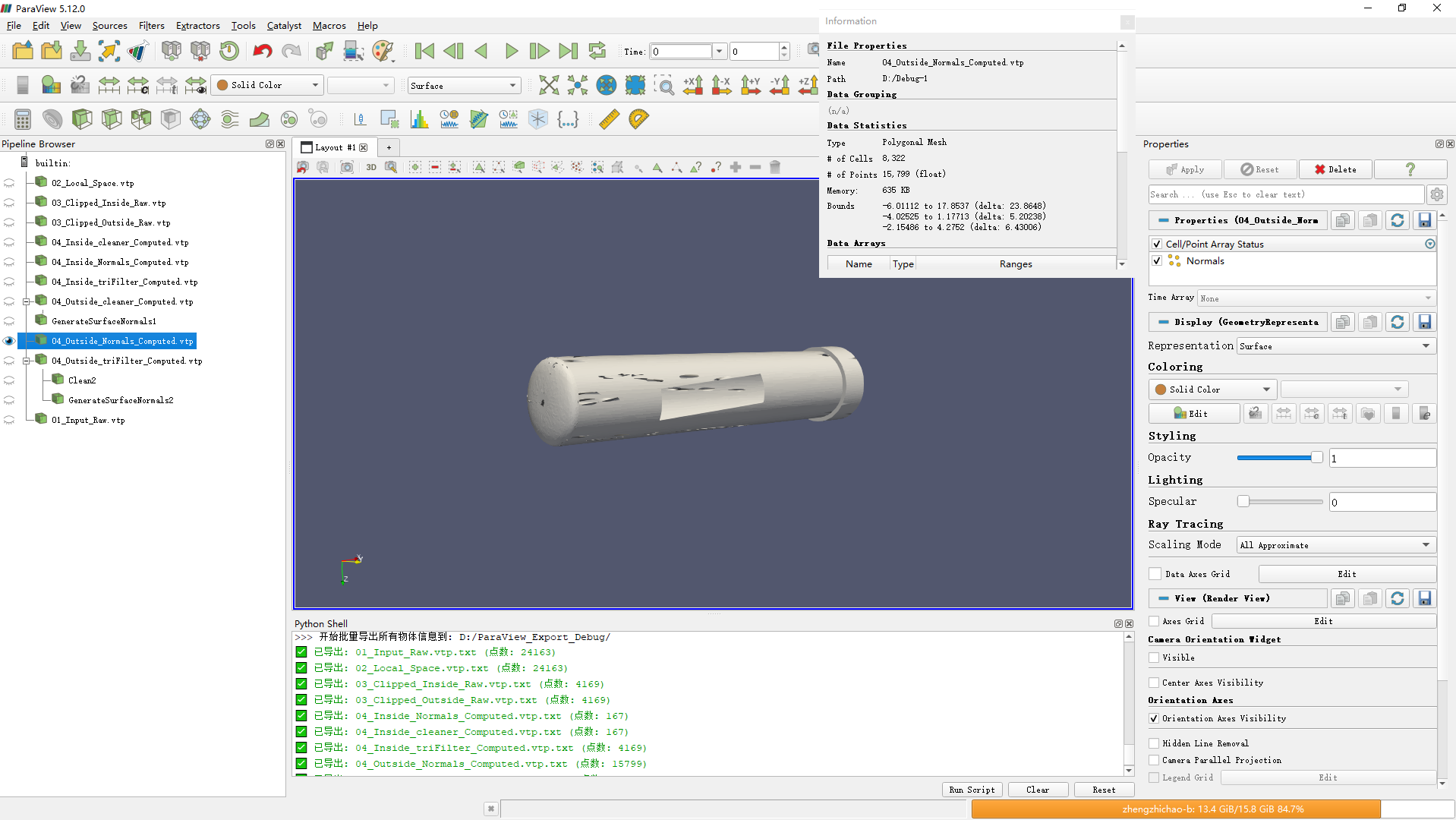
1. **`04_Outside_Normals_Computed.vtp`** : This is the final output from the full C++ pipeline (Triangulate → Clean → Normals).
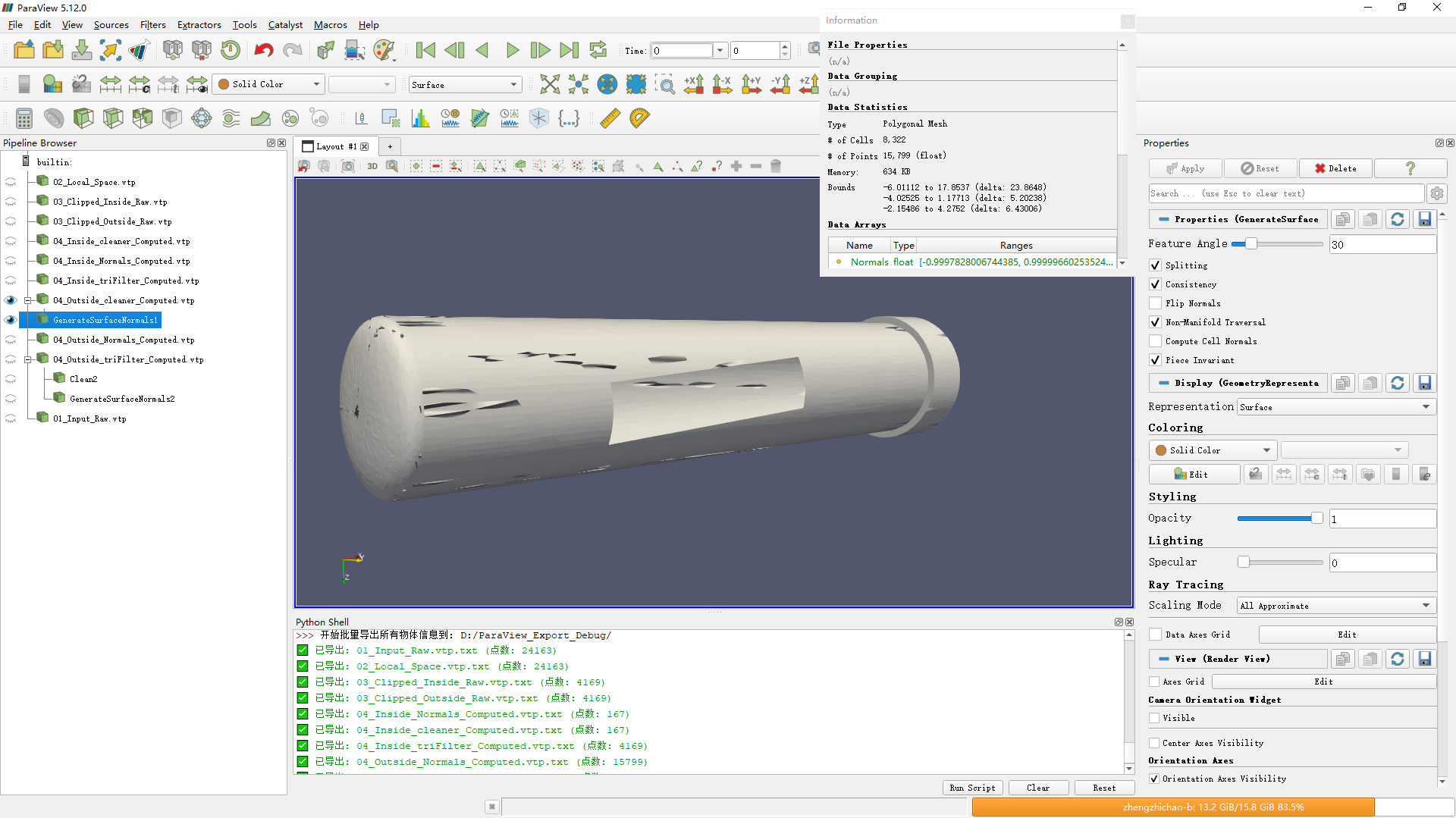
2. **`GenerateSurfaceNormals1` (in ParaView)**: I loaded the code-cleaned file (`04_Outside_cleaner_Computed.vtp`) and manually applied “Generate Surface Normals” in ParaView.

- **Observation:** This object has the **same high point count** as the C++ output (`04_Outside_Normals_Computed.vtp`).

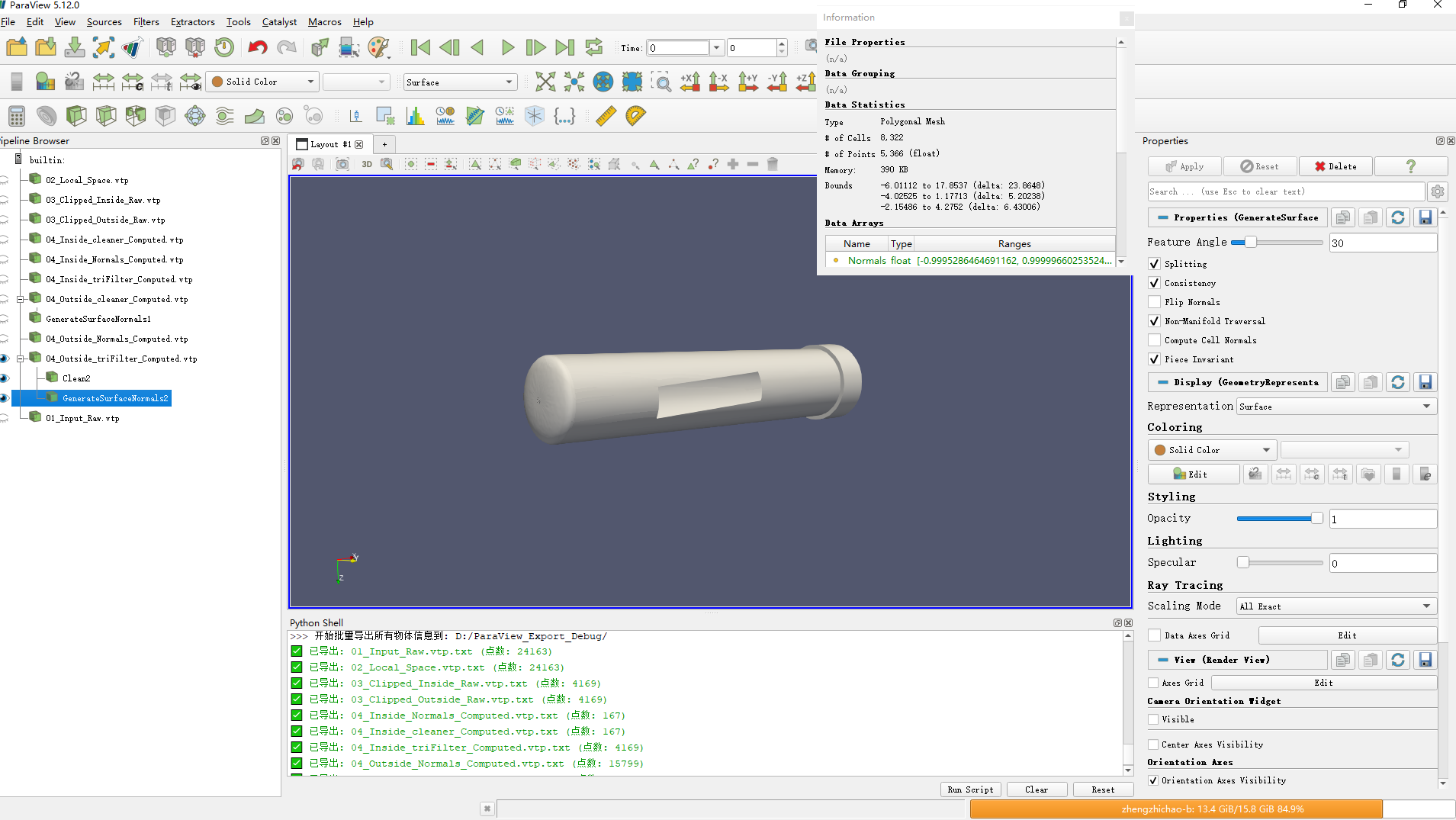
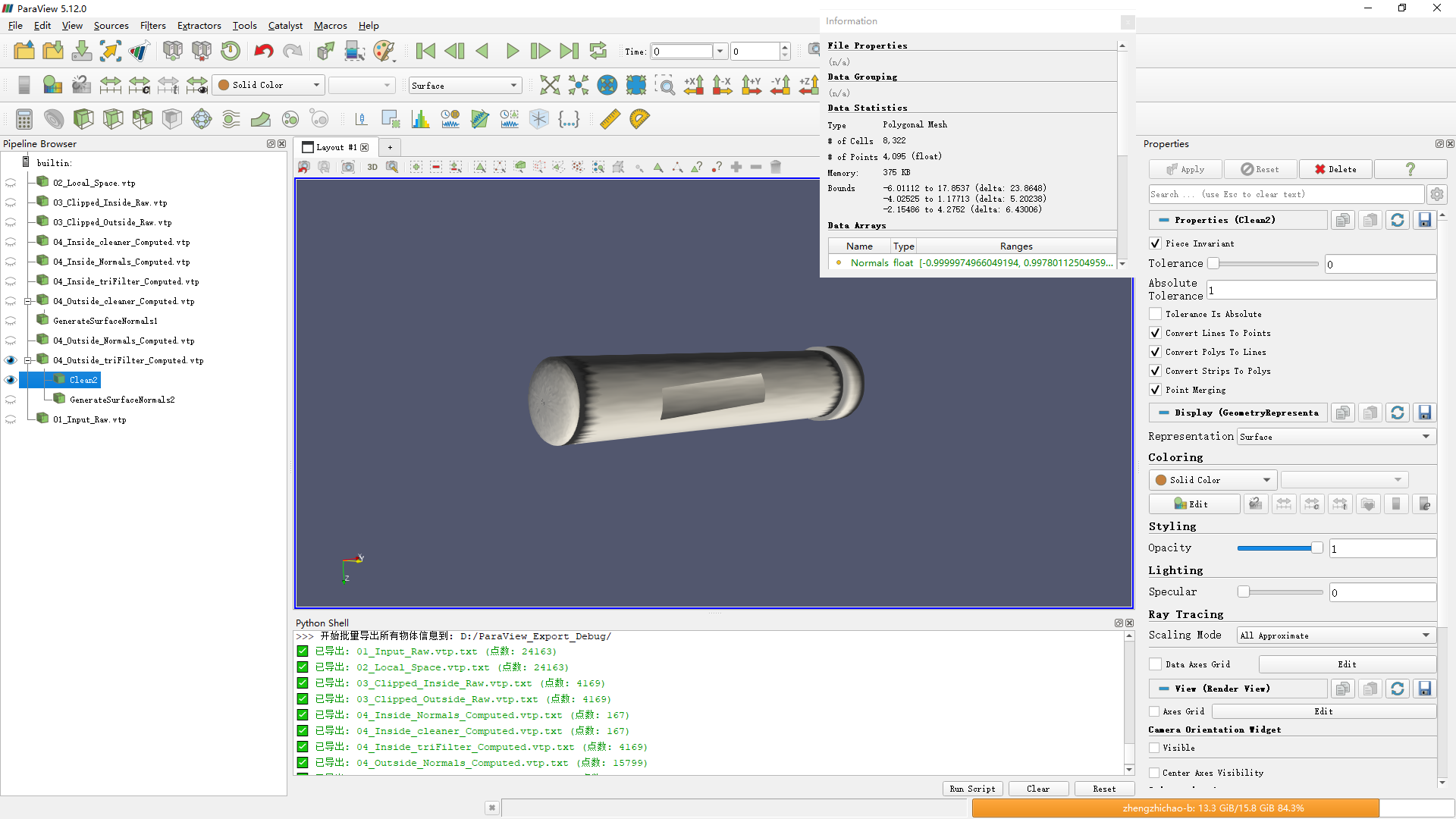
1. **`GenerateSurfaceNormals2` (in ParaView)**: I loaded the raw triangulated file (`04_Outside_triFilter_Computed.vtp`), then manually applied the **Clean** filter followed by the **Generate Surface Normals** filter entirely within ParaView.

- **Observation:** This object has significantly **fewer points** than the previous two cases.  
Any advice on why the C++ `vtkPolyDataNormals` splits the edges while ParaView keeps them connected would be greatly appreciated.

---

<div class="post-metadata">

### Author: ![zhichaozheng322](https://discourse.vtk.org/letter_avatar_proxy/v4/letter/z/edb3f5/32.png) [@zhichaozheng322](https://discourse.vtk.org/u/zhichaozheng322)
#### Post date: [January 13, 2026, 10:54am UTC](https://discourse.vtk.org/t/help-discrepancy-between-paraview-and-vtk-c-vtkcleanpolydata-works-but-mesh-shatters-after-computing-normals/16227/2 "2026-01-13T10:54:25Z")
</div>

![image](https://discourse.vtk.org/uploads/default/original/2X/0/0d63ce8e7d72c2d37431c3781d9ded40af390698.png)  
 ![image](https://discourse.vtk.org/uploads/default/original/2X/5/5f75fed18108819fb9b49b2ba30fd8fc29afe755.png)  
 ![image](https://discourse.vtk.org/uploads/default/original/2X/4/483de6fb33436011dd02fc6d3159c5474b919709.png)

---

<div class="post-metadata">

### Author: ![zhichaozheng322](https://discourse.vtk.org/letter_avatar_proxy/v4/letter/z/edb3f5/32.png) [@zhichaozheng322](https://discourse.vtk.org/u/zhichaozheng322)
#### Post date: [January 14, 2026, 3:54am UTC](https://discourse.vtk.org/t/help-discrepancy-between-paraview-and-vtk-c-vtkcleanpolydata-works-but-mesh-shatters-after-computing-normals/16227/3 "2026-01-14T03:54:33Z")

</div>

I have managed to solve this issue. It turns out the root cause was **Non-Manifold Topology** hidden inside the mesh, which caused `vtkPolyDataNormals` to miscalculate orientations when Consistency checks were enabled.

Here is the breakdown of the problem and the solution:

**1. The Root Cause:** After processing the mesh with `vtkCleanPolyData` (or `vtkStaticCleanPolyData`), some internal vertices were merged, creating **Non-Manifold Edges** (edges shared by 3 or more faces). Specifically, there was an internal “coil” or “septum” structure connecting the inner walls.

When I used `normalGen->ConsistencyOn()`, the algorithm traversed the mesh to unify normal directions. However, upon hitting these non-manifold edges, the traversal logic propagated the wrong orientation (flipping normals inward) to large portions of the mesh, causing the “shattered” look with black artifacts.

**2. How I Diagnosed It:** I verified this using **ParaView** :

1. Applied `CleanPolyData` to the model.
2. Applied the **`Feature Edges`** filter.
3. Unchecked all options and selected **only `Non-Manifold Edges`**.
4. This revealed a disconnected loop of edges inside the cylinder, confirming the topology issue.

**3. The Solution (C++ Code):** To fix this for rendering, the key is to turn **OFF** Consistency (trusting the local winding order) while keeping Splitting **ON** (to handle the sharp 90-degree edges of the cylinder).

Here is the working configuration:

`C++auto normalGen = vtkSmartPointer::New();  
normalGen-\>SetInputData(mesh);

// 1. Enable Splitting to handle sharp edges (e.g., the 90-degree edge of the cylinder cap)  
normalGen-\>SplittingOn();  
normalGen-\>SetFeatureAngle(60.0);

// 2. CRITICAL: Turn OFF Consistency.  
// Since the mesh has non-manifold geometry, enforcing consistency causes  
// the propagation to fail and flip normals incorrectly.  
// We trust the original local winding order here.  
normalGen-\>ConsistencyOff();

// 3. Ensure robustness  
normalGen-\>ComputePointNormalsOn();  
normalGen-\>SetNonManifoldTraversal(true);

normalGen-\>Update();`

Hope this helps anyone else encountering this issue.