# Help: Intrinsic Rotation on Object not working...
**URL:** https://discourse.vtk.org/t/help-intrinsic-rotation-on-object-not-working/7500
**Category:** Support
**Created:** [December 26, 2021, 2:57pm UTC](https://discourse.vtk.org/t/help-intrinsic-rotation-on-object-not-working/7500 "2021-12-26T14:57:00Z")
**Posts on this page:** 8
**Page:** 1
### Author:  [@Charles\_Shin](https://discourse.vtk.org/u/Charles_Shin)
#### Post date: [December 26, 2021, 2:57pm UTC](https://discourse.vtk.org/t/help-intrinsic-rotation-on-object-not-working/7500/1 "2021-12-26T14:57:00Z")
I’m trying to do intrinsic rotation (not rotating camera!!) on a NIFTI image, but it is not working…I’ve been working on this for hours, and it is quite sad that it is still not working.
I saw the documentation regarding RotateX, RotateY, RotateZ (and WXYZ), so I used it as the transformation module as you can see in the code below.
Any help on this issue is more than appreciated!!
Thank you…
```auto
#import ants
import vtk, sys, os
from skimage.filters import threshold_otsu
output_dir = "./"
#head = output_dir + "mask-head.nii.gz"
#brain = output_dir + "mask-brain.nii.gz"
#tumor = output_dir + "mni_standard_mask_ventricle.nii.gz"
#
#head = ants.image_read(head)
#brain = ants.image_read(brain)
#tumor = ants.image_read(tumor)
#
##simplify head into binary values
#head = ants.threshold_image(head,low_thresh=threshold_otsu(head.numpy()))
#
##merge in ascending order of visibility: head -> brain -> ventricle
#head[brain!=0] = 2
#head[tumor!=0] = 3
#
##save
#ants.image_write(head,output_dir + "mask-merged.nii.gz")
#find euler
euler = (45,90,45)
#load to vtk
ren = vtk.vtkRenderer()
renWin = vtk.vtkRenderWindow()
renWin.AddRenderer(ren)
reader = vtk.vtkNIFTIImageReader()
reader.SetFileName(output_dir + "mask-merged.nii.gz")
reader.Update()
imageData = reader.GetOutput()
#marching cubes
MARCHING_CUBES_THRESHOLD = 0.01
fltMarching_whole = vtk.vtkMarchingCubes()
fltMarching_whole.SetInputData(imageData)
fltMarching_whole.ComputeScalarsOff()
fltMarching_whole.ComputeGradientsOff()
fltMarching_whole.ComputeNormalsOn()
fltMarching_whole.SetNumberOfContours(1)
fltMarching_whole.SetValue(0, MARCHING_CUBES_THRESHOLD)
fltMarching_whole.Update()
#finding centerpoint
centerFilter = vtk.vtkCenterOfMass()
centerFilter.SetInputConnection(fltMarching_whole.GetOutputPort())
centerFilter.SetUseScalarsAsWeights(False)
centerFilter.Update()
center = centerFilter.GetCenter()
#print(center)
#finding transformation formula
transform = vtk.vtkTransform()
transform.PostMultiply()
#translating to center
transform.Translate(-center[0], -center[1], -center[2])
#rotations in operating view order (patient not in operating view position yet)
transform.RotateZ(euler[0])
transform.RotateX(euler[1])
#transform.RotateY(euler[2])
#now doing some stuff...
imageScalars = imageData.GetPointData().GetScalars()
iMin, iMax = imageScalars.GetValueRange()
for i in range(1, int(iMax) + 1):
imageData_i = vtk.vtkImageData()
imageData_i.DeepCopy(imageData)
thresh = vtk.vtkImageThreshold()
thresh.SetInputData(imageData_i)
thresh.ThresholdBetween(i,i)
thresh.ReplaceInOn()
thresh.ReplaceOutOn()
thresh.SetInValue(i)
thresh.SetOutValue(0)
thresh.Update()
iMin, iMax = thresh.GetOutput().GetPointData().GetScalars().GetValueRange()
fltMarching_i = vtk.vtkMarchingCubes(); # ***** Discrete version instead?
fltMarching_i.SetInputData(thresh.GetOutput())
fltMarching_i.ComputeScalarsOff()
fltMarching_i.ComputeGradientsOff()
fltMarching_i.ComputeNormalsOn()
fltMarching_i.SetNumberOfContours(1)
fltMarching_i.SetValue(0, MARCHING_CUBES_THRESHOLD)
fltMarching_i.Update()
# # **************** SMOOTHING
smoother_i = vtk.vtkWindowedSincPolyDataFilter()
smoother_i.SetInputConnection(fltMarching_i.GetOutputPort())
smoother_i.SetNumberOfIterations(50)
smoother_i.BoundarySmoothingOff();
smoother_i.FeatureEdgeSmoothingOff();
smoother_i.SetFeatureAngle(45) #120);
smoother_i.SetPassBand(0.1) #0.001);
smoother_i.NonManifoldSmoothingOn();
smoother_i.NormalizeCoordinatesOn();
smoother_i.Update();
normals_i = vtk.vtkPolyDataNormals()
normals_i.SetInputConnection(smoother_i.GetOutputPort())
normals_i.FlipNormalsOn()
# **************** CENTERING
transFilter_i = vtk.vtkTransformFilter()
transFilter_i.SetInputConnection(normals_i.GetOutputPort())
transFilter_i.SetTransform(transform)
# ********** Create the mapper and actor, add with a specific color
franMapper_i = vtk.vtkPolyDataMapper()
franMapper_i.SetInputConnection(transFilter_i.GetOutputPort()) #normals_i
franMapper_i.SetScalarModeToUseCellData()
franMapper_i.ScalarVisibilityOn()
franMapper_i.Update()
# ********* Add the actors to the renderer, set the background and size
franActor_i = vtk.vtkActor()
franActor_i.SetMapper(franMapper_i)
if i == 1: #head
franActor_i.GetProperty().SetColor(232/255,190/255,172/255)
elif i == 2: #brain
franActor_i.GetProperty().SetColor(232/255,160/255,132/255)
elif i == 3: #tumor
franActor_i.GetProperty().SetColor(1,0,0)
ren.AddActor(franActor_i)
#setting up camera
cam1 = vtk.vtkCamera()
(centerx,centery,centerz) = reader.GetOutput().GetCenter()
(xm,xM,ym,yM,zm,zM) = reader.GetExecutive().GetWholeExtent(reader.GetOutputInformation(0))
cam1.SetPosition(0, 0, zM*4.5)
cam1.SetFocalPoint(0,0,0)
cam1.SetViewAngle(30.0)
#cam1.Elevation(90.0) for patient / -90.0 is for local sample (not patient)
cam1.Elevation(90.0)
ren.SetActiveCamera(cam1)
ren.SetBackground(1.0, 1.0, 1.0)
renWin.SetSize(1200, 1200)
renWin.Render()
# **************** screenshot code:
w2if = vtk.vtkWindowToImageFilter()
w2if.SetInput(renWin)
w2if.Update()
writer = vtk.vtkPNGWriter()
writer.SetFileName("screenshot_test2.png")
writer.SetInputData(w2if.GetOutput())
writer.Write()
```
---
### Author:  [@Joel\_Mckay](https://discourse.vtk.org/u/Joel_Mckay)
#### Post date: [December 28, 2021, 12:32pm UTC](https://discourse.vtk.org/t/help-intrinsic-rotation-on-object-not-working/7500/2 "2021-12-28T12:32:55Z")
Note I am still learning how the rendering pipeline likes to chain the stages, but would recommend looking at the [OrientationMarkerWidget](https://kitware.github.io/vtk-examples/site/Cxx/Widgets/OrientationMarkerWidget/) example and class source. Note, transforms on glyph markers for grids behave in an implicit global coordinate context. Also, libvtk is not very intuitive in some ways (ambiguous at times), but there are likely reasons it was designed this way… and the widget class likely takes care of the generic callback plumbing you will need (see [git](https://gitlab.kitware.com/vtk/vtk) path Interaction/Widgets/vtkOrientationMarkerWidget.cxx for details).
Cheers, =)
J
Example:
`
vtkNew octaSource;
double wallSz=(scale \* maxLen);
octaSource-\>SetHeight(wallSz);
octaSource-\>SetRadius(wallSz);
octaSource-\>SetResolution(8);
vtkNew pd;
pd-\>SetPoints(points);
vtkNew mapper;
mapper-\>SetInputData(pd);
mapper-\>SetSourceConnection(octaSource-\>GetOutputPort());
mapper-\>ScalarVisibilityOff();
mapper-\>ScalingOff();
vtkNew actor;
actor-\>SetMapper(mapper);
actor-\>RotateX(90.0);
actor-\>RotateZ(-45.0);
`
---
### Author:  [@dcthomp](https://discourse.vtk.org/u/dcthomp)
#### Post date: [December 28, 2021, 8:22pm UTC](https://discourse.vtk.org/t/help-intrinsic-rotation-on-object-not-working/7500/3 "2021-12-28T20:22:44Z")
NIFTI images (and some other medical formats) include coordinate-system transforms that not all VTK filters/mappers make use of. This may explain the issue you’re having. The [vtkImageData documentation](https://vtk.org/doc/nightly/html/classvtkImageData.html#details) mentions DirectionMatrices are not supported everywhere – and the version of VTK you are using will determine what support is included.
---
### Author:  [@Charles\_Shin](https://discourse.vtk.org/u/Charles_Shin)
#### Post date: [December 31, 2021, 9:45pm UTC](https://discourse.vtk.org/t/help-intrinsic-rotation-on-object-not-working/7500/4 "2021-12-31T21:45:08Z")
Thank you so much for your comment!
Is there a recommended way to ‘remove’ the coordinate system from NIFTI file, and then load the data to VTK?
---
### Author:  [@dcthomp](https://discourse.vtk.org/u/dcthomp)
#### Post date: [January 1, 2022, 2:43am UTC](https://discourse.vtk.org/t/help-intrinsic-rotation-on-object-not-working/7500/5 "2022-01-01T02:43:57Z")
The easiest thing I can think of is to copy the reader’s output and reset the direction matrix to the identity matrix:
```auto
auto copy = vtkImageData::New()
copy->ShallowCopy(rdr->GetOutput())
copy->SetDirectionMatrix(1,0,0, 0,1,0, 0,0,1)
```
You could write the result to a file or simply continue, using `copy` instead of the reader’s output.
---
### Author:  [@Charles\_Shin](https://discourse.vtk.org/u/Charles_Shin)
#### Post date: [January 3, 2022, 9:25am UTC](https://discourse.vtk.org/t/help-intrinsic-rotation-on-object-not-working/7500/6 "2022-01-03T09:25:47Z")
thank you for your advice!
Hmm…so I tried the following:
```auto
imageData.SetDirectionMatrix(1,0,0, 0,1,0, 0,0,1)
```
but the rotation was still camera-oriented…
To give you an example, here are two images. First one is what I want, second one is what the program is outputing:
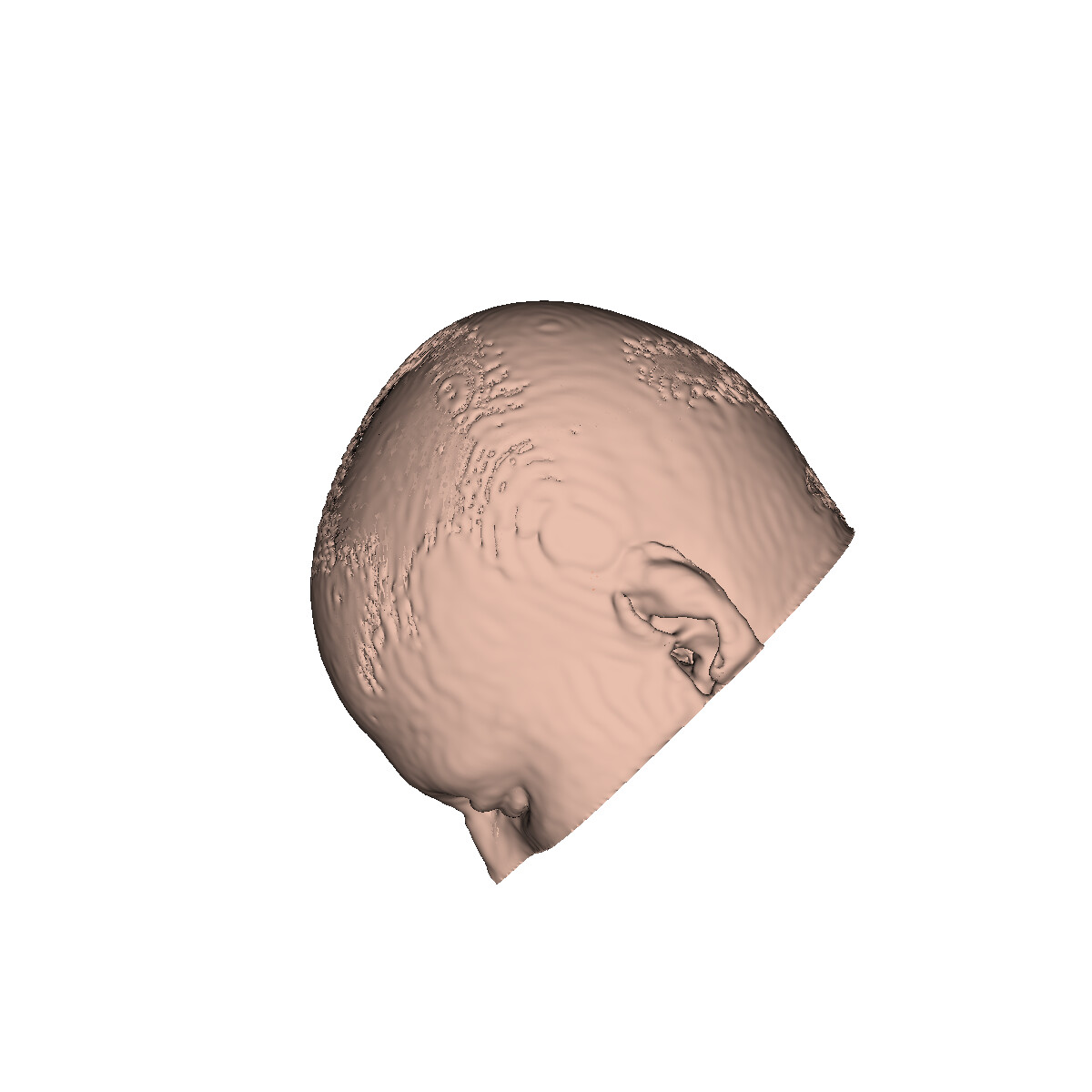

---
### Author:  [@Charles\_Shin](https://discourse.vtk.org/u/Charles_Shin)
#### Post date: [January 3, 2022, 9:51am UTC](https://discourse.vtk.org/t/help-intrinsic-rotation-on-object-not-working/7500/7 "2022-01-03T09:51:16Z")
Found the answer. It was because:
1. swapped the order of declaring translation and rotation (should be first rotation, then translation)
2. it should be premultiply, not postmultiply
---
### Author:  [@dcthomp](https://discourse.vtk.org/u/dcthomp)
#### Post date: [January 10, 2022, 8:13am UTC](https://discourse.vtk.org/t/help-intrinsic-rotation-on-object-not-working/7500/8 "2022-01-10T08:13:44Z")
FYI, if you have access to the vtkTransform, you can choose whether to perform pre- or post-multiplies via a [setting of vtkTransform](https://vtk.org/doc/nightly/html/classvtkTransform.html#a95cf8d127dc6e0e7a96975b7403572e5).