# Hide edges in 3d
**URL:** https://discourse.vtk.org/t/hide-edges-in-3d/15227
**Category:** Web
**Created:** [January 30, 2025, 12:03pm UTC](https://discourse.vtk.org/t/hide-edges-in-3d/15227 "2025-01-30T12:03:23Z")
**Posts on this page:** 19
**Page:** 1
### Author:  [@Javi-r](https://discourse.vtk.org/u/Javi-r)
#### Post date: [January 30, 2025, 12:03pm UTC](https://discourse.vtk.org/t/hide-edges-in-3d/15227/1 "2025-01-30T12:03:23Z")
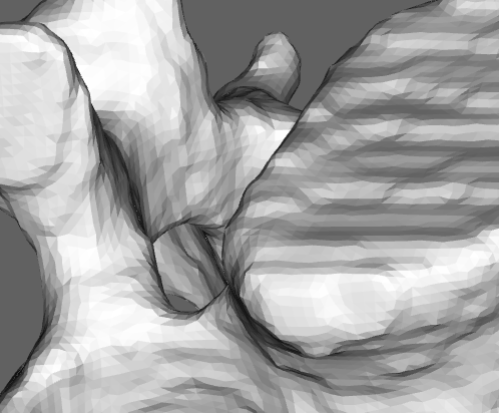
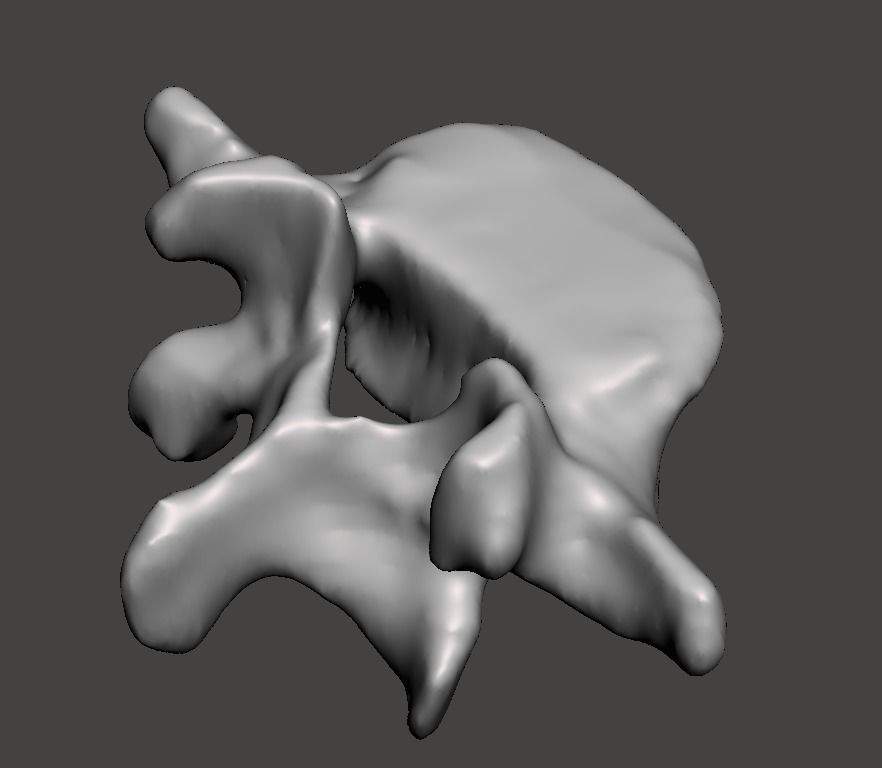
I want to know how to hide the edges (triangles) in 3D.
How can I do it ?
Also, is there any way to activate antialasing ?
This is what it looks like now
This is what I would like to get
To be viewed without the edges
---
### Author:  [@jaswantp](https://discourse.vtk.org/u/jaswantp)
#### Post date: [January 30, 2025, 12:49pm UTC](https://discourse.vtk.org/t/hide-edges-in-3d/15227/2 "2025-01-30T12:49:19Z")
Hello @Javi-r
Use the vtkPolyDataNormals filter.
---
### Author:  [@Javi-r](https://discourse.vtk.org/u/Javi-r)
#### Post date: [January 31, 2025, 10:29am UTC](https://discourse.vtk.org/t/hide-edges-in-3d/15227/3 "2025-01-31T10:29:41Z")
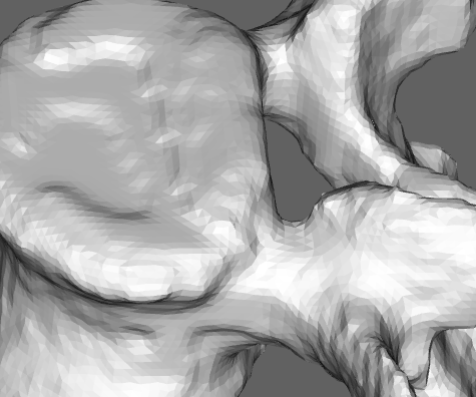
It doesn’t work I get the same result
```auto
const reader = vtkSTLReader.newInstance();
await reader.parseAsArrayBuffer(arrayBuffer);
const normalsFilter = vtkPolyDataNormals.newInstance();
normalsFilter.setInputData(reader.getOutputData());
const vertebraMapper = vtkMapper.newInstance({ scalarVisibility: false });
vertebraMapper.setInputData(normalsFilter.getOutputData());
const vertebraActor = vtkActor.newInstance();
vertebraActor.setMapper(vertebraMapper);
```
Result after applying vtkPolyDataNormals vtk.js 32.9.1
---
### Author:  [@finetjul](https://discourse.vtk.org/u/finetjul)
#### Post date: [January 31, 2025, 1:01pm UTC](https://discourse.vtk.org/t/hide-edges-in-3d/15227/4 "2025-01-31T13:01:35Z")
maybe you have duplicated points in your mesh.
What reader did you use ?
---
### Author:  [@Xoz](https://discourse.vtk.org/u/Xoz)
#### Post date: [February 5, 2025, 3:47am UTC](https://discourse.vtk.org/t/hide-edges-in-3d/15227/5 "2025-02-05T03:47:39Z")
You can try actor.getProperty().setInterpolationToPhong() and actor.getProperty().setInterpolationToFlat(), flat is close to the first pic and phong to the second
---
### Author:  [@Javi-r](https://discourse.vtk.org/u/Javi-r)
#### Post date: [February 6, 2025, 1:00pm UTC](https://discourse.vtk.org/t/hide-edges-in-3d/15227/6 "2025-02-06T13:00:27Z")
Not work
---
### Author:  [@Javi-r](https://discourse.vtk.org/u/Javi-r)
#### Post date: [February 6, 2025, 1:02pm UTC](https://discourse.vtk.org/t/hide-edges-in-3d/15227/7 "2025-02-06T13:02:21Z")
[out\_Segment\_20.stl](https://discourse.vtk.org/uploads/short-url/jUHDATVocGJvsCo8wiEmFR2Wnus.stl) (1.2 MB)
I would say that the STL is fine with all of them.
Attached is one of the ones I use for example
---
### Author:  [@Xoz](https://discourse.vtk.org/u/Xoz)
#### Post date: [February 7, 2025, 3:50am UTC](https://discourse.vtk.org/t/hide-edges-in-3d/15227/8 "2025-02-07T03:50:50Z")
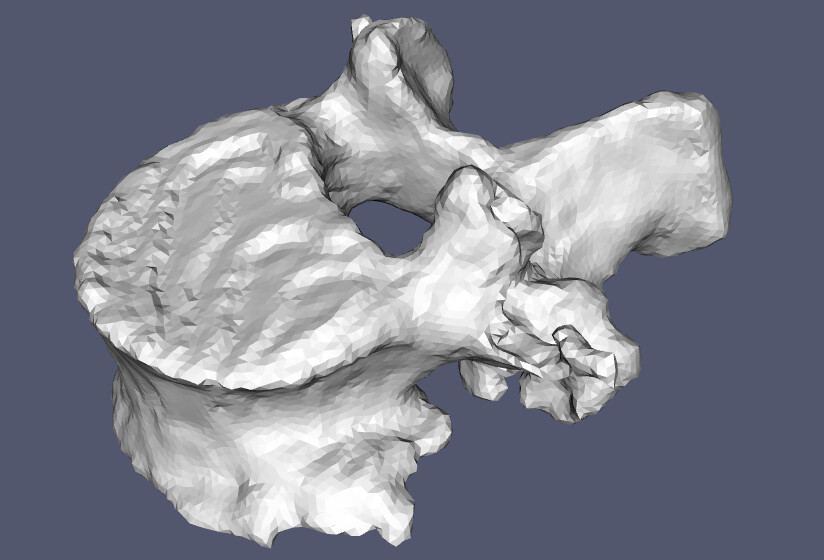
The reading result of stl from stl reader will contain duplicated points, and I tried if not doing a dedup for those points it won’t work, after removing the duplicated points, it works as expected like this:
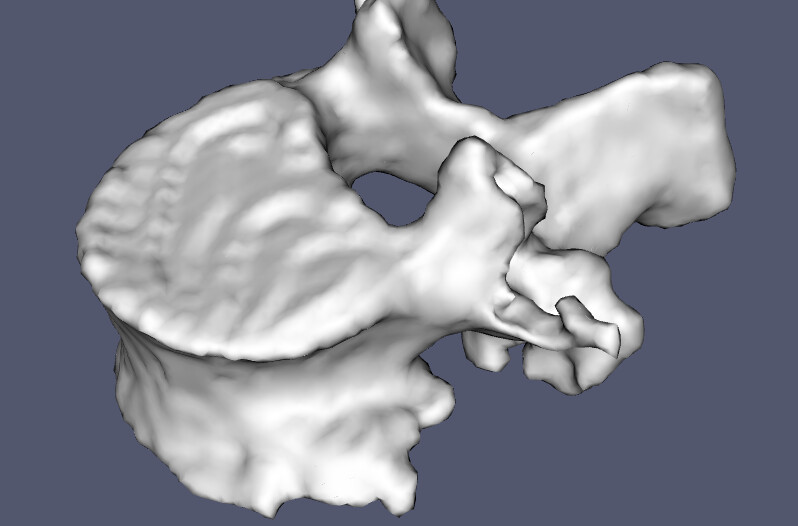
this is the flat interpolation:
---
### Author:  [@finetjul](https://discourse.vtk.org/u/finetjul)
#### Post date: [February 7, 2025, 7:58am UTC](https://discourse.vtk.org/t/hide-edges-in-3d/15227/9 "2025-02-07T07:58:27Z")
In the OBJReader, there is code that identifies duplicated points to conveniently process them.
Feel free to do something similar in the STLReader and make a PR.
---
### Author:  [@Javi-r](https://discourse.vtk.org/u/Javi-r)
#### Post date: [February 10, 2025, 11:05am UTC](https://discourse.vtk.org/t/hide-edges-in-3d/15227/10 "2025-02-10T11:05:04Z")
How did you get it to look like in the first picture ?
I don’t quite understand what you mean
Do you mean that the stl is wrong ?
I have repaired the stl with an online tool and it still looks the same.
---
### Author:  [@Xoz](https://discourse.vtk.org/u/Xoz)
#### Post date: [February 11, 2025, 3:40am UTC](https://discourse.vtk.org/t/hide-edges-in-3d/15227/11 "2025-02-11T03:40:28Z")
The stl is not wrong, but because of it’s saving stratagy, you need to do something to modify the origin data you got from an stl file. e.g. if you save a square with point A,B,C,D, stl stores two triangles A,B,C and B,C,D, when reading the data it gets points array [A,B,C,B,D,C], you need to clear the duplicated to make it be like [A,B,C,D].
You can clear it using method like this:
```javascript
const dedupSTLResult = (vertices: Float32Array, faces: Int32Array, offset = 5) => {
const vMap: Map = new Map()
const vIndexMap: Map = new Map()
let vInc: number = 0
for (let i = 0; i < vertices.length; i += 3) {
const k1 = (vertices[i] * Math.pow(10, offset)).toFixed(0)
const k2 = (vertices[i + 1] * Math.pow(10, offset)).toFixed(0)
const k3 = (vertices[i + 2] * Math.pow(10, offset)).toFixed(0)
const key: string = `${k1},${k2},${k3}`
if (vMap.get(key) !== undefined) {
vIndexMap.set(i / 3, vMap.get(key))
} else {
vIndexMap.set(i / 3, vInc)
vMap.set(key, vInc)
vInc++
}
}
const outVerts: Float32Array = new Float32Array(vMap.size * 3)
for (let k of vMap.keys()) {
const j = vMap.get(k) * 3;
[outVerts[j], outVerts[j + 1], outVerts[j + 2]] = k.split(',').map((e: string) => +e * Math.pow(10, -offset));
}
const outFaces = new Int32Array(faces)
for (let i = 0; i < faces.length; i += 4) {
outFaces[i] = 3
outFaces[i + 1] = vIndexMap.get(faces[i + 1])
outFaces[i + 2] = vIndexMap.get(faces[i + 2])
outFaces[i + 3] = vIndexMap.get(faces[i + 3])
}
return {
vertices: outVerts as Float32Array,
faces: outFaces as Int32Array
}
}
//consider your reader.getOutputData() as polydata here as the result data from stl reader
const originVerts = polydata.getPoints().getData()
const originFaces = polydata.getPolys().getData()
const { vertices, faces } = dedupSTLResult(originVerts, originFaces)
// use these vertices and faces to form a new polydata or apply to the result
polydata.getPoints().setData(vertices)
polydata.getPolys().setData(faces)
// change property of the actor you are using
actor.getProperty().setInterpolationToPhong()
// rerender the vtk window
...
```
---
### Author:  [@finetjul](https://discourse.vtk.org/u/finetjul)
#### Post date: [February 11, 2025, 7:37am UTC](https://discourse.vtk.org/t/hide-edges-in-3d/15227/12 "2025-02-11T07:37:31Z")
Alternatively, someone could write (and contribute) the `vtkCleanPolyData` filter that merges identical points.
---
### Author:  [@ahernsean](https://discourse.vtk.org/u/ahernsean)
#### Post date: [February 11, 2025, 5:10pm UTC](https://discourse.vtk.org/t/hide-edges-in-3d/15227/13 "2025-02-11T17:10:04Z")
Is [VTK: vtkCleanPolyData Class Reference](https://vtk.org/doc/nightly/html/classvtkCleanPolyData.html) insufficient?
---
### Author:  [@finetjul](https://discourse.vtk.org/u/finetjul)
#### Post date: [February 11, 2025, 8:21pm UTC](https://discourse.vtk.org/t/hide-edges-in-3d/15227/14 "2025-02-11T20:21:32Z")
`vtkCleanPolyData` is missing in VTK.js. It would be a great addition in VTK.js.
---
### Author:  [@Javi-r](https://discourse.vtk.org/u/Javi-r)
#### Post date: [February 14, 2025, 10:25am UTC](https://discourse.vtk.org/t/hide-edges-in-3d/15227/15 "2025-02-14T10:25:06Z")
Thanks for your code but it didn’t work for me.
I have uploaded to codepen an example that loads a stl with your code and I still see the edges.
You can see the example and edit it here: [https://codepen.io/jreyero/pen/VYwLwRr](https://codepen.io/jreyero/pen/VYwLwRr)
---
### Author:  [@finetjul](https://discourse.vtk.org/u/finetjul)
#### Post date: [February 14, 2025, 10:48am UTC](https://discourse.vtk.org/t/hide-edges-in-3d/15227/16 "2025-02-14T10:48:29Z")
You then need to compute normals:
```auto
const normals = vtk.Filters.Core.vtkPolyDataNormals.newInstance();
normals.setInputData(polydata);
mapper.setInputConnection(normals.getOutputPort());
```
---
### Author:  [@Javi-r](https://discourse.vtk.org/u/Javi-r)
#### Post date: [February 14, 2025, 11:04am UTC](https://discourse.vtk.org/t/hide-edges-in-3d/15227/17 "2025-02-14T11:04:50Z")
Thanks to both of you it finally worked
Here is the result [https://codepen.io/jreyero/pen/VYwLwRr](https://codepen.io/jreyero/pen/VYwLwRr)
---
### Author:  [@finetjul](https://discourse.vtk.org/u/finetjul)
#### Post date: [February 14, 2025, 11:09am UTC](https://discourse.vtk.org/t/hide-edges-in-3d/15227/18 "2025-02-14T11:09:16Z")
Glad it worked.
Would you mind adding that feature in the STL reader (similar to the one in the OBJ reader) ?
---
### Author:  [@Javi-r](https://discourse.vtk.org/u/Javi-r)
#### Post date: [February 14, 2025, 11:35am UTC](https://discourse.vtk.org/t/hide-edges-in-3d/15227/19 "2025-02-14T11:35:16Z")
Do you want me to add a method to find duplicates like the obj getPointDuplicateIds method ?
Or I add the method dedupSTLResult for example with the name removeDuplicateVertices