# Hide internal edges of quadratic cells
**URL:** https://discourse.vtk.org/t/hide-internal-edges-of-quadratic-cells/2419
**Category:** Support
**Created:** [January 14, 2020, 2:00pm UTC](https://discourse.vtk.org/t/hide-internal-edges-of-quadratic-cells/2419 "2020-01-14T14:00:26Z")
**Posts on this page:** 12
**Page:** 1
### Author:  [@Flagada](https://discourse.vtk.org/u/Flagada)
#### Post date: [January 14, 2020, 2:00pm UTC](https://discourse.vtk.org/t/hide-internal-edges-of-quadratic-cells/2419/1 "2020-01-14T14:00:26Z")
Hi!
In my application I am trying to add some quadratic cell (vtkQuadraticQuad and vtkQuadraticTriangle) in a vtkUnstructuredGrid. The problem is that, as in the following example ([https://lorensen.github.io/VTKExamples/site/Python/GeometricObjects/IsoparametricCellsDemo/](https://lorensen.github.io/VTKExamples/site/Python/GeometricObjects/IsoparametricCellsDemo/)) there are some internal edges that are displayed. Therefore, it is hard to see if displayed elements are quadratic ones or simply several triangles…
In paraview I managed to create a quadratic quad and internal edges seems not to be displayed I assume then that it may be possible to do the same under vtk.
Does anybody have an idea of how to do that?
Thanks in advance !
---
### Author:  [@Flagada](https://discourse.vtk.org/u/Flagada)
#### Post date: [April 7, 2020, 3:40pm UTC](https://discourse.vtk.org/t/hide-internal-edges-of-quadratic-cells/2419/2 "2020-04-07T15:40:22Z")
Hi all!
Sorry to repost but my problem is always there and I found no solution… Nobody have any idea on how to remove internal edges of quadratic elements?
Maybe it can be possible by removing edges of cells actor (EdgeVisibilityOff) and adding edges separatly in another actor with a vtkExtractEdges filter. But this seems to much complicated for such a simple thing…
---
### Author:  [@Yohann\_Bearzi](https://discourse.vtk.org/u/Yohann_Bearzi)
#### Post date: [April 7, 2020, 3:52pm UTC](https://discourse.vtk.org/t/hide-internal-edges-of-quadratic-cells/2419/3 "2020-04-07T15:52:07Z")
Hi,
You can hide edges by setting a vtkUnsignedCharArray named `vtkEdgeFlags` as point data. This array is read at rendering and edges flagged as ‘0’ are not drawn. Points are mapped to edges counter clockwise if I remember correctly, but you will figure this out pretty fast by playing with it.
If you want an example of its use, look at class `vtkHyperTreeGridGeometry` (in VTK master), and don’t hesitate to ask questions if you run into issues going forward.
---
### Author:  [@Flagada](https://discourse.vtk.org/u/Flagada)
#### Post date: [April 7, 2020, 5:43pm UTC](https://discourse.vtk.org/t/hide-internal-edges-of-quadratic-cells/2419/4 "2020-04-07T17:43:17Z")
Thank you for your answer !
Sound promising after activating GetPointData().SetActiveAttribute(vtkEdgeFlagsArray.GetName(), vtk.vtkDataSetAttributes.EDGEFLAG) but I’m afraid this doesn’t works.
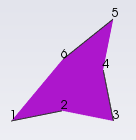
For example, if I take a quadratic triangle with end points 1, 3 and 5 and middle points 2, 4 and 6.
If I turn edgeflag to 0 for points 2, 4 and 6 it hides internal edges but also edges between points 2 and 3, 4 and 5 and 6 and 1. In fact in a quadratic triangle there is 9 edges including internals and only 6 points at all. So how can we choose to hide only the 3 internal edges?
---
### Author:  [@Yohann\_Bearzi](https://discourse.vtk.org/u/Yohann_Bearzi)
#### Post date: [April 7, 2020, 6:40pm UTC](https://discourse.vtk.org/t/hide-internal-edges-of-quadratic-cells/2419/5 "2020-04-07T18:40:53Z")
I’m assuming that you are dealing with triangles right? If so, you would need to duplicate the points and attach to the points of the cells inside the hull zero vtkEdgeFlags. This is how it is handled in `vtkHyperTreeGeometry`.
---
### Author:  [@Yohann\_Bearzi](https://discourse.vtk.org/u/Yohann_Bearzi)
#### Post date: [April 7, 2020, 6:45pm UTC](https://discourse.vtk.org/t/hide-internal-edges-of-quadratic-cells/2419/6 "2020-04-07T18:45:12Z")
Let me reformulate. For any point that needs to have an erased edge, you should associate a point whose `vtkEdgeFlags` is `0` in addition to a point whose `vtkEdgeFlags` is `1`, and connect the triangles accordingly. If you need to erase multiple edges originated from one point, you can link them to the same point with flag `0`.
---
### Author:  [@Flagada](https://discourse.vtk.org/u/Flagada)
#### Post date: [April 7, 2020, 7:37pm UTC](https://discourse.vtk.org/t/hide-internal-edges-of-quadratic-cells/2419/7 "2020-04-07T19:37:24Z")
In my case i’m using vtkQuadraticTriangle, vtkQuadraticQuad, vtkQuadraticWedge, vtkQuadraticTetra and vtkQuadraticHexahedron and in those cells I don’t think we can duplicate points.
In the vtkEdgeFlags example they draw a square using 4 different triangles. In my case it means that I should create several triangle cells to represent one quadratic element and this is a main change in my code.
---
### Author:  [@Yohann\_Bearzi](https://discourse.vtk.org/u/Yohann_Bearzi)
#### Post date: [April 10, 2020, 7:37pm UTC](https://discourse.vtk.org/t/hide-internal-edges-of-quadratic-cells/2419/8 "2020-04-10T19:37:51Z")
By looking around, someone pointed me to this old test file that seems to generate what you intend to do: [VisualizeLagrangeTriangleMesh.cc](https://discourse.vtk.org/uploads/short-url/jIaYV0fbe5rw9qTFZjsRbyYDa5Z.cc) (9.4 KB)
It might be `vtkDataSetSurfaceFilter` which does the trick, but I didn’t test enough to figure out exactly where the magic happens.
Here is a screen of the result rendered in ParaView:
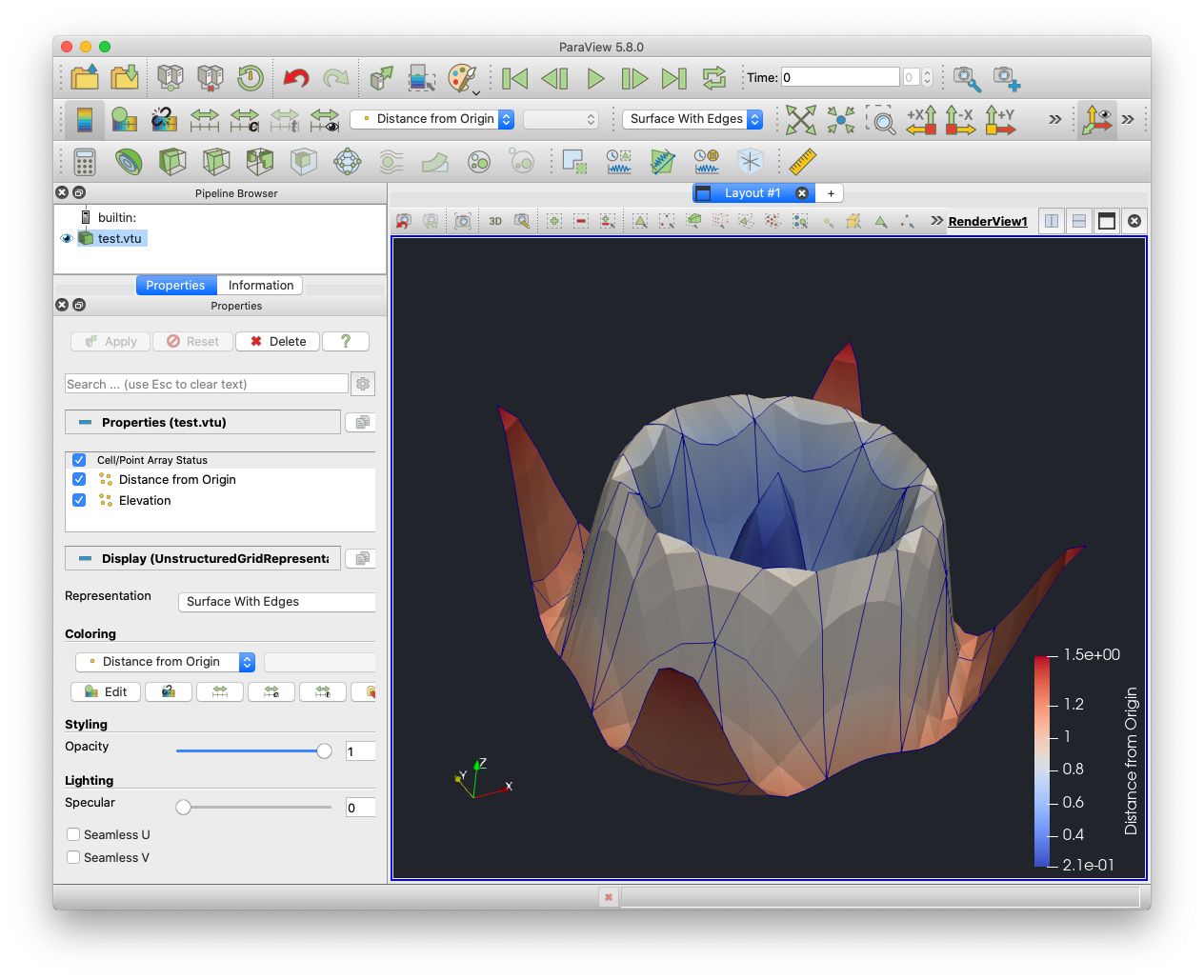
I hope you figure out how to apply this example to your setup soon!
---
### Author:  [@kamyar](https://discourse.vtk.org/u/kamyar)
#### Post date: [May 10, 2021, 6:46pm UTC](https://discourse.vtk.org/t/hide-internal-edges-of-quadratic-cells/2419/9 "2021-05-10T18:46:45Z")
For hiding the internal edge of quadratic cells in VTK you could use **vtkUnstructuredGridGeometryFilter** and **vtkExtractEdges**
_C# sample code:_
> ```
> vtkUnstructuredGridGeometryFilter uggFilter = vtkUnstructuredGridGeometryFilter.New();
> uggFilter.SetInput(uGrid);
> vtkExtractEdges edges = vtkExtractEdges.New();
> edges.SetInputConnection(uggFilter.GetOutputPort());
> vtkDataSetMapper edgeMapper = vtkDataSetMapper.New();
> edgeMapper.SetInputConnection(edges.GetOutputPort());
>
> vtkActor EdgeActor = vtkActor.New();
> EdgeActor .SetMapper(edgeMapper);
> EdgeActor .GetProperty().SetEdgeVisibility(1);
> EdgeActor .GetProperty().SetEdgeColor(0,0.5,0);
> Renderer.AddActor(EdgeActor );
>
> ```
---
### Author:  [@scotsman60](https://discourse.vtk.org/u/scotsman60)
#### Post date: [July 24, 2021, 8:31pm UTC](https://discourse.vtk.org/t/hide-internal-edges-of-quadratic-cells/2419/10 "2021-07-24T20:31:01Z")
@kamyar The approach you show here is the one I use because I couldn’t find a better way.
However, it does mean that you cannot take advantages of the actor methods to hde/show Edges etc. and instead you have to manage visiblity of the actors in your own code. Which isnl’t horrible, but is a pain.
It seems that Paraview has a much more convenient way to handle this - maybe I need to look at the Paraview code… Paraview does seem to use edge flags, but they can’t be using the standard VTK edge flags because they are pretty much unusable for this task as shown by @Flagada above.
It seems that either very few people are using higher order cells otherwise there woudl be an easier way of doing this by now.
Or maybe there is an easy way, and I just don’t know what it is…
Doug
---
### Author:  [@Ugur](https://discourse.vtk.org/u/Ugur)
#### Post date: [July 18, 2022, 3:13pm UTC](https://discourse.vtk.org/t/hide-internal-edges-of-quadratic-cells/2419/11 "2022-07-18T15:13:19Z")
I having also the same problem. Is there way to represent an actor as in ParaView (Surface with Edges)
---
### Author:  [@Flagada](https://discourse.vtk.org/u/Flagada)
#### Post date: [September 16, 2022, 1:06pm UTC](https://discourse.vtk.org/t/hide-internal-edges-of-quadratic-cells/2419/12 "2022-09-16T13:06:51Z")
The solution given par @kamyar works well. As you said @scotsman60 it’s not horrible but it requires a dedicated actor just for that… And also it requires to recalculate the uggFilter at each changes in the uGrid (unless there is a way to link both with a kind of SetInputConnection but I didn’t find how to do that).
The good news is that it also solve another problem I mentionned here :
> [@Make edges of elements visible when viewed by side](https://discourse.vtk.org/t/make-edges-of-elements-visible-when-viewed-by-side/9339):
>
> Hi all! I have recently noticed that when plate elements are exactly viewed from the side, the elements are no more visible, even if the vtkActor property have EdgeVisibilityOn(). Here is an example of what I say and what I would like to have : I don’t exactly know when the problem appeared but I am sure that it worked in the past. I don’t know if it is a change in a vtk version or maybe an update of my display drivers… So my question is do you know if any parameter can be …