# How do I use vtkjs to color cells individually
**URL:** https://discourse.vtk.org/t/how-do-i-use-vtkjs-to-color-cells-individually/9797
**Category:** Web
**Created:** [November 11, 2022, 2:29am UTC](https://discourse.vtk.org/t/how-do-i-use-vtkjs-to-color-cells-individually/9797 "2022-11-11T02:29:51Z")
**Posts on this page:** 7
**Page:** 1
### Author:  [@755\_simulation](https://discourse.vtk.org/u/755_simulation)
#### Post date: [November 11, 2022, 2:29am UTC](https://discourse.vtk.org/t/how-do-i-use-vtkjs-to-color-cells-individually/9797/1 "2022-11-11T02:29:52Z")
---
### Author:  [@Sebastien\_Jourdain](https://discourse.vtk.org/u/Sebastien_Jourdain)
#### Post date: [November 11, 2022, 5:17pm UTC](https://discourse.vtk.org/t/how-do-i-use-vtkjs-to-color-cells-individually/9797/2 "2022-11-11T17:17:26Z")
Assign a field to your cells and color by that field.
---
### Author:  [@755\_simulation](https://discourse.vtk.org/u/755_simulation)
#### Post date: [November 14, 2022, 8:05am UTC](https://discourse.vtk.org/t/how-do-i-use-vtkjs-to-color-cells-individually/9797/3 "2022-11-14T08:05:22Z")
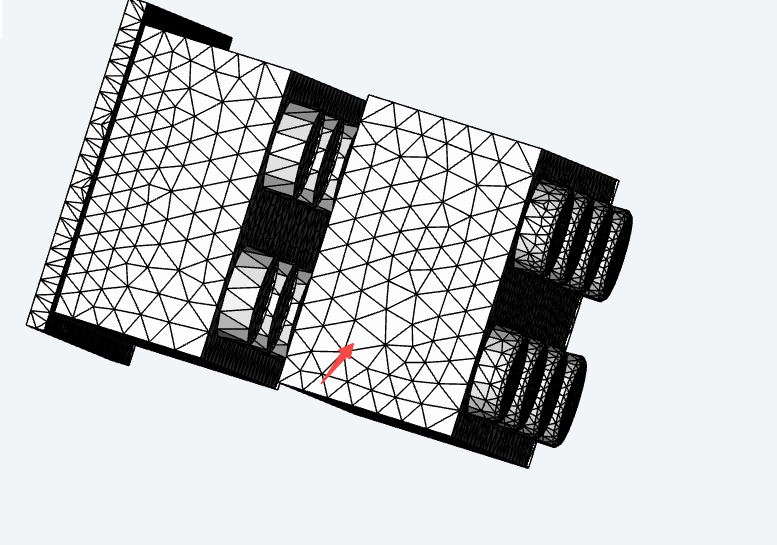
I can understand what you mean, but I’m sorry that I don’t quite understand how to write this code. Could you please give me a similar example?
---
### Author:  [@755\_simulation](https://discourse.vtk.org/u/755_simulation)
#### Post date: [November 14, 2022, 8:09am UTC](https://discourse.vtk.org/t/how-do-i-use-vtkjs-to-color-cells-individually/9797/4 "2022-11-14T08:09:25Z")
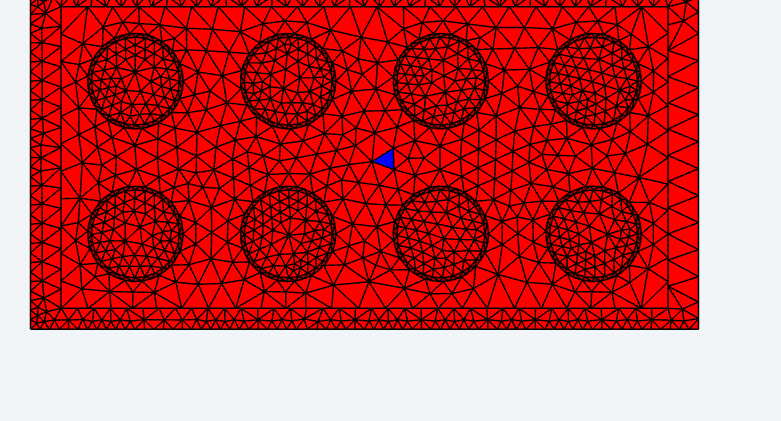
I tried to do this using the filter Calculator, but if I did this, the other cells wouldn’t stay white and would turn red, as shown in the image below.
---
### Author:  [@Ebrahim\_Ebrahim](https://discourse.vtk.org/u/Ebrahim_Ebrahim)
#### Post date: [November 14, 2022, 12:35pm UTC](https://discourse.vtk.org/t/how-do-i-use-vtkjs-to-color-cells-individually/9797/5 "2022-11-14T12:35:24Z")
I had to color cells individually once before, and here is the approach I took:
```nohighlight
addScalarsForColor = vtkCalculator.newInstance();
addScalarsForColor.setInputConnection(.getOutputPort());
addScalarsForColor.setFormula({
getArrays: inputDataSets => ({
input: [],
output: [
{ location: FieldDataTypes.CELL, name: 'MyColorsArray', dataType: 'Int8Array', attribute: AttributeTypes.SCALARS, numberOfComponents: 3 },
],
}),
evaluate: (arraysIn, arraysOut) => {
let dataArray = arraysOut[0]; // a vtkDataArray
for (let i = 0; i < dataArray.getNumberOfTuples(); i++) {
dataArray.setTuple(i, );
}
},
});
mapper = vtkMapper.newInstance();
mapper.setInputConnection(addScalarsForColor.getOutputPort());
mapper.setScalarVisibility(true); // it's true by default but, but just emphasizing here that we need it to be.
mapper.setScalarModeToUseCellFieldData(); // use cell field data to set colors; this necessitates the next line
mapper.setColorByArrayName('MyColorsArray'); // since we use cell field data for colors, we need to specify which data array will be used
// this makes it so that the cell field data array that we use for colors is interpreted directly as RGB values, rather than as scalars to be passed through some lookup table.
mapper.setColorModeToDirectScalars();
```
---
### Author:  [@755\_simulation](https://discourse.vtk.org/u/755_simulation)
#### Post date: [November 15, 2022, 7:11am UTC](https://discourse.vtk.org/t/how-do-i-use-vtkjs-to-color-cells-individually/9797/6 "2022-11-15T07:11:57Z")
Excellent. That’s very useful. Thank you very much for your answer.
---
### Author:  [@j-fu](https://discourse.vtk.org/u/j-fu)
#### Post date: [July 20, 2026, 11:55pm UTC](https://discourse.vtk.org/t/how-do-i-use-vtkjs-to-color-cells-individually/9797/7 "2026-07-20T23:55:54Z")
This made my day! [Fix trimesh bug & update stuff by j-fu · Pull Request #23 · j-fu/PlutoVista.jl · GitHub](https://github.com/j-fu/PlutoVista.jl/pull/23/changes/a04d24622967b5c927b2a3e4f74cde32de3d07c4)