# How to access resliced image data from vtkImageResliceMapper in VTK.js
**URL:** https://discourse.vtk.org/t/how-to-access-resliced-image-data-from-vtkimagereslicemapper-in-vtk-js/16078
**Category:** vtk.js
**Tags:** vtkjs
**Created:** [October 2, 2025, 1:23pm UTC](https://discourse.vtk.org/t/how-to-access-resliced-image-data-from-vtkimagereslicemapper-in-vtk-js/16078 "2025-10-02T13:23:27Z")
**Posts on this page:** 4
**Page:** 1
### Author:  [@shuj](https://discourse.vtk.org/u/shuj)
#### Post date: [October 2, 2025, 1:23pm UTC](https://discourse.vtk.org/t/how-to-access-resliced-image-data-from-vtkimagereslicemapper-in-vtk-js/16078/1 "2025-10-02T13:23:27Z")
Hi,
I’m trying to retrieve pixel data from a slice rendered using `vtkImageResliceMapper` in VTK.js. Specifically, I want to access the resliced output as a pixel array to count the occurrence of each pixel colour.
Initially, I used `vtkImageReslice`, but encountered image striping artefacts.
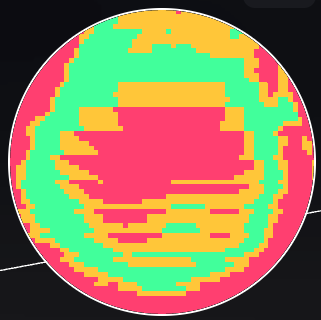
Since`vtkImageReslice.setInterpolationMode()` only supports `NearestNeighbor`, I switched to `vtkImageResliceMapper`, which supports linear interpolation and produces better visual results.
However, after switching, I can no longer access the resliced image data. Calling `getCurrentImage()` on the mapper returns `null`.
Is there a recommended way to extract the pixel data from the resliced output when using `vtkImageResliceMapper`?
---
### Author:  [@sankhesh](https://discourse.vtk.org/u/sankhesh)
#### Post date: [October 2, 2025, 4:01pm UTC](https://discourse.vtk.org/t/how-to-access-resliced-image-data-from-vtkimagereslicemapper-in-vtk-js/16078/2 "2025-10-02T16:01:32Z")
There is a distinction between the two implementations: `vtkImageReslice` and `vtkImageResliceMapper`.
`vtkImageReslice` is a filter that generates image output, which can then be sent to a mapper for rendering or to another filter in the processing pipeline for further manipulation. In contrast, `vtkImageResliceMapper` acts as a mapper; it displays a slice from the 3D volume on the screen using the graphics API.
Although it is possible to obtain pixel output from the rendering process, important characteristics of the image data, such as data type and origin, may not be preserved. In summary, if you need an output data object for further processing, it is advisable to use a filter. This principle applies to all VTK processing objects.
---
### Author:  [@shuj](https://discourse.vtk.org/u/shuj)
#### Post date: [October 3, 2025, 10:39am UTC](https://discourse.vtk.org/t/how-to-access-resliced-image-data-from-vtkimagereslicemapper-in-vtk-js/16078/3 "2025-10-03T10:39:11Z")
Thank you for the quick response. I did try implementing linear interpolation with `vtkImageReslice`, but it was significantly slower than using `vtkImageResliceMapper`. From what I understand, the mapper uses the GPU, which explains the performance difference.
For my use case, I need both speed and access to the resulting pixel values. Do you have any suggestions on how I might achieve this?
---
### Author:  [@sankhesh](https://discourse.vtk.org/u/sankhesh)
#### Post date: [October 6, 2025, 7:15pm UTC](https://discourse.vtk.org/t/how-to-access-resliced-image-data-from-vtkimagereslicemapper-in-vtk-js/16078/4 "2025-10-06T19:15:59Z")
Hi @shuj, You could write some code that reslices the volume using the mapper in an offscreen window and captures the color buffer or takes a screenshot of the window. You’d lose data type and precision as the output will be 8-bit intensity or a 24-bit RGB image.
I’m curious to know what the performance difference is, though.