# How to add a texture without background to surface?
**URL:** https://discourse.vtk.org/t/how-to-add-a-texture-without-background-to-surface/13868
**Category:** Support
**Created:** [May 12, 2024, 8:06am UTC](https://discourse.vtk.org/t/how-to-add-a-texture-without-background-to-surface/13868 "2024-05-12T08:06:16Z")
**Posts on this page:** 6
**Page:** 1
### Author:  [@learn\_forever](https://discourse.vtk.org/u/learn_forever)
#### Post date: [May 12, 2024, 8:06am UTC](https://discourse.vtk.org/t/how-to-add-a-texture-without-background-to-surface/13868/1 "2024-05-12T08:06:16Z")
Hi Experts:
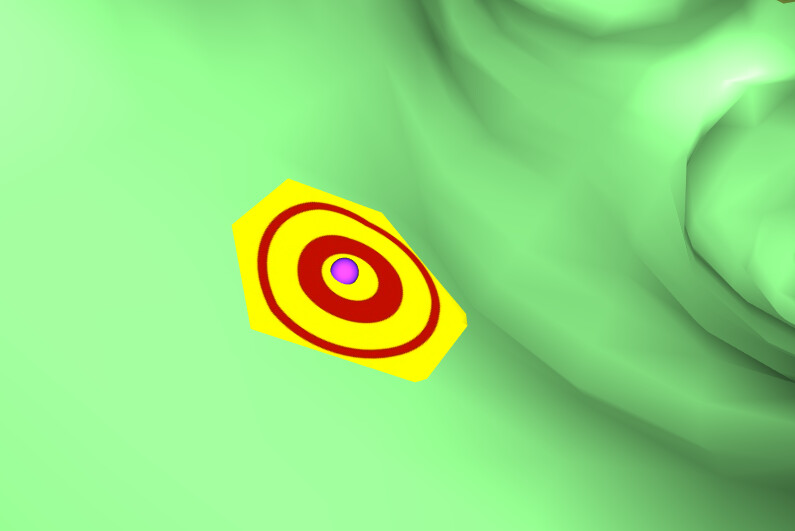
I use vtkClipPolyData with a sphere as clip function to clip a polydata surface. And then add a texture to the clip area. See picture and detailed code snippets below. Here comes my question: how to remove the background(in yellow color) of the texture? The texture itself has no backgound. The yellow actually comes from the actor but can’t be set with opactiy zero, otherwise the texture will be invisible.
```
vtkActor actor = vtkActor.New();
actor.PickableOff();
//actor.GetProperty().SetColor(1.0, 1.0, 0.0); //set actor color, if not set, will use default color
vtkSphere clipSphere = vtkSphere.New();
clipSphere.SetRadius(1);
clipSphere.SetCenter(coordX, coordY, coordZ);
vtkClipPolyData clipper = vtkClipPolyData.New();
clipper.GenerateClipScalarsOn();
clipper.SetClipFunction(clipSphere);
clipper.SetInputData(polydata);
clipper.InsideOutOn();
vtkTextureMapToPlane texToSphere = vtkTextureMapToPlane.New();
texToSphere.SetInputConnection(clipper.GetOutputPort());
vtkPolyDataMapper newMapper = vtkPolyDataMapper.New();
newMapper.ScalarVisibilityOff();
newMapper.SetInputConnection(texToSphere.GetOutputPort());
newMapper.Update();
actor.SetMapper(newMapper);
vtkJPEGReader pngReader = vtkJPEGReader.New();
pngReader.SetFileName(AimImgFilePath);
pngReader.Update();
vtkTexture texture = vtkTexture.New();
texture.SetInputConnection(pngReader.GetOutputPort());
texture.InterpolateOn();
texture.RepeatOff();
//texture.EdgeClampOff();
texture.MipmapOn();
actor.SetTexture(texture);
```
---
### Author:  [@Paulo\_Carvalho](https://discourse.vtk.org/u/Paulo_Carvalho)
#### Post date: [May 14, 2024, 9:51pm UTC](https://discourse.vtk.org/t/how-to-add-a-texture-without-background-to-surface/13868/2 "2024-05-14T21:51:42Z")
Hello,
What happens when you do this:
```cpp
texture.InterpolateOff();
```
?
best,
PC
---
### Author:  [@learn\_forever](https://discourse.vtk.org/u/learn_forever)
#### Post date: [May 16, 2024, 1:26am UTC](https://discourse.vtk.org/t/how-to-add-a-texture-without-background-to-surface/13868/3 "2024-05-16T01:26:45Z")
Hello Paulo,
It doesn’t help when I do this: texture.InterpolateOff(). Texture.InterpolateOff only means that the texture mapping will not interpolate between texels (texture elements) when mapping them onto geometry. This can’t solve my problems. Thanks!
---
### Author:  [@Paulo\_Carvalho](https://discourse.vtk.org/u/Paulo_Carvalho)
#### Post date: [May 16, 2024, 11:32am UTC](https://discourse.vtk.org/t/how-to-add-a-texture-without-background-to-surface/13868/4 "2024-05-16T11:32:07Z")
Hello,
What happens when you do this:
```cpp
texture.PremultipliedAlphaOn();
```
?
best,
PC
---
### Author:  [@learn\_forever](https://discourse.vtk.org/u/learn_forever)
#### Post date: [May 17, 2024, 1:49am UTC](https://discourse.vtk.org/t/how-to-add-a-texture-without-background-to-surface/13868/5 "2024-05-17T01:49:08Z")
Hello Paulo:
It doesn’t help either with:
texture.PremultipliedAlphaOn();
Thanks anyway. Perhaps I need some other solutions. Any suggestions are appreciated.
---
### Author:  [@Paulo\_Carvalho](https://discourse.vtk.org/u/Paulo_Carvalho)
#### Post date: [May 18, 2024, 2:25pm UTC](https://discourse.vtk.org/t/how-to-add-a-texture-without-background-to-surface/13868/6 "2024-05-18T14:25:46Z")
Hello,
Please, try each of these one at a time and observe the results:
```cpp
texture.SetBlendingMode(VTKTextureBlendingMode::VTK_TEXTURE_BLENDING_MODE_NONE);
texture.SetBlendingMode(VTKTextureBlendingMode::VTK_TEXTURE_BLENDING_MODE_REPLACE);
texture.SetBlendingMode(VTKTextureBlendingMode::VTK_TEXTURE_BLENDING_MODE_MODULATE);
texture.SetBlendingMode(VTKTextureBlendingMode::VTK_TEXTURE_BLENDING_MODE_ADD);
texture.SetBlendingMode(VTKTextureBlendingMode::VTK_TEXTURE_BLENDING_MODE_ADD_SIGNED);
texture.SetBlendingMode(VTKTextureBlendingMode::VTK_TEXTURE_BLENDING_MODE_INTERPOLATE);
texture.SetBlendingMode(VTKTextureBlendingMode::VTK_TEXTURE_BLENDING_MODE_SUBTRACT);
```
regards,
PC